Welcome Guest ( Log In | Register )

87 Pages « < 81 82 83 84 85 > » Bottom

Outline · [ Standard ] · Linear+

> Papago GPS Software for Android, its working!!! - updated @ page 3

views
     
subangman
post May 18 2012, 11:51 PM

On my way
****
Senior Member
562 posts

Joined: Oct 2008
From: GMT +8


QUOTE(chteh @ May 17 2012, 02:43 PM)
You need to download new fix from M3 then install.


Added on May 17, 2012, 4:43 pm
This product are refundable?
*
OK.... got it all fixed yesterday.

Drove down to Papago and park right in front of their HQ... went in wit mild temp..... any wrong
move from them will make all hell break loose.... thirsty for blood ..LOL !

BUT i was attended my one of their Mandarin speaking Indian staff from Gemas. VERY polite young man
and his professionalism deserves my credit. Btw i'm a non mandarin fella... 'chow banana'.

He tried several methods installing via SD card but program crashed in midway... and finally got it fixed after waited for nearly 2hrs there.

Main reason... CANNOT save the NAVISEA file in the memory card as per instruction sheet.
MUST save the file to tablet as the program will go with the IMEI nos.

No way to install to another device via SD card.

Now I have my Papago on tab and silly often misleading outdated Navi in car as well. rclxm9.gif rclxm9.gif rclxm9.gif

This post has been edited by subangman: May 18 2012, 11:53 PM
SuggieBliss
post May 29 2012, 03:31 PM

Getting Started
**
Junior Member
60 posts

Joined: Mar 2010
Can i know where to download the .apk file for Papago M8? Or the X5 apk (latest verion with 3d mode) Thank you...
bryan_823
post Jun 6 2012, 09:57 AM

On my way
****
Senior Member
649 posts

Joined: Apr 2007
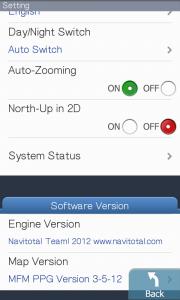
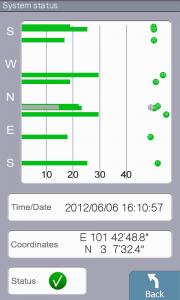
Am using the latest papago M9 on my HTC Desire. It is the X version with latest MFM maps brows.gif

Improvements compare to papago X5:

1) GPS locking is super fast (1-2 secs)

2) Latest maps

3) Nicer UI

4) Auto rotate

5) Improved navigation sound rolleyes.gif

Attached Image Attached Image

This post has been edited by bryan_823: Jun 7 2012, 12:58 PM
CuriOu5
post Jun 7 2012, 10:41 PM

Casual
***
Junior Member
380 posts

Joined: Apr 2007
From: Malaysia
QUOTE(bryan_823 @ Jun 6 2012, 10:57 AM)
Am using the latest papago M9 on my HTC Desire. It is the X version with latest MFM maps  brows.gif

Improvements compare to papago X5:
What improvement? Except for the coordinate search everything is the same as x5. Still don't have fastest route option. Rerouting still as slow

1) GPS locking is super fast (1-2 secs)
Speed on login very much depended upon your phone.

2) Latest maps
The night mode map colours look like shit colour.

3) Nicer UI
Exactly the same as X5. Sygic's UI way much nicer than Papago.

4) Auto rotate
Already in X5Thai therefore nothing new.

5) Improved navigation sound  rolleyes.gif
The M9 English sounds terrible. X5 English voice is way much better. I have replaced all the M9 English voice files with x5's

Attached Image Attached Image
*
fisherman10
post Jun 7 2012, 10:50 PM

Regular
******
Senior Member
1,372 posts

Joined: Dec 2007


QUOTE(CuriOu5 @ Jun 7 2012, 10:41 PM)

*
QUOTE
The M9 English sounds terrible. X5 English voice is way much better. I have replaced all the M9 English voice files with x5's


can explain how to do it? I dont know which folders to replace and such. thanks!
tednet
post Jun 8 2012, 03:07 PM

Waaalllaauuu
*****
Senior Member
952 posts

Joined: Mar 2009


guys, i have install papago M9 to my galaxy ace.. on start-up everything went well, sat lock and my position also ok.

once i enter a destination, suddenly papago show dat im sumwhere in middle of pahang, terengganu and negeri sembilan.

have any one got problem like dis?
ntdote
post Jun 8 2012, 03:22 PM

Casual
***
Junior Member
324 posts

Joined: Nov 2007


How much does PAPAGO costs? Does it support S3?
CuriOu5
post Jun 8 2012, 03:22 PM

Casual
***
Junior Member
380 posts

Joined: Apr 2007
From: Malaysia
QUOTE(tednet @ Jun 8 2012, 04:07 PM)
guys, i have install papago M9 to my galaxy ace..  on start-up everything went well, sat lock and my position also ok.

once i enter a destination, suddenly papago show dat im sumwhere in middle of pahang, terengganu and negeri sembilan.

have any one got problem like dis?
*
Switch off your mobile data.
tednet
post Jun 8 2012, 03:23 PM

Waaalllaauuu
*****
Senior Member
952 posts

Joined: Mar 2009


QUOTE(CuriOu5 @ Jun 8 2012, 03:22 PM)
Switch off your mobile data.
*
ok2... wil try to do dat this evening..

u also got dis problem b4?
CuriOu5
post Jun 8 2012, 03:27 PM

Casual
***
Junior Member
380 posts

Joined: Apr 2007
From: Malaysia
QUOTE(fisherman10 @ Jun 7 2012, 11:50 PM)
can explain how to do it? I dont know which folders to replace and such. thanks!
*
Copy the files from x5 /Sounds/VoiceEn to the same directory tree in M9 Navisea/Sounds/VoiceEn. Replace all files.


Added on June 8, 2012, 3:37 pm
QUOTE(tednet @ Jun 8 2012, 04:23 PM)
ok2... wil try to do dat this evening..

u also got dis problem b4?
*
No. I read from other forum.

This post has been edited by CuriOu5: Jun 8 2012, 03:37 PM
sapstar
post Jun 8 2012, 03:42 PM

Getting Started
**
Junior Member
75 posts

Joined: Jun 2005
From: Cheras


QUOTE(CuriOu5 @ Jun 7 2012, 10:41 PM)

*
hehe... that's the NAVITOTAL version de... brows.gif


do u got that 'map goes back to Pahang' problem??
freddy manson
post Jun 8 2012, 03:50 PM

ðñê hêll ð£ å gµ¥
*******
Senior Member
4,858 posts

Joined: Jun 2006
From: Tawau, Sabah


After using for a while in my Tab, i go back to Sygic, both Tab and my Galaxy SII..

Sygic Aura got better UI, navigation is friendly..eventho slow map updates..
tednet
post Jun 8 2012, 03:54 PM

Waaalllaauuu
*****
Senior Member
952 posts

Joined: Mar 2009


QUOTE(CuriOu5 @ Jun 8 2012, 03:27 PM)
Copy the files from x5 /Sounds/VoiceEn to the same directory tree in M9 Navisea/Sounds/VoiceEn. Replace all files.


Added on June 8, 2012, 3:37 pm
No. I read from other forum.
*
ooo okay... will try out and feedback here.. hope its solve the random place problem
[revolution]
post Jun 9 2012, 03:32 PM

>> Revolution Yourself : Engage and Transform <<
******
Senior Member
1,321 posts

Joined: Aug 2007
From: KL | Taiwan


htc one x is not full screen.. how?
annoymous1234
post Jun 9 2012, 05:01 PM

Look at all my stars!!
*******
Senior Member
7,616 posts

Joined: Mar 2009

sucks! m9 is so full of bugs! sygic is way better. only bad thing bout sygic is tat old map and wrong road name. but calculate is faster and no lag. papago is such a disappointment
CuriOu5
post Jun 9 2012, 07:38 PM

Casual
***
Junior Member
380 posts

Joined: Apr 2007
From: Malaysia
QUOTE(annoymous1234 @ Jun 9 2012, 06:01 PM)
sucks! m9 is so full of bugs! sygic is way better. only bad thing bout sygic is tat old map and wrong road name. but calculate is faster and no lag. papago is such a disappointment
*
I totally agree with you. If sygic got monthly map update papago can tapau bukus.
cactusjack
post Jun 10 2012, 06:35 PM

Getting Started
**
Junior Member
53 posts

Joined: Dec 2010
so, is papago m9 worth buying?

since sygic got no map update, is there any other good gps navigator for

android ?
bryan_823
post Jun 11 2012, 10:05 AM

On my way
****
Senior Member
649 posts

Joined: Apr 2007
QUOTE(CuriOu5 @ Jun 9 2012, 07:38 PM)
I totally agree with you. If sygic got monthly map update papago can tapau bukus.
*
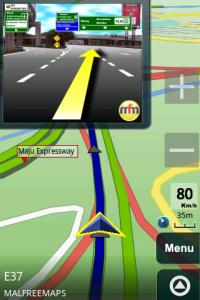
Personally I feel Papago junction view is nicer and easier to read., compare to Sygic Aura android.

Attached Image
CuriOu5
post Jun 11 2012, 11:25 PM

Casual
***
Junior Member
380 posts

Joined: Apr 2007
From: Malaysia
QUOTE(bryan_823 @ Jun 11 2012, 11:05 AM)
Personally I feel Papago junction view is nicer and easier to read., compare to Sygic Aura android.

Attached Image
*
Sygic navigation more precise it tells you which route to take rather than just turn left or exit to. Papago visual does help but you have to keep your eyes on the map at junctions to see whether to turn. Tricky when the junctions are very close to one another. With audio you just listen to exit junction number and concentrate on the exit junction to turn off which is much safer.
uzary
post Jun 14 2012, 11:29 PM

J@ck da D0n
*******
Senior Member
3,149 posts

Joined: Mar 2007
From: Kuala Terengganu


i believe many have mentioned this fix regarding the map going haywire once navigation start.. howeva i would like to contribute the fix here and i suggest ts can put this temp fix on the first page.

easiest solution is to turn off the mobile data on ur phone b4 u start the app.

if u wan a kinda of permanent fix, and sumhow dunwan to turn off ur mobile data for wateva reason, u can use this method. (need a rooted device)

1) donlod an app call permissions free, available in the playstore market
2) once install, select papago/navitotal app
3) disble the internet connection permission
4) there r few instructions that wil guide u on wat to do n how to lock the permission
5) done, if the permission is successfully disable n lock, ur papago shud work fine while the mobile data is on.

* btw do this on ur own risk, make sure u know wat u do, i wont be responsible for any error that wil come up out of this but i tested it mycef n so far everythg working flawlessly.

my advice is, it is best to just turn off ur mobile data while navigating, be focus on ur driving n ur direction rather then to be distracted by whatapps/any messaging/social app notification. tongue.gif

87 Pages « < 81 82 83 84 85 > » 
Bump Topic Add ReplyOptions New Topic
 

Change to:
| Lo-Fi Version
0.0342sec    0.31    6 queries    GZIP Disabled
Time is now: 6th December 2025 - 09:42 PM