

QUOTE(CuriOu5 @ Aug 30 2011, 10:07 PM)
Check your PM

plz pm me also, would like to know how...haha =D Papago GPS Software for Android, its working!!! - updated @ page 3
|
|
 Sep 1 2011, 12:25 AM Sep 1 2011, 12:25 AM
|
 
Junior Member
102 posts Joined: Mar 2009  
|
QUOTE(CuriOu5 @ Aug 30 2011, 10:07 PM) Check your PM plz pm me also, would like to know how...haha =D |
|
|
Sep 1 2011, 01:50 PM
|

Junior Member
155 posts Joined: Jan 2011
|
Reliability depends on the mappers and feedback they got from the users. There are some errors that I have found in the maps. Reliability I would say 99.5% for the places I have traveled with the map.
[/quote] Gud review frm u.. unfortunately unable to open papago cannot load map.. all file have been move to malaysia folder in sd (replace all prev file with new) o due to my X5 ver.. currently map ver 1-12-10.. really appreciate ur help.. tq |
|
|
Sep 1 2011, 09:24 PM
|

Junior Member
380 posts Joined: Apr 2007 From: Malaysia
|
[quote=amedeto8,Sep 1 2011, 02:50 PM]
Reliability depends on the mappers and feedback they got from the users. There are some errors that I have found in the maps. Reliability I would say 99.5% for the places I have traveled with the map. [/quote] Gud review frm u.. unfortunately unable to open papago cannot load map.. all file have been move to malaysia folder in sd (replace all prev file with new) o due to my X5 ver.. currently map ver 1-12-10.. really appreciate ur help.. tq [/quote] Which version are you installing. X5TH or X5SE. If you are installing the X5TH version. Copy the Thai map to the SDcard first. Then copy the Malaysia map into the Maps directory. Sdcard/NaviTH/Maps/. When you start Papago X5TH for the first time it will read the Thai map first. One in go to Setting to change the UI language (2nd from top) and Voice type (3rd from top) to English and thereafter map to Malaysia. |
|
|
Sep 2 2011, 03:30 AM
|
|
Junior Member
155 posts Joined: Jan 2011
|
QUOTE(CuriOu5 @ Sep 1 2011, 09:24 PM) Which version are you installing. X5TH or X5SE. If you are installing the X5TH version. Copy the Thai map to the SDcard first. Then copy the Malaysia map into the Maps directory. Sdcard/NaviTH/Maps/. When you start Papago X5TH for the first time it will read the Thai map first. One in go to Setting to change the UI language (2nd from top) and Voice type (3rd from top) to English and thereafter map to Malaysia. if not mistaken only replace files inside sdcard/navisea/maps/malaysia.. o i miss out other thing before replace new map?? what i did was run exe file > replace files inside malaysia folder.. |
|
|
Sep 2 2011, 11:46 AM
|
|
Junior Member
380 posts Joined: Apr 2007 From: Malaysia
|
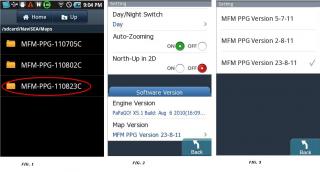
QUOTE(amedeto8 @ Sep 2 2011, 04:30 AM) Im using X5SEA n have different folder as what u mention.. I assume you run the exe file and select to install the map into the SDcard directly.if not mistaken only replace files inside sdcard/navisea/maps/malaysia.. o i miss out other thing before replace new map?? what i did was run exe file > replace files inside malaysia folder.. 1) Did you select the directory for the sdcard or just accept the directory suggested by the installer. 2) Did you select Android version. 3) If you have done the above the new maps should see be in your sdcard/NaviSEA/Maps/MFM-PPG-110823C directory. 4) Go to Papago Settings and under Software version change the Map version by touching the same and the map versions will appear for your selection. This post has been edited by CuriOu5: Sep 2 2011, 11:52 AM Attached thumbnail(s) 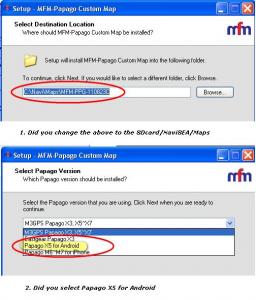
|
|
|
Sep 3 2011, 07:14 PM
|
|
Junior Member
155 posts Joined: Jan 2011
|
QUOTE(CuriOu5 @ Sep 2 2011, 11:46 AM) I assume you run the exe file and select to install the map into the SDcard directly. thanks a lot.. able to use it for custom map only..1) Did you select the directory for the sdcard or just accept the directory suggested by the installer. 2) Did you select Android version. 3) If you have done the above the new maps should see be in your sdcard/NaviSEA/Maps/MFM-PPG-110823C directory. 4) Go to Papago Settings and under Software version change the Map version by touching the same and the map versions will appear for your selection. |
|
|
Sep 4 2011, 06:15 PM
|
|
Junior Member
380 posts Joined: Apr 2007 From: Malaysia
|
QUOTE(amedeto8 @ Sep 3 2011, 08:14 PM) thanks a lot.. able to use it for custom map only.. You should be able to use with updated maps. Did you manage to use the August 2011 map. |
|
|
Sep 4 2011, 06:55 PM
|
|
Junior Member
13 posts Joined: Apr 2009
|
Hello everyone,
I have some problem about papago x5 on my nexus s. It required internet connection to detect my position. Is it defected or my nexus s does not have such gps ic? Kindly advise me what to do. Thanks in advance |
|
|
Sep 4 2011, 10:29 PM
|
|
Junior Member
56 posts Joined: Feb 2010
|
QUOTE(CuriOu5 @ Aug 30 2011, 10:07 PM) Check your PM PM me also.. thank you very much~~ |
|
|
Sep 4 2011, 11:12 PM
|
|
Junior Member
155 posts Joined: Jan 2011
|
QUOTE(CuriOu5 @ Sep 4 2011, 06:15 PM) You should be able to use with updated maps. Did you manage to use the August 2011 map. august 2011?? nope now im using custom jun 2011..mind share d link  edit : manage to find it 23/08/2011 rite.. again tq fren  This post has been edited by amedeto8: Sep 4 2011, 11:21 PM |
|
|
Sep 28 2011, 03:34 PM
|

Senior Member
758 posts Joined: Aug 2008
|
|
|
|
Sep 28 2011, 06:41 PM
|
|
Junior Member
380 posts Joined: Apr 2007 From: Malaysia
|
|
|
|
Sep 28 2011, 08:02 PM
|

Senior Member
2,175 posts Joined: May 2008 From: ~Earth~™®© 
|
Hi anyone can tell me how to install papago in the asus eee pad transformers with full malaysia map. Please pm me the method. Thanks
|
|
|
Sep 28 2011, 09:30 PM
|
|
Senior Member
7,616 posts Joined: Mar 2009
|
is papago x8 out for android yet?
and how do i update sygic map? no option for updates |
|
|
Sep 28 2011, 10:00 PM
|
|
Junior Member
380 posts Joined: Apr 2007 From: Malaysia
|
QUOTE(annoymous1234 @ Sep 28 2011, 10:30 PM) is papago x8 out for android yet? There is no x8 for android as I understand. They will release update for x5se to m8 for android but don't know when.and how do i update sygic map? no option for updates Sygic map updates will be notified through android market and as I understand it to be quarterly. This post has been edited by CuriOu5: Sep 28 2011, 10:03 PM |
|
|
Sep 28 2011, 10:35 PM
|
|
Senior Member
1,416 posts Joined: Apr 2005 From: Kuala Lumpur
|
QUOTE(mousqy @ Sep 28 2011, 03:34 PM) i've tried sygic.the UI maybe better but maps is not up to date. my neighborhood is not fully covered even though already existed for like 6 years. even google maps already covered my area long time ago. This post has been edited by faizalmzain: Sep 28 2011, 10:35 PM |
|
|
Sep 29 2011, 01:51 AM
|
|
Senior Member
7,616 posts Joined: Mar 2009
|
QUOTE(faizalmzain @ Sep 28 2011, 10:35 PM) i've tried sygic. ya la. and some of the place is no longer there but still exsist in sygic. the UI maybe better but maps is not up to date. my neighborhood is not fully covered even though already existed for like 6 years. even google maps already covered my area long time ago.  |
|
|
Sep 29 2011, 07:10 AM
|
|
Senior Member
12,696 posts Joined: Aug 2008
|
QUOTE(faizalmzain @ Sep 28 2011, 10:35 PM) i've tried sygic. To help you feel better, even Malfreemaps does not show some neighborhood roads that have been in existence for 20+ years. I was shocked.the UI maybe better but maps is not up to date. my neighborhood is not fully covered even though already existed for like 6 years. even google maps already covered my area long time ago. So there, no maps are infallible. |
|
|
Sep 29 2011, 09:42 AM
|
|
Junior Member
380 posts Joined: Apr 2007 From: Malaysia
|
QUOTE(Optiplex330 @ Sep 29 2011, 08:10 AM) To help you feel better, even Malfreemaps does not show some neighborhood roads that have been in existence for 20+ years. I was shocked. I like sygic for their city maps which are more detailed than papago. You can find the lorongs which help a lot when you are caught in a jam. Another option I like is the fastest route option which papago x5 doesn't have.So there, no maps are infallible. |
|
|
Sep 29 2011, 09:58 AM
|
|
Senior Member
12,696 posts Joined: Aug 2008
|
QUOTE(CuriOu5 @ Sep 29 2011, 09:42 AM) I like sygic for their city maps which are more detailed than papago. You can find the lorongs which help a lot when you are caught in a jam. Another option I like is the fastest route option which papago x5 doesn't have. I seen the video posted on the 1st page and I personally don't like the way voice work. Take this scenario for example. You drive ahead and ahead of you, there are 3 roads A (280 meter), B(300 meter), C(320 meters). And you wanted to turn left at B. While Papago will tell you to turn left at 300 meters but since these 3 roads are so close to each other, how do we know which is 300 meters? I know some other voice navigation will tell you "turn now" when you reaches B but not when you reach A or C. |
| Bump Topic Add ReplyOptions New Topic |
| Change to: |  0.0279sec 0.0279sec
 0.23 0.23
 6 queries 6 queries
 GZIP Disabled GZIP Disabled
Time is now: 6th December 2025 - 05:42 AM |
 Quote
Quote