Outline ·
[ Standard ] ·
Linear+
Cable Management Thread V2, Share your cabling tricks here
|
SUSj_petrucci
|
 Jan 15 2012, 03:01 PM Jan 15 2012, 03:01 PM
|
New Member


|
QUOTE(hypermax @ Jan 15 2012, 02:21 PM) Seriously why the rage? I really dun think i have belittled/insulted you in anyway in my posts.  Well, i suggest we stop here before the mod comes to "moderate" both of us  no dont get me wrong there was no rage there.. i am not even intimidated by your post. u got your point, just hope u understand mine too thats all.. i dont mind if u want to put 3 pics for just 1 or 2 time as i mentioned in my previous post which u failed to highlight QUOTE(j_petrucci @ Jan 13 2012, 10:25 AM) no what i mean is.. doesnt matter how big or how many pics u want to put but please use the spoiler as it is there to help us. 1 or 2 times it is ok. but if so many times then other people also will follow. pity to those who cannot load the page coz having hard time to load all those pics. i've been there, i know. but this guys has been spamming all over LYN with tons of pics.. and i am just giving a reminder only. if u or he likes it or not thats not my problem. i've done my part and i am please with myself. cheers  |
|
|
|
|
|
Clem1982
|
Jan 15 2012, 04:15 PM
|
|
|
QUOTE(azizul9736 @ Jan 15 2012, 10:26 AM) re-do cable, But concern on my HDD getting heat-up , prevly i separate it. HOW? » Click to show Spoiler - click again to hide... « no cause for concern there I suppose check with HWmonitor to see ur HDD temp... I doubt its anything close to overheating... HDDs works best at about between 35C to 55C IINM so go figure...  anyway nice job on the CM, looks a lot neater IMHO  |
|
|
|
|
|
CyntrixTech
|
Jan 17 2012, 11:58 PM
|
|
|
Something HUGE is coming  |
|
|
|
|
|
1qaz1qaz
|
Jan 18 2012, 11:14 AM
|
|
|
QUOTE(CyntrixTech @ Jan 18 2012, 12:58 AM) Something HUGE is coming how HUGE ??? |
|
|
|
|
|
CyntrixTech
|
Jan 18 2012, 07:36 PM
|
|
|
QUOTE(1qaz1qaz @ Jan 18 2012, 11:14 AM) Hint: "an orderly harmonious systematic universe" |
|
|
|
|
|
Dennos
|
Jan 18 2012, 08:52 PM
|
|
|
QUOTE(owikh84 @ Jan 17 2012, 11:38 PM) Dual ATX 24pins adapter cable custom made by niclasteoh => 100% satisfied!  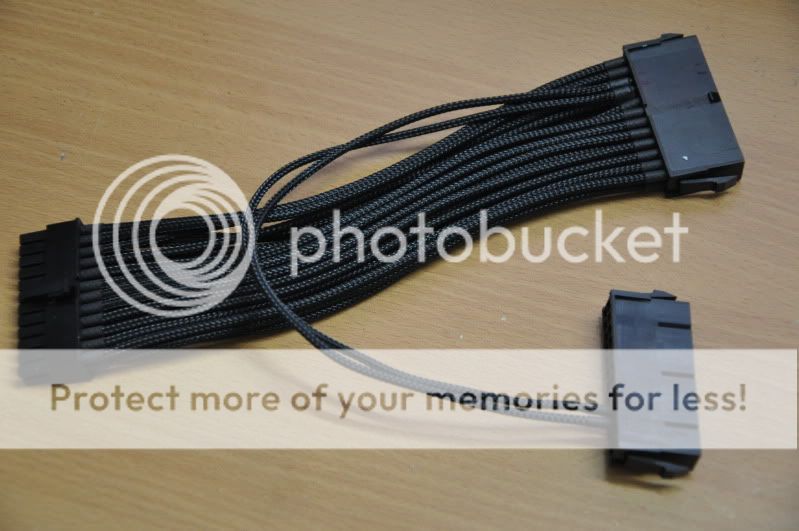 how to use? dual mobo? |
|
|
|
|
|
RegentCid
|
Jan 18 2012, 09:49 PM
|
|
|
It must be someone have been brought Cosmos II.....
CyntrixTech doing the cable management?
|
|
|
|
|
|
owikh84
|
Jan 18 2012, 11:34 PM
|
i7 Clan

|
QUOTE(Dennos @ Jan 18 2012, 08:52 PM) dual PSUs. so that i could push the power button one time to power up two PSU simultaneously. |
|
|
|
|
|
CyntrixTech
|
Jan 19 2012, 12:32 AM
|
|
|
QUOTE(RegentCid @ Jan 18 2012, 09:49 PM) It must be someone have been brought Cosmos II..... CyntrixTech doing the cable management? You guess was correct Cooler Master Cosmos II Super Tower - Watercooled » Click to show Spoiler - click again to hide... « |
|
|
|
|
|
k3lvinng007
|
Jan 19 2012, 02:46 AM
|
|
|
this is omg....super nice
|
|
|
|
|
|
1qaz1qaz
|
Jan 19 2012, 09:59 AM
|
|
|
dual radiator just for CPU?? is that too over??
|
|
|
|
|
|
CyntrixTech
|
Jan 19 2012, 11:23 AM
|
|
|
QUOTE(1qaz1qaz @ Jan 19 2012, 09:59 AM) dual radiator just for CPU?? is that too over?? See the long tube going from the bottom rad all the way to the cpu? It's meant to be connected to the GPU when the block releases |
|
|
|
|
|
1qaz1qaz
|
Jan 19 2012, 05:53 PM
|
|
|
oic~
|
|
|
|
|
|
soR
|
Jan 19 2012, 06:59 PM
|
|
|
Before  Before Before by Lolipopeer, on Flickr After  @ the back @ the back by Lolipopeer, on Flickr  After After by Lolipopeer, on Flickr first time did this, any tips? spent few hours on this but looks still bad This post has been edited by soR: Jan 19 2012, 07:02 PM |
|
|
|
|
|
CyntrixTech
|
Jan 20 2012, 12:26 AM
|
|
|
FSP Hexa's cables are pretty short and are hard to route if not impossible. Coupling it with a casing that doesn't have a whole lot of room to hide cables, it's going to be difficult.
|
|
|
|
|
|
soR
|
Jan 20 2012, 06:48 AM
|
|
|
QUOTE(CyntrixTech @ Jan 20 2012, 12:26 AM) FSP Hexa's cables are pretty short and are hard to route if not impossible. Coupling it with a casing that doesn't have a whole lot of room to hide cables, it's going to be difficult. yeah got alot to do, anyone tried using this http://www.chattgutter.com/images/OtherPro..._BlackPipe2.gif |
|
|
|
|
|
kherel77
|
Jan 20 2012, 09:42 AM
|
|
|
QUOTE(soR @ Jan 19 2012, 06:59 PM) first time did this, any tips? spent few hours on this but looks still bad Thermaltake V4~? I'm planning to get this casing....but seem like do not help much in cable management  |
|
|
|
|
|
soR
|
Jan 20 2012, 10:17 AM
|
|
|
QUOTE(kherel77 @ Jan 20 2012, 09:42 AM) Thermaltake V4~? I'm planning to get this casing....but seem like do not help much in cable management yep its thermaltake v4, still alot to do for cable management for now i guess its good for airflow and alot better than before |
|
|
|
|
|
saster_182
|
Jan 20 2012, 10:24 AM
|
Getting Started
|
QUOTE(soR @ Jan 20 2012, 10:17 AM) yep its thermaltake v4, still alot to do for cable management for now i guess its good for airflow and alot better than before used this once. but my 24-pin cable cant route between motherboard back plate and side plate.. and also cant slot my 140mm fan inside.. good luck bro. |
|
|
|
|



 Quote
Quote


 0.0307sec
 0.64
0.64
 6 queries
 GZIP Disabled