

QUOTE(Razaelx @ Nov 21 2009, 09:53 AM)
pls, pls, pls refer to kaz hirai's statement. onoinengaming will always be free. they will only charge those pay per view shows, which has already began... 

Technical PlayStation 3 FAQ For Beginners | V4, General PS3 Q&A and Technical Discussion
|
|
 Nov 23 2009, 07:38 AM Nov 23 2009, 07:38 AM
|
 
Senior Member
2,652 posts Joined: Jan 2003  
|
QUOTE(Razaelx @ Nov 21 2009, 09:53 AM) pls, pls, pls refer to kaz hirai's statement. onoinengaming will always be free. they will only charge those pay per view shows, which has already began... |
|
|
|
|
|
Nov 23 2009, 11:40 AM
|

Senior Member
1,886 posts Joined: Jan 2005 From: world above you 
|
lets say i hv a ps3 40gb. with firmware problems. tried using a new HDD. still doesnt work. all i get is green light on the console. but no video and audio. nothing works. thn the system shuts down by itself. tried the "recovery mode" (press power button for 6 secs repeated it twice) no menu came up.. ayway to rectify this?
thanks. |
|
|
Nov 23 2009, 11:51 AM
|

Senior Member
1,915 posts Joined: Aug 2009 From: Johor Bahru
|
Noob question:
1. PS3 games display in full hd 1080p? 2. PS3 games audio in 5.1/7.1 surround sound? I might buy a PS3 slim next year, plan to use a 22"/24" HDCP support LCD monitor at resolution 1920x1080 via HDMI for display; and might get a cheap HTIB for audio. But if the games are not utilizing surround sound maybe I'll just get some 2.1 speaker. |
|
|
Nov 23 2009, 12:04 PM
|

Senior Member
1,180 posts Joined: Jan 2007 From: *awaiting GPS accuracy* 
|
Noob question:
1. PS3 games display in full hd 1080p? Only certain titles, not all. Most of them are still in 720p. 2. PS3 games audio in 5.1/7.1 surround sound? Yes. With the proper home theatre system. I might buy a PS3 slim next year, plan to use a 22"/24" HDCP support LCD monitor at resolution 1920x1080 via HDMI for display; and might get a cheap HTIB for audio. But if the games are not utilizing surround sound maybe I'll just get some 2.1 speaker. This post has been edited by geekster129: Nov 23 2009, 12:05 PM |
|
|
Nov 23 2009, 12:21 PM
|

All Stars
14,258 posts Joined: Mar 2005
|
QUOTE(TitaniumZ @ Nov 23 2009, 11:51 AM) Noob question: 3rd party games are MOSTLY in 5.1(Mirror's Edge, Ghostbusters,MGS4,etc)*2. PS3 games audio in 5.1/7.1 surround sound? I might buy a PS3 slim next year, plan to use a 22"/24" HDCP support LCD monitor at resolution 1920x1080 via HDMI for display; and might get a cheap HTIB for audio. But if the games are not utilizing surround sound maybe I'll just get some 2.1 speaker.  only some 3rd party games are in 7.1(Batman Arkham Asylum,GRID,etc)* but ALL first party games are in 7.1(Resistance 1,2,Killzone 2,Uncharted 2,etc) you do not want to get a cheap HTiB,believe me..i know  go get a full fledged 7.1 HDMI system,and you'll be absolutely sucked in by the games. unfortunately blu ray movies are generally 5.1 only  only some provide 7.1,and 6.1 *not all games have a perfect mix,though when it comes to 7.1 surround. racing games have a near perfect mix, i think (tested GRID,GT5p,etc the sounds come out from the right speakers at the right time.) action/adventure games however, may have issues. despite being in 7.1, the sound occasionally come out from the wrong speakers...(tested Uncharted 1,Batman Arkham Asylum) example: Batman AA; i blow a wall that is in front of the character, yet the rear speakers emit the explosive sound made in front  |
|
|
Nov 23 2009, 01:54 PM
|

Senior Member
736 posts Joined: Feb 2007 From: Hell 
|
Full RGB does NOT improve PQ...
It 'cheats' in a way, but it actually makes colors less accurate. If anyone ones, I can put karangan here later about it  |
|
|
|
|
|
Nov 23 2009, 02:00 PM
|

Junior Member
25 posts Joined: Dec 2006
|
Is there a way to create a US PSN account and port downloaded DLCs to other acc? I tried signing up to a MY PSN but DLCs for English versions of games are sorely lacking.
|
|
|
Nov 23 2009, 02:01 PM
|
|
Senior Member
736 posts Joined: Feb 2007 From: Hell
|
QUOTE(FieryAeon @ Nov 23 2009, 02:00 PM) Is there a way to create a US PSN account and port downloaded DLCs to other acc? I tried signing up to a MY PSN but DLCs for English versions of games are sorely lacking. Usually, after you download, all other users can use the DLCs. IINM, only game saves and certain DLCs cannot share between users. My KZ2 DLC is from MY store and works fine on US acc, so I would assume most DLCs can work the same way |
|
|
Nov 23 2009, 02:03 PM
|

Senior Member
2,657 posts Joined: Feb 2008 From: Highbury House, 75 Drayton Park, London
|
QUOTE(gnsumas @ Nov 23 2009, 01:54 PM) Full RGB does NOT improve PQ... Yes, plz put a karangan on it... also how bout the superwhite or something like that? coz i see some pixelated green pixels while playing winning eleven10 It 'cheats' in a way, but it actually makes colors less accurate. If anyone ones, I can put karangan here later about it  |
|
|
Nov 23 2009, 02:06 PM
|

Junior Member
359 posts Joined: Sep 2007 From: Negara Dua Dimensi
|
QUOTE(FieryAeon @ Nov 23 2009, 02:00 PM) Is there a way to create a US PSN account and port downloaded DLCs to other acc? I tried signing up to a MY PSN but DLCs for English versions of games are sorely lacking. im not sure whether this is related or not, last time I purchased the Gundam 0081 DLCs on PSN-MY (with Maybank Debit card) and its playable in JP account.maybe thats because im using region3 game |
|
|
Nov 23 2009, 02:08 PM
|
|
Senior Member
736 posts Joined: Feb 2007 From: Hell
|
QUOTE(ericpires @ Nov 23 2009, 02:03 PM) Yes, plz put a karangan on it... also how bout the superwhite or something like that? coz i see some pixelated green pixels while playing winning eleven10 AFAIK, Full RGB and Super White are meant for PC Monitors, not TVs. So if you use a Monitor, go ahead, otherwise, turn them off  Karangan on the way |
|
|
Nov 23 2009, 02:19 PM
|
|
Junior Member
25 posts Joined: Dec 2006
|
QUOTE(gnsumas @ Nov 23 2009, 02:01 PM) Usually, after you download, all other users can use the DLCs. Thanks! I have created a US PSN acc on purpose just to see if that will work, hopefully. >.<' But it looks like I also need to find someone selling US PSN top-up cards here. Can someone direct me to the right thread?IINM, only game saves and certain DLCs cannot share between users. My KZ2 DLC is from MY store and works fine on US acc, so I would assume most DLCs can work the same way |
|
|
Nov 23 2009, 02:24 PM
|
|
Senior Member
2,657 posts Joined: Feb 2008 From: Highbury House, 75 Drayton Park, London
|
QUOTE(gnsumas @ Nov 23 2009, 02:08 PM) AFAIK, Full RGB and Super White are meant for PC Monitors, not TVs. So if you use a Monitor, go ahead, otherwise, turn them off So if i turn off Full RGB and super white, i would get more accurate colours and no more pixellation.. on a LCD TV?Karangan on the way Waiting your karangan  |
|
|
|
|
|
Nov 23 2009, 02:38 PM
|

Junior Member
62 posts Joined: Sep 2004 From: Ampang
|
QUOTE(ericpires @ Nov 23 2009, 02:24 PM) So if i turn off Full RGB and super white, i would get more accurate colours and no more pixellation.. on a LCD TV? i'm more worried if the lcd tv/monitor displays colour banding effect... its just ruin the beauty of Hi-def resolutionsWaiting your karangan Added on November 23, 2009, 2:44 pm QUOTE(ruztynail @ Nov 23 2009, 11:40 AM) lets say i hv a ps3 40gb. with firmware problems. tried using a new HDD. still doesnt work. all i get is green light on the console. but no video and audio. nothing works. thn the system shuts down by itself. tried the "recovery mode" (press power button for 6 secs repeated it twice) no menu came up.. ayway to rectify this? is the new hdd ok or not? coz it will not boot into recovery mode if hdd doesnt exist... connection prob i thinkthanks. This post has been edited by shahreza2000: Nov 23 2009, 02:44 PM |
|
|
Nov 23 2009, 02:49 PM
|
|
Senior Member
736 posts Joined: Feb 2007 From: Hell
|
Karangan time
 IINM, most TVs display a color range of 15-235, and most monitors 0-255. Full RGB makes the PS3 output at 0-255 (which is why it says 'set this as necessary with the display in use' or something like that). So: 
Which basically means, when you turn on Full RGB on a HDTV, 0-14 and 236-255 are being output, but are not visible, so you essentially get less shades of black and less shades of white as well. This makes the pics less 'washed out', but upon closer observation, some shades merge with other shades, which makes the colors look 'deeper', but some colors are lost. For example, the PS3 version of MW2 looks washed out compared to the 360 version side by side, as shown here: 
After adding Full RGB, the colours look more or less the same: 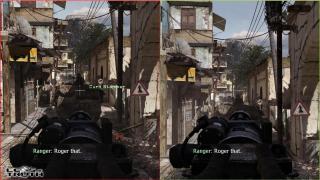
But if you look closely (although not so evident in that shot), the shadows have less shades of grey after the adjustment. For a clearer example, look at the cliffs behind Soap in the next pic and tell me which one has more colour  
|
|
|
Nov 23 2009, 02:55 PM
|
|
Senior Member
736 posts Joined: Feb 2007 From: Hell
|
Also, just to piss off the 360 fanboys...

Washed out 360 version ftw!  |
|
|
Nov 23 2009, 02:57 PM
|

Senior Member
1,495 posts Joined: Sep 2005 From: Damansara Perdana - KL
|
so basically, I can switch off FULL RGB on my HDTV?
Hey, will try this at home I'm still tweaking my new 42" baby |
|
|
Nov 23 2009, 03:00 PM
|
|
Senior Member
736 posts Joined: Feb 2007 From: Hell
|
QUOTE(Lord_Ashe @ Nov 23 2009, 02:57 PM) so basically, I can switch off FULL RGB on my HDTV? Well, technically speaking, some HDTVs do display the whole spectrum of colours, but you'll need a calibration kit to see if yours can Hey, will try this at home I'm still tweaking my new 42" baby Full RGB is more or less turning up the contrast on your TV all the way This post has been edited by gnsumas: Nov 23 2009, 03:18 PM |
|
|
Nov 23 2009, 03:06 PM
|
|
Junior Member
62 posts Joined: Sep 2004 From: Ampang
|
@gnsumas..
full RGB 0-255 limited RGB 16-235 This post has been edited by shahreza2000: Nov 23 2009, 03:07 PM |
|
|
Nov 23 2009, 03:11 PM
|
|
Senior Member
1,495 posts Joined: Sep 2005 From: Damansara Perdana - KL
|
QUOTE(gnsumas @ Nov 23 2009, 03:00 PM) Well, technically speaking, some HDTVs do display the whole spectrum of colours, but you'll need a calibration kit for that Good point. Trying to find DVE or similar. All I have right now is the THX optimiser from my old ori STAR WARS trilogy boxset.Full RGB is more or less turning up the contrast on your TV all the way |
|
Topic ClosedOptions
|
| Change to: |  0.0340sec 0.0340sec
 0.29 0.29
 6 queries 6 queries
 GZIP Disabled GZIP Disabled
Time is now: 13th December 2025 - 03:09 AM |
 Quote
Quote