Welcome Guest ( Log In | Register )

87 Pages « < 54 55 56 57 58 > » Bottom

Outline · [ Standard ] · Linear+

 AMD® Socket AM3 Unlocking 4th CORE Thread ~, Those Who Have Tried,Please List it HERE

views
     
wolfverine81
post Jun 8 2010, 03:55 PM

Casual
***
Junior Member
334 posts

Joined: Jul 2006


i`m using the asus m4a88td v evo/usb3,
whats your problem,
i`m sometime cannot boot coz the dram led blinking,
it scan that my ram isnt compitable with board,
sometime give me headache about this,
have to pull and push it back to the socket.
haroldz123
post Jun 9 2010, 12:11 AM

Regular
******
Senior Member
1,062 posts

Joined: May 2008
QUOTE(wolfverine81 @ Jun 8 2010, 03:55 PM)
i`m using the asus m4a88td v evo/usb3,
whats your problem,
i`m sometime cannot boot coz the dram led blinking,
it scan that my ram isnt compitable with board,
sometime give me headache about this,
have to pull and push it back to the socket.
*
i open a thread for this mobo
ur RAM not compatible?
can refund back or change?

dram problem can use MEM OK! switch
piumiu
post Jun 10 2010, 07:12 PM

I see you.
*******
Senior Member
3,174 posts

Joined: Oct 2008
From: Wonderland


just go to shop and ask them to fix. cant fix swap with other ram.
u may have to top up the difference.
8tvt
post Jun 10 2010, 07:15 PM

Peace Lover
*******
Senior Member
8,753 posts

Joined: Jan 2003
told ya.. asus prob.. pity..
wait for the bios update or change the ram..
or tweak here and there.. happy ASUSah..
bopiang
post Jun 13 2010, 03:46 AM

Getting Started
**
Junior Member
208 posts

Joined: Apr 2005
From: Puchong, Selangor


QUOTE(Amedion @ May 29 2010, 10:06 AM)
MSI 770 C45 BIOS 1.6
AMD Phenom X2 555BE
3Gb Kingston DDR1333
Silverstone SST400

Fail. Can't unlock 4 cores.
When I enable to choose cores. Only able to select 2 cores.
So, how am I going to unlock the third?

Btw, how to update the MSI motherboard via windows? I don't have floopy disk ...  sweat.gif
*
what is ur batch no?
update via USB stick at bios setting. easy.


btw, any ppl here have a list of batches that unlock?
cuz now have 1012? but as far that i know, even 1009,
wont unlock. is there a batch guide somewhere?
thx in advanced

thumbup.gif

This post has been edited by bopiang: Jun 13 2010, 03:48 AM
Amedion
post Jun 13 2010, 11:17 AM

It's a bird! No, it's a plane! No, it's star
*******
Senior Member
3,377 posts

Joined: Jul 2005
From: Klang


QUOTE(bopiang @ Jun 13 2010, 03:46 AM)
what is ur batch no?
update via USB stick at bios setting. easy.
btw, any ppl here have a list of batches that unlock?
cuz now have 1012? but as far that i know, even 1009,
wont unlock. is there a batch guide somewhere?
thx in advanced

thumbup.gif
*
I think the older Deneb is proven to be a better overclocker and has higher success rate of unlocking ..

Current batch all is Callisto ..
bboyspirit
post Jun 14 2010, 02:07 AM

Getting Started
**
Junior Member
279 posts

Joined: Mar 2008
after i install the 212+ dual fans + tuniq TX-2 ..
the idle temp still at 47.
and my pc perform sudden lag..
what happened actually?
Attached Image
kuntawakaw
post Jun 14 2010, 02:24 AM

imma tag fag!
*******
Senior Member
3,795 posts

Joined: Nov 2008
From: Varies....


QUOTE(Amedion @ Jun 13 2010, 11:17 AM)
I think the older Deneb is proven to be a better overclocker and has higher success rate of unlocking ..

Current batch all is Callisto ..
*
dont think so..the 550BE have high success rate on 0922..but there are dozens of batches that reported hard to unlock..
and i guess the is no callisto chip..so do heka..all is deneb.. correct me if im wrong
about the clocking... i also think c3 better.. in 550BE, x4 3.9ghz is a struggle + luck..prime stable is also imposible for most batches (on air)..but 555BE..4.0ghz x4 is possible

QUOTE(bboyspirit @ Jun 14 2010, 02:07 AM)
after i install the 212+ dual fans + tuniq TX-2 ..
the idle temp still at 47.
and my pc perform sudden lag..
what happened actually?

Attached Image
*
post cpuz main n memory tab + hwmonitor SS..
lack of info here...
how much temp before and what heatsink used before?
sudden lag?and?when?
i juast can say cpu might be unstable..

bboyspirit
post Jun 14 2010, 03:02 AM

Getting Started
**
Junior Member
279 posts

Joined: Mar 2008
all info should be here..
using stock fan also idle at 5X.

Attached Image
haroldz123
post Jun 14 2010, 11:09 AM

Regular
******
Senior Member
1,062 posts

Joined: May 2008
asus turboV EVO bcame unstable at 4.0ghz

i know i can do it manual (OC), but stil learning
makoshark
post Jun 16 2010, 12:26 AM

Casual
***
Junior Member
300 posts

Joined: Feb 2010


QUOTE(haroldz123 @ Jun 14 2010, 11:09 AM)
asus turboV EVO bcame unstable at 4.0ghz

i know i can do it manual (OC), but stil learning
*
the far that i can go only at 3.5Ghz. 3.7Ghz unstable when prime..im still learning too but till now cant find the nice combo for high oc cry.gif try to google it n found 4.0Ghz oc for my proc thumbup.gif , dnt know hw they do that..
shinjite
post Jun 16 2010, 01:06 AM

�ŞħĬΩĵΐŦ��
********
All Stars
19,320 posts

Joined: Jan 2003
From: Klang


Here is my OC results for my FX-5000 proc

http://valid.canardpc.com/show_oc.php?id=1243908
ah_fei78
post Jun 24 2010, 07:02 PM

Getting Started
**
Junior Member
127 posts

Joined: May 2006
here is the temperature when i run prime95 for 8 mins, and it reach 69C. it is very danger??Attached Image

This post has been edited by ah_fei78: Jun 24 2010, 07:03 PM
shinjite
post Jun 24 2010, 09:11 PM

�ŞħĬΩĵΐŦ��
********
All Stars
19,320 posts

Joined: Jan 2003
From: Klang


Yes it is....normally its best not to go over 60c for AMD
8tvt
post Jun 24 2010, 09:24 PM

Peace Lover
*******
Senior Member
8,753 posts

Joined: Jan 2003
what cooler is that?
tmpin1 refer to what?
saturn85
post Jun 25 2010, 12:33 AM

Folding@home
*******
Senior Member
8,686 posts

Joined: Mar 2009


QUOTE(bboyspirit @ Jun 14 2010, 02:07 AM)
after i install the 212+ dual fans + tuniq TX-2 ..
the idle temp still at 47.
and my pc perform sudden lag..
what happened actually?

Attached Image
*
how is the casing air flow?
ah_fei78
post Jun 25 2010, 07:30 AM

Getting Started
**
Junior Member
127 posts

Joined: May 2006
QUOTE(ah_fei78 @ Jun 24 2010, 07:02 PM)
here is the temperature when i run prime95 for 8 mins, and it reach 69C. it is very danger??Attached Image
*
sorry, it is i read the temperature wrongly?

TMPIN0 is for motherboard?
and TMPIN1 is for processor?

if in this case my processor is only 47C in maximum.

anyone know about this?
saturn85
post Jun 25 2010, 02:11 PM

Folding@home
*******
Senior Member
8,686 posts

Joined: Mar 2009


i think TMPIN0 is for processor, and TMPIN1 is for motherboard.

the temperature reading which is changing fast is refer to processor temperature.
if motherboard temperature reach 69c, that is very very high already.

but i m curious that what is TMPIN2 that can reach 128c. shocking.gif

This post has been edited by saturn85: Jun 25 2010, 02:12 PM
shinjite
post Jun 25 2010, 03:11 PM

�ŞħĬΩĵΐŦ��
********
All Stars
19,320 posts

Joined: Jan 2003
From: Klang


TMPIN2 can be a bogus value

My TMPIN1 is over 100c as well
ah_fei78
post Jun 25 2010, 03:16 PM

Getting Started
**
Junior Member
127 posts

Joined: May 2006
QUOTE(saturn85 @ Jun 25 2010, 02:11 PM)
i think TMPIN0 is for processor, and TMPIN1 is for motherboard.

the temperature reading which is changing fast is refer to processor temperature.
if motherboard temperature reach 69c, that is very very high already.

but i m curious that what is TMPIN2 that can reach 128c.    shocking.gif
*
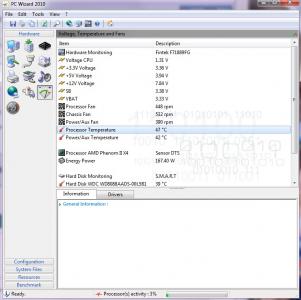
the thing that confusing me is, if i compare TMPIN0 and TMPIN1 with pc wizard s/w and hwinfo. both tell me different thing

in pc wizard, it mentioned the processor value is same as TMPIN1, and motherboard pair with TMPIN0

but in hwinfo

is the other way.

Which one is wrong? or all is wrong because of the unlock stuff. all s/w unable to handle for unlocked processor?

This post has been edited by ah_fei78: Jun 25 2010, 03:17 PM

87 Pages « < 54 55 56 57 58 > » Top
 

Change to:
| Lo-Fi Version
0.0272sec    0.34    6 queries    GZIP Disabled
Time is now: 4th December 2025 - 12:43 PM