


 Mar 9 2009, 09:56 PM, updated 16y ago


1.) Login the P1 modem interface, goto http://10.1.1.254
username: admin
password: admin123
2.) Best Spot for wimax signal: once login adjust your P1 modem to find best spot (normally near window or outside window) and point to "Wimax Base station" direction (which you can see from modem interface the "RSSI" will keep changing, the lower "RSSI" the better signal it is, keep trying until you get lowerest RSSI)
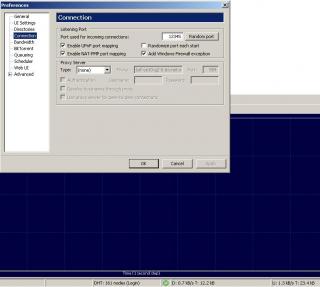
3.) BT user: must do port forwarding (refer to the picture below)
4.) DMZ Zone: Put your own IP (online gaming, FTP,.... others) under DMZ zone but once your IP under DMZ zone, you don't have protection meaning you're expose yourself without firewall, do it with extra caution (refer to below picture)
5.) Online Gaming: If you know your online game port number just simply do port forwarding so that you don't need put yourself in DMZ zone, it'll help latency problem
6.) Goto uTorrent preference use port: 12345 (example, u can use any port u like, refer to below picture on how to use certain port)
7.) Use Router to share with others: if you use router to share bandwidth you'll need goto router setting interface (normally is http://192.168.1.1 username/password: admin / admin) change your "Internet connection type" to DHCP or automatic or whatever router will assign IP to your PC because all the authentication will do within that P1 modem itself. (refer to picture below)
Hope can help you all....
P/S: forgot to tell you guys, raining do affect the signal, try don't put any electronic device (Wifi router, TV, microwave....) near this p1 modem
Tips: Always check your account usage, for example 1200 Package with 20GB (upload+download) whether exceed the quota, once it exceed P1 will start to cap your speed, btw you still able to get full speed during mid-night.

Guys, something P1 will give when your birthday coming ~~
Updated !!!!!!!!!!!!!!!!
A quick tips maybe can help you improve your speed which is pointing direction to the nearest base station.
Scenario 1:
Each CPE modem will search for frequency 2375000, 2380000, 2385000. If it happen your area have 3 base station nearby and your CPE pointing is in the middle of 2 base station.
Result: it'll cause frequent disconnect and reconnect, because it'll always search for best connectivity (Technology limitation)
Work around: Call / Email their Customer support ask them to plot out the base station by the map then you'll know which direction you should point to.
Scenario 2: Bandwidth limitation on base station is xxMbps, each base station connect to internet backbone have the limitation, let's say it's 10Mbps and 1 Wiggy max capacity already 10Mbps can suck all the bandwidth. If you find out the base station you connected have very good (green light) signal but very slow internet speed. This could be the reason
Work around: Try point to another base station even the connection is weaker(orange, red light) you could get better internet speed & bandwidth
How to know you're connect to different base station ??
Simple, just check the frequency you're connected at 1st then change direction or position. Check again, if it happen connect to different frequency it's different base station.
This post has been edited by yong888: Oct 25 2009, 09:55 PM
Attached thumbnail(s)




 Quote
Quote







 . P1 slows down these few days


 0.0237sec
 0.29
0.29
 6 queries
 GZIP Disabled