

Oops...I accidentally format my HDD!!!

This post has been edited by lightning69: Mar 17 2009, 10:22 PM
Western Digital TV™ HD Media Player, Full HD 1080p Player @MSRP USD129.99
|
|
 Mar 17 2009, 09:21 PM Mar 17 2009, 09:21 PM
Return to original view | Post
#21
|
 
Senior Member
2,298 posts Joined: Jan 2003 From: Miri, Sarawak  
|
Here is my Bluray backup so far!
Oops...I accidentally format my HDD!!! This post has been edited by lightning69: Mar 17 2009, 10:22 PM |
|
|
|
|
|
Mar 17 2009, 10:15 PM
Return to original view | Post
#22
|
|
Senior Member
2,298 posts Joined: Jan 2003 From: Miri, Sarawak
|
Its backup....legit one hehehe
This post has been edited by lightning69: Mar 18 2009, 07:46 AM |
|
|
Mar 18 2009, 07:47 AM
Return to original view | Post
#23
|
|
Senior Member
2,298 posts Joined: Jan 2003 From: Miri, Sarawak
|
HDD is very cheap now...
Anyway they are all in mkv. |
|
|
Mar 22 2009, 08:36 PM
Return to original view | Post
#24
|
|
Senior Member
2,298 posts Joined: Jan 2003 From: Miri, Sarawak
|
QUOTE(fragglerock @ Mar 22 2009, 06:13 PM) htkaki, try these n pls inform whether there are clippin or not If there is clipping, check if there is multiple audio files in the mkv. So far if there is multiple audio files in the mkv, then the dts will result in clipping. However some mkv with only DTS audio will still have clipping but those are very rare. Oldboy (2003) 720p.BluRay.DTS-ES.x264-ESiR The Host (2006) Blu-Ray.720p.x264.DTS-REDµX Young Frankenstein 1974 720p BluRay x264-SiNNERS Miami Vice 2006 Unrated 720p BluRay DTS x264-ESiR  So far most of my DTS mkv files plays fine except Band of Brothers. Added on March 22, 2009, 8:40 pm QUOTE(DikkieD @ Mar 21 2009, 11:51 PM) This device is a real gem. Bought it two months ago in the Netherlands, with a 320gb WD hd... I agree that the WDTV is a great product but I think the PC can render better quality. I did notice inconsistent HD quality...some looks great but some appears very "noisy". But when I play it on PC, all looks great.After the latest upgrade it works perfect, it plays 99,8% of my mkv files. I am enjoying the HD TV Player very much. I used my xbox360 to stream video content, but that only supported the wmv files. Now I can watch everything. It almost looks like an ad, but it isn't; just a happy customer  This post has been edited by lightning69: Mar 22 2009, 08:40 PM |
|
|
Mar 23 2009, 08:43 PM
Return to original view | Post
#25
|
|
Senior Member
2,298 posts Joined: Jan 2003 From: Miri, Sarawak
|
QUOTE(welwitchia @ Mar 23 2009, 12:40 PM) Do u mind sharing the setting for your PC cause my WD TV seems to produce better PQ than my HTPC? I use Media Player Classic : HC. At first I was contented with hardware DXVA decoding but after seeing the PQ WD TV, it pales in comparison.. so I went ahead an install FFDShow which somewhat improved the PQ (it could be all in my mind Well, maybe I'm wrong because its not an apple to apple comparison. My PC LCD is only 19" while the LCD tv I test with so far ranges from 32" to 50". I think it could be the size that cause the quality differences as even DVD looks awesome on a 13" TV!!!  ) but I still think the WD TV beat my HTPC hands down in terms of PQ. ) but I still think the WD TV beat my HTPC hands down in terms of PQ.On the other hand I'm not surprise if PC can render better HD images as the processor and the graphics card alone cost more than the WDTV. What do you guys think? This post has been edited by lightning69: Mar 23 2009, 08:45 PM |
|
|
Mar 26 2009, 01:14 AM
Return to original view | Post
#26
|
|
Senior Member
2,298 posts Joined: Jan 2003 From: Miri, Sarawak
|
QUOTE(incognito @ Mar 26 2009, 12:00 AM) hi guys, im interested in getting this unit but after reading this comment from eye im a bit hesitant now. currently i convert my mkv files using mkv2vob and play it on my ps3. the ps3 is connected to an LCD TV using HDMI for video and rca stereo to a pair of klipsch gmx 2.1s (no $ to buy AVR If your budget is really tight, then I suggest you stick to your PS3 for your HD movies player. I have both the PS3 and the WDTV and i find the WDTV more convenient as it supports subtitles(although I hate watching movies with subtitles). The big disadvantages of the PS3 is that it supports Fat32 only so the movies files have to be split if you're using the USB drive plug into the PS3 direct. However if you can connect your PS3 to your PC via PS3mediaserver, then you can stream your mkv files to your PS3 without having to convert it using mkv2vob and it supports subtitles too! ). just wondering if its possible to do this setup for the WDTV as well? i dont need DTS decoding; just being able to output stereo sound via rca and video using hdmi is enough. ). just wondering if its possible to do this setup for the WDTV as well? i dont need DTS decoding; just being able to output stereo sound via rca and video using hdmi is enough.thnx in advance for ur assistance! With regards to your question on whether you can setup the WDTV like you setup your PS3, the answer is yes. The WDTV can be connected to the HDTV via HDMI for picture while the sound can be thru composite cables for stereo or optic cables for surround sound. However the WDTV can only decode Dolby Digital(AC3) sound and not DTS audio. If you want DTS audio, you need a AV receiver with DTS decoding. So if you plan to connect the WDTV via composite cables, then you need to convert the DTS mkv with mkv2vob to ac3 sound. This post has been edited by lightning69: Mar 26 2009, 01:15 AM |
|
|
|
|
|
Mar 26 2009, 08:58 AM
Return to original view | Post
#27
|
|
Senior Member
2,298 posts Joined: Jan 2003 From: Miri, Sarawak
|
QUOTE(JayC75 @ Mar 26 2009, 08:45 AM) PS3mediaserver cant stream MKV file smoothly lah, try one and it keep shuttering. Unless u got other way to do it? I have no problem streaming mkv files with PS3mediaserver except a few Full HD content. Maybe your setting is wrong or your PC is too slow lah. I set my PS3mediaserver setting to lossless quality streaming and so far its buttery smooth. Btw i'm using lan cable connection. |
|
|
Mar 28 2009, 07:43 PM
Return to original view | Post
#28
|
|
Senior Member
2,298 posts Joined: Jan 2003 From: Miri, Sarawak
|
QUOTE(ayell @ Mar 28 2009, 05:45 PM) Just received mine today. Thumbs up for this player, very easy to install and use, no need user manuals, plug the power, HDMI cable and USB drive, straight away can watch movie. My kids also can navigate it easily. You made the right choice...enjoy! Enjoying my 720p movies now.  Only that I bought it before I read the above post. I got it at Rm373 without HDMI cable huhuhuhu |
|
|
Mar 29 2009, 12:08 AM
Return to original view | Post
#29
|
|
Senior Member
2,298 posts Joined: Jan 2003 From: Miri, Sarawak
|
QUOTE(ayell @ Mar 28 2009, 08:28 PM) As for me 720p is good enough as my LCD can only display 720p You should upgrade. Its simple and safe and it adds lots of new features.p/s: my firmware is still 1.00.01, now at WD website is 1.01.02, is it advisable to upgrade it? is it easy and safe? Added on March 29, 2009, 12:12 am QUOTE(ic-klass @ Mar 28 2009, 08:11 PM) Is it worth getting the 1080p mkv?? Or will 720p mkv be enough?? Considering the 1080p is around >7Gb and 720p is >4Gb? Depends on your TV resolution. IMO 720p is not that much different from 1080p if properly encoded. I have try many a few movies in 1080P vs 720P, serously I can tell much difference.Now my average time to download a 1080p is around 14-15hrs, but with 720p i could get it at 8-9 hour. Roughly 2 hrs for 1 Gb.. This post has been edited by lightning69: Mar 29 2009, 12:12 AM |
|
|
Mar 31 2009, 12:42 PM
Return to original view | Post
#30
|
|
Senior Member
2,298 posts Joined: Jan 2003 From: Miri, Sarawak
|
QUOTE(ic-klass @ Mar 31 2009, 12:04 PM) so many possibilities...But scare shit coz i know nuts bout programing - just know how to on/off pc only... At least you know how to on/off PC. My PC never off so I don't even know how to turn on/off now.   |
|
|
Apr 1 2009, 04:51 PM
Return to original view | Post
#31
|
|
Senior Member
2,298 posts Joined: Jan 2003 From: Miri, Sarawak
|
QUOTE(incognito @ Mar 31 2009, 11:07 PM) arghhh. was afraid i would need to resort to this. converting using mkv2vob would strip out the included subtitles. guess i would need to get only non-DTS 720p rips from now on You can get subtitles for almost any movies easily. but thnx anyway! |
|
|
Apr 3 2009, 11:00 AM
Return to original view | Post
#32
|
|
Senior Member
2,298 posts Joined: Jan 2003 From: Miri, Sarawak
|
Will download it immediaetly
|
|
|
Apr 4 2009, 08:44 AM
Return to original view | Post
#33
|
|
Senior Member
2,298 posts Joined: Jan 2003 From: Miri, Sarawak
|
Upgrade to the latest 1.02 firmware...no issue so far.
What I like is the subtitles now show the language code too instead of just the number. Those problem DTS audio files the were clipping previously is solved now. No more clipping DTS audio...hooray. |
|
|
|
|
|
Apr 8 2009, 07:33 PM
Return to original view | Post
#34
|
|
Senior Member
2,298 posts Joined: Jan 2003 From: Miri, Sarawak
|
QUOTE(ssyam @ Apr 8 2009, 02:21 PM) Update firmware.. here is some result for thumbnails Can you play mp4? I have a few MP4 format file i create for my PS3 but it doesn't play at all....unsupported format!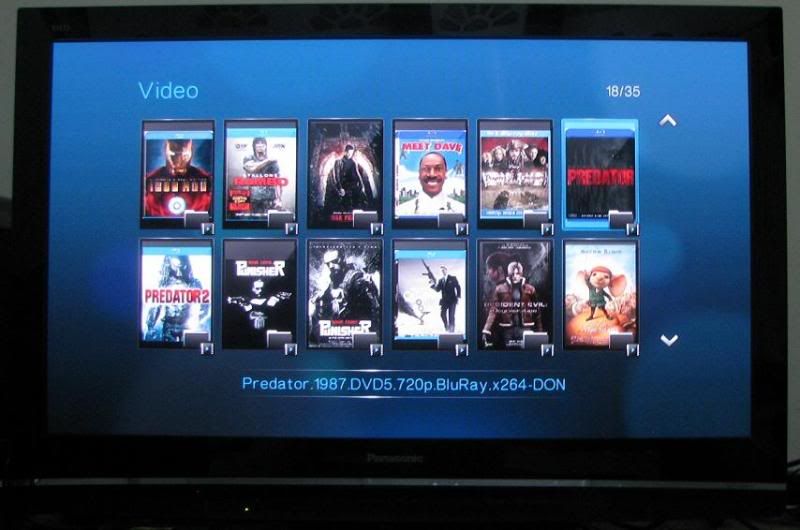 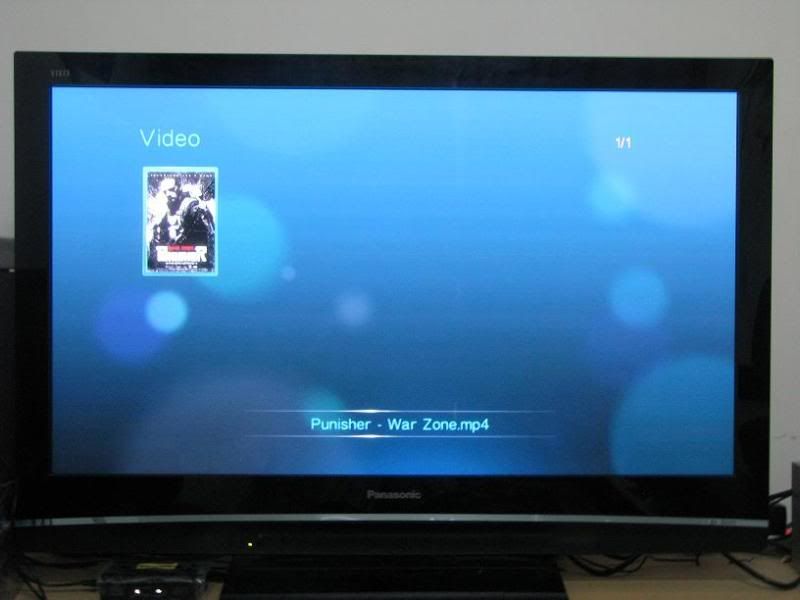 |
|
|
Apr 9 2009, 11:15 AM
Return to original view | Post
#35
|
|
Senior Member
2,298 posts Joined: Jan 2003 From: Miri, Sarawak
|
The WDTV manual says it can play MP4 file but none of my MP4 video plays on it. Any idea?
|
|
|
Apr 11 2009, 05:28 PM
Return to original view | Post
#36
|
|
Senior Member
2,298 posts Joined: Jan 2003 From: Miri, Sarawak
|
QUOTE(mikapoh @ Apr 11 2009, 04:40 PM) Thanks guy for all the information. Will give it a try soon. Cheers. WDTV already can play Flac lossless audio!Just pray & hope that in a shorter term, WDTV is able to play loseless audio!!! That will be perfect. |
|
|
Apr 11 2009, 05:53 PM
Return to original view | Post
#37
|
|
Senior Member
2,298 posts Joined: Jan 2003 From: Miri, Sarawak
|
QUOTE(mikapoh @ Apr 11 2009, 05:38 PM) Wow, is this true?? Thanks. Flac Lossless Audio are CD quality music files. I am not sure about Dolby True HD or DTS Master Audio.  Maybe my info is out-dated. Maybe my info is out-dated.So, has anyone tried before? How is the sound compare to original BD loseless audio? 90% of the BD SQ. Thats mean we need to use HDMI 1.3 cable to transmit the loseless audio............. I have DL a few Flac lossless eg Eagles Bootleg and the are just awesome. |
|
|
Apr 14 2009, 01:38 PM
Return to original view | Post
#38
|
|
Senior Member
2,298 posts Joined: Jan 2003 From: Miri, Sarawak
|
QUOTE(htkaki @ Apr 14 2009, 09:26 AM) wdtv cant do lossless audio and it cant play most of the BD ISO /BDMV files smoothly; judders, can't play at all or like slow-mo. Mikapoh, you sld check out the dvico thread as i posted some shots there. Where did you get the 1TB Maxtor RM332 & WD - RM369...care to share?That's the main reason i ditched my wdtv for Dvico 6500. Anyway, wdtv is a very good player at that price  Maxtor RM332 WD - RM369. Have to reformat WD to NTFS. I didn't see any significant difference apart from the design itself. |
|
|
Apr 14 2009, 01:58 PM
Return to original view | Post
#39
|
|
Senior Member
2,298 posts Joined: Jan 2003 From: Miri, Sarawak
|
QUOTE(kianwee @ Apr 14 2009, 01:46 PM) I got my WD Elements 1TB for RM350 only Is this internal 3.5" HDD or external USB HDD? I want to buy in bulk 1TB external USB HDD only. |
|
|
Apr 14 2009, 02:29 PM
Return to original view | Post
#40
|
|
Senior Member
2,298 posts Joined: Jan 2003 From: Miri, Sarawak
|
QUOTE(kianwee @ Apr 14 2009, 02:10 PM) Element = external USB 2.0 HDD Let me google it. I thought WD Essential is 3.5" External and Elements is 2.5" . I have bought a lot of 1TB WD Essential so if Element is the same thing @ cheaper price, then I might go for it. Anyway, where did you buy it? |
|
Topic ClosedOptions
|
| Change to: |  0.4446sec 0.4446sec
 0.83 0.83
 7 queries 7 queries
 GZIP Disabled GZIP Disabled
Time is now: 22nd December 2025 - 10:39 AM |
 Quote
Quote