Welcome Guest ( Log In | Register )

4 Pages  1 2 3 > » Bottom

Outline · [ Standard ] · Linear+

 (Tutorial) ICS seed Iphone3g Via Built-in Wifi, Tethering discussion

views
     
TSsetoyo
post Oct 31 2008, 11:51 AM, updated 18y ago

Luv MySeLF!
*****
Senior Member
849 posts

Joined: Sep 2007
Introduction:
I’m always on the move... So I’m using celcom3g broadband... I wanna share my internet network..
My iphone3g on prepaid plan sure... sweat.gif sweat.gif
maybe will change to unlimited data + talk plan... next time

What is ICS?
Internet Connection Sharing

This method for ppl want to seed internet connection from celcom3g broadband to their beloved iphone3g via built-in wifi.
Full Usage... Hehe...
This method can be use to any laptop or desktop that have built-in wifi only.
U can forget about this if you have wifi at your place..

notworthy.gif First, Thank for viewing.. notworthy.gif

Minimum Requirement:
1. Laptop (Build In Wifi) or desktop (Wifi Card)
2. Iphone3g flex.gif
3. Internet Connection come from laptop or desktop; Example, 3g broadband (usb port), streamyx (LAN port), etc
4. Your patient.. of course.. learning mode...

Tested on:
Iphone3g 2.1 firmware

Windows Vista platform

In Your Vista:
1. First turn on ur laptop wifi... (of course)

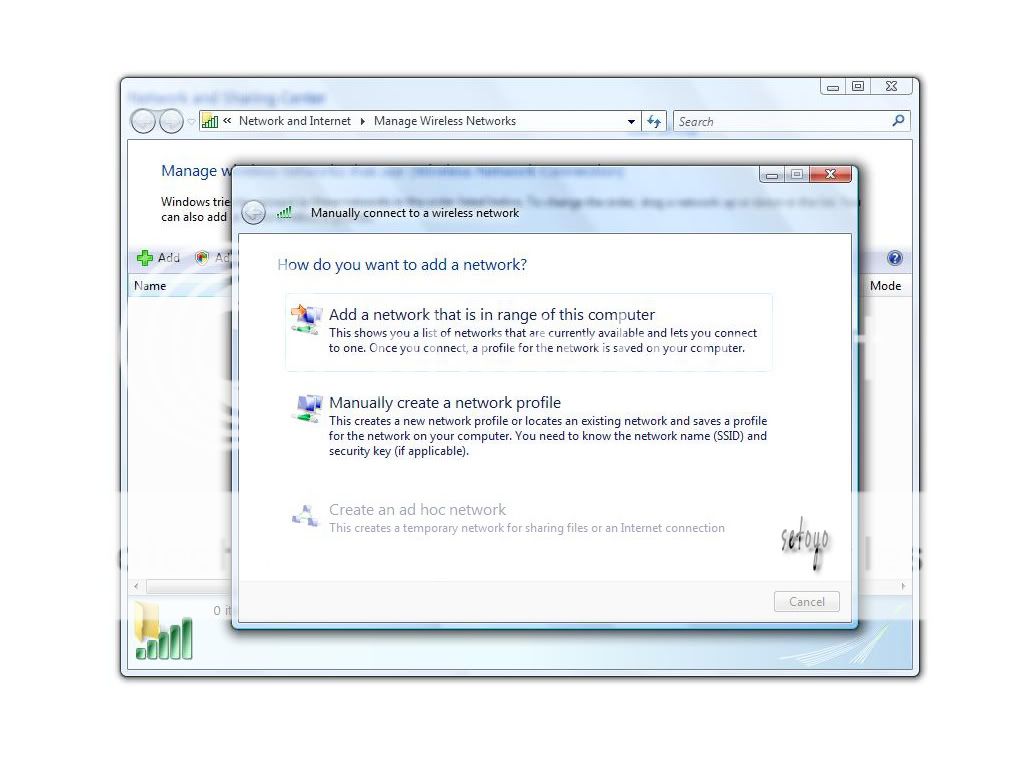
2. Open Your Control Panel --> Network & Internet --> Network Sharing Center --> Click Manage Wireless Network

3. Click “Add” A simple dialog will pop up

4. Click "Create an ad hoc network"
user posted image

5. Just click "Next" after that..

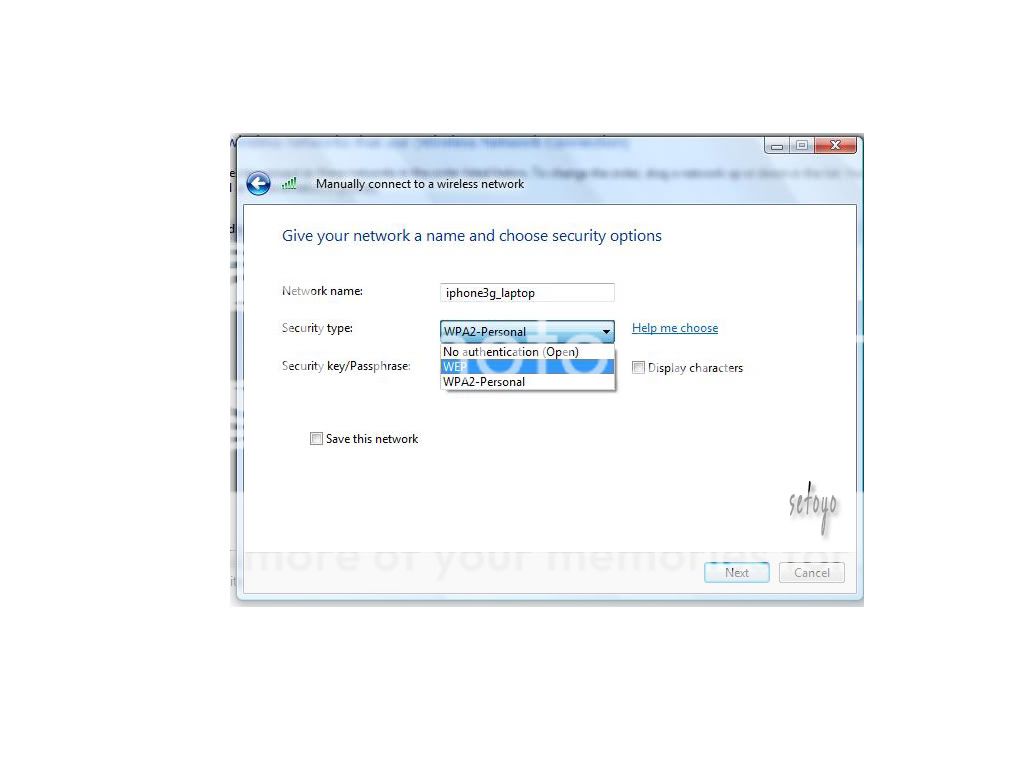
6. Put your Network Name: iphone3g_laptop (You can make any name)
Choose Security type: WEP
Type Security key/ Passphrase : aabbccddee (Key in your password)
Don’t forget to --> "Tick" Save this network. (Very important)
user posted image

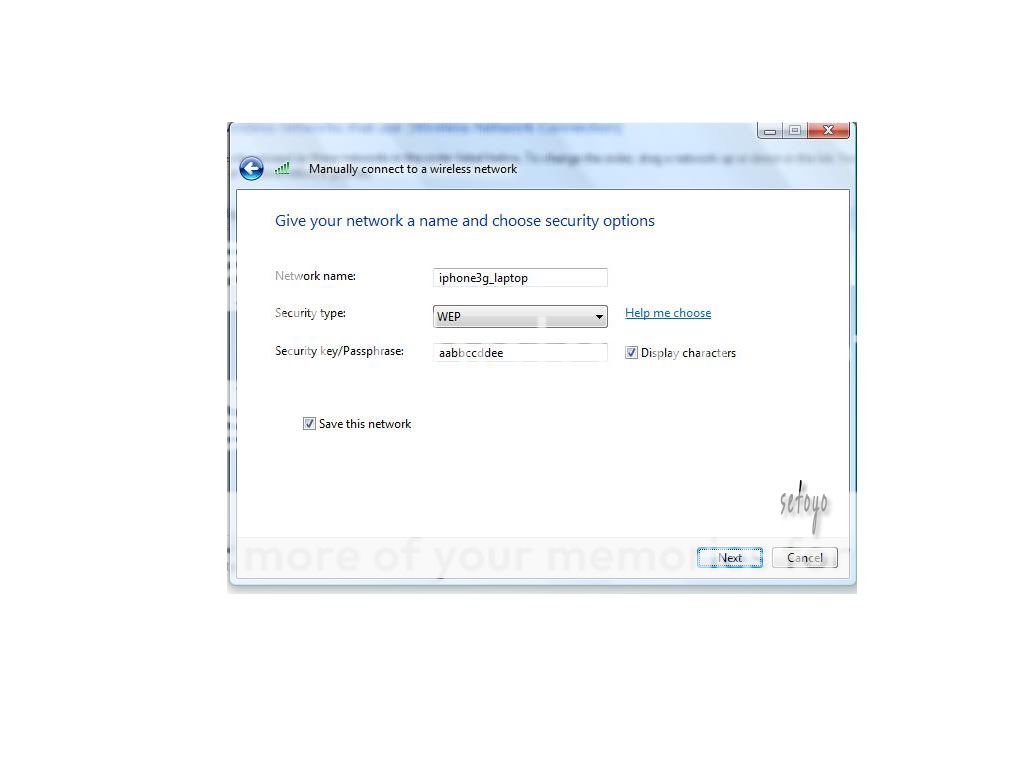
7. And it will be like this. Click "Next"
user posted image

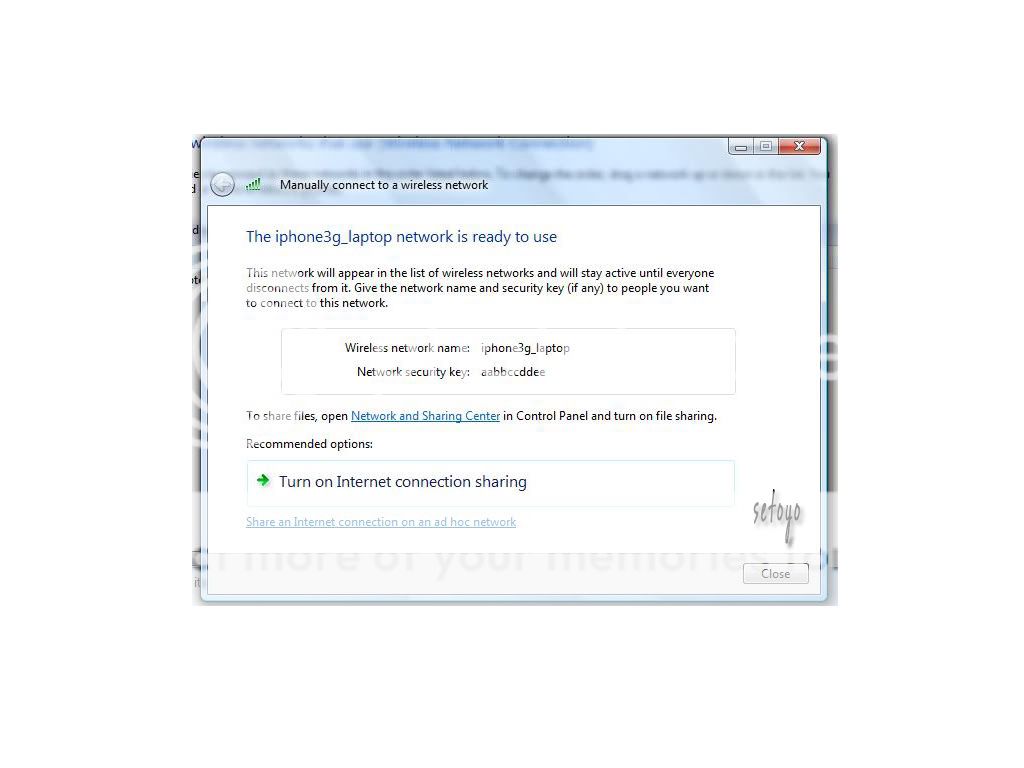
8. Now, You will see this page. Click "Turn On Internet Connection Sharing"
user posted image

9. Wait, until you find this page. Actually Security WEP (Sorry Wrong Pic Will update later on)
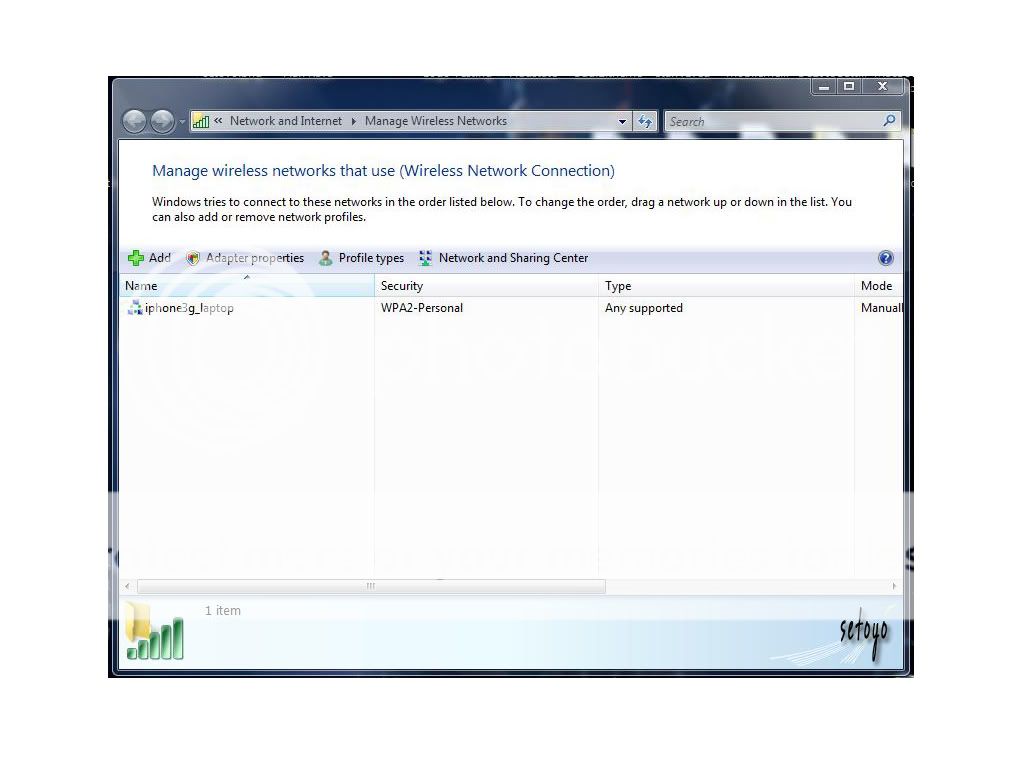
user posted image

10. Fuhh... Almost done. You can check here...
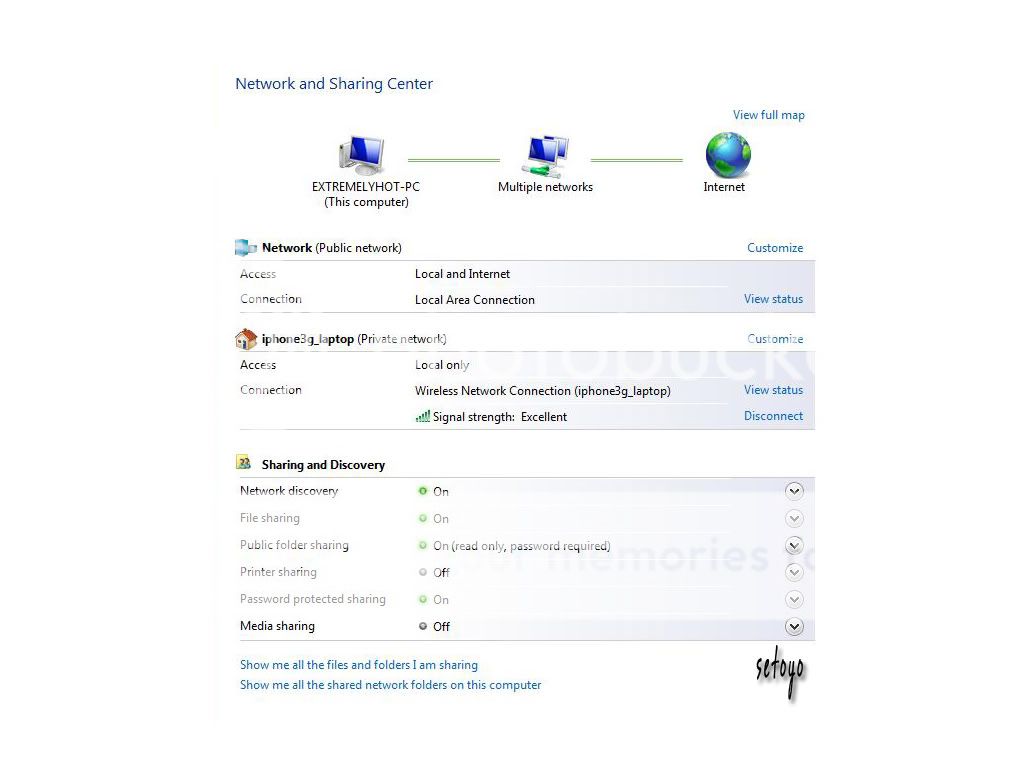
user posted image

This post has been edited by setoyo: Nov 12 2008, 12:24 AM
TSsetoyo
post Oct 31 2008, 12:14 PM

Luv MySeLF!
*****
Senior Member
849 posts

Joined: Sep 2007
Now your beloved iphone3g...

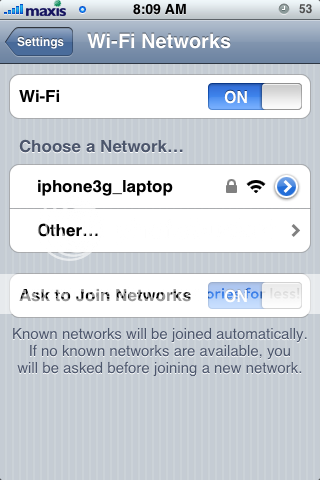
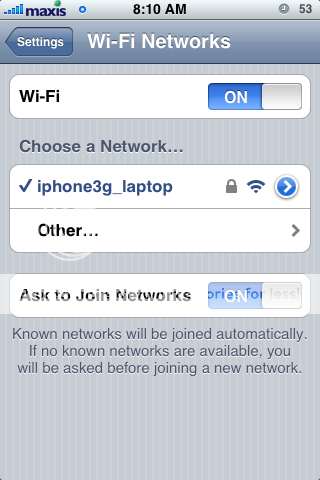
1. Setting --> Wifi --> Turn "On" --> The Wifi will sniff out any wifi --> Choose your laptop wifi that you made just now.. Put Your Password..
user posted image

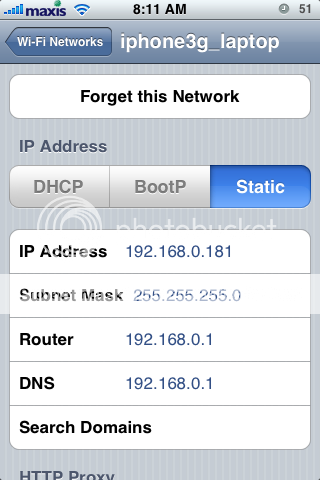
2. Next, Click the Blue Arrow
user posted image
--> Choose Static
user posted image


3. Done.. Now testing…

Now, test to your wifi connection.
1. Close any 3G, Edge through bosspref.

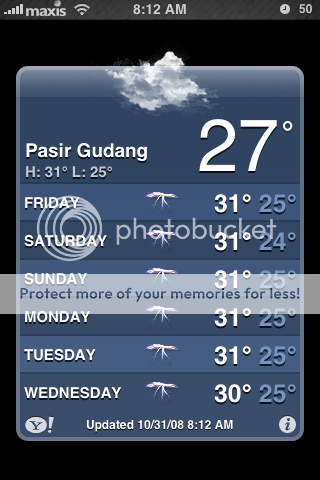
2. Choose "Weather" or other program that need internet connection..
For Example:
user posted image

This
user posted image

And this
user posted image

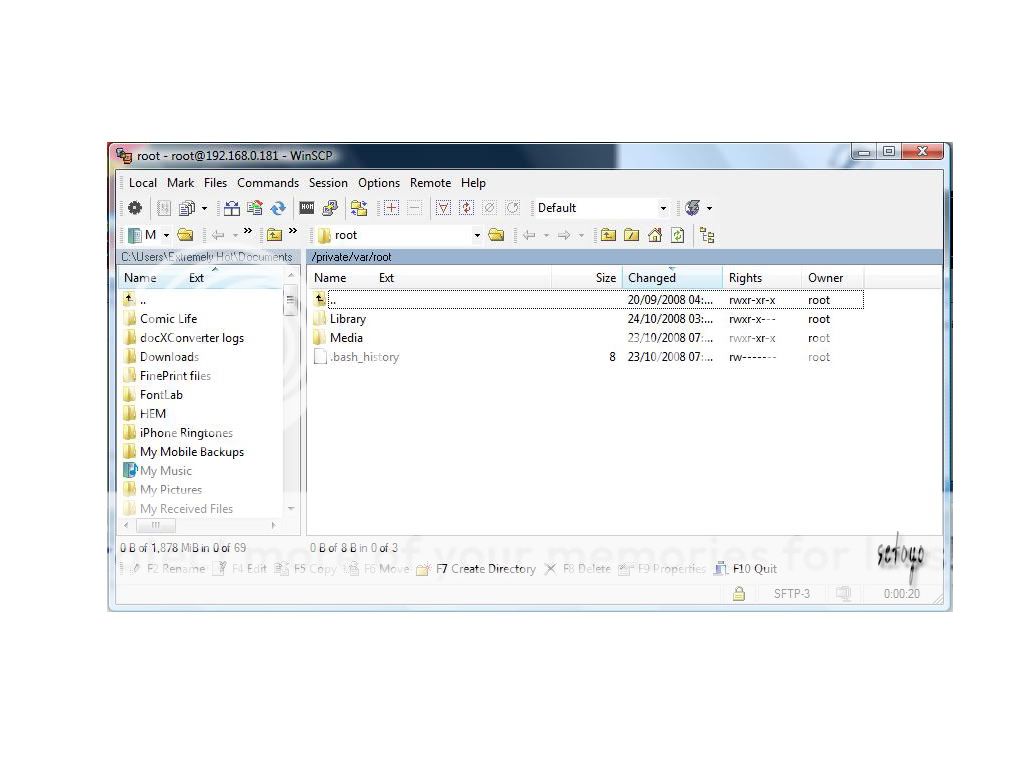
3. You can use Winscp via wifi too..
user posted image


Question:

Why after i configure my laptop, use the wifi things and then turn off the laptop.
After that, i turn my laptop..
But then when iphone3g sniff wifi cant find the laptop? Why?

Answer:
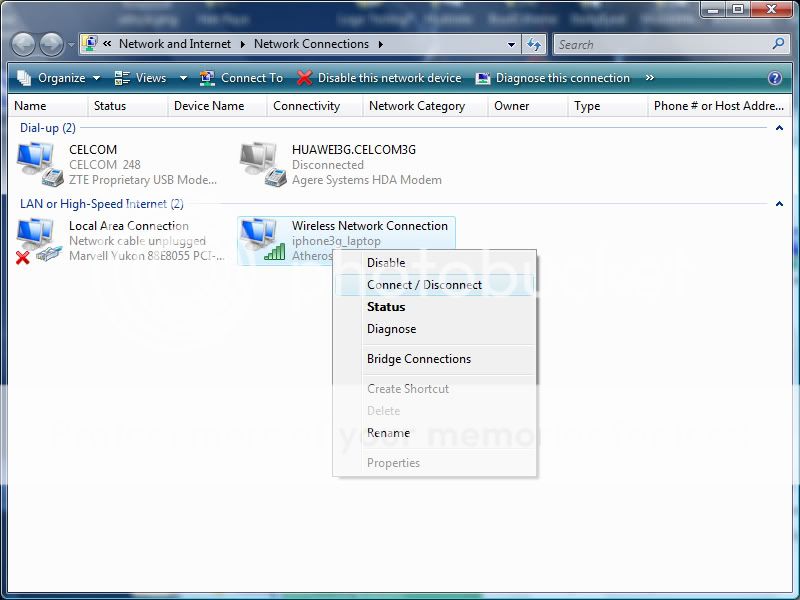
U need to connect it manually. Try look at this pic
user posted image


Issue:
1. Can’t use “WPA2-Personal” setting in Network Security- Can’t be join (Tested) maybe i miss some place...
2. U may lose your setting (This happened to me often) So Solution buy wifi.. haha
If any sifu out there, care to solve this.. Thanks in advance..
.......................................................................................................................
Internet Sharing for MAC user------by baretta---Post #28
Iphone3g as modem via usb-----by Potion----Post #42


.......................................................................................................................
Any comment will be appreciate
and again, thanks for viewing.. notworthy.gif
and support..

P/s: Will update the step..Coz i maybe miss..


This post has been edited by setoyo: Nov 13 2008, 04:42 PM
rx330
post Oct 31 2008, 12:42 PM

10k Club
********
All Stars
11,811 posts

Joined: Jun 2006
no need jailbreak or anyhting?
got instructions for xp? is this the so call tier simi ring?
davidgary73
post Oct 31 2008, 12:55 PM

Music Producer
Group Icon
VIP
4,903 posts

Joined: Jul 2008
@rx330

This should work well with non JB'ed 3G iphones. I reckon this is called ad-hoc as setoyo stated. Could be tethering too.

"A mobile ad-hoc network (MANET) is a kind of wireless ad-hoc network, and is a self-configuring network of mobile routers (and associated hosts) connected by wireless links"

"Tethering in cellular wireless is the connection of a non-mobile device (e.g. desktop computer, notebook computer, laptop computer), to a mobile device (e.g. cell phone, PDA) for the purpose of wireless Internet access by the non-mobile "tethered" device".

TSsetoyo
post Oct 31 2008, 12:56 PM

Luv MySeLF!
*****
Senior Member
849 posts

Joined: Sep 2007
For xp... i think.. some method just different interface...

jailbreak.. no need..
virgin iphone3g can use this method too..
try it out.. and post it here bro the result..

peace..
twinkles
post Oct 31 2008, 01:32 PM

GOD behind You !
****
Senior Member
656 posts

Joined: Aug 2008


thanks brother !! learn more against on Iphone !
Clarencerx
post Oct 31 2008, 02:07 PM

Apple. The only perfection.
*****
Senior Member
971 posts

Joined: Nov 2005
From: Perth, Australia


thanks for the tips ts
harmeet15
post Oct 31 2008, 11:24 PM

Winners don't make excuses
*******
Senior Member
2,729 posts

Joined: Oct 2005
From: Gotham City


just da guide i was looking for...
nice review bro...
appreciate it...thx a mil...
kasmankk
post Oct 31 2008, 11:48 PM

New Member
*
Junior Member
27 posts

Joined: Dec 2007


how about the other way around?
can the laptop be connected with Iphone so that it works as a modem or wifi server (not sure what is the right term) ?

Fighteden
post Nov 1 2008, 12:05 AM

Stark Industries
*****
Senior Member
977 posts

Joined: May 2008
From: My Chair


Sweet guide ..

Thanks for sharing dude, awesome stuff ..
rx330
post Nov 1 2008, 12:13 AM

10k Club
********
All Stars
11,811 posts

Joined: Jun 2006
thans david, wondering got the same method to work on a mac?
as i may discard my window liao n get a mac for replacement
pjastro
post Nov 1 2008, 12:29 AM

Getting Started
**
Junior Member
82 posts

Joined: Oct 2008


If you on a Mac.

Try use iphoneModem.
On your Airport- click create network- you will see your address say "iphone Modem"
Click on. No need to set any ip address.
iphone modem done everything for you.

Another app called pdaNet on Cydia works the same.


TSsetoyo
post Nov 1 2008, 06:57 PM

Luv MySeLF!
*****
Senior Member
849 posts

Joined: Sep 2007
QUOTE(harmeet15 @ Oct 31 2008, 11:24 PM)
just da guide i was looking for...
nice review bro...
appreciate it...thx a mil...
*
Hope u try it, give us the pro and cons...
to know what issue u get...
What im missing...
Thanks..

QUOTE(kasmankk @ Oct 31 2008, 11:48 PM)
how about the other way around?
can the laptop be connected with Iphone  so that it works as a modem or wifi server (not sure what is the right term) ?
*
That mean, the iphone as a modem, isnt?

QUOTE(Fighteden @ Nov 1 2008, 12:05 AM)
Sweet guide ..

Thanks for sharing dude, awesome stuff ..
*
Thanks bro... really appreciate...

QUOTE(rx330 @ Nov 1 2008, 12:13 AM)
thans david, wondering got the same method to work on a mac?
as i may discard my window liao n get a mac for replacement
*
U can try this; Coz i dont have a mac atm... Got this from other side.. Give it a try..

1. Go to “Preferences”
2. Select “Sharing”
3. Go to “Internet Sharing”, select FireWire and Ethernet, to be sure, and tick the small box near “Internet Sharing”
4. You are ready .. Go to your iPhone .. Settings - WiFI .. then click on you connection ..
TSsetoyo
post Nov 1 2008, 06:58 PM

Luv MySeLF!
*****
Senior Member
849 posts

Joined: Sep 2007
QUOTE(pjastro @ Nov 1 2008, 12:29 AM)
If you on a Mac.

Try use iphoneModem.
On your Airport- click create network- you will see your address say "iphone Modem"
Click on. No need to set any ip address.
iphone modem done everything for you.

Another app called pdaNet on Cydia works the same.
*
thanks for tip, bro... rclxms.gif
mangoman
post Nov 2 2008, 02:12 AM

Retired Member
****
Senior Member
560 posts

Joined: Oct 2005
From: Australia


This is a good guide. Cheers for u. wink.gif
Rinyuu
post Nov 2 2008, 10:32 AM

Getting Started
**
Junior Member
90 posts

Joined: Jun 2007


Can give specific methods for mac? Cos its not working with me. i created new network then,

1.System Preference
2.Sharing
3.Ethernet
4.Internet Sharing
5.Open iphone wifi, i selected the network i created.
6.Connected but cant use it.No router ip been showing.
TSsetoyo
post Nov 2 2008, 11:15 AM

Luv MySeLF!
*****
Senior Member
849 posts

Joined: Sep 2007
QUOTE(Rinyuu @ Nov 2 2008, 10:32 AM)
Can give specific methods for mac? Cos its not working with me. i created new network then,

1.System Preference
2.Sharing
3.Ethernet
4.Internet Sharing
5.Open iphone wifi, i selected the network i created.
6.Connected but cant use it.No router ip been showing.
*
Hai guys, hope ppl on mac wanna help this.. Coz im not on mac.. laugh.gif
What the missing point.. TQ..

Support will be appreciate in advance.. notworthy.gif


Added on November 2, 2008, 11:18 am@Rinyuu

QUOTE(pjastro @ Nov 1 2008, 12:29 AM)
If you on a Mac.

Try use iphoneModem.
On your Airport- click create network- you will see your address say "iphone Modem"
Click on. No need to set any ip address.
iphone modem done everything for you.

Another app called pdaNet on Cydia works the same.
*
Try this..

This post has been edited by setoyo: Nov 2 2008, 11:18 AM
Rinyuu
post Nov 2 2008, 11:55 AM

Getting Started
**
Junior Member
90 posts

Joined: Jun 2007


QUOTE(setoyo @ Nov 2 2008, 11:15 AM)
Hai guys, hope ppl on mac wanna help this.. Coz im not on mac.. laugh.gif
What the missing point.. TQ..

Support will be appreciate in advance.. notworthy.gif


Added on November 2, 2008, 11:18 am@Rinyuu
Try this..
*
i downloaded iphone modem, installed but nothing showed up at airport such iphonemodem
did i miss something else?

Snuffykl
post Nov 2 2008, 02:04 PM

**emolified**
*****
Senior Member
835 posts

Joined: Oct 2006
From: Malacca


works like charm rclxms.gif thumbup.gif thx for the tutorial bro. hehehe
TSsetoyo
post Nov 2 2008, 09:29 PM

Luv MySeLF!
*****
Senior Member
849 posts

Joined: Sep 2007
QUOTE(Snuffykl @ Nov 2 2008, 02:04 PM)
works like charm  rclxms.gif  thumbup.gif thx for the tutorial bro. hehehe
*
Mostly welcome.. rclxms.gif
mind share pro and cons bro..

BTW... any mac user out there wanna share ur setting...
Really appreciate it..

4 Pages  1 2 3 > » Top
 

Change to:
| Lo-Fi Version
0.0210sec    0.70    5 queries    GZIP Disabled
Time is now: 17th December 2025 - 10:48 AM