Outline ·
[ Standard ] ·
Linear+
Technical PlayStation 3 FAQ For Beginners | V2, General PS3 Q&A and Technical Disucssion
|
TSacougan
|
 Oct 8 2008, 12:20 AM Oct 8 2008, 12:20 AM
|

|
QUOTE(ali86 @ Oct 7 2008, 04:39 PM) Hi guys, just wanna to ask you all...how to transfer saved games data to PS3? i mean step by step guide....coz' i tried already, but nothing happen...i want to copy my saved data to my second set PS3....plz help....thanks some of the PS3 game data can be copied/back-uped. just select the gamesave, press triangle and copy using a thumbdrive however, some game saves are "locked" (maybe due to online leaderboards or other settings) so u can't transfer them to another PS3. |
|
|
|
|
|
TSacougan
|
Oct 8 2008, 05:52 PM
|
|
|
QUOTE(ali86 @ Oct 8 2008, 05:43 PM) i already copied my saved games....then i trasfer to my second ps3, when i start the game, it start the new games......  may i know the name of the game u trying to share the gamesave? another thing, are both of your PS3 same region? maybe one of them is different region (e.g. a JPN set) from the other? |
|
|
|
|
|
TSacougan
|
Oct 9 2008, 12:11 AM
|
|
|
^ is it possible than only 1 of your PS3 has updated to the latest GT5P patch?
a gamesave made after the game is patched won't be recognized by a pre-patch version of the game.
anyway, u can d/load a gamesave with lots of credits/cars fr gamefaqs or gtplanet forum.
|
|
|
|
|
|
TSacougan
|
Oct 9 2008, 12:23 PM
|
|
|
yes, i dload the gtplabet save just fine. here i'll reattach it here. i dont have GT5P US so i can't test the save Attached File(s) GT5P_US_Bluray_All_cars_1_mil_Oct_6_2008.zip
 ( 41.38k )
Number of downloads: 9 |
|
|
|
|
|
TSacougan
|
Oct 15 2008, 02:08 PM
|
|
|
Gfreak, don't worry, anyone can ask questions here. the problem is most times ppl dunno the answer  i don't have a HDTV but from ur description, is it definitely not behaving normally. try unplug/replug the HDMI cable again and test different resolutions. try setting ps3 to [480p+720p] only and try out other games/demos/videos and see if the problem occur. rgd the wireless setup, mb u can retype the question here. i using normal LAN only and dunno much abt wireless connection setup. do note that PS3 browser is really lousy, it is quite unresponsive at most times. any old + cheapo PC with firefox >>>>>> PS3 browser  |
|
|
|
|
|
TSacougan
|
Oct 16 2008, 07:10 PM
|
|
|
nelienuxe_sara, i wonder why u kenot plug in? did u buy the convertor with DVI-I "plug"?i dont have samsung monitor, but what DVI port is it using? 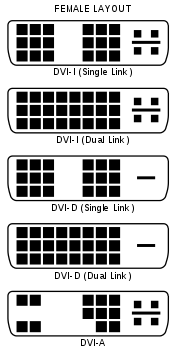 http://en.wikipedia.org/wiki/Digital_Visual_Interface http://en.wikipedia.org/wiki/Digital_Visual_Interface |
|
|
|
|
|
TSacougan
|
Oct 17 2008, 08:51 AM
|
|
|
QUOTE(nelienuxe_sara @ Oct 17 2008, 02:11 AM) yes i buy the dvi-i so wut to do? can replace ka? i didnt know samsung 931bw usind dvi d T_T are u sure the cable won't fit? looking at the picture, a DVI-I cable can fit and is compatible with the DVI-D port. the slots and pins match, try hooking it up again? edit: unless the samsung uses DVI-DL (dual link) port? This post has been edited by acougan: Oct 17 2008, 08:54 AM |
|
|
|
|
|
TSacougan
|
Oct 18 2008, 03:02 PM
|
|
|
^my experience with constant PSN DC is i will reboot my modem/router and change a new IP.
sometimes one IP i will DC every few mintues, i try another IP, i stay connected for hours, weird eh?
i'm using streamyx and LAN connection
|
|
|
|
|
|
TSacougan
|
Oct 18 2008, 09:29 PM
|
|
|
^when watching DVD/BD, the PS3 OS will turn off other HDD activtiy and sign off from PSN. they say it makes watching movies a quieter and smoother experience |
|
|
|
|
|
TSacougan
|
Oct 24 2008, 01:38 PM
|
|
|
QUOTE(S4PH @ Oct 24 2008, 01:17 PM) sifu's out here is there any way to get logitech rumble pad 2, 2 work on the ps3 if can work i dont have to buy dual shock 3 the logitech rumble pad 2 is a USB controller, eh? if u have one, just plug in and play (it will be recognize as controller 2 if u have another 6axis/DS3 enabled at that moment) some games will recognize it, some games won't. This post has been edited by acougan: Oct 24 2008, 01:38 PM |
|
|
|
|
|
TSacougan
|
Oct 29 2008, 11:35 PM
|
|
|
^ there is a way (cheaper but takes longer)
1. buy new HDD and casing
2. format it to FAT32
3. backup your PS3 into your this HDD (it will be a couple of huge files)
4. now transfer the backup files from this HDD to your PC
5. insert new HDD into PS3
6. use the casing for the old HDD and format it into FAT32
7. copy the backup files from PC into a directory called PS3/BACKUP on your old HDD
8. use the Restore Utility on the XMB
|
|
|
|
|
|
TSacougan
|
Oct 30 2008, 04:22 PM
|
|
|
PS3 ----->(via optical cable) -----> 5.1 system/receiver/amplifier
can support DD5.1 and DTS
PS3 ----->(HDMI cable) -----> 7.1/HD Audio system/receiver/amplifier ----->(HDMI cable) -----> HDTV
this one is for HD Audio
This post has been edited by acougan: Oct 30 2008, 04:23 PM
|
|
|
|
|
|
TSacougan
|
Oct 30 2008, 04:40 PM
|
|
|
PS3 ----->(via red/white cable) -----> can only get stereo sound
no need pening, try find the manual of your amplifier/sound system for setup tips.
this is the setup most of us use:
PS3 ----->(via optical cable) -----> 5.1 system/receiver/amplifier (sound)
at the same time
PS3 ----->(via HDMI cable) -----> HDTV (picture)
This post has been edited by acougan: Oct 30 2008, 04:41 PM
|
|
|
|
|
|
TSacougan
|
Oct 31 2008, 01:08 AM
|
|
|
^thanks for the informative post + pict  i'll C+P into front page so others can find it easily |
|
|
|
|
|
TSacougan
|
Nov 2 2008, 12:46 AM
|
|
|
i'm not sure what happened but GTAIV (PAL version) outputs a 480i/p PAL signal for SD resolutions. some devices/TVs/etc kenot accept such a signal.
read your gadmei vgabox manual. can it accept 720p via component cables? if can, then select 720p at XMB.
EDIT: no other game nvm, try other game demos 1st
This post has been edited by acougan: Nov 2 2008, 12:48 AM
|
|
|
|
|
|
TSacougan
|
Nov 5 2008, 11:34 PM
|
|
|
|
|
|
|
|
|
TSacougan
|
Nov 12 2008, 09:37 PM
|
|
|
^ i heard of auto-shutdown but ur ps3 has auto-startup!!!! u must be ignoring it for some time. it demands your attention! LoL
anyway, the ps3 will auto-startup if the sensor detect a disc incoming.
|
|
|
|
|
|
TSacougan
|
Nov 14 2008, 02:13 PM
|
|
|
QUOTE(huh @ Nov 14 2008, 11:44 AM) I've been trying to add funds to my wallet by credit card for the US Playstation Store but can't seem to get it to work. I randomly entered a US address when creating my account. And now I an error message saying my credit card details are invalid. Anyone got a solution to this? I wanna get the Poker game and it's not available in the Singapore store. the poker game is not available in SGP store? haha i tot their govt is building 2 casinos!! anyway, i'm pretty sure it was available in HK store. mb u check the SGP store again? |
|
|
|
|
|
TSacougan
|
Nov 16 2008, 08:17 AM
|
|
|
actually, since FW 2.4, even with the PC proxy program, u still NEED to connect the PS3 to the internet to install demos
but using the PC proxy program means u can d/load the huge demos using PC (use d/load accelerator programs also can) first, adn then "trick" the PS3 into linking to your PC directory and install it.
|
|
|
|
|
|
TSacougan
|
Nov 19 2008, 10:12 AM
|
|
|
ok, gimme a minute...
local PS3 warranty is 1 year (parts+labor)
i wonder if SonyMY will sell extended warranty plan soon like some of its other products?
|
|
|
|
|



 Quote
Quote
 0.0419sec
 0.48
0.48
 7 queries
 GZIP Disabled