Welcome Guest ( Log In | Register )

Bump Topic Topic Closed RSS Feed
6 Pages < 1 2 3 4 > » Bottom

Outline · [ Standard ] · Linear+

Nokia [Nokia N82 Official Thread V3], Storytelling rediscovered continues...

views
     
cute_boboi
post Aug 19 2008, 10:27 AM

° 忍 °
*******
Senior Member
6,462 posts

Joined: Nov 2004
From: [Latitude-N3°9'25"] [Longitude-E101°42'45"]


DannGun,

I'm using N82 authorised set. No problem at all. The camera is quite good for an integrated mobile phone.

Of course, please don't compare it to compact digital camera or some other DLSR.

cute_boboi
post Aug 19 2008, 12:32 PM

° 忍 °
*******
Senior Member
6,462 posts

Joined: Nov 2004
From: [Latitude-N3°9'25"] [Longitude-E101°42'45"]


QUOTE(icecarpediem @ Aug 19 2008, 12:19 PM)
has anyone successfully find a tripod which can be used by the N82?
*
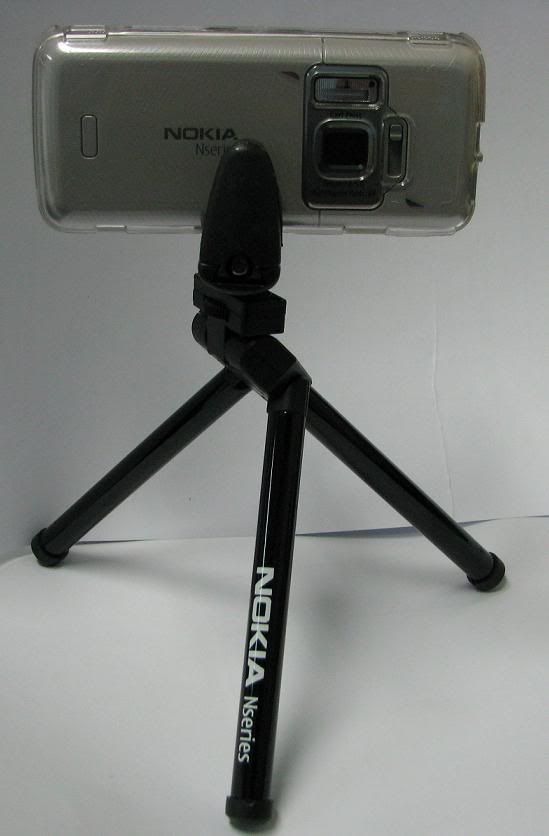
My Nokia DT-22 posted previously in N82 V1 & V2 rolleyes.gif
» Click to show Spoiler - click again to hide... «


This post has been edited by cute_boboi: Aug 19 2008, 12:32 PM
cute_boboi
post Aug 19 2008, 03:54 PM

° 忍 °
*******
Senior Member
6,462 posts

Joined: Nov 2004
From: [Latitude-N3°9'25"] [Longitude-E101°42'45"]


QUOTE(mizie86 @ Aug 19 2008, 12:47 PM)
anyone know whre I can get this DT-22? drool.gif  drool.gif  Price??
*
Some telco shops use it for display purpose, not for sale shakehead.gif
Previously I tried to ask in KL Nokia shop (opened by authorised Nokia), they don't know what is DT-22 doh.gif
I bought it at MBK Bangkok around RM50. I think can be cheaper if bargain 9 9.
The upper portion can be used with normal standard tripod, just screw it in only as usual. thumbup.gif

QUOTE(cucubud @ Aug 19 2008, 03:26 PM)
Can show the photo of the keypad side also?
*
Sorry, don't have photo sweat.gif Anyway, it grip between the LCD and keypad area there (Nokia word), but it does cover up the lower left LCD a bit (5mmx10mm). Anyway, if you are using the tripod, most likely for taking pictures only. In fact, that is the recommended grip area, you can grip anywhere else you like, or even N95, etc.

cute_boboi
post Aug 20 2008, 11:12 AM

° 忍 °
*******
Senior Member
6,462 posts

Joined: Nov 2004
From: [Latitude-N3°9'25"] [Longitude-E101°42'45"]


DannGun,

Please use proper term, authorised set and AP set tongue.gif

I don't think authorised set is that cheap now hmm.gif and by Zitron only.

cute_boboi
post Aug 20 2008, 11:39 AM

° 忍 °
*******
Senior Member
6,462 posts

Joined: Nov 2004
From: [Latitude-N3°9'25"] [Longitude-E101°42'45"]


QUOTE(franson @ Aug 20 2008, 11:25 AM)
guys, can share a bit why u guys buy Nokia n82 instead of Nokia n95?~~
=)
*
1) I don't like slide/flip. I like traditional candybar form factor
2) At the time, N82 more latest than N95. N95 8GB don't have micro-SD slot, so it is out for me.
3) 99% same features with N95.

cute_boboi
post Aug 20 2008, 12:50 PM

° 忍 °
*******
Senior Member
6,462 posts

Joined: Nov 2004
From: [Latitude-N3°9'25"] [Longitude-E101°42'45"]


QUOTE(shazmie @ Aug 20 2008, 12:01 PM)
guys, sorry if this ques askd d..my n82 ap set hang when i open the gallery. .done format memory card, hard reset hp.im using sandisk 2gb..but stil the same. Any1 can help me?
*
Try take out the micro-SD. Then capture a few pictures (store in phone memory). Then try open gallery if it hangs or not. If still hang, means:
1) phone faulty
2) reinstall firmware using Nokia Software Updater (google for it)

If no hang, means micro-SD or slot related problem.

cute_boboi
post Aug 22 2008, 10:25 AM

° 忍 °
*******
Senior Member
6,462 posts

Joined: Nov 2004
From: [Latitude-N3°9'25"] [Longitude-E101°42'45"]


franson,

yeah, it cracks easily, even without drop/pressure. Seems like the connectors are not properly align. I'm on my 4th crystal case now. sweat.gif

This is the 3rd crystal case design. They change quite frequent by production batch. Even the seller also open and inspect the casing/notches before selling to me. thumbup.gif

cute_boboi
post Aug 28 2008, 06:40 PM

° 忍 °
*******
Senior Member
6,462 posts

Joined: Nov 2004
From: [Latitude-N3°9'25"] [Longitude-E101°42'45"]


QUOTE(Norns @ Aug 28 2008, 06:23 PM)
Thanks so much for explanation notworthy.gif

Anyone know how to manage better the gallery ?

When i press gallery button, all kind of image on phone is lump together .. all symbols and so on. Any way to filter it out ?
*
Example: For those garmin images, plug into PC as USB. Then find the files and set all properties to Hidden. Then delete all the _paltbn folder. Let gallery regenerate all.

Otherwise, use 3rd party viewer like Resco, etc.

cute_boboi
post Aug 28 2008, 08:18 PM

° 忍 °
*******
Senior Member
6,462 posts

Joined: Nov 2004
From: [Latitude-N3°9'25"] [Longitude-E101°42'45"]


QUOTE(-Teddy- @ Aug 28 2008, 07:59 PM)
Wouldn't it be hard to control playing this kind of shooting games on the tiny screen and navigation buttons?
Can Resco be used to upload a picture directly to Flickr like the default gallery do?
*
No, you need something compatible with Flickr or plug-in. There is no one app for all. Each app has its own feature.

cute_boboi
post Aug 29 2008, 10:44 AM

° 忍 °
*******
Senior Member
6,462 posts

Joined: Nov 2004
From: [Latitude-N3°9'25"] [Longitude-E101°42'45"]


QUOTE(Norns @ Aug 28 2008, 10:37 PM)
Tq a lot cuteboboi !

Plan to upgrade to MicroSD soon ..

Can I know wats the main different between normal microSD 8gb and MicroSD SDCH level 4 8gb ? i was planning to get sandisk ...
Is it better speed and performance?
*
Any SD (SD, mini-SD, micro-SD) from 4GB and higher are classified as SDHC. 2GB and below are normal SD. It is just a standard specification.

Class = refer to the read/write speed. micro-SD so far only has Class 4 fastest. Normal SD has Class 6.

Basically your question on normal microSD 8gb and MicroSD SDCH level 4 8gb is the same thing. Laymen will call it 8GB micro-SD. Technical people will call it 8GB micro-SDHC Class 4.

SDHC Wiki

cute_boboi
post Sep 3 2008, 09:48 AM

° 忍 °
*******
Senior Member
6,462 posts

Joined: Nov 2004
From: [Latitude-N3°9'25"] [Longitude-E101°42'45"]


QUOTE(vvwowvv @ Sep 3 2008, 12:09 AM)
hie.. any body using N82 as modem (MAXIS HSDPA) for the whole day? will it disconnected often?

smile.gif
*
It depends on the telco network signal strength and coverage. As long as your N82 has near full signal (not half), then it will not disconnect. It will jump between 3.5G and 3G while surfing.

Also, I always use CA101 USB cable + USB cable extensions to drag it longer and put the phone at a better reception area. Longest I used is 3x extensions. Then pull another power cable and plug in charger.

I tried with bluetooth, but it keeps getting disconnected or hang, and need to disconnect/reconnect. Even after reboot notebook and switch off/on N82.

I've connected recently for >8 hours continuous without disconnection. Also downloaded patch files 300MB in <2 hrs.

cute_boboi
post Sep 3 2008, 05:37 PM

° 忍 °
*******
Senior Member
6,462 posts

Joined: Nov 2004
From: [Latitude-N3°9'25"] [Longitude-E101°42'45"]


QUOTE(shredder @ Sep 3 2008, 05:30 PM)
is there any mini tripod available for n82?
*
12th reply on DT-22 whistling.gif

My Nokia DT-22 posted previously in N82 V1 & V2 rolleyes.gif
» Click to show Spoiler - click again to hide... «


cute_boboi
post Sep 9 2008, 12:24 AM

° 忍 °
*******
Senior Member
6,462 posts

Joined: Nov 2004
From: [Latitude-N3°9'25"] [Longitude-E101°42'45"]


QUOTE(NewbieBetta @ Sep 8 2008, 09:13 PM)
yeah the v2.29..

hey..i also noticed in lelong.com.my they are selling garmin mobile xt in 1gb memory card for rm90,does that mean..its the original software with lifetime software upgrade or its a 1yr license? & no more extra service charged like the voice navigation thingy?

note:theres a huge price diff from this 2 site

1st http://forum.lowyat.net/index.php?showtopi...4973&hl=microsd selling sandisk 8gb ultra microsd at rm215
2nd http://www.lelong.com.my/merchant/default.asp?userid=kkwern selling sandisk 8gb ultra microsd ar rm122

now now..is there pirated sandisk stuff out there?
*
QUOTE(-Teddy- @ Sep 8 2008, 11:20 PM)
Anyway to make sure I don't miss out hidden and system files? Will the 8GB's price go down soon by any chance? I know RM110 is already freaking cheap, but who doesn't want to save?  tongue.gif
*
One 2nd floor Low Yat Plaza shop is selling SanDisk 8GB micro-SDHC at RM85. This unit only comes with card, without the USB converter/reader.

I guess the 16GB should be out anytime, and sell in PC Fair Dec'08 ?

QUOTE(ziggy87 @ Sep 8 2008, 11:07 PM)
1) Take out existing µSD. Use N82 "Remove Memory Card" option.
2) Plug in new µSD into N82 and format it. Ignore all apps errors at this moment.
3) Plug both µSD into PC and copy all files (including hidden & system files)
4) If you don't have two card readers, copy with care, don't open the folder/files in PC HDD, as it might create some unnecessary files like thumbs.db. Overwrite whatever in the formatted new card.
5) Plug the new µSD into N82, and all the apps should work as before.

some member here provided the guide
i juz saved it.. thumbup.gif
*
Me lah. tongue.gif Pls remember me next time tongue.gif

cute_boboi
post Sep 9 2008, 01:07 AM

° 忍 °
*******
Senior Member
6,462 posts

Joined: Nov 2004
From: [Latitude-N3°9'25"] [Longitude-E101°42'45"]


QUOTE(ziggy87 @ Sep 9 2008, 12:32 AM)
i rmb u
wanted to mention ur name but i sked later if i wrong then paiseh icon_rolleyes.gif
*
doh.gif LOL icon_rolleyes.gif

QUOTE(NewbieBetta @ Sep 9 2008, 12:39 AM)
sorry mistaken on the price..

here u go the mobile xt come preloaded in the memory card
http://www.lelong.com.my/Auc/List/2008-09D...D_Card_RM90.htm

normal 8gb card is rm85 but how about the sandisk 8gb ultra mobile in lowyat?
*
Cannot remember exact, but I recall ultra mobile (with the USB reader) in Low Yat Plaza around RM105-115.

cute_boboi
post Sep 10 2008, 06:55 PM

° 忍 °
*******
Senior Member
6,462 posts

Joined: Nov 2004
From: [Latitude-N3°9'25"] [Longitude-E101°42'45"]


Yes, since 30 Jul 2008 rolleyes.gif

GMXT 4.20.20 for S60v3

cute_boboi
post Sep 10 2008, 11:52 PM

° 忍 °
*******
Senior Member
6,462 posts

Joined: Nov 2004
From: [Latitude-N3°9'25"] [Longitude-E101°42'45"]


QUOTE(seraph8660 @ Sep 10 2008, 10:39 PM)
ok.. about the garmin,
i hav to delete all the garmin folder then just can install the new one?
*
No, just let it overwrite. i.e. don't delete anything, just run the latest installer, same way.

cute_boboi
post Sep 11 2008, 12:48 PM

° 忍 °
*******
Senior Member
6,462 posts

Joined: Nov 2004
From: [Latitude-N3°9'25"] [Longitude-E101°42'45"]


No, got used to it. Similiar like my previous N80. But N80 has a higher resolution screen (416x352) and can view more in a screen than N82/N95/etc. (320x240)

cute_boboi
post Sep 11 2008, 02:34 PM

° 忍 °
*******
Senior Member
6,462 posts

Joined: Nov 2004
From: [Latitude-N3°9'25"] [Longitude-E101°42'45"]


Use the Super converter by eRightSoft. Google for it. Freeware.

cute_boboi
post Sep 11 2008, 03:01 PM

° 忍 °
*******
Senior Member
6,462 posts

Joined: Nov 2004
From: [Latitude-N3°9'25"] [Longitude-E101°42'45"]


QUOTE(NewbieBetta @ Sep 11 2008, 02:49 PM)
u installed the trial version..thats why..I cant even get my N82 to run with 4.20.20 it wont install automatically,I went & search for the .sis file to install & it take forever loading..therefore i opt for 4.10.60

anyone here is using latest version mind to share their file?for me 4.20.20 cant run,so anyone using older & tested running version?

oh ya I read somewhere..they claim N82 music playing sux..but i dont feel that..Im using a creative in ear headphone & the bass is tight enough with enough treble too..they claim N81 is better in music?anyone wanna comment in this?
*
Follow the installation instruction, for whichever GMXT version you install. I still have GMXT 4.10.60, 4.10.80, 4.20.00 and 4.20.20 installer with me thumbup.gif

You'll need the FreeBasemap and SupportFiles also.

Then latest malsingmap v2.29

QUOTE
Installation Instructions

   1. As with any software update, you should always create a backup of the data on your device before beginning. Please see the information provided in the user manual for your device for more information.
      All saved settings/waypoints/routes/tracks will be lost when the update to version 4.20.20 is complete. Please save all appropriate data before beginning the update.
   2. To import your existing saved settings/waypoints/routes/tracks after you have updated to the latest version, you will need to export them to the SD card at this time. Select Tools->Manage My Data then select the Manage option. Select Export GPX. This will create a file on the SD card that contains all of your saved information. Select Done and Exit the application when this is complete.
   3. Copy the following file from the SD card to a safe location (this file will be used to import your saved information later): (SD card)\Garmin\GPX\CURRENT.GPX
      After copying this file, delete the file from the SD card.
   4. Insert the SD card into your card reader. (Applicable for most Symbian OS devices - some Nokia phones offer 'Data Transfer' mode when connected to the PC and will allow the phone to act like a USB card reader.)
   5. To begin the SD card setup, select the 'Download' link found on this web page.
   6. Select to 'Run' or 'Save' the file. Selecting 'Run' will immediately launch the install program. Selecting 'Save', will save the file to your PC and require you to launch the install program from the saved location.
   7. If you receive an error copying the files to the destination SD card, you will need to manually browse the card to remove the following two files:
      (SD card)\Garmin\Apps\Symbian\res\GarminMobileXT.SIS
      (SD card)\private\10202dce\GarminMobileXT_PA.SIS
      Rerun the file downloaded from the link on this web page (Step 5).
   8. Follow the directions provided when running the downloaded program and directions provided on the device display to complete the application update. Insert the SD card into the phone (if necessary). If the installation/update does not occur automatically upon insertion of the SD card into your device, browse to the \Garmin\Apps\Symbian\RES directory and manually run the GarminMobileXT.SIS file.
   9. Exit the application (if necessary). Copy the CURRENT.GPX file saved in Step 2 to SD card location: \Garmin\GPX\CURRENT.GPX
      Replace the existing file on the SD card if necessary.
  10. Start the application. The import of the data should happen automatically. If it does not, select Tools->Manage My Data then select the Manage option. Select Import GPX. Your saved application data should now be available.
  11. You will need to keep the SD card inserted in your device for the voice, help and basemap files. This SD card can also be used to hold your detailed maps.

System requirements:

   1. IBM-compatible PC running Windows 2000 or later operating system and an available USB port.


Added on September 11, 2008, 3:02 pm
QUOTE(ziggy87 @ Sep 11 2008, 02:59 PM)
20GB of free space (or more) on the Hard disk where the OS is installed. shocking.gif  shocking.gif  shocking.gif
*
Ignore it. I have no problem running in my C: with <1GB left. Unless you are converting full length movies, which I've not tried before.


Added on September 11, 2008, 3:05 pm
QUOTE(-Teddy- @ Sep 11 2008, 02:23 PM)
I'm thinking of installing Garmin again. Does Garmin affect battery life even when you are not using it? If I'm not mistaken Garmin will start something to run on the background even if you are not using it.
*
Make sure you exit the application by clicking options/files/etc. -> Exit

Don't just press the Menu or Red cancel call button. Symbian works similiar like PPC/WM OS.

To really ensure you have exit it, try out Dr. Jukka's Y-Tasks to view running tasks or close/kill it. Google for it. It's a freeware.

A good application will not hog the memory or run in background (memory leak) if you exit it properly. Otherwise, it is a lousy app. With such a great volume of users/usage, I'm sure GMXT will be bombarded if they have this kind of bugs.


This post has been edited by cute_boboi: Sep 11 2008, 03:05 PM

cute_boboi
post Sep 11 2008, 08:26 PM

° 忍 °
*******
Senior Member
6,462 posts

Joined: Nov 2004
From: [Latitude-N3°9'25"] [Longitude-E101°42'45"]


QUOTE(Norns @ Sep 11 2008, 08:02 PM)
I have just purchased microsd 8gb ..

Can i transfer all my item from my old card to my new card ?

will this affect all installed application, *ahem*, and all modification i made so far ?

hope can guide me notworthy.gif
*
1) Take out 2GB from N82
2) Plug in 8GB into N82
3) Use N82 to format it
4) Take out 8GB from N82
5) Plug 2GB into PC using USB reader.
6) Enable Windows Explorer to view all files (including hidden)
7) Copy all files from 2GB into a temporary folder in HDD
8) Safely remove USB device (2GB)
9) Plug in 8GB into PC using USB reader
10) Copy all files from temporary folder in HDD into 8GB (Overwrite all)
11) Safely remove USB device (8GB)
12) Plug 8GB into N82

Everything should work fine. If it doesn't, you can always revert back to the 2GB.

Take note, once you add/uninstall programs with the 8GB, the 2GB won't work well anymore as the files/programs are different already.

Make sure you select Remove Memory card properly in N82.

Please rate good. thanks smile.gif


This post has been edited by cute_boboi: Sep 11 2008, 08:28 PM

6 Pages < 1 2 3 4 > » Top
Topic ClosedOptions
 

Change to:
| Lo-Fi Version
0.0251sec    0.55    7 queries    GZIP Disabled
Time is now: 13th December 2025 - 07:44 AM