

It still works back in 2.1 now 2.2 it still the same method.
Either Fugu or Cyberduck.
(Update)iPhone 3.1 OS MALAYSIA Telco Carrier Logos, ipcc file
(Update)iPhone 3.1 OS MALAYSIA Telco Carrier Logos, ipcc file
|
|
 Nov 27 2008, 10:32 PM Nov 27 2008, 10:32 PM
|
 
Junior Member
82 posts Joined: Oct 2008  
|
It still works back in 2.1 now 2.2 it still the same method.
Either Fugu or Cyberduck. |
|
|
|
|
|
Nov 28 2008, 08:39 PM
|

Junior Member
124 posts Joined: Nov 2008
|
it also work on FW 2.2 for DIGI
 |
|
|
Nov 29 2008, 11:17 PM
|

Senior Member
623 posts Joined: Jan 2003 From: PJ, Malaysia 
|
Awesome works for Maxis on FW2.2. Thanks a lot man!
This post has been edited by MangO: Nov 29 2008, 11:35 PM |
|
|
Nov 30 2008, 08:53 AM
|

Junior Member
181 posts Joined: Sep 2007
|
yup same as previous process...
thanks for heads up |
|
|
Dec 2 2008, 12:30 PM
|

Senior Member
2,149 posts Joined: Aug 2005 From: Malaysia
|
MyMaxis link is not working or the file is corrupted. can anyone send me this file please?
thanks a lot! |
|
|
Dec 2 2008, 12:41 PM
|
 
VIP
4,903 posts Joined: Jul 2008
|
QUOTE(Dozz @ Dec 2 2008, 12:30 PM) MyMaxis link is not working or the file is corrupted. can anyone send me this file please? http://forum.lowyat.net/topic/752226/+40#entry21071621thanks a lot!  |
|
|
|
|
|
Dec 3 2008, 10:50 AM
|

Junior Member
218 posts Joined: Apr 2006 From: ~ Infrared World ~
|
i'm using umobile on iphone for unlimited broadband/call/sms/everything lol ~ any umobile logo here?
|
|
|
Dec 3 2008, 04:06 PM
|

Newbie
1 posts Joined: May 2008
|
UMOBILE 018 有没有
|
|
|
Dec 11 2008, 05:14 PM
|
|
Senior Member
7,343 posts Joined: May 2005
|
Wow just came across this thread ... applied the my maxis logo on my iphone 2g... it's cool !
|
|
|
Dec 28 2008, 03:40 PM
|

All Stars
10,261 posts Joined: Jan 2003
|
Hey, does this work with sim unlocked phone? this works for unlocked phone only?
I dont think it does. I copied the files and rebooted. No change. |
|
|
Dec 28 2008, 09:22 PM
|

Junior Member
67 posts Joined: Jun 2007
|
It worked on mine perfectly, thx.
|
|
|
Dec 29 2008, 04:55 PM
|

Junior Member
14 posts Joined: Jun 2008
|
work on FW 2.2 for celcom~..
|
|
|
Dec 29 2008, 09:08 PM
|
|
Junior Member
4 posts Joined: May 2006
|
i dont see the carrier bundles folder under Library. must i create this folder?
thanx |
|
|
|
|
|
Dec 29 2008, 09:09 PM
|

All Stars
10,688 posts Joined: Jan 2005
|
QUOTE(qencing @ Dec 29 2008, 09:08 PM) i dont see the carrier bundles folder under Library. must i create this folder? could u explain what u goin' to do?thanx |
|
|
Dec 29 2008, 09:44 PM
|
|
Junior Member
4 posts Joined: May 2006
|
QUOTE(gengstapo @ Dec 29 2008, 09:09 PM) could u explain what u goin' to do? i access my iphone 38 FW2.2 using ssh (cyberduck) all ok.but when i open the Library folder there is no folder named Carrier Bundles. Im trying to change Telco logo to maxis. Where i need to copy the 50212 and MAXIS.BUNDLE and paste it in Carrier Bundle folder. Attached thumbnail(s) 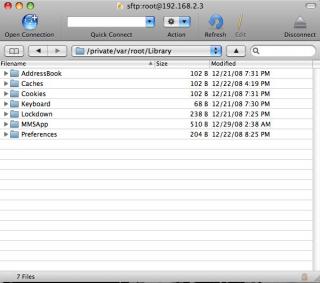
|
|
|
Dec 29 2008, 09:57 PM
|
|
Junior Member
380 posts Joined: Dec 2008
|
QUOTE(qencing @ Dec 29 2008, 09:44 PM) i access my iphone 38 FW2.2 using ssh (cyberduck) all ok. Bro, your path sudah salah la. but when i open the Library folder there is no folder named Carrier Bundles. Im trying to change Telco logo to maxis. Where i need to copy the 50212 and MAXIS.BUNDLE and paste it in Carrier Bundle folder. If you read the first post, it says System/Library/Carrier Bundles. Not private/var/root/Library. Then place the files in Carrier Bundles n restart. This post has been edited by TripleH: Dec 29 2008, 09:58 PM |
|
|
Dec 29 2008, 10:14 PM
|
|
Junior Member
4 posts Joined: May 2006
|
QUOTE(TripleH @ Dec 29 2008, 09:57 PM) Bro, your path sudah salah la. HAHAHAHAHA... im that blind. js being too excited. Works like a charm.If you read the first post, it says System/Library/Carrier Bundles. Not private/var/root/Library. Then place the files in Carrier Bundles n restart. THANX TripleH. This post has been edited by qencing: Dec 29 2008, 10:17 PM |
|
|
Dec 30 2008, 05:28 PM
|

Junior Member
93 posts Joined: Mar 2007 From: ლ(ಠ益ಠლ)
|
Just bought an officially unlocked iphone and i would like to have the logo too.
Im not using a mac but a pc, so i have no idea how to get it on. I've downloaded WinSCP as said in page one but i need some direction on the usage and how to go about it. Any help from fellow brothers will be much appreciated Thank you |
|
|
Dec 30 2008, 05:39 PM
|
|
Junior Member
380 posts Joined: Dec 2008
|
QUOTE(sexbomb @ Dec 30 2008, 05:28 PM) Just bought an officially unlocked iphone and i would like to have the logo too. Use iFunBox. It' much easier.Im not using a mac but a pc, so i have no idea how to get it on. I've downloaded WinSCP as said in page one but i need some direction on the usage and how to go about it. Any help from fellow brothers will be much appreciated Thank you http://i-funbox.com/ This post has been edited by TripleH: Dec 30 2008, 05:39 PM |
|
|
Dec 31 2008, 11:22 AM
|
|
Junior Member
93 posts Joined: Mar 2007 From: ლ(ಠ益ಠლ)
|
Ok I'll give it a try
Thanks |
|
Topic ClosedOptions
|
| Change to: |  0.0157sec 0.0157sec
 0.53 0.53
 6 queries 6 queries
 GZIP Disabled GZIP Disabled
Time is now: 4th December 2025 - 02:01 PM |
 Quote
Quote