Welcome Guest ( Log In | Register )

Bump Topic Topic Closed RSS Feed
85 Pages « < 64 65 66 67 68 > » Bottom

Outline · [ Standard ] · Linear+

 NETWORK ATTACHED STORAGE (NAS), old thread closed. please open a new one

views
     
CocoMonGo
post Sep 19 2012, 06:34 PM

Ooo Finally
****
Senior Member
551 posts

Joined: Dec 2006


QUOTE(jchue73 @ Sep 19 2012, 04:38 PM)
Ok, that explains. If you're more into WiFi, a good one to get is the Asus RT-N56U which for me also acts as my Unifi router. Fast and stable. I hear the newer N66U is faster but more expensive too.
Nothing serious and not work related. Just for fun storing my movie files and junk.  biggrin.gif I'm still running a P5Q S775 mobo. My overclocked quad core processor is still plenty fast for normal usage as I don't play games. The trick to making things faster is to get enough memory and to upgrade to a faster hardisk or RAID or upgrade to SSD. No more having to wait long.
*
Measuring the rates through the network isnt going to be very accurate because you are imposing other constrains that has nothing to do with the ZFS implementation (like poor cable quality, or poor firewall configurations etc). The rates I previously indicated are rates for the computer to write into a ZFS and mdadm volume and both gave very similar readings.
Here are some read ups that might help give some indication of the performance of ZFS vs mdadm/RAID
ZFS Performance
Post #392 On RAIDZ CPU usage being lower
Point #2 on CPU usage for RAID

more than happy to test the network speed for ZFS is there is a willing donor for the router though whistling.gif
loonsave
post Sep 19 2012, 09:35 PM

Regular
******
Senior Member
1,635 posts

Joined: May 2005


QUOTE(jchue73 @ Sep 19 2012, 01:44 PM)
Yes. But if during rebuild and resynching, another drive fails, then you loose data.
Yeah. You are right. But I think won't be that bad luck. tongue.gif

QUOTE(jchue73 @ Sep 19 2012, 01:44 PM)
Looking forward to the results.
*
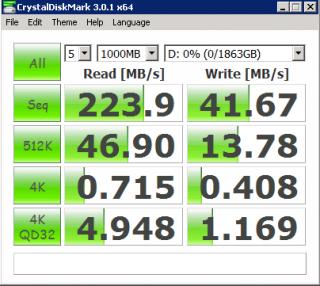
Attached Image

The result not that good. But I can tolerate with the writing speed. Average 50MB/second copy from my desktop to the storage.
jchue73
post Sep 20 2012, 03:50 PM

Look at all my stars!!
*******
Senior Member
2,496 posts

Joined: Nov 2006
QUOTE(CocoMonGo @ Sep 19 2012, 06:34 PM)
Measuring the rates through the network isnt going to be very accurate because you are imposing other constrains that has nothing to do with the ZFS implementation (like poor cable quality, or poor firewall configurations etc). The rates I previously indicated are rates for the computer to write into a ZFS and mdadm volume and both gave very similar readings.
Here are some read ups that might help give some indication of the performance of ZFS vs mdadm/RAID
ZFS Performance
Post #392 On RAIDZ CPU usage being lower
Point #2 on CPU usage for RAID
A lot of reading. Only the 1st link gave some real world data. It's not too bad but I get the impression that CPU usage seems very high.

QUOTE(CocoMonGo @ Sep 19 2012, 06:34 PM)
more than happy to test the network speed for ZFS is there is a willing donor for the router though  whistling.gif
LOL, I have 2 dead gigabit switches. One is an Asus 8 port that died after warranty and the other is Cisco 8 port that was very new but died. Not sure why. Never got to claim warranty because need to claim it from Singapore.

QUOTE(loonsave @ Sep 19 2012, 09:35 PM)
Attached Image

The result not that good. But I can tolerate with the writing speed. Average 50MB/second copy from my desktop to the storage.
Not too bad. Better performance than those other NAS units that are more expensive. Software RAID under Windows usually gives better performance than the implementation of RAID under other OSes.

I believe the performance will scale up if you add one more drive. But be aware the long time required to sync the volume if you add one more drive. That is why I prefer hardware RAID 5 or just use RAID 0 from the motherboard.

user posted image
numbertwo
post Sep 20 2012, 07:05 PM

Regular
******
Senior Member
1,788 posts

Joined: Mar 2009
From: PJ lamansara... :D


QUOTE(jchue73 @ Sep 20 2012, 03:50 PM)
**snapped**
LOL, I have 2 dead gigabit switches. One is an Asus 8 port that died after warranty and the other is Cisco 8 port that was very new but died. Not sure why. Never got to claim warranty because need to claim it from Singapore.
*snapped*
*
why not consider a Hp procurve Gb-switch? It comes with lifetime warranty from HP..

jchue73
post Sep 20 2012, 07:40 PM

Look at all my stars!!
*******
Senior Member
2,496 posts

Joined: Nov 2006
QUOTE(numbertwo @ Sep 20 2012, 07:05 PM)
why not consider a Hp procurve Gb-switch?  It comes with lifetime warranty from HP..
Yes, I so want that Procurve 1810 but nobody here sells it. sad.gif The only ones I found were the 1410 which is unmanaged switch.
numbertwo
post Sep 20 2012, 08:36 PM

Regular
******
Senior Member
1,788 posts

Joined: Mar 2009
From: PJ lamansara... :D


QUOTE(jchue73 @ Sep 20 2012, 07:40 PM)
Yes, I so want that Procurve 1810 but nobody here sells it.  sad.gif The only ones I found were the 1410 which is unmanaged switch.
*
I presume you have checked with HP and its reseller locally? I hv just sent an enquiry email to my HP distributor, who knows they might have it? I will let you know here if they 'ever' response wink.gif. I'm using 1410-8g myself...
wildwestgoh
post Sep 21 2012, 03:26 PM

Look at all my stars!!
*******
Senior Member
2,215 posts

Joined: Jul 2005


I think someone did mention about WD Sentinel DX4000 before?
Do you think we can get just the system without all the HDDs and the license copy of Windows 2008? It would be darn cheap if it can be done.
numbertwo
post Sep 21 2012, 06:01 PM

Regular
******
Senior Member
1,788 posts

Joined: Mar 2009
From: PJ lamansara... :D


QUOTE(numbertwo @ Sep 20 2012, 08:36 PM)
I presume you have checked with HP and its reseller locally?  I hv just sent an enquiry email to my HP distributor, who knows they might have it?  I will let you know here if they 'ever' response wink.gif.  I'm using 1410-8g myself...
*
Ok, 1810-8G is available, if you (or just anyone) are keen pls let me know... it's in the region of RM500+.
mikeymic
post Sep 21 2012, 07:16 PM

Getting Started
**
Junior Member
172 posts

Joined: Oct 2006
From: Puchong


QUOTE(mikeymic @ Sep 14 2012, 01:27 PM)
argghh... u beat me to it.. was planning to go down there today. sad.gif wondering anyone knows where got stock at this price? Hope to hear good news... smile.gif
*
Finally found the last unit of the N36L at Digital Mall... smile.gif
jchue73
post Sep 21 2012, 07:33 PM

Look at all my stars!!
*******
Senior Member
2,496 posts

Joined: Nov 2006
QUOTE(wildwestgoh @ Sep 21 2012, 03:26 PM)
I think someone did mention about WD Sentinel DX4000 before?
Do you think we can get just the system without all the HDDs and the license copy of Windows 2008? It would be darn cheap if it can be done.
You sure it would be cheap? Don't think they come without hardisk because their website only list these part number and all come with hardisk.

CODE
4 TB (2 x 2 TB)      WDBLGT0040KBK
6 TB (2 x 3 TB)      WDBLGT0060KBK
8 TB (4 x 2 TB)      WDBLGT0080KBK
12 TB (4 x 3 TB)     WDBLGT0120KBK
16 TB (4 x 4 TB)     WDBLGT0160KBK


Besides, it will only work with the RE4-GP drives. Put in any other drive and it would not work.

http://wdc.custhelp.com/app/answers/detail...vVmpBYWRPNmw%3D

Anyway, why would you want the Sentinel? It's very slow with very slow rebuild times. I believe the RAID implementation is actually done by Windows Storage Server 20908 R2 (aka Software RAID) and the rebuild can take a few days. If you insist on an Intel platform which is inferior in this case in terms of CPU power and power consumption to AMD, then you can also get the Acer Revo RC111 which is cheaper that comes with WHS 2011 but does not come with drives.

If you don't mind software RAID, best would be to get the more powerful N36L. Even N40L is still very much cheaper than the Sentinel after you factor in the additional 4 drives yourself.

QUOTE(numbertwo @ Sep 21 2012, 06:01 PM)
Ok, 1810-8G is available, if you (or just anyone) are keen pls let me know... it's in the region of RM500+.
PM sent.

QUOTE(mikeymic @ Sep 21 2012, 07:16 PM)
Finally found the last unit of the N36L at Digital Mall... smile.gif
Congrats. I believe when I asked them the other time before Merdeka, they told me they had the last unit. I guess nobody bought that unit until you got it from them.
loonsave
post Sep 21 2012, 09:26 PM

Regular
******
Senior Member
1,635 posts

Joined: May 2005


QUOTE(mikeymic @ Sep 21 2012, 07:16 PM)
Finally found the last unit of the N36L at Digital Mall... smile.gif
*
Congratulation an enjoy your new toy. Going to get 2 x 8GB ram soon. And HDD most probably next year. tongue.gif
mikeymic
post Sep 22 2012, 02:53 AM

Getting Started
**
Junior Member
172 posts

Joined: Oct 2006
From: Puchong


QUOTE(jchue73 @ Sep 21 2012, 07:33 PM)
Congrats. I believe when I asked them the other time before Merdeka, they told me they had the last unit. I guess nobody bought that unit until you got it from them.
*
Thanks. Actually it was a long trip down to Lowyat KL, no more stocks & lucky the staff was very helpful to help me check which outlet has the N36L. Luck was on my side & found it at Digital Mall PJ then rush all the way there. What a round trip.... smile.gif


QUOTE(loonsave @ Sep 21 2012, 09:26 PM)
Congratulation an enjoy your new toy. Going to get 2 x 8GB ram soon. And HDD most probably next year.  tongue.gif
*
yeap.. gonna enjoy it man.. not as lucky as u.. i only got additional 1GB ram.. sad.gif now planning to get additional HDD.. lucky I've got 1 2TB to plug in for the moment.. smile.gif
loonsave
post Sep 22 2012, 09:41 AM

Regular
******
Senior Member
1,635 posts

Joined: May 2005


QUOTE(mikeymic @ Sep 22 2012, 02:53 AM)
Thanks. Actually it was a long trip down to Lowyat KL, no more stocks & lucky the staff was very helpful to help me check which outlet has the N36L. Luck was on my side & found it at Digital Mall PJ then rush all the way there. What a round trip.... smile.gif
yeap.. gonna enjoy it man.. not as lucky as u.. i only got additional 1GB ram.. sad.gif now planning to get additional HDD.. lucky I've got 1 2TB to plug in for the moment.. smile.gif
*
The promotion come with 2GB RAM, you should request from them.
mikeymic
post Sep 22 2012, 11:32 AM

Getting Started
**
Junior Member
172 posts

Joined: Oct 2006
From: Puchong


QUOTE(loonsave @ Sep 22 2012, 09:41 AM)
The promotion come with 2GB RAM, you should request from them.
*
Yaya... Total 2x1gb only... Planning to get 4gbx2 if price is ok... U found any good deal for ecc ram?
loonsave
post Sep 22 2012, 11:59 AM

Regular
******
Senior Member
1,635 posts

Joined: May 2005


QUOTE(mikeymic @ Sep 22 2012, 11:32 AM)
Yaya... Total 2x1gb only... Planning to get 4gbx2 if price is ok... U found any good deal for ecc ram?
*
No. I will go for Non-ECC ram. tongue.gif
numbertwo
post Sep 22 2012, 04:04 PM

Regular
******
Senior Member
1,788 posts

Joined: Mar 2009
From: PJ lamansara... :D


Anyone here wanna have my 2GB ecc RAM, you may have it for RM50/-.

I run the N40L mainly for media & torrent server plus some background monitoring tools, I found that the 8GB (non-ecc) RAM is overly excessive ..
loonsave
post Sep 22 2012, 04:38 PM

Regular
******
Senior Member
1,635 posts

Joined: May 2005


QUOTE(numbertwo @ Sep 22 2012, 04:04 PM)
Anyone here wanna have my 2GB ecc RAM, you may have it for RM50/-.

I run the N40L mainly for media & torrent server plus some background monitoring tools, I found that the 8GB (non-ecc) RAM is overly excessive ..
*
Going to run few VM and router simulation in my N36L, so I need more RAM. tongue.gif

Anyone flash the BIOS with the hacked BIOS on N36L/N40L?

This post has been edited by loonsave: Sep 22 2012, 04:39 PM
numbertwo
post Sep 22 2012, 05:53 PM

Regular
******
Senior Member
1,788 posts

Joined: Mar 2009
From: PJ lamansara... :D


QUOTE(loonsave @ Sep 22 2012, 04:38 PM)
Going to run few VM and router simulation in my N36L, so I need more RAM.  tongue.gif

Anyone flash the BIOS with the hacked BIOS on N36L/N40L?
*
I did.. smile.gif
CocoMonGo
post Sep 22 2012, 05:55 PM

Ooo Finally
****
Senior Member
551 posts

Joined: Dec 2006


QUOTE(loonsave @ Sep 22 2012, 11:59 AM)
No. I will go for Non-ECC ram. tongue.gif
*
is there much price difference in non ECC and ECC? otherwise my opinion is to get the ECC since the system can support it
loonsave
post Sep 22 2012, 06:13 PM

Regular
******
Senior Member
1,635 posts

Joined: May 2005


QUOTE(CocoMonGo @ Sep 22 2012, 05:55 PM)
is there much price difference in non ECC and ECC? otherwise my opinion is to get the ECC since the system can support it
*
I think price should be quite difference for 8GB.

85 Pages « < 64 65 66 67 68 > » Top
Topic ClosedOptions
 

Change to:
| Lo-Fi Version
0.0218sec    0.59    6 queries    GZIP Disabled
Time is now: 6th December 2025 - 07:53 PM