QUOTE(tauevo @ Dec 2 2008, 10:26 AM)
"Re-Neutering it usually does the trick." can u explain in more detail? thanks.
My apologize for not going into detail on this, mate. By "Re-Neutering" it, I'm referring to the use of BootNeuter, a second time. Basically you will need to install the 'BootNeuter.tar' payload into a custom IPSW using PwnageTool or WinPwn (whichever works for you), OR if you still have WiFi access on your phone you can look it up and install it from Cydia under 'Utilities'. Note that this method is targeted at 2.x users, as the current versions of BootNeuter only contain the 04.05.04_G files intended for 2.x phones.
NOTE : Only attempt this on 2G phones, as this will not function correctly on 3G phones until a soft-unlock is released.Once you've done that, once you see 'BootNeuter' on your Springboard and are able to start it up, it will first try to determine your current bootloader and baseband status and settings. Once done, there are 4 options you can tinker with. The current settings should look like this.
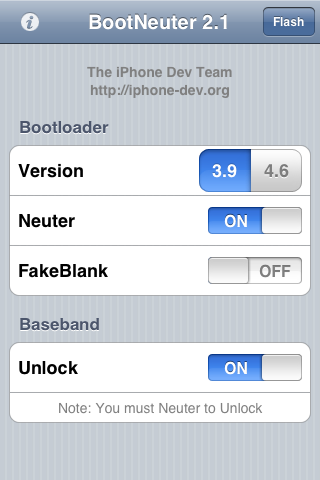
**If you have fakeblank turned ON, I would strongly suggest opting for a non-fakeblank bootloader. I've ran into many unpleasant encounters with problematic fakeblanks. Just one man's opinion 
Now, change your settings to the following, then tap on 'Flash'.
 IMPORTANT : Once BootNeuter starts flashing, NEVER, understand any circumstances allow anything to interrupt the process, be it sleep mode, a low battery gauge or your potential impatience. Ensure that AUTO-LOCK is set to 'Never', and that your battery gauge is at least half-full. From my previous experiences, the baseband flashing process in particular has been known to take more than 1/2 an hour in bad cases, so just be patient and keep your distance, it will finish eventually. Most importantly, DO NOT reboot the phone until the last step below has been completed.
After it is done, revert the settings back to the first image above once again, and 'Flash'. What does this do? Basically this is one of the few techniques I've tried and tested which have succeeded at achieving a completely clean, fresh baseband. And this is important because the baseband is usually, and as a matter of fact ALWAYS behind cellular and WiFi connectivity issues. Once you're done with the final step, reboot the phone and you SHOULD have resolved any underlying WiFi issues.
Thanks.
NOTE : The instructions above are compiled from my personal experiences with baseband troubleshooting on both 1.1.x and 2.x which have attained successful complete recoveries of WiFi connectivity issues. However, I shall not be held liable for any potential corruption (not permanent 'damage') and/or ineffective outcomes of this procedure. I will, however, be glad to entertain any questions and requests for assistance on the matter.
UPDATE : Download the BootNeuter 2.1 payload HERE.This post has been edited by Samanoske Akechi: Dec 2 2008, 04:03 PM 

 Dec 2 2008, 12:44 AM


 Quote
Quote

 0.0232sec
 0.84
0.84
 7 queries
 GZIP Disabled