

So what is the solution if the method doesnt help?
iPhone Wireless Problem- Not available!!, Solutions?
iPhone Wireless Problem- Not available!!, Solutions?
|
|
 Dec 2 2008, 07:51 AM Dec 2 2008, 07:51 AM
|
 
Junior Member
230 posts Joined: Dec 2006 
|
So what is the solution if the method doesnt help?
|
|
|
|
|
|
Dec 2 2008, 10:18 AM
|

Senior Member
656 posts Joined: Aug 2008  
|
QUOTE(Samanoske Akechi @ Dec 2 2008, 12:44 AM) Guys, don't be misled by the size of the iPhone's antennas. I'm certain that the iPhone's 802.11 wireless radio strengths, both 2G and 3G, are very much equivalent to that of an ordinary notebook's Intel Wireless adapter. And by saying that, I mean it in a literal sense when I say if your laptop detects it, your phone should be no different. thanks for your helps  In cases where you see any abnormalities in the iPhone's connectivity strengths, irregular connection drops even during use and even the inability to connect to a/an secured/unsecured WiFi-AP at any given time, your first shot would be to perform the "Reset All Network Settings" option as recommended by many others here. However if the problem persists, I have seen many such cases where it's usually linked to a corrupted or less-than-functional baseband. Re-Neutering it usually does the trick. That's all I have for now. Hope it's helpful.   |
|
|
Dec 2 2008, 10:26 AM
|
|
Junior Member
230 posts Joined: Dec 2006
|
"Re-Neutering it usually does the trick." can u explain in more detail? thanks.
|
|
|
Dec 2 2008, 02:12 PM
|

Senior Member
625 posts Joined: Aug 2006 From: Subang Jaya
|
QUOTE(tauevo @ Dec 2 2008, 10:26 AM) "Re-Neutering it usually does the trick." can u explain in more detail? thanks. My apologize for not going into detail on this, mate. By "Re-Neutering" it, I'm referring to the use of BootNeuter, a second time. Basically you will need to install the 'BootNeuter.tar' payload into a custom IPSW using PwnageTool or WinPwn (whichever works for you), OR if you still have WiFi access on your phone you can look it up and install it from Cydia under 'Utilities'. Note that this method is targeted at 2.x users, as the current versions of BootNeuter only contain the 04.05.04_G files intended for 2.x phones.NOTE : Only attempt this on 2G phones, as this will not function correctly on 3G phones until a soft-unlock is released. Once you've done that, once you see 'BootNeuter' on your Springboard and are able to start it up, it will first try to determine your current bootloader and baseband status and settings. Once done, there are 4 options you can tinker with. The current settings should look like this. 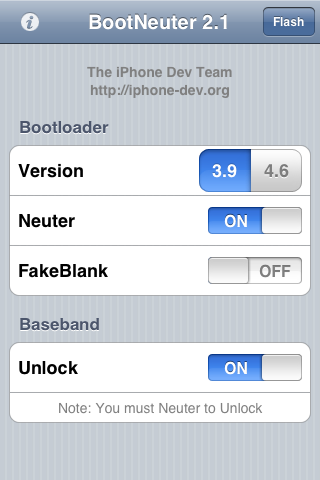 **If you have fakeblank turned ON, I would strongly suggest opting for a non-fakeblank bootloader. I've ran into many unpleasant encounters with problematic fakeblanks. Just one man's opinion Now, change your settings to the following, then tap on 'Flash'.  IMPORTANT : Once BootNeuter starts flashing, NEVER, understand any circumstances allow anything to interrupt the process, be it sleep mode, a low battery gauge or your potential impatience. Ensure that AUTO-LOCK is set to 'Never', and that your battery gauge is at least half-full. From my previous experiences, the baseband flashing process in particular has been known to take more than 1/2 an hour in bad cases, so just be patient and keep your distance, it will finish eventually. Most importantly, DO NOT reboot the phone until the last step below has been completed.After it is done, revert the settings back to the first image above once again, and 'Flash'. What does this do? Basically this is one of the few techniques I've tried and tested which have succeeded at achieving a completely clean, fresh baseband. And this is important because the baseband is usually, and as a matter of fact ALWAYS behind cellular and WiFi connectivity issues. Once you're done with the final step, reboot the phone and you SHOULD have resolved any underlying WiFi issues. Thanks. NOTE : The instructions above are compiled from my personal experiences with baseband troubleshooting on both 1.1.x and 2.x which have attained successful complete recoveries of WiFi connectivity issues. However, I shall not be held liable for any potential corruption (not permanent 'damage') and/or ineffective outcomes of this procedure. I will, however, be glad to entertain any questions and requests for assistance on the matter. UPDATE : Download the BootNeuter 2.1 payload HERE. This post has been edited by Samanoske Akechi: Dec 2 2008, 04:03 PM |
|
|
Dec 2 2008, 02:25 PM
|
|
Junior Member
230 posts Joined: Dec 2006
|
by ur statements, i need to jb my iphone 3g rite?
|
|
|
Dec 2 2008, 02:35 PM
|

Junior Member
148 posts Joined: Aug 2008
|
dude am having the same occasional problem connecting to wifi as well. should i put it erm, the iphone is able to detect and join the network but however safari is not able to open any webpage.
am using singtel unlocked unit, 3g. |
|
|
|
|
|
Dec 2 2008, 02:43 PM
|

Junior Member
146 posts Joined: Jun 2008 From: KL lowyat plaza
|
my cus had same problem. even standing beside the router sometime cannot link. so he went to singtel and got it change. 1 to 1 brand new set This post has been edited by chinamobile: Dec 2 2008, 02:46 PM |
|
|
Dec 2 2008, 02:54 PM
|
|
Junior Member
230 posts Joined: Dec 2006
|
hi chinamobile.
may i noe the procedure for 1 to 1 exchange? Added on December 2, 2008, 3:02 pm QUOTE(rawn @ Dec 2 2008, 02:35 PM) dude am having the same occasional problem connecting to wifi as well. should i put it erm, the iphone is able to detect and join the network but however safari is not able to open any webpage. urs is able to detect is not an issue la bro. perphaps u didnt get the rite password from the wifi router. i ever put wrong password although the network is connected but is not connected to the internet. hope this helps u. else if u can try other apps such as youtube via ur wifi (PLS note tat NOT the simcard 3g or using edge or gprs ar) can or not?am using singtel unlocked unit, 3g. This post has been edited by tauevo: Dec 2 2008, 03:02 PM |
|
|
Dec 2 2008, 03:06 PM
|
|
Senior Member
625 posts Joined: Aug 2006 From: Subang Jaya
|
QUOTE(tauevo @ Dec 2 2008, 02:25 PM) by ur statements, i need to jb my iphone 3g rite? Unfortunately, yes. However I would consider this one of the many benefits of jailbreaking. Warranties can only do so much. In time, manual fixes like this will come in handy. But of course, since you're still on warranty, exchanging it for a new unit is of course THE most logical course of action right now. QUOTE(rawn @ Dec 2 2008, 02:35 PM) dude am having the same occasional problem connecting to wifi as well. should i put it erm, the iphone is able to detect and join the network but however safari is not able to open any webpage. This particular method isn't currently supported on the iPhone 3G because a baseband unlock has not been achieved in order to facilitate the flashing of the baseband. From your description of the problem, it could well be related to the baseband.am using singtel unlocked unit, 3g. Though this may sound obvious, I assume that the WiFi-AP which you're currently connected to has been checked for a functional internet connection? |
|
|
Dec 2 2008, 03:17 PM
|
|
Junior Member
230 posts Joined: Dec 2006
|
QUOTE(Samanoske Akechi @ Dec 2 2008, 03:06 PM) Unfortunately, yes. However I would consider this one of the many benefits of jailbreaking. Warranties can only do so much. In time, manual fixes like this will come in handy. But of course, since you're still on warranty, exchanging it for a new unit is of course THE most logical course of action right now. Thank you so much for ur assitance. So i need to claim the warranty then. Any people here ever make such warranty claim? Pls guide me ya. thank you!This particular method isn't currently supported on the iPhone 3G because a baseband unlock has not been achieved in order to facilitate the flashing of the baseband. From your description of the problem, it could well be related to the baseband. Though this may sound obvious, I assume that the WiFi-AP which you're currently connected to has been checked for a functional internet connection? |
|
|
Dec 2 2008, 03:48 PM
|

Senior Member
3,657 posts Joined: May 2005
|
@Samanoske Akechi
It's a good thing that u put up a guide on using BootNeuter so people will not brick their baseband BUT u must put a disclaimer that BootNeuter only works with 1st generation iPhone. If people that don't know about this and run BootNeuter, they might face more problem . Even right now BootNeuter is not working properly on fw2.2. Be careful when writing something that might ruin the device. This post has been edited by frozzbyte: Dec 2 2008, 03:49 PM |
|
|
Dec 2 2008, 04:01 PM
|
|
Senior Member
625 posts Joined: Aug 2006 From: Subang Jaya
|
QUOTE(frozzbyte @ Dec 2 2008, 03:48 PM) @Samanoske Akechi Thanks for pointing that out, mate. Noted and disclaimer added. However, BootNeuter is working flawlessly on 2.2 (2G). There's no reason to worry. The fundamental utilities working behind the scenes of BootNeuter have been the same since 1.0.2.It's a good thing that u put up a guide on using BootNeuter so people will not brick their baseband BUT u must put a disclaimer that BootNeuter only works with 1st generation iPhone. If people that don't know about this and run BootNeuter, they might face more problem . Even right now BootNeuter is not working properly on fw2.2. Be careful when writing something that might ruin the device. |
|
|
Dec 2 2008, 04:08 PM
|
|
Junior Member
146 posts Joined: Jun 2008 From: KL lowyat plaza
|
QUOTE(tauevo @ Dec 2 2008, 02:54 PM) hi chinamobile. You will need to produce the Singtel Receipt. Photocopy also can may i noe the procedure for 1 to 1 exchange? Added on December 2, 2008, 3:02 pm urs is able to detect is not an issue la bro. perphaps u didnt get the rite password from the wifi router. i ever put wrong password although the network is connected but is not connected to the internet. hope this helps u. else if u can try other apps such as youtube via ur wifi (PLS note tat NOT the simcard 3g or using edge or gprs ar) can or not? goto hello! ComCentre 31 Exeter Road Singapore 239732 Mon - Sat : 10am to 9pm Sun/PH : 11am - 8 pm Nearest MRT Station: Somerset MRT Main line: +65 6838 3388 best you call them |
|
|
|
|
|
Dec 2 2008, 04:25 PM
|

Junior Member
191 posts Joined: Nov 2006
|
bro tumpang your thread =)
how come my wi-fi off by itself? as in... if i lock my phone, the wifi will be disconnected. when i unlock, it will connect by itself again. how can i make sure it's connected all the while? |
|
|
Dec 2 2008, 04:27 PM
|
|
Senior Member
3,657 posts Joined: May 2005
|
QUOTE(Samanoske Akechi @ Dec 2 2008, 04:01 PM) Thanks for pointing that out, mate. Noted and disclaimer added. However, BootNeuter is working flawlessly on 2.2 (2G). There's no reason to worry. The fundamental utilities working behind the scenes of BootNeuter have been the same since 1.0.2. Mmm ... they might have updated BootNeuter to work on fw2.2. Last time when using it, it will hang there and need a reboot.What do u mean by the bold sentence? The fundamentals of unlocking have been the same since 1.0.2, refering to fw1.0.2? Added on December 2, 2008, 4:34 pm QUOTE(wzseow @ Dec 2 2008, 04:25 PM) bro tumpang your thread =) It's meant to be like that as a measure to save battery. If u want to keep the connection even when the phone in sleeping mode, install insomnia in cydia (need to JB).how come my wi-fi off by itself? as in... if i lock my phone, the wifi will be disconnected. when i unlock, it will connect by itself again. how can i make sure it's connected all the while? This post has been edited by frozzbyte: Dec 2 2008, 04:34 PM |
|
|
Dec 2 2008, 04:40 PM
|
|
Junior Member
191 posts Joined: Nov 2006
|
QUOTE(frozzbyte @ Dec 2 2008, 04:27 PM) Mmm ... they might have updated BootNeuter to work on fw2.2. Last time when using it, it will hang there and need a reboot. okay got it thanks What do u mean by the bold sentence? The fundamentals of unlocking have been the same since 1.0.2, refering to fw1.0.2? Added on December 2, 2008, 4:34 pm It's meant to be like that as a measure to save battery. If u want to keep the connection even when the phone in sleeping mode, install insomnia in cydia (need to JB).  |
|
|
Dec 2 2008, 07:11 PM
|
|
Junior Member
230 posts Joined: Dec 2006
|
QUOTE(chinamobile @ Dec 2 2008, 04:08 PM) You will need to produce the Singtel Receipt. Photocopy also can Thanks bro. One more question ya. How long does it takes to get the phone?goto hello! ComCentre 31 Exeter Road Singapore 239732 Mon - Sat : 10am to 9pm Sun/PH : 11am - 8 pm Nearest MRT Station: Somerset MRT Main line: +65 6838 3388 best you call them |
|
|
Dec 2 2008, 07:20 PM
|
|
Senior Member
625 posts Joined: Aug 2006 From: Subang Jaya
|
QUOTE(frozzbyte @ Dec 2 2008, 04:27 PM) Mmm ... they might have updated BootNeuter to work on fw2.2. Last time when using it, it will hang there and need a reboot. Yes, indeed. Every BootNeuter version update is only intended to add the additional, updated firmware basebands. Perhaps some bugfixes left and right, but fundamentally it is a mere GUI of ienew, ieraser, bbupdater in terms of the baseband flashing functions.What do u mean by the bold sentence? The fundamentals of unlocking have been the same since 1.0.2, refering to fw1.0.2? |
|
|
Dec 3 2008, 08:47 AM
|

Junior Member
237 posts Joined: Jul 2008
|
before that, make sure the wireless device is DHCP or not. If not u need mannually key in ur IP.
|
|
|
Dec 3 2008, 04:30 PM
|

Senior Member
724 posts Joined: Jul 2007 From: Land Below The Wind...
|
my office wifi lagi lah bodoh.... its a hidden network... so i choose others and key in the name and password manually via wpa security.. it says unable to connect... so i change to wpa enterprise rightaway and re-key in the username and since the password is there earlier, i just join and wolla, its connected and surf i go.... but remember my step, i have to connect via wpa and got kicked and then change to wpa enterprise....
And if i straightly choose wpa enterprise security from the begining and key in the username & password, it show connected but NO INTERNET LINE!!... i have to redo everything (reset network settings inc.) and do the step top above first to get internet connection... This problem was since the very 2.0 firmware... while im on 1.1.x, langsung takde chance to connect to a hidden network (that time only have wep and wpa only....) But i dont bother the steps i did as long as i can connect kekekeke... outside on open wifi, no problem.... so, what's the culprit? P/S: im still on 1st gen kekekeke (Buat malu orang lama only kekekeke) |
| Change to: |  0.0239sec 0.0239sec
 0.85 0.85
 6 queries 6 queries
 GZIP Disabled GZIP Disabled
Time is now: 4th December 2025 - 07:31 PM |
 Quote
Quote