


i think i saw 1 Samsung model 32 inch with full hd. but cant remember the price.
Best 32" HDTV for all Next-Gen Consoles, Your reccomendation.
|
|
 Aug 18 2008, 02:10 PM Aug 18 2008, 02:10 PM
|
 
Junior Member
289 posts Joined: Jan 2003 From: Shah Alam   
|
got such RM2300 for 1080p?
i think i saw 1 Samsung model 32 inch with full hd. but cant remember the price. |
|
|
|
|
|
Aug 18 2008, 02:51 PM
|

Senior Member
1,057 posts Joined: Jul 2005
|
QUOTE(tot31 @ Apr 6 2008, 01:40 PM) Any 32" 1366 x 768 LCD tv is good for gaming regardless the brand name. Really? Then we should all be flocking to Carrefour and carting off those China-mari Haier ones.  |
|
|
Aug 19 2008, 12:02 PM
|

Senior Member
2,247 posts Joined: Feb 2005
|
this is how Heavenly Sword look like in Toshiba 32AV500E,just to share,will upload some pic with Panny 37LX80MK if everything went smooth
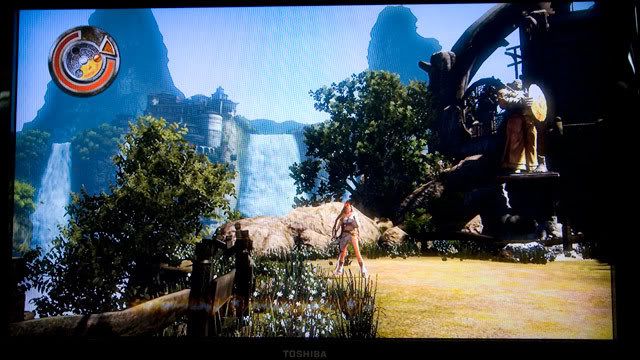 OT : How to go through this stage here huh? How to through weapon to that "piring" (on the right) accurately huh? This post has been edited by myqd: Aug 19 2008, 12:04 PM |
|
|
Aug 19 2008, 12:59 PM
|
|
Junior Member
289 posts Joined: Jan 2003 From: Shah Alam
|
what is that mean?
toshiba better or panny? *cant wait  |
|
|
Aug 19 2008, 01:06 PM
|
|
Senior Member
2,247 posts Joined: Feb 2005
|
QUOTE(dimenxion @ Aug 19 2008, 12:59 PM) what is that mean? hehe,no war,i come in peace toshiba better or panny? *cant wait  |
|
|
Aug 19 2008, 01:51 PM
|
|
Junior Member
289 posts Joined: Jan 2003 From: Shah Alam
|
QUOTE(myqd @ Aug 19 2008, 01:06 PM) hehe,no war,i come in peace no la...i also dont mean to flame... just want to know the difference since at the shop we cant bring our console....  |
|
|
|
|
|
Aug 19 2008, 05:45 PM
|

Newbie
0 posts Joined: Aug 2008
|
Is the Samsung Series 4 32" LE32A 436 good for supporting the PS3???
Or either the Sony KLV-32S400A BRAVIA 32" S Series..i'm not too sure Need opinions....  Added on August 19, 2008, 5:49 pm QUOTE(myqd @ Aug 19 2008, 12:02 PM) this is how Heavenly Sword look like in Toshiba 32AV500E,just to share,will upload some pic with Panny 37LX80MK if everything went smooth Easy..just throw the "piring"...haha..or the shield..to the right...let the thing hit the stairs/wall..and it will fly back and hit the gong.. OT : How to go through this stage here huh? How to through weapon to that "piring" (on the right) accurately huh? I finished the game already..so..i'm willing to help...just ask me..  This post has been edited by Hatter: Aug 19 2008, 05:52 PM |
|
|
Aug 19 2008, 06:43 PM
|
|
Senior Member
2,247 posts Joined: Feb 2005
|
QUOTE(Hatter @ Aug 19 2008, 05:45 PM) Is the Samsung Series 4 32" LE32A 436 good for supporting the PS3??? thanks Hatter,so u mean need to throw the shield on the right then let it reflex and hit the gong ya....thanks thanks,will try later. Or either the Sony KLV-32S400A BRAVIA 32" S Series..i'm not too sure Need opinions.... Added on August 19, 2008, 5:49 pm Easy..just throw the "piring"...haha..or the shield..to the right...let the thing hit the stairs/wall..and it will fly back and hit the gong.. I finished the game already..so..i'm willing to help...just ask me.. FYI,between Sammy & Sony,i'm not sure about the diff in PQ from PS3 but according to "trusted sources" from the repair service here,Sammy got more "problem" compare to Sony.I'm not saying Sammy is not good as i got a friend here bought a Sammy Series 3 few week ago and so far no issue at all,maybe just luck lor. ok,here come the BD on Panny 37LX80MK : 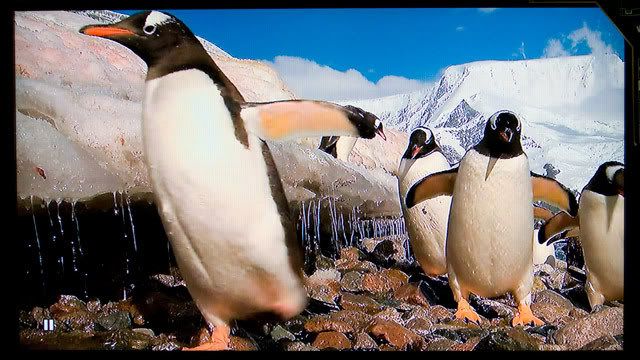 Frankly,i dun see much diff between my previous sample TSB 32AV500E,unless putting them side by side,same source/wire/time/place.From my 1st impression,i found Panny is very good in contrast,i set it in Eco Mode,Brightness reduce to 42 and sharpness to 6,colour temp "cool",the rest maintance.Gameplay(Heavenly Sword) is still nice,superb colour saturation,more "natural" compare to TSB which looks a bit fake.Anyway,i dun think i'm in the position to judge the diff in PQ for both as i didnt compare both side by side.I'm juz sharing base on what i saw from both LCD,at diff time. BTW,anyone can share the setting of colour for Panny 37LX80MK as reference ? thanks in advance This post has been edited by myqd: Aug 19 2008, 06:45 PM |
|
|
Aug 19 2008, 07:49 PM
|
|
Newbie
0 posts Joined: Aug 2008
|
Thank you for the info myqd...I need recommendations..
Basically i'm just looking for a reliable HDTV with superb clarity/sharpness/colour... Something in the RM2000-3000 price range..for gaming and movies.. If it has a PC input, it would be an additional bonus.. And can someone tell me what are HD signals..like (720p, 1080i, 1080p)...what does it mean??? And also contrast ratio (10000:1)...i'm new to TV's.. |
|
|
Aug 19 2008, 11:06 PM
|

Senior Member
14,193 posts Joined: May 2005 From: Sbn / KL 
|
QUOTE(Hatter @ Aug 19 2008, 05:45 PM) Is the Samsung Series 4 32" LE32A 436 good for supporting the PS3??? I think you got the wrong model. Aint got this in MalaysiaOr either the Sony KLV-32S400A BRAVIA 32" S Series..i'm not too sure Need opinions.... |
|
|
 Aug 20 2008, 12:03 AM Aug 20 2008, 12:03 AM
|

Senior Member
866 posts Joined: Jan 2003 From: "Pak Pak Kangku Noh" 
|
QUOTE(htkaki @ Aug 19 2008, 11:06 PM) I think you got the wrong model. Aint got this in Malaysia LG better than this two brands..compare ghosting and contrast. |
|
|
Aug 20 2008, 11:37 AM
|

Senior Member
1,450 posts Joined: Jun 2008 From: KK
|
QUOTE(Hatter @ Aug 19 2008, 07:49 PM) Thank you for the info myqd...I need recommendations.. I'm no expert in this field, but to my knowledge and experience:Basically i'm just looking for a reliable HDTV with superb clarity/sharpness/colour... Something in the RM2000-3000 price range..for gaming and movies.. If it has a PC input, it would be an additional bonus.. And can someone tell me what are HD signals..like (720p, 1080i, 1080p)...what does it mean??? And also contrast ratio (10000:1)...i'm new to TV's.. What is HD? HD stands for high definition, in which case the industry standard is 720p, 1080i and 1080p. Standard definitions (480i) and enhanced definitions (480p) are not. What are all the fuss of SD, ED or HD? It's all about screen resolution. SD is 640x480 interlaced, ED is 640x480 progressive while HD includes, but not limited to, 1280x720 progressive, 1920x1080 interlaced and progressive. When a LCD TV says HD ready, then it's native is normally 1366x768, While Plasmas are either 800x600 or 1024x768. Full HD means native resolution is 1920x1080. Progressive vs Interlace Progressive is what you see on your computer screen right now, meaning all the vertical lines (eg. 1280x720, 720 is the amount of vertical lines) are displayed. Interlace is what you see on an old television set (must be older CRT TV), where you can see lines in between lines, and displaying only half the amount of vertical lines (thus 1080i is actually showing 540 vertical lines and yes, 720p is showing more lines). Contrast ratio? Don't let this thing fool you, every company comes out with the contrast ratio they claimed it would be. There's no industry standard setting for this, they are just manipulating with their own figures. Trust your own eyes with this when buying a HDTV. Set all the TVs on normal mode and play a dark scenery video, look for which TV that you can see the most detail from (like the cloud in the dark sky, the water in the sea, the lightings from outside a building). In short, contrast is the ability to see through the dark items as being dark rather being black like nothing on display and the clarity/separation between dark and bright items. Cables This is a very long story, but I'm not going to say which cable/brand is the best like most A/V equipment sellers. For HDTV, your best choice is always DVI/HDMI, both send digital signals. A RM5 DVI/HDMI cable can perform just as good as Monster Cables (upward RM500) if the cable is less than 5m long. Other method of obtaining HD signals are 15-pin D-Sub (normally and wrongly known as VGA, in which VGA is actually meaning 640x480 resolution) and component cables (the Red, Green and Blue cable, but please don't mistaken it as RGB cable, both are very different). Both are analog signals, and this time, cable quality does make some different. You'd like gold plated cables for analog signals, and thicker ones if you are planning to get very long cables (more than 5m) as to reduce the signal loss. For other equipments like Astro (can only display 480i), your best bet is S-Video cable. This cable will cause no "bleeding" on the screen unlike the normally used composite (yellow) cable. "Bleeding" is especially easy to notice on red objects with a black background where you see the red colour coming crawling out like how you colour over the line on an art work. What else? Ever heard of Bravia, DNIe etc? Those are the processing engines for display much like your graphics card, so I'm not going to comment much on this but remember to get a more easily fixed ones. LCD/Plasma/DLP are all well known for lower durability compare to their CRT counterparts so you may want to do yourself a favour by getting a more easily fixed ones. My opinion on TV engines is that, Bravia is rank among the bottom of my satisfactory list along with lousy brands like Haier etc. Another thing is the panel (also commonly called screen) which does make a big contribution to the picture quality. Another one of my personal comment is Sony's panel are as good as shit (they got it from Samsung by-product catalogue). That's all I can tell now (I'm at work). I could go on days and days talking on this, but I'm afraid I'd get banned for this. Remember one thing, trust your eyes and do your own settings on the TV when testing them, and make sure all are of the same size and using the same type of cable when comparing each of them. If you are refused to do so, buy somewhere else. Finally, do yourself a favour by not buying Sony's TV, thay have nothing comparable for their price other than their design. Buy it and watch them for hours and their ridiculous gamma settings will give you eye sore. Allow me to say this, when you are buying any flat panels, you are looking for the least worse display unlike the perfectly fine but bulky and "unsexy" CRT. Added on August 20, 2008, 11:59 am QUOTE(e30 @ Aug 18 2008, 01:34 AM) hey guys. if i'm on a low budget (<rm1k), and cannot afford HD-Ready LCD TV for my PS3, would it be better for me to buy 22"-24" LCD monitor (DVI/HDMI input, HDCP) or is it a better to buy a HD-Ready CRT TV (with HDMI input).. in terms of picture quality, both should be he same rite since both are only HD-Ready, and not full HDTV. btw, is it still possible to buy brand new HD-Ready CRT from shops and how much do they cost? I always have some space in my heart reserved for CRT. If you are using it solely for 360, PS3 or PC, then it all depends on the space occupied. If you are using it for something else like Astro, older consoles, CRT is your choice since it can display what they are meant to without compromising the PQ. The only problem is I can't find wide screen CRT locally (please let me know if anyone knows where to get one). For LCD monitor, look out for the resolution and make sure it's 1920x1200 so as to get the full out from your PS3.This post has been edited by gundamalpha: Aug 20 2008, 12:03 PM |
|
|
Aug 20 2008, 02:28 PM
|

Senior Member
613 posts Joined: Aug 2008 From: Sydney- KL - Stockholm
|
i recommend Samsung instead, my friend use sony bravia and im using samsung both 32 inches.
he ended up sold his sony bravia and get samsung instead, the color is much sharper.. sony bravia only good for 42 inches above where its full HD. |
|
|
|
|
|
Aug 20 2008, 02:46 PM
|
|
Senior Member
613 posts Joined: Aug 2008 From: Sydney- KL - Stockholm
|
QUOTE(hxcpride @ Aug 20 2008, 02:28 PM) i recommend Samsung instead, my friend use sony bravia and im using samsung both 32 inches. he ended up sold his sony bravia and get samsung instead, the color is much sharper.. sony bravia only good for 42 inches above where its full HD. Attached thumbnail(s) 
|
|
|
Aug 20 2008, 03:36 PM
|
|
Newbie
0 posts Joined: Aug 2008
|
Thanks alot for the input gundamalpha and hxcpride..
I have a much better understanding about these new HDTV's now..haha  I think i shall go out get my hands on a Samsung then..  This post has been edited by Hatter: Aug 20 2008, 03:42 PM |
|
|
Aug 21 2008, 11:23 AM
|

Junior Member
104 posts Joined: Jun 2007
|
different people different taste after all...me, having bought samsung series 4 very2 not satisfied.. i wish i bought other brand instead... make sure when u buy your samsung lcd ask the seller to give you at least one week zero dead pixel guarantee. i haven't experience other brand but this samsung for sure got ghosting effect. other thing is, when i play games like alone in the dark or bioshock in dark scene areas, the colour looks like when you set your pc to 8 bit colour. |
|
|
Aug 21 2008, 11:32 AM
|
|
Senior Member
1,450 posts Joined: Jun 2008 From: KK
|
Yep, although Samsung does make very good panels, their response time are pretty weak on lower-mid range, thus ghosting effects. However you could set it to game mode to improve it, but at the same time sacrificing something else like contrast etc. Some LCD manufacturers that are really good after several testings include LG (best for its price), Toshiba and Sharp. The rests are bearable to poor for gaming (although I'm impressed with Panasonic's scaling engine). Like I said earlier, you are looking for the least worst when you are buying flat panels, so don't expect it to be as good as good old CRT or true PC flat panel monitor (that's another discussion).
|
|
|
Aug 21 2008, 11:50 AM
|
|
Junior Member
104 posts Joined: Jun 2007
|
on specs samsung response time fast indeed, 6 ms... i only experience ghosting in dark areas...playing gears of war is perfect even on dark areas like the place you got into where there's heavy rain and you need to find factory entrance. one thing i still confuse...for x360, vga vs component..... when i use component, the colours vibrant, picture very sharp but in dark areas/shadow it become too dark and you don't see much detail. when i use vga(no hdmi), the colours washed out, picture blur..but in dark areas/shadow you can see a lot more detail. setting the reference level to expanded mode improve the colour but still not as good as component and it still a bit blurry. any suggestion? or is this normal? QUOTE(gundamalpha @ Aug 21 2008, 11:32 AM) Yep, although Samsung does make very good panels, their response time are pretty weak on lower-mid range, thus ghosting effects. However you could set it to game mode to improve it, but at the same time sacrificing something else like contrast etc. Some LCD manufacturers that are really good after several testings include LG (best for its price), Toshiba and Sharp. The rests are bearable to poor for gaming (although I'm impressed with Panasonic's scaling engine). Like I said earlier, you are looking for the least worst when you are buying flat panels, so don't expect it to be as good as good old CRT or true PC flat panel monitor (that's another discussion). |
|
|
Aug 21 2008, 12:11 PM
|
|
Senior Member
1,450 posts Joined: Jun 2008 From: KK
|
Hmm.. let me think how to answer your question. You get RGB from from VGA (thus many manufacturers named it RGB input) and component has different colour ratio (lots of green and less blue & red). Technically, DVDs are set/designed/manufactured/optimized through component. But that doesn't mean that RGB is worse than component. It all depends on how good the TVs engine receive the input and translate it to the screen.
But since you said VGA has better contrast, I would suggest you to stick to it and set your resolution to 1280 x 768 on your 360 (if your TV is 1366 x 768 native). Don't worry too much regarding the colour, a lot of people think that vibrant colour + crisp brightness = great PQ, but in reality the best picture is always deeper and less vibrant after calibration. One very important thing I forgot to mention is when you play on LCD, make sure the surrounding is bright enough, while the opposite for Plasmas (the darker the better). This is often a mistake to many people who try to set up a dark home theater with LCD. And if I assume you are using a 32" panel sit about 5~7 feet in front of it to get the best view (or 5 times the height of the screen). |
|
|
Aug 21 2008, 12:32 PM
|
|
Junior Member
104 posts Joined: Jun 2007
|
i guess your fact is true because i once said to myself after playing around component/vga...i should use component for dvd playback and vga for gaming. but that too much hassle. i'm using 40" - la40a450...sit 7 feet from the screen, at this distance vga pq is sharp actually, but if i sit 5 feet from the screen i'll start noticing the blurriness compare to component. |
| Change to: |  0.0186sec 0.0186sec
 0.45 0.45
 6 queries 6 queries
 GZIP Disabled GZIP Disabled
Time is now: 24th December 2025 - 01:04 AM |
 Quote
Quote