


Personal Amir Likes Parkour, Perodua Nautica
Personal Amir Likes Parkour, Perodua Nautica
|
|
 Apr 21 2008, 09:06 PM Apr 21 2008, 09:06 PM
|
Senior Member
2,475 posts Joined: Nov 2005 From: kopitiam  
|
i've seen the news. congratz on the recognition.
|
|
|
|
|
|
Apr 21 2008, 09:30 PM
|

Senior Member
3,114 posts Joined: Dec 2006 
|
nice photos...i like the second one more... its not too sharp and gave me the late 80s looks
 |
|
|
Apr 21 2008, 09:49 PM
|

Senior Member
1,142 posts Joined: Sep 2004 From: Puchong 
|
Amazing pics, i love the guitar shots
|
|
|
Apr 22 2008, 12:02 AM
|

Senior Member
6,410 posts Joined: Jan 2003 From: MLK
|
I love how your pics brings out the details that we can't really see with our naked eye. Can't wait for your tutorial.
 |
|
|
Apr 22 2008, 12:33 AM
|
 
Elite
2,332 posts Joined: Jan 2003 From: *KL-ian* 
|
i like the last pic of the guitar....awesomeness..
|
|
|
Apr 22 2008, 06:04 PM
|

Senior Member
1,443 posts Joined: Jun 2006 From: Bandar Baru Bangi
|
QUOTE(orenzai @ Apr 21 2008, 09:30 PM) nice photos...i like the second one more... its not too sharp and gave me the late 80s looks  QUOTE(BlueSilver @ Apr 21 2008, 09:49 PM) Amazing pics, i love the guitar shots QUOTE(zadan @ Apr 22 2008, 12:33 AM) i like the last pic of the guitar....awesomeness.. thanks guys QUOTE(Joseph Hahn @ Apr 22 2008, 12:02 AM) I love how your pics brings out the details that we can't really see with our naked eye. Can't wait for your tutorial. its almost done, im doing a few more and i'll post em on youtube.QUOTE(dgrebel @ Apr 21 2008, 09:06 PM) i've seen the news. congratz on the recognition. yeah! and the editor of the star seems to like the story done on us and they're gonna do another story on us this friday which will be printed in The Star's Section Two. yay!This post has been edited by ' or 1=1 --: Apr 22 2008, 06:05 PM |
|
|
|
|
|
Apr 24 2008, 01:17 PM
|
|
Senior Member
1,443 posts Joined: Jun 2006 From: Bandar Baru Bangi
|
Ok so here's one of my promised tutorials. but i think this one covers most of it already.
I chose the bicycle shot since i started using textures with HDR with that shot.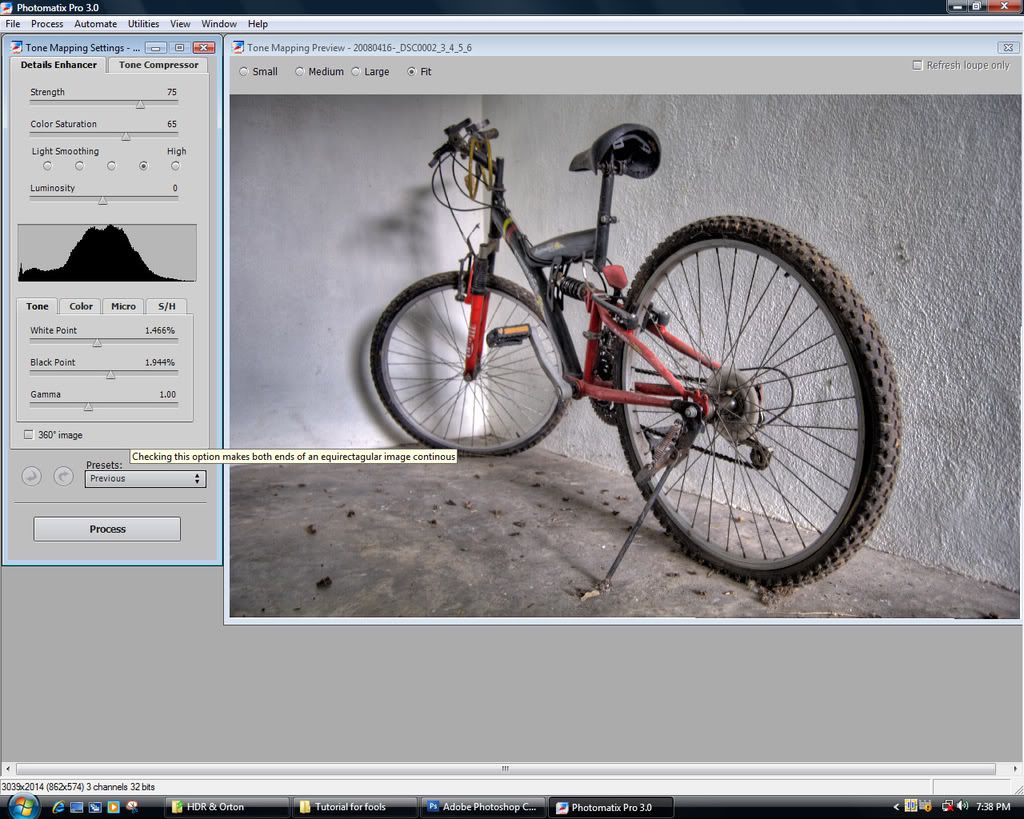 We start off with photomatix, in this case i merged 5 photos. basically my method is to not do anything much in photomatix and try to get an evenly lit image. Therefor, i don't really push the strength much since i prefer adding contrast manually. so here we have a pretty good one, no clipping. 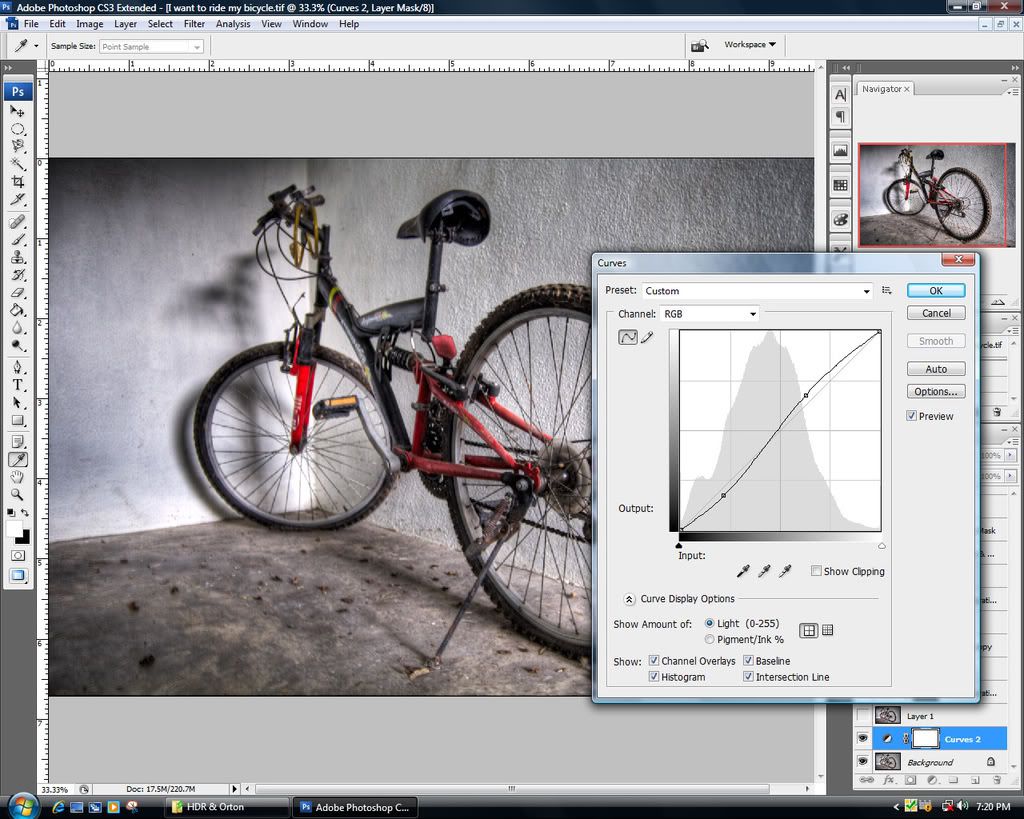 The first thing i did for this particular image was adding more contrast with a typical S-curve. 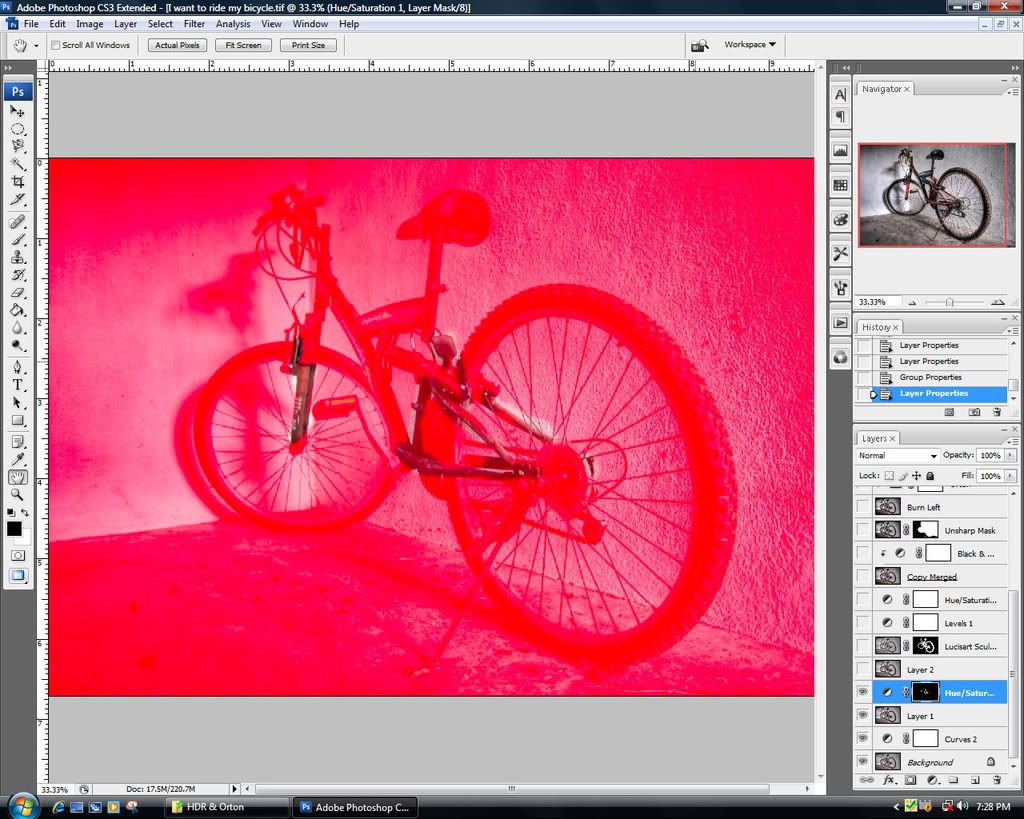 Next i reduced the saturation on the bikes' frame with the masking technique to get a more natural look. 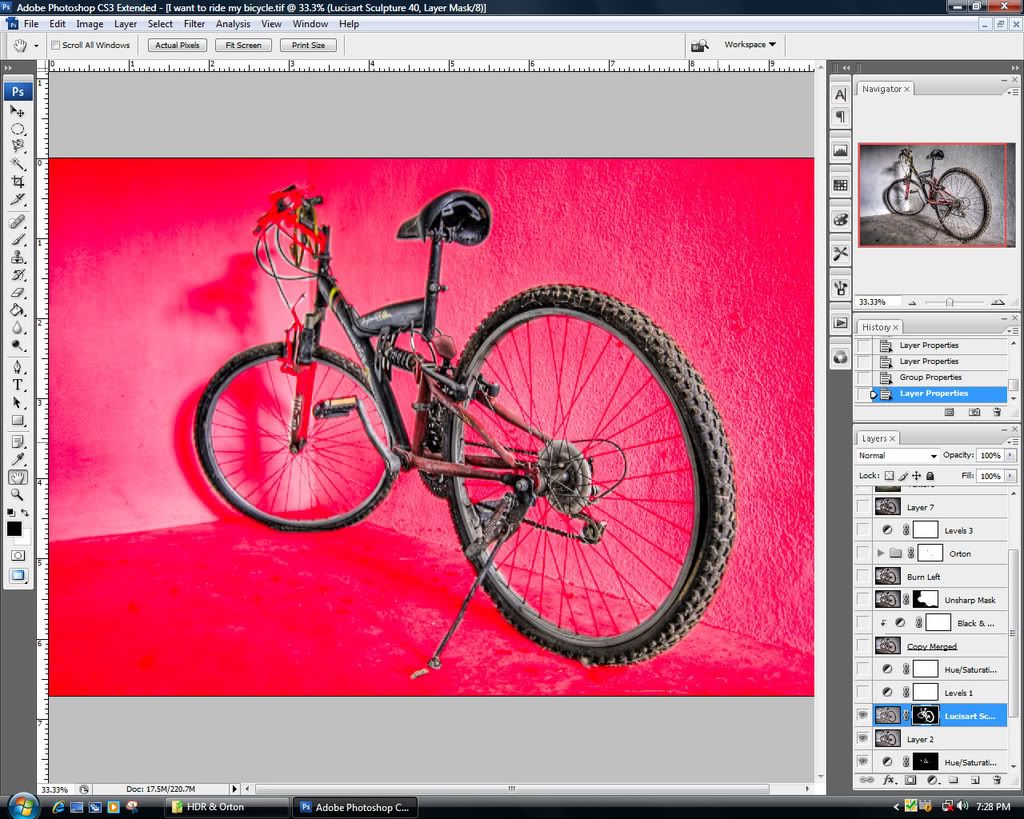 And here you can see what lucisart does. i didn't pump it up too much on this. settings are on sculpture with the slider on 40 and masked so that it only affects the bike. 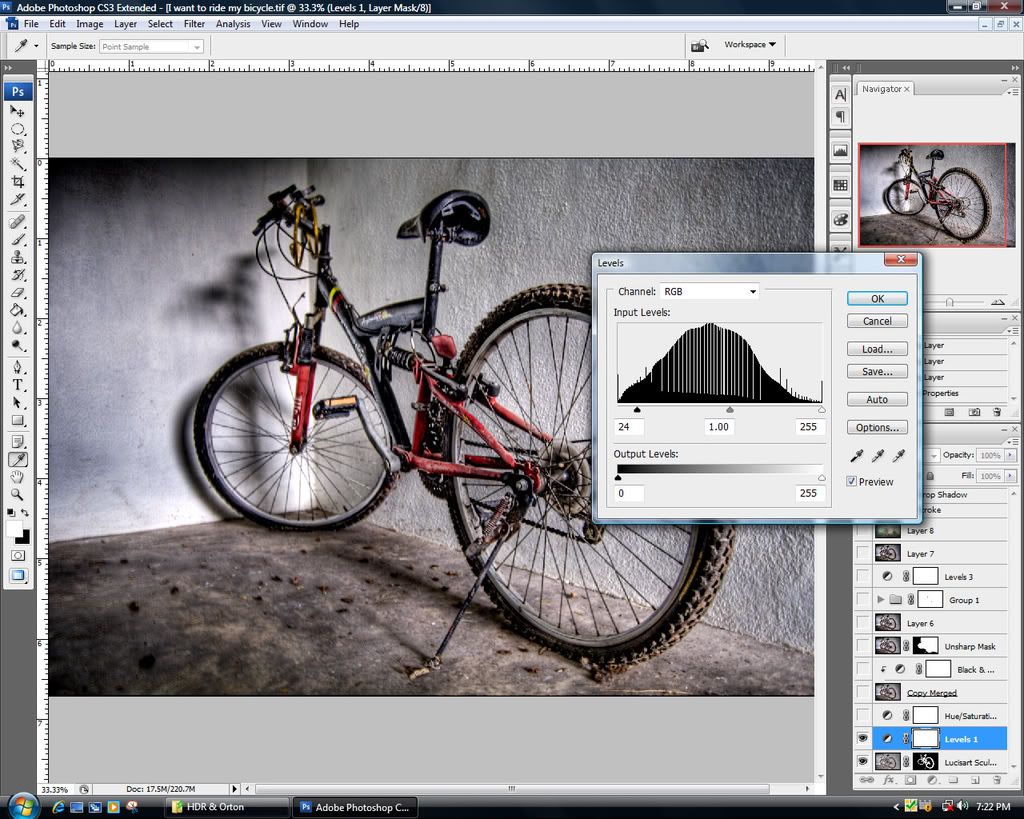 Here i added an adjustment layer. levels in this case and darkened the shadows a bit for more depth. 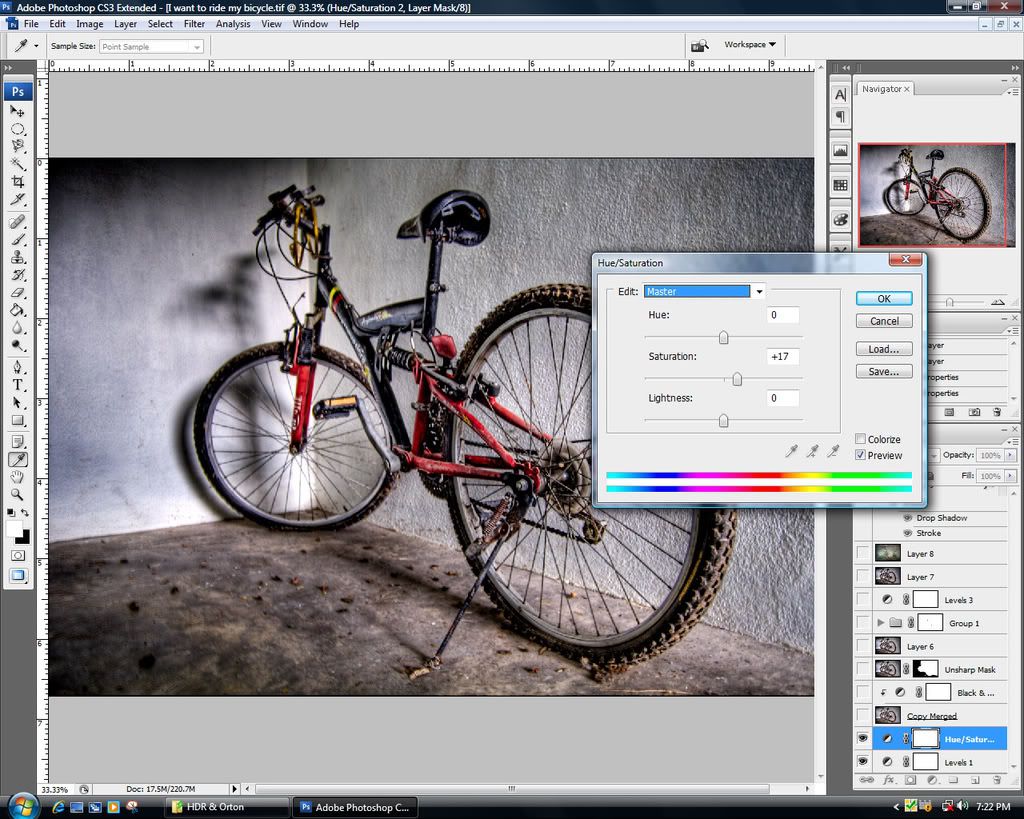 And now i raise the saturation a bit cuz i like my images to be colorful so u can see, the reason i desaturated the reds earlier is so that i can get an even saturation throughout the image when i want to pump it up more later.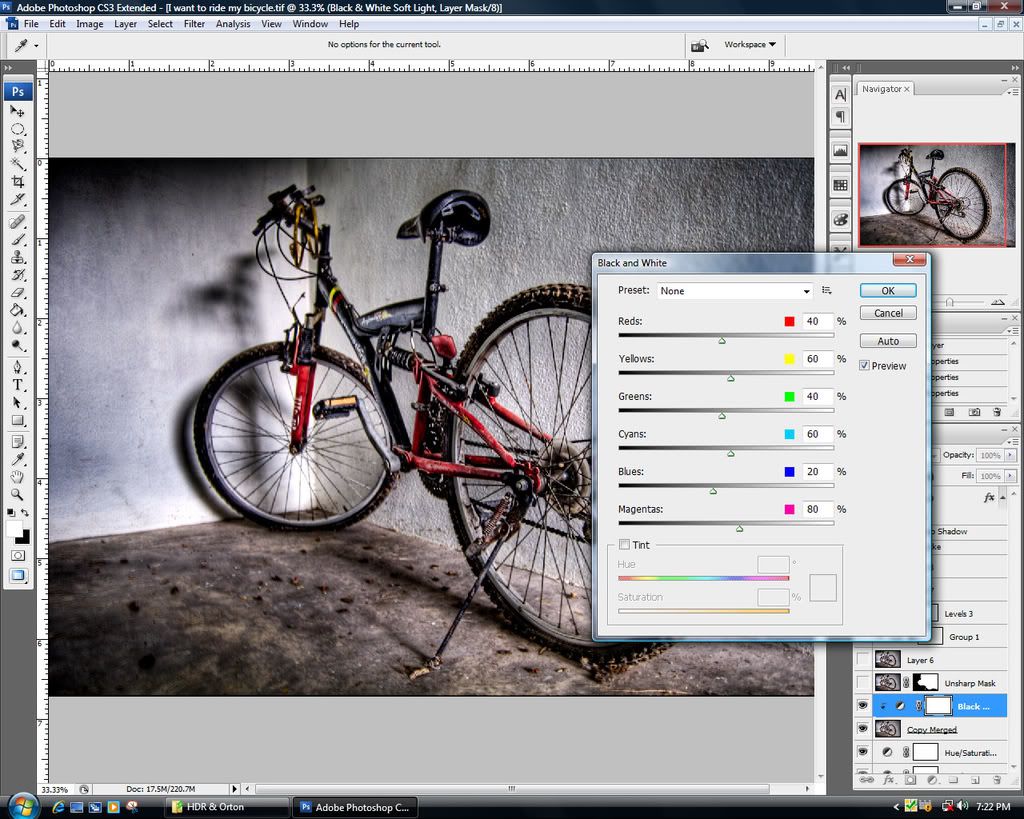 and here is a classic method, some people prefer applying their image adjustments but i prefer to use the non-destructive method and use adjustment layers. so here i added the black and white adjustment layer with it set to soft light and adjusted the sliders so i get the desired effect. there's no right way to do this, just experiment with it. 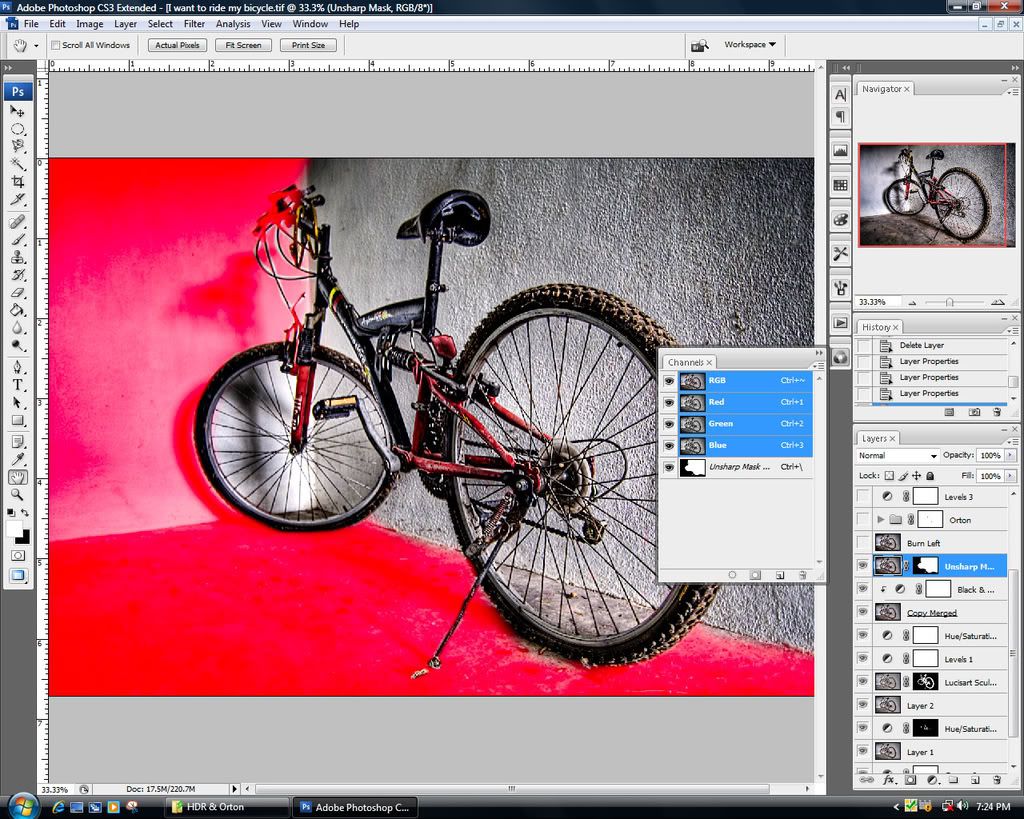 ok we are almost near the end already. here i applied some unsharp mask. can't remember how much, but im guessing around radius around 3-4.5 at 70-100%. and i masked out the wall on the left cuz i wanted to bring bike out and not the walls as well. 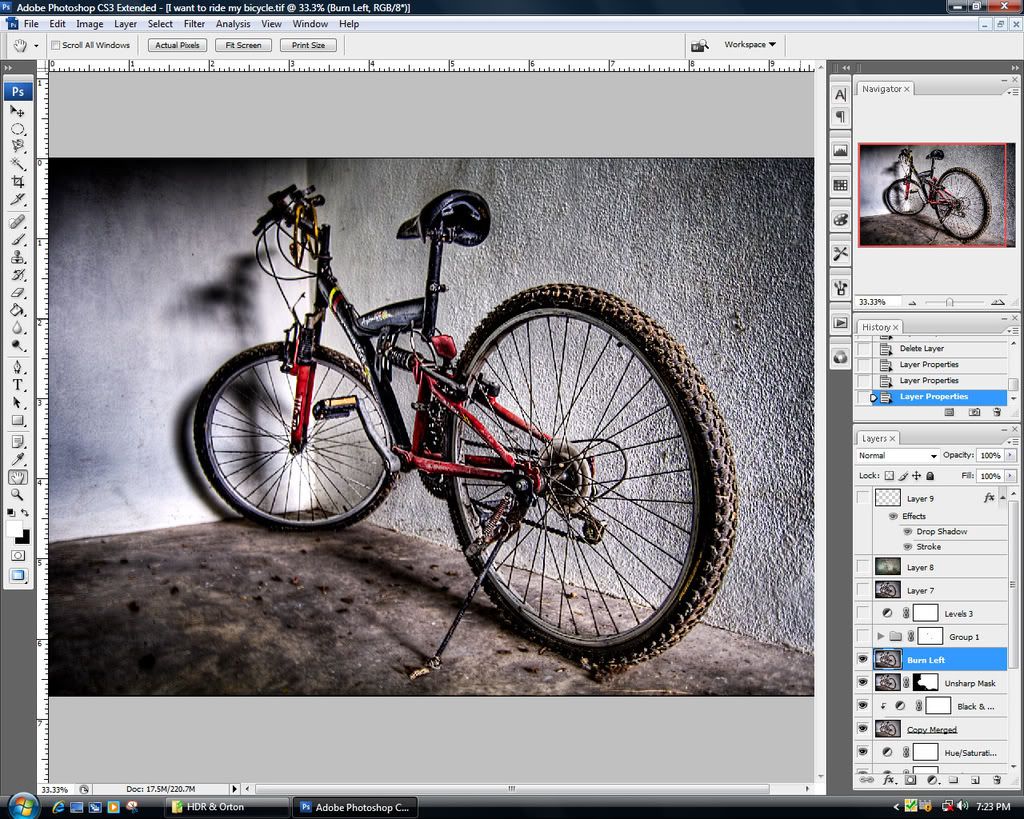 and here i burned the midtones on the left wall a bit to get some darker shadows. 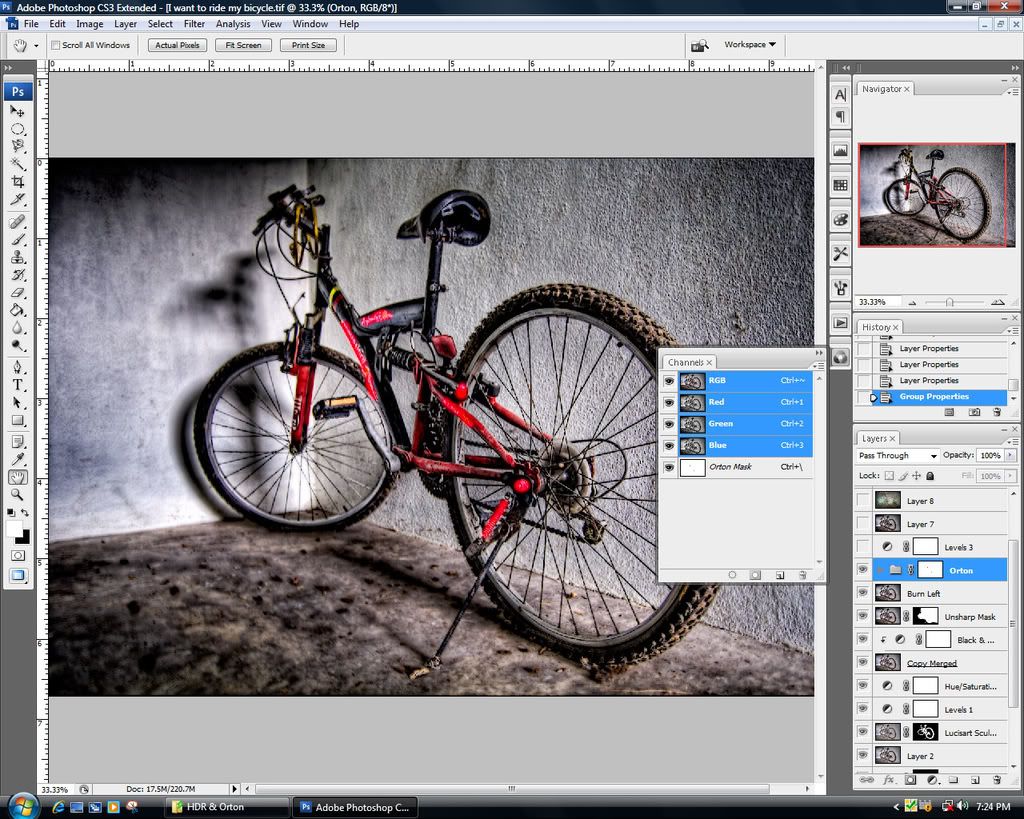 this is where i applied the orton effect, and i masked out some details so t remains sharp. there are different methods to achieve the orton effect, i'll post about it later since mine's a bit complicated.  continued below... This post has been edited by ' or 1=1 --: Apr 24 2008, 01:24 PM |
|
|
Apr 24 2008, 01:18 PM
|
|
Senior Member
1,443 posts Joined: Jun 2006 From: Bandar Baru Bangi
|
continued..
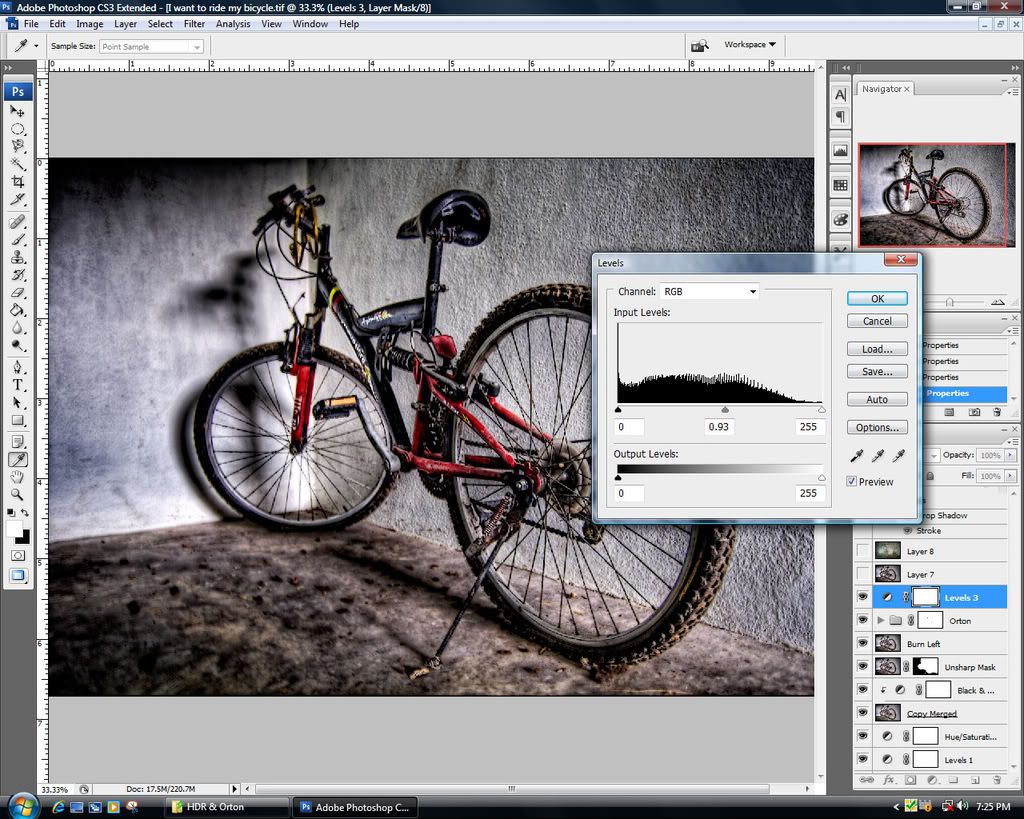 Now i darkened the midtones a bit more with another levels adjustment layer. 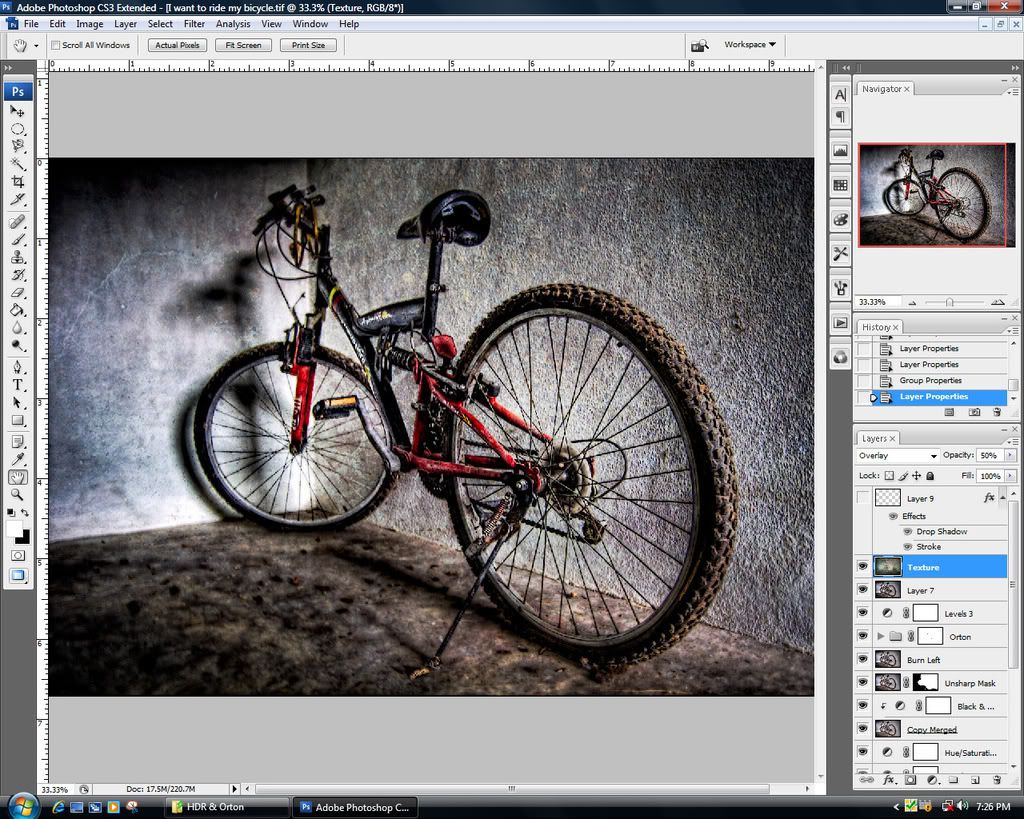 and as a final touch, i applied a texture overlay on top of it. and voila! its done. hope you guys enjoyed and learnt something from this. and remember, the key is to experiment with different methods. and don't be afraid to go over the top. we all gotta start somewhere. just go crazy and have fun. i'll be posting my orton tutorial and when to and not to use it soon. later |
|
|
Apr 25 2008, 08:42 AM
|

Senior Member
748 posts Joined: Sep 2007 From: No Man Lands
|
appreciate d tutorial
BUT... loading time TOO long...  |
|
|
Apr 25 2008, 10:40 AM
|

Senior Member
1,220 posts Joined: Jun 2005 From: Slavestate
|
nice one amir.
it's been very informative. question: is lucisart only compatible with CS3? and am still waiting for your workflow on the shoe photo. |
|
|
Apr 25 2008, 01:16 PM
|
|
Senior Member
3,114 posts Joined: Dec 2006
|
i dont have a registered version of photomatix...which means yr tut i cant use
 |
|
|
Apr 25 2008, 01:30 PM
|
|
Senior Member
6,410 posts Joined: Jan 2003 From: MLK
|
Thanks amir.
Will definitely try it. |
|
|
Apr 25 2008, 02:02 PM
|
|
Senior Member
1,443 posts Joined: Jun 2006 From: Bandar Baru Bangi
|
QUOTE(xnobys @ Apr 25 2008, 10:40 AM) nice one amir. I think its compatible with older versions as well since lucisart has been around for about 2-3 years already. and as for the shoe shot. its basically the same thing. i started with HDR, and then i used lucisart on the shoe and masked everthing else out. orton the background and unsharp mask at the end. workflow is basically like the one i posted above. try to focus on one subject to draw attention to. and use masks. it's been very informative. question: is lucisart only compatible with CS3? and am still waiting for your workflow on the shoe photo. QUOTE(orenzai @ Apr 25 2008, 01:16 PM) i dont have a registered version of photomatix...which means yr tut i cant use you can! u can use photoshop's HDR merge. its a bit different tho. but its still good. alright now for my new set. its called, sleepless at 4 a.m. posting before and after shots to show that how bad white balance, framing (distracting backgrounds), lighting and color casts can be fixed in photoshop. no texturing this time all are HDR shots btw. 5 exposures each. The before shot. i was supposed to clean this thing a bit, but i procrastinated. and here it is. all greasy and stuff. kinda gross really lol.  and here, i enhanced the grossness, and removed the dull fluorescent light colors. 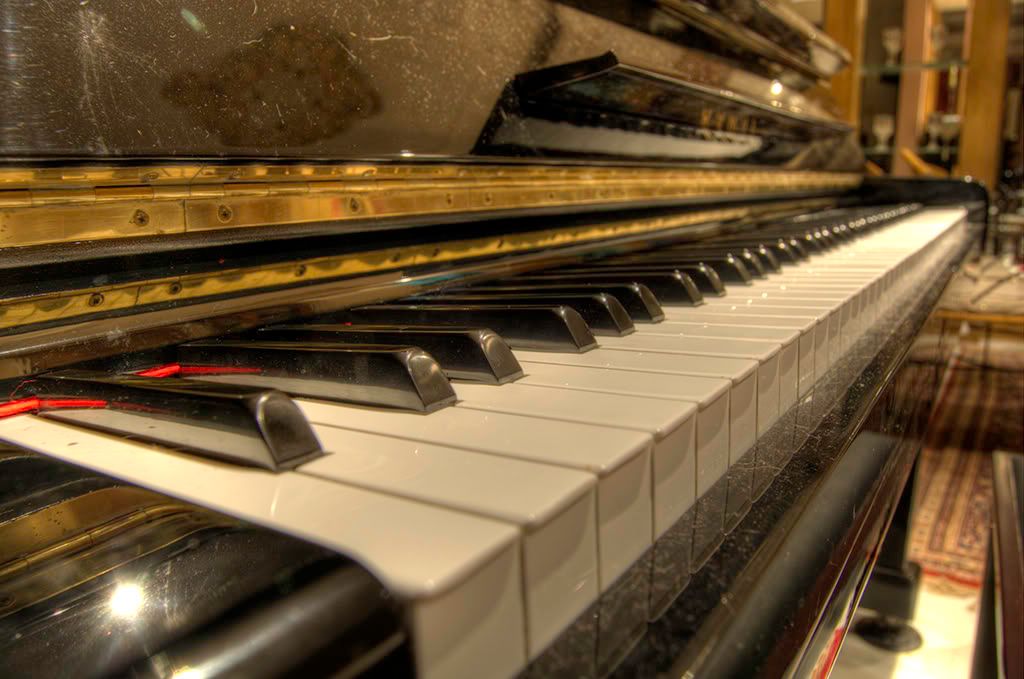 This is me piano. And those are cat hair. damn those cats! grrr...  and here i toned down the orangeness and gave a more cooler shade to the keys while darken out the distracting areas of the frame. 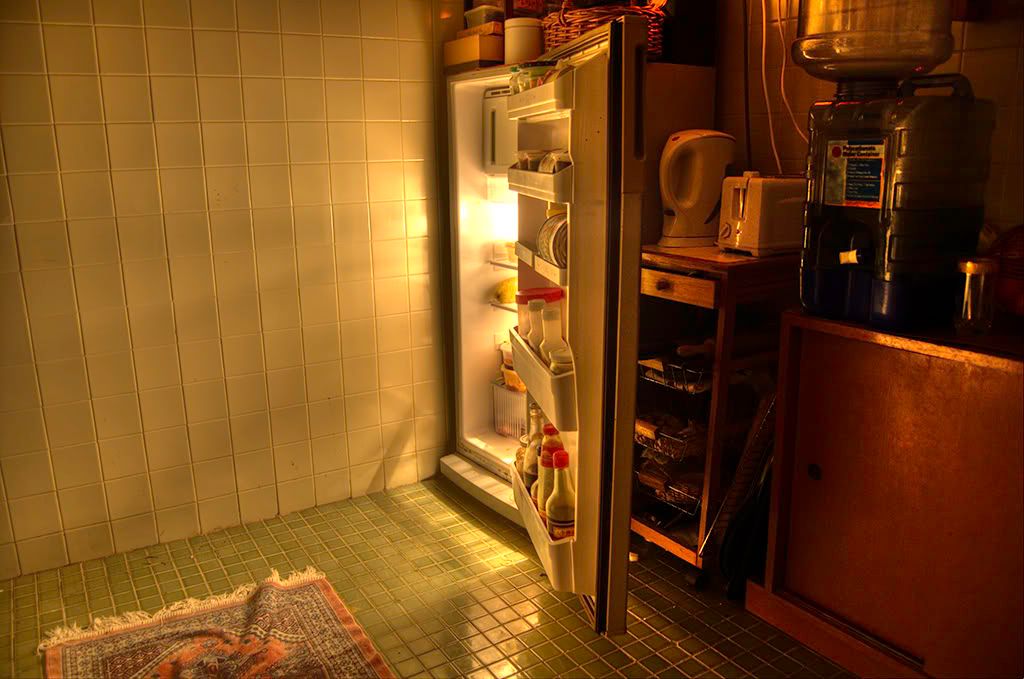 Ah. the fridge. I hate this fridge cuz there's never anything to eat or drink innit. its pretty damn useless if you ask me. keeps the soy sauce from spoiling tho.  so here is what i actually wanted to portray. and luckily i managed to. removed the orange color that was coming from the fridge and darkened the distracting areas out. so i hope after viewing this you'd reconsider from deleting some of your photos that you think are poorly framed or very teruk the white balance. cuz they can be fixed with a little imagination  thats all for today, need to get some more sleep now. |
|
|
|
|
|
Apr 25 2008, 02:04 PM
|

All Stars
10,261 posts Joined: Jan 2003
|
You sure are talented with photoshop! Kudos!
|
|
|
Apr 27 2008, 10:46 AM
|
|
Junior Member
192 posts Joined: May 2007 
|
want to kill u because of jealousy..
 hahahaha nice series bro.. |
|
|
Apr 30 2008, 03:52 PM
|
|
Senior Member
1,220 posts Joined: Jun 2005 From: Slavestate
|
Amir,
how to remove the ambient/available light? it seems that your flicr account no longer active. |
|
|
Apr 30 2008, 06:53 PM
|

Senior Member
962 posts Joined: Oct 2006 From: KL
|
Congrats Amir!!! Saw you in The Star today with your fellow traceurs
. And your photoshop skills respect . |
|
|
Apr 30 2008, 07:29 PM
|
|
Senior Member
2,475 posts Joined: Nov 2005 From: kopitiam
|
QUOTE(NasiLemakMan @ Apr 30 2008, 06:53 PM) Congrats Amir!!! Saw you in The Star today with your fellow traceurs http://thestar.com.my/youth2/story.asp?fil...9580&sec=youth2 . And your photoshop skills respect .http://thestar.com.my/youth2/story.asp?fil...8179&sec=youth2 my junior. LOL  Added on April 30, 2008, 7:29 pmi can see u amir.. hehehe  This post has been edited by dgrebel: Apr 30 2008, 07:29 PM |
|
|
May 1 2008, 04:04 PM
|
|
Senior Member
1,443 posts Joined: Jun 2006 From: Bandar Baru Bangi
|
QUOTE(calvin_gsc @ Apr 25 2008, 02:04 PM) You sure are talented with photoshop! Kudos! QUOTE(lanun8 @ Apr 27 2008, 10:46 AM) want to kill u because of jealousy.. haha! thanx guys. hahahaha nice series bro.. but don't kill me QUOTE(xnobys @ Apr 30 2008, 03:52 PM) Amir, ambient light? you can do it in a lot of different ways. some people use the simple vignetting method. for me, i convert it to black and white, adjust the sliders until almost everything is darker or black. and then peel out the original image with with sometimes the gradient tool, sometimes i just use the brush and some other times i just use the marquee tool. how to remove the ambient/available light? it seems that your flicr account no longer active. QUOTE(NasiLemakMan @ Apr 30 2008, 06:53 PM) Congrats Amir!!! Saw you in The Star today with your fellow traceurs haha thanks man, did it last friday. was a very fun session. . And your photoshop skills respect .QUOTE(dgrebel @ Apr 30 2008, 07:29 PM) http://thestar.com.my/youth2/story.asp?fil...9580&sec=youth2 XD yep, thats me. just running. http://thestar.com.my/youth2/story.asp?fil...8179&sec=youth2 my junior. LOL Added on April 30, 2008, 7:29 pmi can see u amir.. hehehe loloh yeah, i've been pretty busy lately. pretty busy playing with my xbox lol. got it last saturday along with an sb-600 and the d40 remote. i think i got a pretty good deal, rm770 for the sb-600 at the first shop i went. was expecting somewhere around the RM850s. and it took me over 100 shots to get some decent understanding of how to use this darn thing. so yesterday after work, rigging faizal tahir for his stunt performance on stage for AIM. he's gonna be doing a couple of flips and flying around a bit during his performance. dunno how its gonna be like during the actual performance tho. he's pretty fat XDso anyway, here a re some shots i took yesterday. along with my usual pp treatment. for today's set, some tricking and parkour action. always wanted to this. experimental stage. hope you guys like them. so here it goes in chronological order. that's siddiq trying to clear a precision jump. the gap was around 7-8 feet. the ledge is about 15-18 feet high. good for confidence building and focus.  Yeppers, great sky that day. same location with a different angle.  So this is actually how you learn to do a sideflip. get a spotter and just roll over him until u get used to the feeling. to complete it just jump  hehe! some people take short skips but some guys prefer to run for the momentum.  Barefoot tricking!!! it does give a lot more air after you're used to training with shoes.  this fella was hiding in the grass where we were training. luckily didn't step on him  Ali doing a layout. that's just another name for a backlflip from a platform without tucking your legs.  Ammar posing as i messed around with my flash. eventually he got bored after about 5 shots and went off.  me trying a new move. ze webster, lol. im not falling by the way tho i almost did. look at my face ROFL!! i dunno why im posting this, pretty embarassing but what the hey. oh as a reminder. do not try this at home folks. not without proper training anyway. ok that ends it for today. thanks for the views. will continue to try to improve. This post has been edited by ' or 1=1 --: May 1 2008, 04:07 PM |
|
|
May 1 2008, 09:56 PM
|
|
Senior Member
6,410 posts Joined: Jan 2003 From: MLK
|
2nd & 2nd last pic.
|
| Change to: |  0.0274sec 0.0274sec
 0.53 0.53
 5 queries 5 queries
 GZIP Disabled GZIP Disabled
Time is now: 24th December 2025 - 09:26 PM |
 Quote
Quote