Welcome Guest ( Log In | Register )

Outline · [ Standard ] · Linear+

 Opinions for casing air flow, CM Elite 330/331

views
     
TSlongpants
post Dec 24 2007, 06:37 PM, updated 18y ago

Getting Started
**
Junior Member
260 posts

Joined: Nov 2005


SIFU SIFU of LYN,

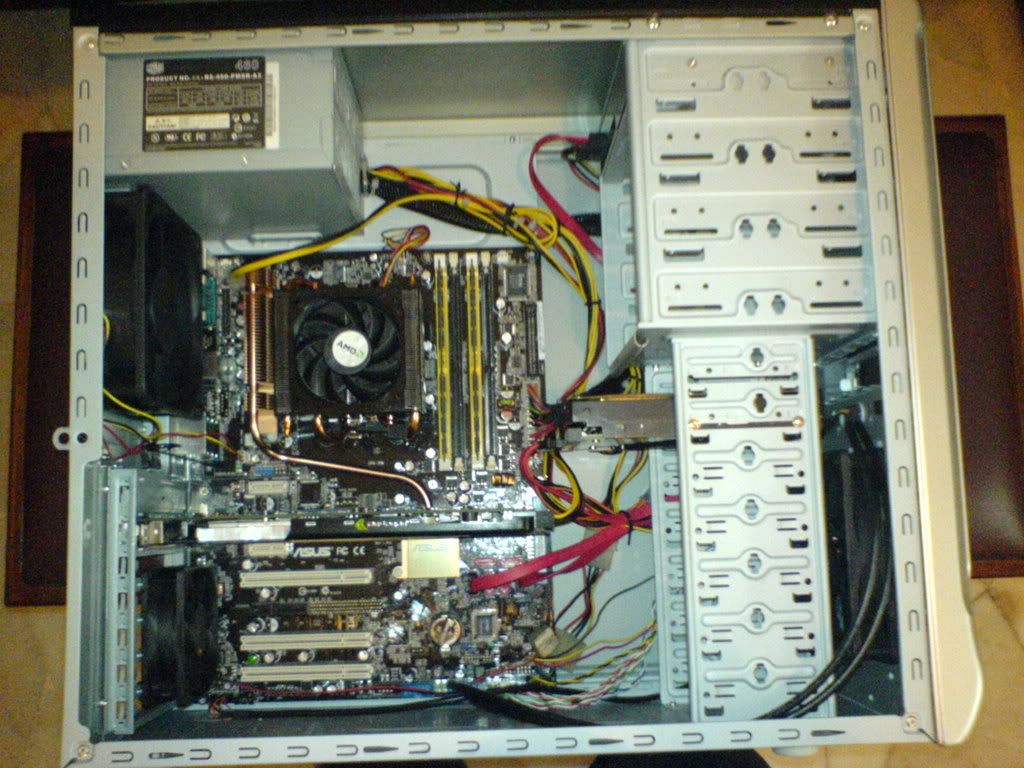
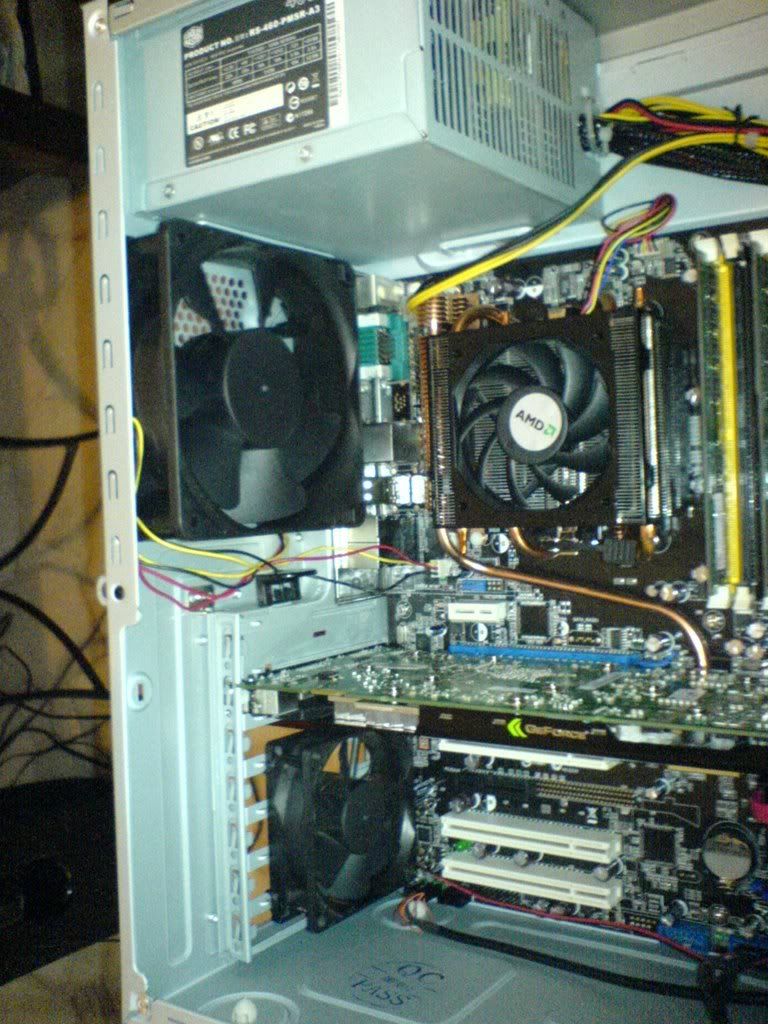
I need opinions to cool down this rig. I want to get more fans. But before that, need suggestions and opinions from first before doing anything. Hope so you guys not to be too harsh on me. blush.gif
GC TEMPERATURE - Idle 60~63c, Load 70~80+c
AMBIENT TEMPERATURE - Idle - 50~51c, Load 60~65c
But, when i open my casing and use fan to blow in, GC TEMP Idle - 53~55c, Load - 65~70c
Anyway, my budget is about 100 bucks on everything(fans, accessories, modding without voiding warranty) i can do to cool this rig down.
user posted image
user posted image
user posted image
user posted image
user posted image
user posted image

THANKS A BUNCH!

user posted image


This post has been edited by longpants: Dec 25 2007, 03:15 PM
shirohamada
post Dec 24 2007, 07:25 PM

Enthusiast
*****
Senior Member
944 posts

Joined: Jan 2007
i know.
just leave the side panel open. XD
otherwise thats about right.
you could punch some holes on the side panel so the air intake to the cpu is better. is that stock cpu fan? the case fan perform better than that. ditch it and rig the case fan.
meGATron77
post Dec 24 2007, 07:32 PM

Getting Started
**
Junior Member
248 posts

Joined: Aug 2007
From: BGees PERAK


bro go get aftermarket vga cooler la. buy artic cooling S1 only RM110 if not mistaken tongue.gif btw how much u bought asus en8800gt? drool.gif does it supposed come with glaciator heatsink juz like i read from asus website? hmm.gif
sniper on the roof
post Dec 24 2007, 08:17 PM

20k VIP Club
Group Icon
VIP
23,414 posts

Joined: Jan 2003
From: Taipei
A couple suggestions:

1) simplest, cheapest and best result. Add a fan on the bottom of the vga card using chopstick mod

2) Or add a fancard.

3) Move your Hdd to the highest slot (it's unnecessarily obstructing the intake now) and change the rear exhaust to a 12cm fan. Almost no result but sure hell's more elegant.


SUSAllnGap
post Dec 24 2007, 08:41 PM

[ Modding with Passion(tm) ]
*******
Senior Member
4,561 posts

Joined: Jan 2003
From: Penangites


change the rear fan to 120mm fan
add holes on the side panel and whack in a 120mm directly on the GC area

btw, what proc is that ?
kinda high end stock AMD heatsink there
cschun86
post Dec 24 2007, 08:44 PM

Heading towards 2000~
******
Senior Member
1,972 posts

Joined: Oct 2006
From: Seberang Perai


QUOTE(AllnGap @ Dec 24 2007, 08:41 PM)
change the rear fan to 120mm fan
add holes on the side panel and whack in a 120mm directly on the GC area

btw, what proc is that ?
kinda high end stock AMD heatsink there
*
the proc are AMD X2 6000+ or maybe 6400+,
only this 2 model come with such stock cooler...
gth517
post Dec 24 2007, 09:57 PM

New Member
*
Junior Member
40 posts

Joined: Oct 2007
From: Ampang, KL
yeah, a bit different. but is it necessary to change that stock cooler? or it is more better then after-market cooler. for examples of cooler... let's say an affordable cooler, Artic Cooling freezer 64.
hypermax
post Dec 24 2007, 10:14 PM

Newbie
*******
Senior Member
2,524 posts

Joined: Jan 2003
From: Beneath the starry night


QUOTE(longpants @ Dec 24 2007, 06:37 PM)
SIFU SIFU of LYN,

I need opinions to cool down this rig. I want to get more fans. But before that, need suggestions and opinions from first before doing anything. Hope so you guys not to be too harsh on me.  blush.gif
Idle 60~63c, Load 70~80+c
But, when i open my casing and use fan to blow in, Idle - 53~55c, Load - 65~70c
Anyway, my budget is about 100 bucks on everything(fans, accessories, modding without voiding warranty) i can do to cool this rig down.
» Click to show Spoiler - click again to hide... «


THANKS A BUNCH!
*
Add a 120mm blowhole on top of the casing which act as exhaust. That really helps a lot as hot air tends to rise.

QUOTE(sniper on the roof @ Dec 24 2007, 08:17 PM)
A couple suggestions:

1) simplest, cheapest and best result. Add a fan on the bottom of the vga card using chopstick mod

2) Or add a fancard.

3) Move your Hdd to the highest slot (it's unnecessarily obstructing the intake now) and change the rear exhaust to a 12cm fan. Almost no result but sure hell's more elegant.
*
May i ask what's a chopstick mod?? I am interested too.
ocz
post Dec 24 2007, 11:39 PM

Cinematographer
*******
Senior Member
2,827 posts

Joined: Mar 2007
From: MALAYSIA


Bro,theres still a cable management probs in your rig. notworthy.gif

About the ventilations,put a 120mm fans for exhaust.
On the front part,i believe theres a place to put another 120mm fans for intake.

If its still not enough,make a hole of 120mm on top to place a fans.

boyz
post Dec 25 2007, 01:42 AM

Your Humble Vaudevillian
******
Senior Member
1,523 posts

Joined: Oct 2004
From: Penrissen Camp


Replace the front and back fan with 120MM with speed controller fans. For eg. Silverstone, or any other brand. Std air flow for the stock CM 330 or 331 fan is not that good. Its too weak to push or blow. i recommend 2000RPM fans and above. When u r gaming then u might want to quicken the speed. but u r idling then u can lower the fan speed.


Added on December 25, 2007, 1:43 amAdditionally if your budget increase get the Fan for your GC, the PCIE fan from Vizo might help lower the temp for gc/casing.

This post has been edited by boyz: Dec 25 2007, 01:43 AM
noprob
post Dec 25 2007, 01:47 AM

Regular
******
Senior Member
1,982 posts

Joined: Jul 2007
sory , had to ask .. the side panel is it customize or stock with the case ?
TSlongpants
post Dec 25 2007, 03:30 AM

Getting Started
**
Junior Member
260 posts

Joined: Nov 2005


Thnx the reply guys. Couldn't reply just now. Went for Xmas countdown. biggrin.gif thumbup.gif
QUOTE(meGATron77 @ Dec 24 2007, 07:32 PM)
bro go get aftermarket vga cooler la. buy artic cooling S1 only RM110 if not mistaken tongue.gif btw how much u bought asus en8800gt?  drool.gif does it supposed come with glaciator heatsink juz like i read from asus website?  hmm.gif
*
my budget below $100 until I go get part time job dude. cry.gif
I bought it for $960 +- (but my whole comp package aroung 3.2k) AND i dont think it is the glaciator heatsink u are talking about.

QUOTE(sniper on the roof @ Dec 24 2007, 08:17 PM)
A couple suggestions:

1) simplest, cheapest and best result. Add a fan on the bottom of the vga card using chopstick mod

2) Or add a fancard.

3) Move your Hdd to the highest slot (it's unnecessarily obstructing the intake now) and change the rear exhaust to a 12cm fan. Almost no result but sure hell's more elegant.
*
1)I wonder what is the chopstick mod
2)Fan card - I saw a lot of them in BULK there. But don't know whether is it good enough to suck air out or not.
3)DEFINITELY Note that! notworthy.gif
QUOTE(AllnGap @ Dec 24 2007, 08:41 PM)
change the rear fan to 120mm fan
add holes on the side panel and whack in a 120mm directly on the GC area

btw, what proc is that ?
kinda high end stock AMD heatsink there
*
Oh about the 12mm fan at front and the smaller fan at rear. I reused that 80mm fan from my old comp and then i switch the 120mm CM fan to the front. But, it is no use ler, I really need a 12mm fan at rear!

QUOTE(cschun86 @ Dec 24 2007, 08:44 PM)
the proc are AMD X2 6000+ or maybe 6400+,
only this 2 model come with such stock cooler...
*
Ooops.. Ya the Proc is X2 6000+, my bad sweat.gif

QUOTE(ocz @ Dec 24 2007, 11:39 PM)
Bro,theres still a cable management probs in your rig. notworthy.gif

If its still not enough,make a hole of 120mm on top to place a fans.
*
1)I'm still new at cable management. I've tried tying all the cables together at putting some of it at the back of the panel, but still not enough "clean", i guess. sad.gif
2)Should i worry about warranty for casing if i want to mod? and don't think i Have the budget to do that yet . sad.gif
QUOTE(boyz @ Dec 25 2007, 01:42 AM)


Added on December 25, 2007, 1:43 amAdditionally if your budget increase get the Fan for your GC, the PCIE fan from Vizo might help lower the temp for gc/casing.
*
Vizo Dual propeller fans? is it good?

QUOTE(noprob @ Dec 25 2007, 01:47 AM)
sory , had to ask .. the side panel is it customize or stock with the case ?
*
Erm.. It's stock. AND I know it is different than the website one.

reez07
post Dec 25 2007, 07:22 AM

Getting Started
**
Junior Member
74 posts

Joined: Aug 2007
From: cheras kl


use what thermalpaste?
lohwenli
post Dec 25 2007, 10:43 AM

Penang Overclockers Club
*****
Senior Member
971 posts

Joined: Aug 2006
From: Penang


QUOTE(longpants @ Dec 25 2007, 03:30 AM)
Should i worry about warranty for casing if i want to mod? and don't think i Have the budget to do that yet .  sad.gif

Vizo Dual propeller  fans? is it good?
*
Don't bother with those slot cooling fans, most of them either don't cool well or cause exessive noise. I can see that the main problem with your case is your exhaust fan. Thats why there is so much difference when you open the case and when its closed. The temps you get when the casing is open is the typical temperature of a 6000 processor running on the stock cooler, you cannot really hope to get any better than that without changing to a better 3rd party cooler.

Don't worry about casing warranty..not likely you'll ever need it..anything that would damage your casing enough to make you want to claim warranty would probably void the warranty in the first place (and unfortunately, in that kind of situation I doubt your hardware would survive too).
Vervain
post Dec 25 2007, 11:03 AM

Scathach
*******
Senior Member
5,464 posts

Joined: Mar 2005
if can cut off the grills or holes to accommodate a single big hole. use higher cfm fans rather more fans.
zzloo
post Dec 25 2007, 11:12 AM

Hmm..?
*******
Senior Member
2,139 posts

Joined: May 2007


buy 2 Delta..
reez07
post Dec 25 2007, 11:17 AM

Getting Started
**
Junior Member
74 posts

Joined: Aug 2007
From: cheras kl


but delta fan very noise la...
if u dont mind its ok lor...
Vervain
post Dec 25 2007, 02:07 PM

Scathach
*******
Senior Member
5,464 posts

Joined: Mar 2005
just add VR to control the fan speed. full speed when you're pushing the pc, low speed when idle. works for me.
TSlongpants
post Dec 25 2007, 03:12 PM

Getting Started
**
Junior Member
260 posts

Joined: Nov 2005


Oh. I think some of you got it wrong about the temperature. The temperature of the idle and load of, 60~63c - 70~80c is my GC temperature NOT MY CPU. The temperature is taken from RivaTuner.

user posted image

MY BAD! MY BAD! so so sorry about that sad.gif rclxub.gif


Added on December 25, 2007, 3:16 pmAnybody can teach how turn on the system and cpu temperature in Rivatuner?


Added on December 25, 2007, 3:28 pmFOR 2000 rpm 12mm fans, What other brands other than silverstone, coolermaster, etc?

This post has been edited by longpants: Dec 25 2007, 03:28 PM
sannielyk
post Dec 26 2007, 04:58 PM

Getting Started
**
Junior Member
83 posts

Joined: Dec 2007
user posted image

This thing can be help u a lot . smile.gif

This post has been edited by sannielyk: Dec 26 2007, 05:01 PM
TSlongpants
post Dec 26 2007, 06:30 PM

Getting Started
**
Junior Member
260 posts

Joined: Nov 2005


QUOTE(sannielyk @ Dec 26 2007, 04:58 PM)
» Click to show Spoiler - click again to hide... «


This thing can be help u a lot .  smile.gif
*
Some forumers says that Slot fans are useless/hopeless... Probably my only choice is to mod the case to blow in air. But what other cheap mods can i do?!?
meGATron77
post Dec 26 2007, 08:45 PM

Getting Started
**
Junior Member
248 posts

Joined: Aug 2007
From: BGees PERAK


go get pci blower oso can help u . it suck hot air from ur vga card smile.gif
neostalker
post Dec 26 2007, 08:58 PM

Getting Started
**
Junior Member
84 posts

Joined: Sep 2006


well....the air flow inside the case is important. The cool air should suck into case from the bottom and hot air suck out from the top. I think this can give the better air flow. juz my 2 cent smile.gif.... You try figure this urself how to modify your case lar...
skymyxe
post Dec 26 2007, 09:01 PM

Enthusiast
******
Senior Member
1,047 posts

Joined: Dec 2006
From: GKL/KV


As many people wonder, this is an example using a simple 4 sticks with the Silverstone FM82 fan blowing air under your GC. icon_rolleyes.gif

» Click to show Spoiler - click again to hide... «


skylineGTR
post Dec 27 2007, 06:51 AM

Casual
***
Junior Member
399 posts

Joined: May 2007
From: K. Trg


the key for a good casing airflow is having a balance between air blow-in and blow-out, so u can have a good blow in by making 12cm hole with fan at ur side panel, and put a good fan at the rear, if u still want more, u can make a hole at the top and put a fan for blow out....
Ciku
post Dec 27 2007, 12:05 PM

Getting Started
**
Junior Member
98 posts

Joined: Sep 2006
From: Tranung kite


QUOTE(sannielyk @ Dec 26 2007, 04:58 PM)
user posted image

This thing can be help u a lot .  smile.gif
*
good airflow but give some extra noise... sometime I not plug in it for my peaceful icon_rolleyes.gif
TSlongpants
post Dec 27 2007, 02:38 PM

Getting Started
**
Junior Member
260 posts

Joined: Nov 2005


I was wondering if i have only rear and front fans, won't it be like that?
user posted image
The hot air of the GC not much different since there is no good air circulation.
capiche
post Dec 27 2007, 03:09 PM

Casual
***
Junior Member
380 posts

Joined: Jan 2007
From: Malacca
hi bro... i;m using the same casing as u do... my system is a c2d sys.... what i do is get a VIZO 12mm fan for intake.. and a CM 12mm fan.. the fan bundled with the casing is lousy...

u can lower ur hdd to the lowest position to avoid the air being directed to the vga...
PeowYong
post Dec 27 2007, 04:23 PM

PeowYong
*******
Senior Member
2,263 posts

Joined: Jan 2003
From: MMU Cyberjaya, Sandakan


QUOTE(longpants @ Dec 27 2007, 02:38 PM)
I was wondering if i have only rear and front fans, won't it be like that?
user posted image
The hot air of the GC not much different since there is no good air circulation.
*
my case is same like urs, hot air trapped below the gc...
anyway to solve it?? open up all unused pci slot?

TSlongpants
post Dec 27 2007, 08:04 PM

Getting Started
**
Junior Member
260 posts

Joined: Nov 2005


I just got an EVERCOOL 12mm fan as my REAR fan, from ALL IT for 30 bucks. runs at 2200rpm.. The temp has dramatically dropped.. will post up pics and results later..

QUOTE(PeowYong @ Dec 27 2007, 04:23 PM)
my case is same like urs, hot air trapped below the gc...
anyway to solve it?? open up all unused pci slot?
*
If the hot air really trapped under it ah.. maybe follow do that mod to let air blow into the GC compartment.


mADmAN
post Dec 27 2007, 08:13 PM

10k Club
********
All Stars
10,530 posts

Joined: Nov 2004
From: Petaling Jaya & Mid Valley


wat u can do is open up the balance of the PCI slot covers and tie a fan there to suck out the hot air mah.
syazwanreno
post Dec 27 2007, 08:22 PM

Won (*3*) Chu Kiss Me?
******
Senior Member
1,269 posts

Joined: Apr 2007
From: Shah Alam


QUOTE(mADmAN @ Dec 27 2007, 08:13 PM)
wat u can do is open up the balance of the PCI slot covers and tie a fan there to suck out the hot air mah.
*
how about the RM10 pci blower that you buy from ALL IT?? (i'm using it too)
mADmAN
post Dec 27 2007, 08:28 PM

10k Club
********
All Stars
10,530 posts

Joined: Nov 2004
From: Petaling Jaya & Mid Valley


the PCI Blower is excellent of course.. but kinda noisy.

and id only recommend it to those using GC coolers like the stock 8800 series coolers. otherwise if ur using coolers like zalman etc....the GC cooler and the blower will be fighting for air againsts each other.

tieing a fan to the pci slots is good for those who have a spare fan. quick and easy solution. and it would fit any type of GC cooler coz it wont be fighting for air with the GC cooler.
PeowYong
post Dec 29 2007, 02:09 AM

PeowYong
*******
Senior Member
2,263 posts

Joined: Jan 2003
From: MMU Cyberjaya, Sandakan


hm...anyone know how does the cooling for the gigabyte 8800GTS 320mb work?

which side suck air which side blowing out...
hard to feel which is which...
TSlongpants
post Dec 29 2007, 02:23 AM

Getting Started
**
Junior Member
260 posts

Joined: Nov 2005


Okay, now the GC temp has dropped dramatically. . Idle is 56-58 C and Load is around 70-75 c. . Ambient temp now is around 46C (lowest) .. still high?

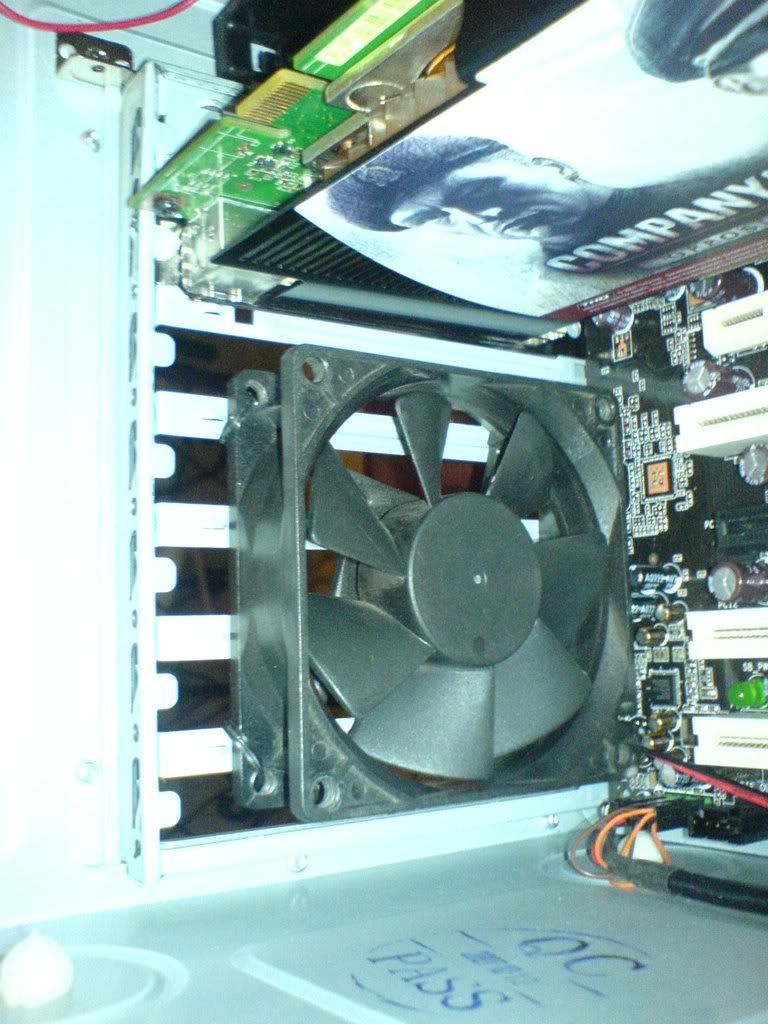
1. I tried cable management for the better air flow.. I know it looks messy but, at least the air flows better
2. Well, I moved the HDD to the higher slot. . (I am having doubt putting it at the highest slot
3. and then tied a fan at the empty slots there..
This is what i did :
user posted image
user posted image
user posted image
user posted image


This post has been edited by longpants: Dec 29 2007, 02:28 AM
meGATron77
post Dec 29 2007, 08:48 AM

Getting Started
**
Junior Member
248 posts

Joined: Aug 2007
From: BGees PERAK


cayalah bro. mesti rajin2 tie cables baru ngam ho:)
capiche
post Dec 29 2007, 02:03 PM

Casual
***
Junior Member
380 posts

Joined: Jan 2007
From: Malacca
bro.. change ur intake fan.... tht 1 comes with the casing is not tat gud... their flow rate is very low....
E-J@1
post Dec 29 2007, 03:07 PM

Capital Eâ„¢
*******
Senior Member
2,603 posts

Joined: Sep 2006
QUOTE(longpants @ Dec 29 2007, 02:23 AM)
Okay, now the GC temp has dropped dramatically...
*
this is why i luv BTX (Inverted ATX) chassis

coz both top & bottom compartment have their own dedicated exhaust fan wub.gif

this way not hot air being trap or circulated

ya, ya, u can blow hole on the bottom part for ATX design

does it look nice? i know it ain't gonna be silent, air pushing out hitting your house floor or pc table laugh.gif
mizivincible
post Jan 2 2008, 08:13 AM

"They'll be singing que sera sera"
******
Senior Member
1,633 posts

Joined: Oct 2007
From: Cheras, Selangor


May I know if I decided to put a fan below the card, the fan should be blowing facing the card or towards bottom ?
jimmydotnet
post Jan 2 2008, 10:57 AM

Jimbo da Riverian
*****
Senior Member
766 posts

Joined: Nov 2005
From: Slim Shady Town


im using the same mobo n the same cpu...but the different part is the GC..im using HD3870...much more cooler..got two slot cooler...n more importantly im using transparent acrylic casing....really cool...n kewl thumbup.gif
TSlongpants
post Jan 2 2008, 08:50 PM

Getting Started
**
Junior Member
260 posts

Joined: Nov 2005


QUOTE(mizivincible @ Jan 2 2008, 08:13 AM)
May I know if I decided to put a fan below the card, the fan should be blowing facing the card or towards bottom ?
*
i use that as an exhaust fan (blow out)
skymyxe
post Jan 2 2008, 10:56 PM

Enthusiast
******
Senior Member
1,047 posts

Joined: Dec 2006
From: GKL/KV


QUOTE(mizivincible @ Jan 2 2008, 08:13 AM)
May I know if I decided to put a fan below the card, the fan should be blowing facing the card or towards bottom ?
*
Look at my previous post on how the FM82 blows the air toward the GC icon_rolleyes.gif
moomoojojo
post Mar 23 2008, 03:44 PM

Casual
***
Junior Member
331 posts

Joined: Aug 2007
From: HoMeToWn Sg PeTaNi...BlAja GoMBaK


use thermaltake or delta high end fan in front of ur case..12cm...my case same as u...temperature reduce a lot..noisy a little bit..but its ok..
justin78
post Mar 24 2008, 02:05 PM

Getting Started
**
Junior Member
179 posts

Joined: Jul 2005


QUOTE(longpants @ Dec 29 2007, 02:23 AM)
Okay, now the GC temp has dropped dramatically. . Idle is 56-58 C and Load is around 70-75 c. . Ambient temp now is around 46C (lowest) .. still high?

1. I tried cable management for the better air flow.. I know it looks messy but, at least the air flows better
2. Well, I moved the HDD to the higher slot. . (I am having doubt putting it at the highest slot
3. and then tied a fan at the empty slots there..
This is what i did :
user posted image
*
Just a suggestion here, you can try to put a fan just below the CD-Rom to suck air into the casing.
nubi
post Mar 24 2008, 04:08 PM

New Member
*
Junior Member
10 posts

Joined: Feb 2008


ur pc is bout same as mine. same casing, procs & even mobo. i also got prob b4 & my solution is below.

1. change both casing fan 2 vizo 120mm.

2. put same fan under ur gc (using cable tie).

3. tidy up the cables.

it's done. just add 3 fans (RM35 X 3). i also use led fan 2 make it more stylo... hehe...
snoopyguy
post Apr 22 2008, 10:10 PM

Getting Started
**
Junior Member
145 posts

Joined: Apr 2007


i also using the same casing..the temp is kinda hot..
well.. this thread really help me alot ..
Time to get more fans
ThinWai
post Apr 29 2008, 08:05 AM

Casual
***
Junior Member
474 posts

Joined: Aug 2007
From: Kota Kinabalu, Sabah


close the side panel and put fans lo. hmm. drill hole urself. u using m2n e sli mobo? i used b4. thumbs up for u=)
jumanz
post Apr 29 2008, 10:23 AM

Getting Started
**
Junior Member
266 posts

Joined: Mar 2005


mm power supply does generate heat as well. for your case if you are installing a fan at the expension bay area. you are just sucking the air out.

hot air coming out but not enough cool air is going into the cpu casing. another good way is to drill holes on the arcylic panel just at the left corner. so you have a proper ciruculation. Please remember to use the same size as the one at the PCI panel

er just my 2 cents. if you try to avoid drilling get teh VEZO PCI airflow card . it does work
enzim10
post May 10 2008, 10:03 AM

Getting Started
**
Junior Member
218 posts

Joined: Nov 2006
From: Passion and the Opera


Air Flow is one of the most important factors when Modifying a case. The goal in cooling your case is to bring the temperature down to a moderate level allowing for increased performance and decreased chance of harm.

The Basic concept is to bring in fresh air and take out the Hot air

In general you would have Intake threw the front and exhaust threw the back.
The Circle in the drawing above shows the Hot spot. This is where 80 % of your heat inside the case is created.


user posted image

lease be aware the heat sink is not always the source of the heat.
In server or Multiple drive situations you might find the Hot Spot is actually near the hard drive bay.


user posted image

Now the First thing you should ask yourself is how can I add to this cooling process.
That's simple Increase the volume of air going threw the system, and the best way to do that is add fans.

user posted image

In general allot of people place a blow hole in the top of the case this is for a few reasons.

One hot air rises. Two as you can see Figure the fan in the top keep the air flow moving in one direction.

Bottom right to top left. how about the hot spot !!!!!

user posted image

There are other options as well like Fans in a window or on the front panel.

Ideally you want the hole in this situation placed directly across the CPU or Hot Spot.

The reason for this is you would maximize the amount of hot air flowing out and lessons the chance of harming the internal air flow of the case creating a back draft..
Sometimes for example if the hot spot was the drive area like in, I might have the fan pulling air in instead of taking it out just do to the location of your standard intakes and to keep the air flow moving in one direction. Another important thing to remember, if something doesn't seem to work flow wise you can always change it. Start out by making sure the hard ware is performing up to spec. Most the newer mother boards have sensors for RPM speed and Temp. so use those tools to tweak the case. Then you will want to take another look at air flow maybe change a fan from an intake to an exhaust never know what will help till you try.

The overall goal of Air cooling is to keep the entire case a lower temp.

THE IMPORTANT IS U MUST CREATIVE TO DESIGN UR OWN HEAT TRANSFER- better find the hot spot and blow the air to it and flow it outside

I HOPE THIS WILL HELP YOU GUY

credits: http://www.marnscda.com/airflow.htm


This post has been edited by enzim10: May 11 2008, 06:19 PM
chyu89
post May 10 2008, 10:54 PM

I'm not a gynaecologist but I'll take a look
*******
Senior Member
2,465 posts

Joined: Sep 2007
From: Kuala Lumpur     Status: Freeride not dead
» Click to show Spoiler - click again to hide... «


I would be nice if u stop copy paste.

My suggestion is side panel fan. Do it like stacker style 4 fans stick together the fit by the sidepanel.
enzim10
post May 11 2008, 03:18 PM

Getting Started
**
Junior Member
218 posts

Joined: Nov 2006
From: Passion and the Opera


QUOTE(chyu89 @ May 10 2008, 10:54 PM)
» Click to show Spoiler - click again to hide... «


I would be nice if u stop copy paste.

My suggestion is side panel fan. Do it like stacker style 4 fans stick together the fit by the sidepanel.
*
zzz...

i just want help ts.. copy paste it ok since it was knowledge - maybe could help ts to have good air flow..

u just give ur opinion lor no need to comment other else i do wrong!!! notworthy.gif notworthy.gif
E-J@1
post May 11 2008, 03:42 PM

Capital Eâ„¢
*******
Senior Member
2,603 posts

Joined: Sep 2006
QUOTE(enzim10 @ May 11 2008, 03:18 PM)
zzz...

i just want help ts.. copy paste it ok since it was knowledge - maybe could help ts to have good air flow..

u just give ur opinion lor no need to comment other else i do wrong!!! notworthy.gif  notworthy.gif
*
next time just post the link where u got it

stop copy paste like that

such copy paste is plagiarism grumble.gif

u didn't state any link

u didn't quote it as if it is ur own work

u didn't use ur own words explaining it

u didn't give any opinion/reasoning

definitely deem as plagiarism grumble.gif

This post has been edited by E-J@1: May 11 2008, 03:43 PM
enzim10
post May 11 2008, 06:18 PM

Getting Started
**
Junior Member
218 posts

Joined: Nov 2006
From: Passion and the Opera


QUOTE(E-J@1 @ May 11 2008, 03:42 PM)
next time just post the link where u got it

stop copy paste like that

such copy paste is plagiarism grumble.gif

u didn't state any link

u didn't quote it as if it is ur own work
u didn't use ur own words explaining it

u didn't give any opinion/reasoning

definitely deem as plagiarism grumble.gif
*
credits: http://www.marnscda.com/airflow.htm

satistified?? shakehead.gif
Prodigenous Zee
post May 11 2008, 10:59 PM

Enthusiast
*****
Senior Member
736 posts

Joined: Mar 2008


QUOTE(E-J@1 @ May 11 2008, 03:42 PM)
such copy paste is plagiarism grumble.gif

...

definitely deem as plagiarism grumble.gif
*
Not to be rude but, you should go read up on what plagiarism means.

This post has been edited by Prodigenous Zee: May 11 2008, 11:01 PM
E-J@1
post May 11 2008, 11:36 PM

Capital Eâ„¢
*******
Senior Member
2,603 posts

Joined: Sep 2006
QUOTE(enzim10 @ May 11 2008, 06:18 PM)
credits: http://www.marnscda.com/airflow.htm

satistified??  shakehead.gif
*
that's good

u post to any thread/forum also ppl will tell u to just post link of it, trust me wink.gif

QUOTE(Prodigenous Zee @ May 11 2008, 10:59 PM)
Not to be rude but, you should go read up on what plagiarism means.
*
user posted image

http://www.google.com.my/search?hl=en&q=define%3A+plagiarism&btnG=Google+Search&meta=
  • stealing someone else's ideas and presenting them as your own
  • is using another person's ideas or creative work without giving credit to that person
  • Presenting the words or ideas of someone else as your own without proper acknowledgment of the source
  • Plagiarism involves using the work of another person and presenting it as one’s own. Any of the following acts constitutes plagiarism unless the source of each quotation or piece of borrowed material is clearly acknowledged
  • Plagiarism is the act of copying or borrowing the work or ideas of another author without acknowledgment. Students who are writing essays, reports, dissertations or theses must list their sources, such as books and journal articles, in a list of references appended to their work
  • Plagiarism is when someone uses someone else’s writing or ideas and pretends that they are their own
  • using someone else’s words, thoughts, or work without giving proper credit

& ur point is?
Prodigenous Zee
post May 11 2008, 11:57 PM

Enthusiast
*****
Senior Member
736 posts

Joined: Mar 2008


Plagiarism means you are claiming it as your own. The guy didn't ever claim it as his own. icon_rolleyes.gif
SUSwongth7
post May 13 2008, 10:31 PM

Casual
***
Junior Member
440 posts

Joined: Oct 2007


looks like this thread will become a college assignment thread..LOL!
Braynumb
post Aug 1 2008, 10:52 PM

Yea, Still Broke
******
Senior Member
1,409 posts

Joined: May 2008
From: Somewhere Over There...


this is not going anywhere...
ocz
post Aug 1 2008, 11:13 PM

Cinematographer
*******
Senior Member
2,827 posts

Joined: Mar 2007
From: MALAYSIA


So TS,did you solve your air flow problems yet? wink.gif
chaics85
post Sep 19 2008, 11:57 AM

On my way
****
Senior Member
698 posts

Joined: Mar 2008
From: Oil town @ Miri
bro.. u should follow wat justin78 says... put a 120mm fan under ur dvd rom. it helps alot. cos it helps me lower my temp down. go buy those high cfm fan like coolermaster 120mm 90cfm fan. buy two for ur intake. it will surely help cool down ur rig.
nice rig anyway... i'm using the same mobo too.. cheers.. thumbup.gif
http://www.coolermaster.com/products/produ...cate=36&id=4410
fesick
post Sep 19 2008, 01:16 PM

Serious mode
*******
Senior Member
2,009 posts

Joined: Oct 2006
From: My house
waa..still got people replying in this thread..
should just use current cm thread
lotiman2003
post Sep 29 2008, 06:31 PM

Regular
******
Senior Member
1,367 posts

Joined: Sep 2005
From: Penang


QUOTE(PeowYong @ Dec 27 2007, 04:23 PM)
my case is same like urs, hot air trapped below the gc...
anyway to solve it?? open up all unused pci slot?
*
Then how to settle if the PSU is locate at the bottom instead of the top? And no place to open up the PCI slot because expansion card is there? Will the bottom casing fan which blow upward help?

This post has been edited by lotiman2003: Sep 29 2008, 06:34 PM
sysh
post Oct 1 2008, 05:47 PM

Getting Started
**
Junior Member
265 posts

Joined: Sep 2008
From: Kuala Lumpur
Hey.. that's exactly the same Case that I'm using. I managed to improve the airflow significantly by having placing a high RPM fan at the front (like what u did with the CM), but I'm using a Vizo Freezer fan. Better if you had the Silverstone FM121 'cos I feel the air vents in Front is kinda blocked by the Ports. At the rear, I switched to the Silverstone FM123 w/ controller which helped quite a bit. But IMHO, you should invest in an aftermarket CPU cooler cos the stock ones have trouble dissipating the heat (as what I experienced). The mods that I made have dropped by idle load temperature from avg. 59 C to about 50 C at normal room temperature (no air-con). At night, it goes down to a sweet 41 C (aircon) at idle load.

P/s: Waiting for Ian to insert a side panel fan for my casing to improve airflow smile.gif
monodevil
post Oct 15 2008, 03:38 PM

On my way
****
Junior Member
681 posts

Joined: Sep 2008


newbie here..sorry to interrupted
i also have the same casing (elite 330)
how to install fan at 5.25 drive bay (dvd room bay)
need any special item ka?


Added on October 15, 2008, 3:42 pmsorry for double post..currently my cpu temp is 33 (idle) 50 (load) & gc is 54(idle) & 65 (load)...
is it ok? i have change to aftermarket cpu cooler (cm hyper tx) & 12cm fan for front & rear...

p/s : wtb zalman fan for rear..hehehe

This post has been edited by monodevil: Oct 15 2008, 03:42 PM
karthyhu
post Oct 15 2008, 05:44 PM

Regular
******
Senior Member
1,165 posts

Joined: Jul 2007
From: Johor


to install a fan at 5.25" bay just use cable tie
ham_revilo
post Oct 15 2008, 06:17 PM

I
*******
Senior Member
6,583 posts

Joined: Feb 2008


QUOTE(monodevil @ Oct 15 2008, 03:38 PM)
newbie here..sorry to interrupted
i also have the same casing (elite 330)
how to install fan at 5.25 drive bay (dvd room bay)
need any special item ka?


Added on October 15, 2008, 3:42 pmsorry for double post..currently my cpu temp is 33 (idle) 50 (load) & gc is 54(idle) & 65 (load)...
is it ok? i have change to aftermarket cpu cooler (cm hyper tx) & 12cm fan for front & rear...

p/s : wtb zalman fan for rear..hehehe
*
u also can look for bro allngap to customise the fan u want brows.gif

your temp seems normal to me... actually quite cool edi bro smile.gif
monodevil
post Oct 16 2008, 08:25 AM

On my way
****
Junior Member
681 posts

Joined: Sep 2008


to karthyu: cant imagine lor...are all the 4 hole of fan needed to tie at 5.25?

to ham_revilo : actually those are reading in the morning / night.. when
afternoon its will goes up 38-40 (idle) for cpu (environment
temp wise)
sysh
post Oct 18 2008, 05:53 PM

Getting Started
**
Junior Member
265 posts

Joined: Sep 2008
From: Kuala Lumpur
Actually your cpu temp is quite good eventhough when u say during afternoon with a high ambient temp you're looking at 40 C (idle). What I can suggest is to improve airflow. I'm modding my side panel to place a Silverstone FM82 fan to suck in air into my proc, whilst my rear Silverstone FM123 will blow out the hot air which dissipates from my proc. Will let you know how it goes when I finish getting my panel back.

P/s: what thermal paste r u using? that might help a lil
karthyhu
post Oct 19 2008, 07:03 PM

Regular
******
Senior Member
1,165 posts

Joined: Jul 2007
From: Johor


QUOTE(monodevil @ Oct 16 2008, 08:25 AM)
to karthyu: cant imagine lor...are all the 4 hole of fan needed to tie at 5.25?

to ham_revilo : actually those are reading in the morning / night.. when
                      afternoon its will goes up 38-40 (idle) for cpu (environment
                      temp wise)
*
well its up to use how many but for sure minimum must have 2 but to be safe 4 is always good and cable is dam cheap
monodevil
post Oct 20 2008, 11:21 AM

On my way
****
Junior Member
681 posts

Joined: Sep 2008


i just use stock thermalpaste package in hyper tx cpu cooler....

sysh..looking forward to see your rig look like...

btw..just buy vizo 12mm fan to replace my stock fan at the front panel
sysh
post Oct 20 2008, 06:07 PM

Getting Started
**
Junior Member
265 posts

Joined: Sep 2008
From: Kuala Lumpur
QUOTE(monodevil @ Oct 20 2008, 11:21 AM)
i just use stock thermalpaste package in hyper tx cpu cooler....

sysh..looking forward to see your rig look like...

btw..just buy vizo 12mm fan to replace my stock fan at the front panel
*
Oic. somehow in my opinion those 'stock' thermalpaste (i.e. no name) are quite inferior. like the one i received with my Xigmatek cooler, dunno cap ayam one, in a small plastic bag. that's why i used either ArticSilver or Tuniq.

I'll post a pic of my rig after I set it up. Going to LYP to buy my new Phenom X4 proc after work.

The Vizo fan. Is it the "FREEZER" type? I think that's quite lousy. Hardly any airflow. Regret buying it. Might sell it off and buy a new one though.
monodevil
post Oct 21 2008, 08:12 AM

On my way
****
Junior Member
681 posts

Joined: Sep 2008


em just a normal uv led fan... i think quit ok lor
cfm = 62 db = 32 at 1800 rpm

far great than general cm fan

hehehehe
sysh
post Oct 21 2008, 09:56 AM

Getting Started
**
Junior Member
265 posts

Joined: Sep 2008
From: Kuala Lumpur
I test OC'ed my new Phenom X4 2.2Ghz (to 2.4Ghz) and it seems to be running well. Full load < 60 C.

Will try to OC it to 2.6Ghz later tonight and stress test it
monodevil
post Oct 21 2008, 01:46 PM

On my way
****
Junior Member
681 posts

Joined: Sep 2008


em scared to oc my rig lor...hehe

someone say to me that oc will shorten the cpu life..is it true?
(sory if out of topic)


Change to:
| Lo-Fi Version
0.1210sec    0.48    5 queries    GZIP Disabled
Time is now: 21st December 2025 - 05:03 AM