

QUOTE(dj.eRicZzz @ Jan 6 2008, 02:59 AM)
basement u mean lowest floor right? i got as them also...dont have this mobo....

you have to order la.AMDŽ Socket-AM2/AM2+ Overclocking thread (V4), Cockcroach AMD :P
|
|
 Jan 6 2008, 03:09 AM Jan 6 2008, 03:09 AM
|
 
Senior Member
653 posts Joined: Jan 2007 From: Originated From Hell. Status: Lazy.    
|
QUOTE(dj.eRicZzz @ Jan 6 2008, 02:59 AM) basement u mean lowest floor right? i got as them also...dont have this mobo.... you have to order la. |
|
|
|
|
|
Jan 6 2008, 03:11 AM
|

Senior Member
1,701 posts Joined: Jul 2006 From: Malaysia
|
QUOTE(DevilMan @ Jan 6 2008, 03:09 AM) you have to order la. u mean all shop also must order meh  i said i ask they got or no and all said no... |
|
|
Jan 6 2008, 03:12 AM
|
|
Senior Member
653 posts Joined: Jan 2007 From: Originated From Hell. Status: Lazy.
|
QUOTE(dj.eRicZzz @ Jan 6 2008, 03:11 AM) u mean all shop also must order meh what i know robyncom and just pc can order. i said i ask they got or no and all said no... usually i call them 2 days before come and pick up. |
|
|
Jan 6 2008, 12:29 PM
|

Junior Member
12 posts Joined: Dec 2005 From: Ipoh
|
Hi..
I have no idea how you guys have HT link speed of more than 1000MHz. Mine is stuck at the same speed the processor is. How to up this? I'm using MSI K9A Platinum mobo. 

|
|
|
Jan 6 2008, 12:40 PM
|
|
Senior Member
653 posts Joined: Jan 2007 From: Originated From Hell. Status: Lazy.
|
QUOTE(khairulsyahir @ Jan 6 2008, 12:29 PM) Hi.. how can urs so low? mine is 1000mhz I have no idea how you guys have HT link speed of more than 1000MHz. Mine is stuck at the same speed the processor is. How to up this? I'm using MSI K9A Platinum mobo.
 |
|
|
Jan 6 2008, 12:48 PM
|

Senior Member
7,318 posts Joined: Nov 2006 From: Pulau Sipadan
|
check the setting back.. 1x until 5x or 200mhz until 1ghz.. find it.. set manually
|
|
|
|
|
|
Jan 6 2008, 12:49 PM
|

Senior Member
1,404 posts Joined: Apr 2006 From: ......
|
QUOTE(khairulsyahir @ Jan 6 2008, 12:29 PM) Hi.. change your HT multiplier to 5X I have no idea how you guys have HT link speed of more than 1000MHz. Mine is stuck at the same speed the processor is. How to up this? I'm using MSI K9A Platinum mobo.
 |
|
|
Jan 6 2008, 12:57 PM
|
|
Junior Member
12 posts Joined: Dec 2005 From: Ipoh
|
QUOTE(xixo_12 @ Jan 6 2008, 12:48 PM) check the setting back.. 1x until 5x or 200mhz until 1ghz.. find it.. set manually Okay, discovered that the HT Link speed was set to auto in BIOS. Changed it to 1GHz. CPU-Z now shows 1000+MHz HT Link speed, but there's no noticeable difference in my computer speed. What does changing the HT Link speed affects actually?
I've also upped my proc frequency to 215MHz x 15x multiplier, VCORE set to base 1.350V with 16.6% increase. Idle proc core temp is 45C now. Is this in the safe region or not? I checked in AMD website and they say the max temp is 55C - 63C. 
And in my SpeedFan configuration, there's two reference for CPU temp. One is labelled CPU and another is labelled Core. Which of this is the actual CPU temp and which should I be concerned with? 
This post has been edited by khairulsyahir: Jan 6 2008, 01:02 PM |
|
|
Jan 6 2008, 01:02 PM
|
|
Senior Member
653 posts Joined: Jan 2007 From: Originated From Hell. Status: Lazy.
|
QUOTE(khairulsyahir @ Jan 6 2008, 12:57 PM) Okay, discovered that the HT Link speed was set to auto in BIOS. Changed it to 1GHz. CPU-Z now shows 1000+MHz HT Link speed, but there's no noticeable difference in my computer speed. What does changing the HT Link speed affects actually? what cooler are u using mate? yep prefer stay around 63c.
I've also upped my proc frequency to 215MHz x 15x multiplier, VCORE set to base 1.350V with 16.6% increase. Idle proc core temp is 45C now. Is this in the safe region or not? I checked in AMD website and they say the max temp is 55C - 63C.
6000+ is a hot procesor with 125watt, one of the reason i didn't choose that processor. what version of speed your using? mine cant work with my mobo. This post has been edited by DevilMan: Jan 6 2008, 01:04 PM |
|
|
Jan 6 2008, 01:05 PM
|
|
Senior Member
7,318 posts Joined: Nov 2006 From: Pulau Sipadan
|
so funny, just change to 1ghz u can feel the different.. susah woo nak tgk pakai mata kasar.. use SPI.. u can know how fast is fast
|
|
|
Jan 6 2008, 01:06 PM
|

Senior Member
2,352 posts Joined: Jan 2003 From: Pixelgasm
|
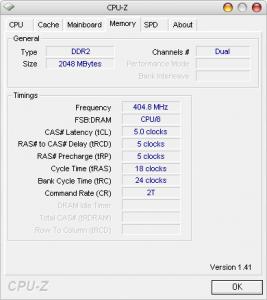
 This is my 24/7 setting. I have problems breaching 290HTT despite lowering multiplier and sorts. Maybe my ram timing not loose enough  |
|
|
Jan 6 2008, 01:07 PM
|
|
Junior Member
12 posts Joined: Dec 2005 From: Ipoh
|
QUOTE(DevilMan @ Jan 6 2008, 01:02 PM) what cooler are u using mate? yep prefer stay around 63c. I'm using the stock heatsink, but the temp has never reached 60C yet, around 44C idle and 55C max when running Super Pi calculating 1M digit (done in 26 sec). Before I overclocked the proc, idle temp was around 33C - 35C, so I see no reason to buy after-market heatsink yet.6000+ is a hot procesor with 125watt, one of the reason i didn't choose that processor. |
|
|
Jan 6 2008, 01:11 PM
|
|
Senior Member
653 posts Joined: Jan 2007 From: Originated From Hell. Status: Lazy.
|
QUOTE(khairulsyahir @ Jan 6 2008, 01:07 PM) I'm using the stock heatsink, but the temp has never reached 60C yet, around 44C idle and 55C max when running Super Pi calculating 1M digit (done in 26 sec). Before I overclocked the proc, idle temp was around 33C - 35C, so I see no reason to buy after-market heatsink yet. well. feel like with those temp your running aircond dude. have you psh super pi and orthos together. then you see your real temp.by the way, what speedfan version your using? |
|
|
|
|
|
Jan 6 2008, 01:12 PM
|
|
Senior Member
7,318 posts Joined: Nov 2006 From: Pulau Sipadan
|
QUOTE(khairulsyahir @ Jan 6 2008, 01:07 PM) I'm using the stock heatsink, but the temp has never reached 60C yet, around 44C idle and 55C max when running Super Pi calculating 1M digit (done in 26 sec). Before I overclocked the proc, idle temp was around 33C - 35C, so I see no reason to buy after-market heatsink yet. SPI running?? try orthos.. i think not the same temp.. |
|
|
Jan 6 2008, 01:13 PM
|
 
Elite
8,545 posts Joined: Aug 2006 From: 224.0.0.6
|
QUOTE(khairulsyahir @ Jan 6 2008, 01:07 PM) I'm using the stock heatsink, but the temp has never reached 60C yet, around 44C idle and 55C max when running Super Pi calculating 1M digit (done in 26 sec). Before I overclocked the proc, idle temp was around 33C - 35C, so I see no reason to buy after-market heatsink yet. Use Orthos to get the full load temp.SPI only utilise one core of your cpu.  -pWs- |
|
|
Jan 6 2008, 01:13 PM
|
|
Senior Member
7,318 posts Joined: Nov 2006 From: Pulau Sipadan
|
QUOTE(redken @ Jan 6 2008, 01:06 PM) This is my 24/7 setting. I have problems breaching 290HTT despite lowering multiplier and sorts. Maybe my ram timing not loose enough |
|
|
Jan 6 2008, 01:17 PM
|
|
Senior Member
2,352 posts Joined: Jan 2003 From: Pixelgasm
|
Kingston KVR Hynix FP-Y5 1GBX2
|
|
|
Jan 6 2008, 01:21 PM
|
|
Senior Member
7,318 posts Joined: Nov 2006 From: Pulau Sipadan
|
QUOTE(redken @ Jan 6 2008, 01:17 PM) Kingston KVR Hynix FP-Y5 1GBX2 have u tried ddr400 divider?? and push to 290 with orthos summore ..error?? |
|
|
Jan 6 2008, 01:23 PM
|
|
Junior Member
12 posts Joined: Dec 2005 From: Ipoh
|
QUOTE(DevilMan @ Jan 6 2008, 01:11 PM) well. feel like with those temp your running aircond dude. have you psh super pi and orthos together. then you see your real temp. Speedfan version 4.33.by the way, what speedfan version your using? whoa...okay, ran orthos and core temp shoot up to more than 70C. Only ran it till 20s then stopped. Looking at how the temp shot up, I didn't dare go any further. My max CPU vcore is 1.63V. I should try lower this down a bit. By the way, does HT voltage affects proc temp? This post has been edited by khairulsyahir: Jan 6 2008, 01:34 PM |
|
|
Jan 6 2008, 01:39 PM
|
|
Senior Member
2,352 posts Joined: Jan 2003 From: Pixelgasm
|
QUOTE(xixo_12 @ Jan 6 2008, 01:21 PM) have u tried ddr400 divider?? and push to 290 with orthos summore ..error?? Either error or cant boot at all@290HTT with same ram settings as above. I dun know how to loose the ram timing further. |
|
Topic ClosedOptions
|
| Change to: |  0.0158sec 0.0158sec
 0.32 0.32
 6 queries 6 queries
 GZIP Disabled GZIP Disabled
Time is now: 5th December 2025 - 04:52 AM |
 Quote
Quote