Welcome Guest ( Log In | Register )

92 Pages « < 60 61 62 63 64 > » Bottom

Outline · [ Standard ] · Linear+

Guide foobar2000 customization topic, post screenshot here.

views
     
yukihatsu
post Nov 3 2007, 02:00 AM

On my way
****
Senior Member
672 posts

Joined: Dec 2006
QUOTE(dOtcO[m] @ Nov 3 2007, 01:31 AM)
thanks a lot  notworthy.gif ..now it works!
hurm..how to change font/font color for song playlist list for that config..
*
go to Preferences>Panels UI>Edit Layout>Playlist Views[Single Column]>Settings>Item Display

and you'll see these codes.
QUOTE
// info
$if(%isplaying%,$alignabs(4,1,40,36,center,top)$font(webdings,9,,208-128-60)$if(%ispaused%,;,4),
$alignabs(4,1,40,36,center,top)$font(Calibri,9,,208-128-60)$if(%totaltracks%,%tracknumber%,$num(%_itemindex%,2).))
$alignabs($sub(%_width%,60),0,60,18,left,middle)$font(Calibri,8,,$if(%isplaying%,208-128-60,208-128-60))[]$font(Calibri,8,,$if(%isplaying%,208-128-60,208-128-60))$if(%isplaying%,%playback_time_remaining%,%length%)
$alignabs($sub(%_width%,60),15,$sub(%_width%,162),18,left,middle)$font(Calibri,8,,$if(%isplaying%,110-110-110,130-130-130))%__bitrate% kbps
$alignabs(44,0,$sub(%_width%,162),18,left,middle)$font(Calibri,8,,$if(%isplaying%,208-128-60,208-128-60))$iflonger(%artist%,30,$trim($cut(%artist%,40))...,%artist%)
$alignabs(250,0,$sub(%_width%,162),18,left,middle)$font(Calibri,8,,$if(%isplaying%,208-128-60,208-128-60))$iflonger(%album%,30,$trim($cut(%album%,50))...,%album%)
$alignabs(250,15,$sub(%_width%,162),18,left,middle)$font(Calibri,8,,$if(%isplaying%,110-110-110,130-130-130))%date%
$alignabs(44,15,$sub(%_width%,162),18,left,middle)$font(Calibri,8,,$if(%isplaying%,110-110-110,130-130-130))$iflonger(%title%,30,$trim($cut(%title%,40))...,%title%)


change the colour by replacing the Blue and Red codes there. use Photoshop to get the RGB codes.

note:
Playing
Idle (Not playing)

omg. this post is too wide eh. ahaha. laugh.gif
cristiano7mu
post Nov 4 2007, 10:24 PM

Look at all my stars!!
*******
Senior Member
2,588 posts

Joined: Nov 2005


Hey i'm new to this foobar found this nice skin
user posted image

from http://www.fooblog2000.com/

but i dunno how to install... after i paste the dll files in "components" folder i still cant see the new skin.

any1 mind to share it?? i read the tutorial but dont understand.
Thanks


Added on November 4, 2007, 10:25 pmand also i wanna use the lyrics function, how to activate it?

This post has been edited by cristiano7mu: Nov 4 2007, 10:25 PM
ZGMF-X24S
post Nov 5 2007, 04:17 PM

banned
*****
Senior Member
870 posts

Joined: May 2007
From: Sri Petaling


QUOTE(cristiano7mu @ Nov 4 2007, 10:24 PM)
Hey i'm new to this foobar found this nice skin
user posted image

from http://www.fooblog2000.com/

but i dunno how to install... after i paste the dll files in "components" folder i still cant see the new skin.

any1 mind to share it?? i read the tutorial but dont understand.
Thanks


Added on November 4, 2007, 10:25 pmand also i wanna use the lyrics function, how to activate it?
*
After copying, u will have to change it manually at the preference. Go to panel UI to activate ur skin.
cristiano7mu
post Nov 5 2007, 09:13 PM

Look at all my stars!!
*******
Senior Member
2,588 posts

Joined: Nov 2005


any tutorial so tat i can learn from it??


Added on November 5, 2007, 9:25 pmi'm stuck at preference> default user interface, then dunno wat to do.
pls help... on the diff themes and lyrics function.

This post has been edited by cristiano7mu: Nov 5 2007, 09:25 PM
dOtcO[m]
post Nov 6 2007, 09:09 AM

Getting Started
**
Junior Member
247 posts

Joined: Aug 2007
u got panelsUI (forgot the name) folder in ur foobar folder? .pui files should be placed there..then only u can select the skin.

installing skin is not that hard though..i only had problems with images path, components missing, component compatibility..huhu.. skin u download got all components archived together? tongue.gif
cristiano7mu
post Nov 6 2007, 06:39 PM

Look at all my stars!!
*******
Senior Member
2,588 posts

Joined: Nov 2005


QUOTE(dOtcO[m)
,Nov 6 2007, 09:09 AM]u got panelsUI (forgot the name) folder in ur foobar folder? .pui files should be placed there..then only u can select the skin.

installing skin is not that hard though..i only had problems with images path, components missing, component compatibility..huhu.. skin u download got all components archived together?  tongue.gif
*
OO.... ok i downloaded the Panel UI thing, and paste
foo_ui_panel.dll in my component then???

wat should i do nx?


This post has been edited by cristiano7mu: Nov 6 2007, 06:58 PM
ZGMF-X24S
post Nov 6 2007, 08:22 PM

banned
*****
Senior Member
870 posts

Joined: May 2007
From: Sri Petaling


QUOTE(cristiano7mu @ Nov 6 2007, 06:39 PM)
OO.... ok i downloaded the Panel UI thing, and paste
foo_ui_panel.dll in my component then???

wat should i do nx?
*
Lol...so messy. ok, if I'm u, I would:
1. Uninstall my Foobar
2. Then. delete the folder in C:\
3. Install Foobar again
4. Download PanelsUI and use README
5. Then only I install the theme
cristiano7mu
post Nov 6 2007, 09:05 PM

Look at all my stars!!
*******
Senior Member
2,588 posts

Joined: Nov 2005


QUOTE(ZGMF-X24S @ Nov 6 2007, 08:22 PM)
Lol...so messy. ok, if I'm u, I would:
1. Uninstall my Foobar
2. Then. delete the folder in C:\
3. Install Foobar again
4. Download PanelsUI and use README
5. Then only I install the theme
*
OK... i reinstall everything and downloaded panelsUI but i couldnt find the "panelsUI" folder in my foobar C:\
do i need to open a new file named PanelsUI myself?


Added on November 6, 2007, 9:16 pmOh... finaly i know how d... thanks all

This post has been edited by cristiano7mu: Nov 6 2007, 09:16 PM
Vorador
post Nov 6 2007, 09:37 PM

Blessed !!!
*******
Senior Member
3,494 posts

Joined: Jan 2003
From: Nosgoth


--edit--

Sorry wrong thread...

This post has been edited by Vorador: Nov 6 2007, 11:24 PM
yukihatsu
post Nov 6 2007, 09:40 PM

On my way
****
Senior Member
672 posts

Joined: Dec 2006
wrong thread Volador. doh.gif sweat.gif
ZGMF-X24S
post Nov 6 2007, 10:09 PM

banned
*****
Senior Member
870 posts

Joined: May 2007
From: Sri Petaling


QUOTE(cristiano7mu @ Nov 6 2007, 09:05 PM)
OK... i reinstall everything and downloaded panelsUI but i couldnt find the "panelsUI" folder in my foobar C:\
do i need to open a new file named PanelsUI myself?


Added on November 6, 2007, 9:16 pmOh... finaly i know how d... thanks all
*
Good u finally know how.
cristiano7mu
post Nov 6 2007, 10:37 PM

Look at all my stars!!
*******
Senior Member
2,588 posts

Joined: Nov 2005


hey is there a UI like Windows Live Messenger... i remember i saw 1...
Vorador
post Nov 6 2007, 11:23 PM

Blessed !!!
*******
Senior Member
3,494 posts

Joined: Jan 2003
From: Nosgoth


QUOTE(yukihatsu @ Nov 6 2007, 09:40 PM)
wrong thread Volador. doh.gif sweat.gif
*
*faster dig a hole and hide inside*
mystical zero
post Nov 7 2007, 05:35 PM

Enthusiast
*****
Senior Member
876 posts

Joined: Nov 2005
From: /root/Melbourne


Guys, I need your assistance.

I am creating my own PanelsUI config for foobar. I would like to split it into two interfaces. One interface for Now Playing and the another for Playlist. However, I'm stuck halfway unsure.gif . I can't think of a way to change between the two interfaces. I know this could be done using $button. But, what should I put for the command argument of the $button function? The objective is to change to the Now Playing interface when for example, the "Now Playing" button is clicked and likewise for the "Playlist" button.

Any help will be appreciated. notworthy.gif
raynmay
post Nov 9 2007, 10:10 AM

~*r@yVy0u*~
******
Senior Member
1,309 posts

Joined: Jan 2003
From: ~]maga land[~


actually how to save a play list for foobar????
i juz know how to add my audio file to it but i duno how to save it to a playlist
im quite new for it
mystical zero
post Nov 9 2007, 11:36 AM

Enthusiast
*****
Senior Member
876 posts

Joined: Nov 2005
From: /root/Melbourne


Finally, I've managed to find the solution to my previous problem. In case you guys don't know, I would like to share this with you. You just need to assign a variable using $puts and place $getpvar(variablename) under the width argument of the $panel function. Then, type in PVAR:SET:<name>:<value> under the command argument of the $button function to set the variable's value. In my case, I set the variable's value to 0 when the button is clicked. Therefore, the panel which I would want to hide will go missing since its width is now 0.

Anyway, here's my very own config created from scratch:

» Click to show Spoiler - click again to hide... «


karasawamk2
post Nov 9 2007, 05:32 PM

Getting Started
**
Junior Member
180 posts

Joined: Jan 2007
From: USJ 9, Subang Jaya


mine..not much

Attached Image

ZGMF-X24S
post Nov 9 2007, 05:47 PM

banned
*****
Senior Member
870 posts

Joined: May 2007
From: Sri Petaling


QUOTE(karasawamk2 @ Nov 9 2007, 05:32 PM)
mine..not much

Attached Image
*
Nice, so clean
yukihatsu
post Nov 9 2007, 06:17 PM

On my way
****
Senior Member
672 posts

Joined: Dec 2006
QUOTE(mystical zero @ Nov 9 2007, 11:36 AM)
Finally, I've managed to find the solution to my previous problem. In case you guys don't know, I would like to share this with you. You just need to assign a variable using $puts and place $getpvar(variablename) under the width argument of the $panel function. Then, type in PVAR:SET:<name>:<value> under the command argument of the $button function to set the variable's value. In my case, I set the variable's value to 0 when the button is clicked. Therefore, the panel which I would want to hide will go missing since its width is now 0.

Anyway, here's my very own config created from scratch:

» Click to show Spoiler - click again to hide... «

*
thats a very nice config. good job. smile.gif
mythmystic
post Nov 9 2007, 08:35 PM

Getting Started
**
Junior Member
169 posts

Joined: Feb 2006
From: MMU, CyberJaya


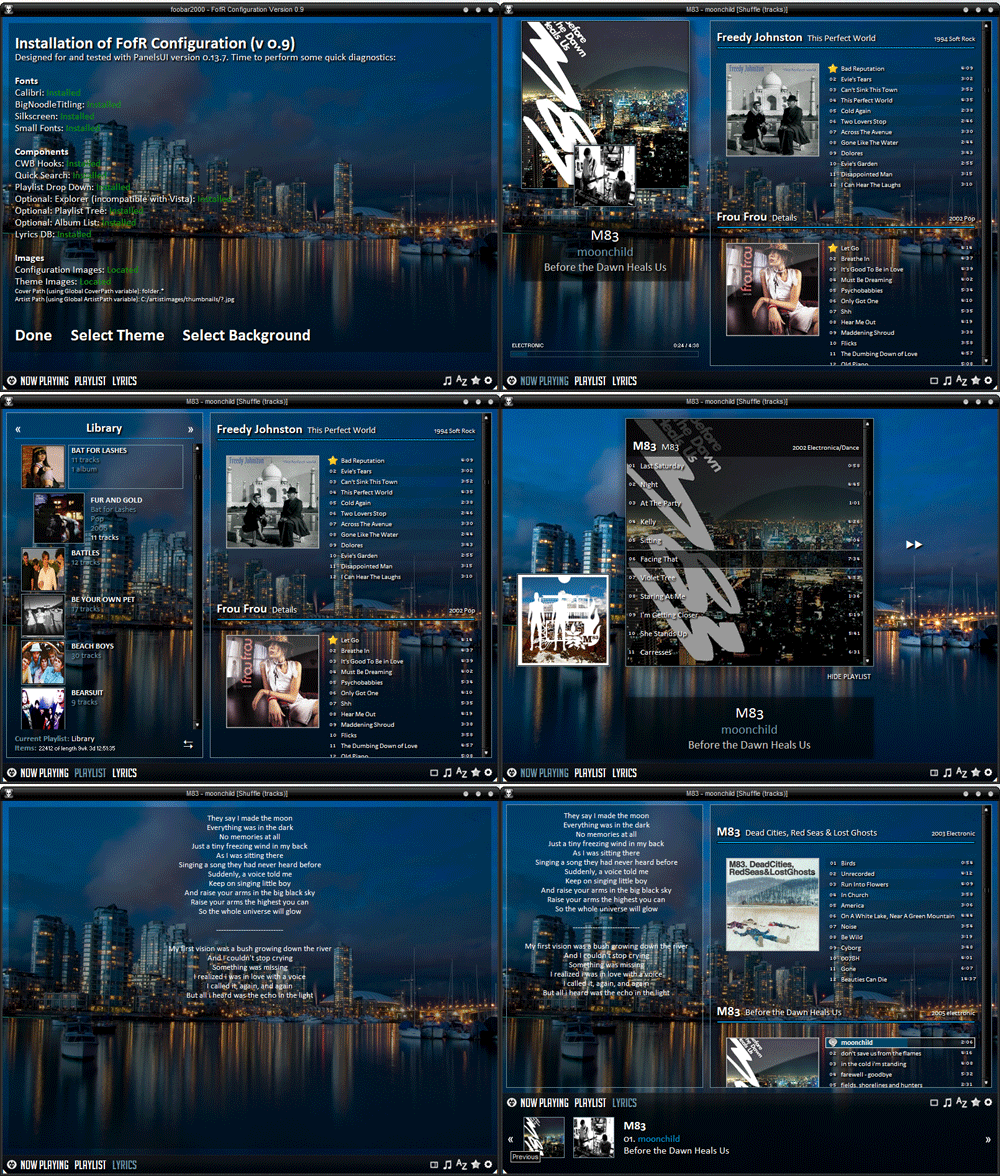
Among my favorite foobar skin...

user posted image user posted image

user posted image user posted image

92 Pages « < 60 61 62 63 64 > » Top
 

Change to:
| Lo-Fi Version
0.8508sec    0.51    6 queries    GZIP Disabled
Time is now: 8th December 2025 - 09:38 PM