Welcome Guest ( Log In | Register )

Outline · [ Standard ] · Linear+

 Tm unifi DL speed drop every night & normal at day, updated 12/5/2025

views
     
TSNormalName
post May 4 2025, 06:17 AM, updated 7 months ago

Getting Started
**
Junior Member
82 posts

Joined: Oct 2015
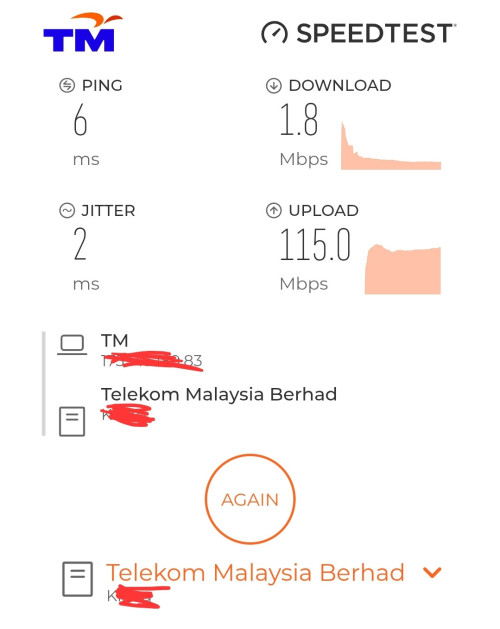
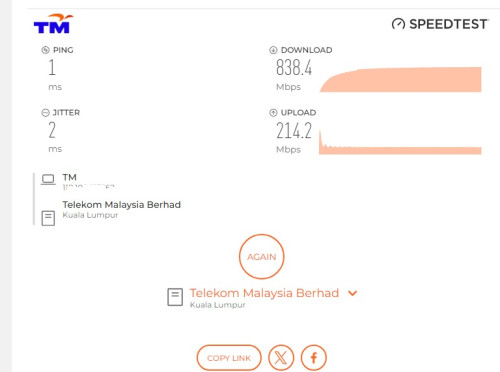
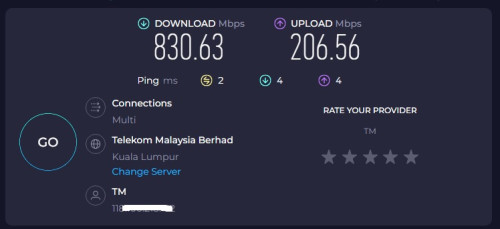
For the past 2 weeks my unifi download speed drop to 1mbps or 0 and upload speed normal evernight when is midnight then the speed is back to normal during day time. Using 800mbps speed
This is very weird anyone knows what happenings?

user posted image


user posted image
speed at 6pm 4/may/2025
This day time speed night time i will upload again when it happens again

[url=https://pictr.com/image/xMfdBc]
user posted image[/url]
The low download speed is back 11/5/2025 3am
After posting this unifi gave me peace for 6 days normal speed now that low download speed is back

user posted image
12 may 1:40am speed drop again


Latest update 11am(12/5/2025) report to tm unifi technician came and check replace connector outside FOC said wear & tear due to weather . hope all goes well thumbsup.gif

user posted image

This post has been edited by NormalName: May 12 2025, 11:37 AM
sonypshomer
post May 4 2025, 06:57 AM

Regular
******
Senior Member
1,594 posts

Joined: Aug 2017
yeah mine too even early morning like now

Usually when you complain they will recommend you to use their own speedtest

https://speedtest.tm.com.my/

But actual test gives different speed which is way slower

https://fast.com/
andyng38
post May 4 2025, 07:59 AM

Look at all my stars!!
*******
Senior Member
2,399 posts

Joined: Jun 2007
There is a possibility TM has severely oversold the bandwidth allotted to your respective areas. At night when more people are at home, everyone gets online, and when they're up and out of the house during the day, u get more bandwidth to use. Keep printscreen copies of your speedtest results with time and date for each test, and keep on complaining.
JimbeamofNRT
post May 4 2025, 08:25 AM

the Original Lanji@_ Chicken Rice Shop Since 2002
******
Senior Member
1,902 posts

Joined: Sep 2012

QUOTE(andyng38 @ May 4 2025, 07:59 AM)
There is a possibility TM has severely oversold the bandwidth allotted to your respective areas. At night when more people are at home, everyone gets online, and when they're up and out of the house during the day, u get more bandwidth to use. Keep printscreen copies of your speedtest results with time and date for each test, and keep on complaining.
*
What many dont know is to make complaint direct to MCMC as well

trust me, they will settle your case faster than ever after make complaint to MCMC

link:

https://aduan.mcmc.gov.my/#/public/login
sadlyfalways
post May 4 2025, 10:07 AM

Regular
******
Senior Member
1,185 posts

Joined: Nov 2020
This shit has been going on since 2020 with UNIFI. Oversell bandwidth, increase speeds just to comply with government regulations but they do not have enough international links and capacity to handle it. In the end speed upgrade from 100 to 800 but actual speed is only 5mbps now

What a shit show

Nobody doing anything about it

3rd world
-PuPu^ZaPruD3r-
post May 4 2025, 11:06 AM

PS5 gamer + 4D addict
*******
Senior Member
2,747 posts

Joined: Jan 2005
From: T20 area


I'm also using 800 Mbps Unifi

Everyday from 8 pm to 12 am, the internet is super slow

Can't even play my online game properly
vhs
post May 4 2025, 12:03 PM

Getting Started
**
Junior Member
90 posts

Joined: May 2022
This problem has been happening for a few years. Don't expect TM to do anything about it because if they care, they would have done something. It affects international site, not local sites. Root cause is most likely during certain hours, the traffic is routed to pass through a busy and congested international node and cause oversea traffic to slow down.


This post has been edited by vhs: May 4 2025, 12:05 PM
netmatrix
post May 4 2025, 12:12 PM

The machine... it sees everything.
*******
Senior Member
6,727 posts

Joined: Jan 2003
From: Zion


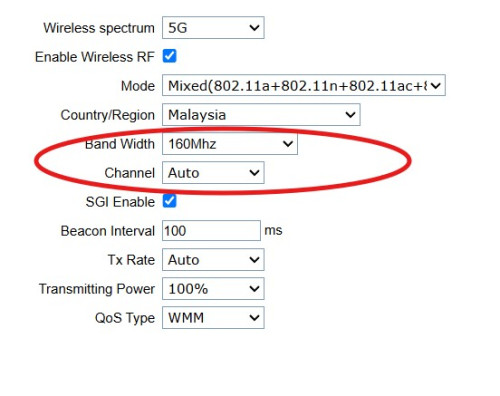
Is everyone getting that problem on Wi-Fi 5Ghz?

I changed my bandwidth setting in my Unifi D-link router and it solved the slow problem.

user posted image
incognitroll
post May 4 2025, 12:49 PM

Getting Started
**
Junior Member
148 posts

Joined: Oct 2018
are you on a high-rise or landed property? which service do you usually download from? using a vpn?

i’ve been getting a consistent 800 mbps all the time. my old router (wdr4300) technically supported gigabit speeds, but it would occasionally drop to 100 mbps, so i got into the habit of checking my speed every time i booted up my pc.

since i replaced the router, i haven’t experienced any speed drops. actually, ever since i moved in, i’ve had full speed all the way. started with 300 mbps, then got a free upgrade to 500 mbps, and now 800 mbps. always maxed out, no issues.

that being said, i never trusted their router. i've been using my own since day one.

This post has been edited by incognitroll: May 4 2025, 12:53 PM
TSNormalName
post May 4 2025, 01:21 PM

Getting Started
**
Junior Member
82 posts

Joined: Oct 2015
QUOTE(incognitroll @ May 4 2025, 12:49 PM)
are you on a high-rise or landed property? which service do you usually download from? using a vpn?

i’ve been getting a consistent 800 mbps all the time. my old router (wdr4300) technically supported gigabit speeds, but it would occasionally drop to 100 mbps, so i got into the habit of checking my speed every time i booted up my pc.

since i replaced the router, i haven’t experienced any speed drops. actually, ever since i moved in, i’ve had full speed all the way. started with 300 mbps, then got a free upgrade to 500 mbps, and now 800 mbps. always maxed out, no issues.

that being said, i never trusted their router. i've been using my own since day one.
*
Landed mine drop to 0 mbps when midnight , what model router u using can intro

This post has been edited by NormalName: May 4 2025, 01:23 PM
incognitroll
post May 4 2025, 01:54 PM

Getting Started
**
Junior Member
148 posts

Joined: Oct 2018
QUOTE(NormalName @ May 4 2025, 01:21 PM)
Landed  mine drop to 0 mbps  when midnight , what model router u using can intro
*
using the ax1800 (ax23) is nothing special and feels outdated by today’s standards. anything in the rm200–400 range would be a nice upgrade over the stock router.

This post has been edited by incognitroll: May 4 2025, 01:56 PM
sakuraboo
post May 4 2025, 02:14 PM

thereisnospoon
******
Senior Member
1,644 posts

Joined: Jan 2007
Definitely need to complain
Momo33
post May 4 2025, 02:17 PM

Regular
******
Senior Member
1,448 posts

Joined: Oct 2019
QUOTE(NormalName @ May 4 2025, 07:17 AM)
For the past 2 weeks my unifi download speed drop to 1mbps or 0 and upload speed normal evernight when is midnight then the speed is back to normal during day time.  Using 800mbps speed
This is very weird anyone knows what happenings?
*
drop to 1 mbps , i would say is a router problem .

what router are u using.
have u check settings .

Have you tried direct LAN cable to lan port and test with a capable PC ..the speed ??

todays router s given free by Unifi like FiberHome, DLink are perfectly good routers.


This post has been edited by Momo33: May 4 2025, 02:20 PM
PJng
post May 4 2025, 04:19 PM

10k Club
********
All Stars
12,039 posts

Joined: Oct 2017


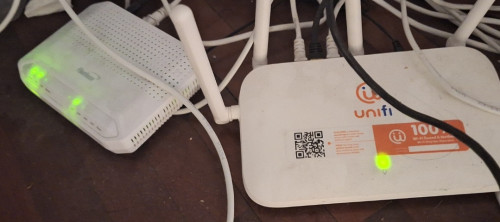
What router you use? That is not possible drop to 0 mbps

user posted image

Mine just ax20
ionStorm
post May 4 2025, 04:28 PM

*nyan*
Group Icon
Elite
3,350 posts

Joined: Jan 2003
From: Petaling Jaya


Lol. This thread is a joke. TM got lambasted without additional info.
jonthebaptist
post May 4 2025, 04:49 PM

Regular
******
Senior Member
1,036 posts

Joined: Sep 2022
i remember some one else also posted this about this issue a while back.

probably these threads:

https://forum.lowyat.net/topic/5489069

https://forum.lowyat.net/topic/5456295 (Post #10)

https://forum.lowyat.net/topic/5424552/+3420 (Post #3434)

This post has been edited by jonthebaptist: May 4 2025, 04:56 PM
JimbeamofNRT
post May 4 2025, 05:03 PM

the Original Lanji@_ Chicken Rice Shop Since 2002
******
Senior Member
1,902 posts

Joined: Sep 2012

QUOTE(netmatrix @ May 4 2025, 12:12 PM)
Is everyone getting that problem on Wi-Fi 5Ghz?

I changed my bandwidth setting in my Unifi D-link router and it solved the slow problem.

user posted image
*
- use wifi scanner. check which channel less congested at your premise
JimbeamofNRT
post May 4 2025, 05:05 PM

the Original Lanji@_ Chicken Rice Shop Since 2002
******
Senior Member
1,902 posts

Joined: Sep 2012

QUOTE(incognitroll @ May 4 2025, 12:49 PM)
are you on a high-rise or landed property? which service do you usually download from? using a vpn?

i’ve been getting a consistent 800 mbps all the time. my old router (wdr4300) technically supported gigabit speeds, but it would occasionally drop to 100 mbps, so i got into the habit of checking my speed every time i booted up my pc.

since i replaced the router, i haven’t experienced any speed drops. actually, ever since i moved in, i’ve had full speed all the way. started with 300 mbps, then got a free upgrade to 500 mbps, and now 800 mbps. always maxed out, no issues.

that being said, i never trusted their router. i've been using my own since day one.
*
wdr4300 is a very ancient router already by now bro - summore it is a free stock router

like I always said lah, always get a decent router
JimbeamofNRT
post May 4 2025, 05:07 PM

the Original Lanji@_ Chicken Rice Shop Since 2002
******
Senior Member
1,902 posts

Joined: Sep 2012

QUOTE(NormalName @ May 4 2025, 01:21 PM)
Landed  mine drop to 0 mbps  when midnight , what model router u using can intro
*
KINDLY PLEASE SPEND SOME MONEY for a better router.

like I said before

many ppl very kiamsiap when it comes to good router but can pay expensive monthly subscription for the internet

this, I cannot brain.

it is like paying ron 100 for kancil 660

those telco supplied router are just plain sucks


if u guys on budget, can consider TP-Link Archer AX53 RM only RM200 plus now

Cheap TP-LINK AX53 AX3000

review
https://www.blacktubi.com/review/archer-ax53/


OR BETTER STILL

get the mid tier router from asus, tp-link is better, bigger ram that can handle bigger traffic, better soc. yes bandwidth is way more important than the latest router available in the market

for example

AX73 5400
under rm500

TP-LINK AX 73 AX5400


OR

This post has been edited by JimbeamofNRT: May 4 2025, 05:09 PM
zerorating
post May 4 2025, 05:35 PM

Miskin Adab
*****
Senior Member
972 posts

Joined: Aug 2007
From: Lokap Polis


ts, you complain speed slow without telling your download source doesnt help people to give further advise.
incognitroll
post May 4 2025, 05:57 PM

Getting Started
**
Junior Member
148 posts

Joined: Oct 2018
QUOTE(JimbeamofNRT @ May 4 2025, 05:05 PM)
wdr4300 is a very ancient router already by now bro - summore it is a free stock router

like I always said lah, always get a decent router
*
when i signed up tm gave me d-link wbr-2300. i still have the box, lol. if i remember correctly, they only started giving out wdr4300 much later.
TSNormalName
post May 4 2025, 06:53 PM

Getting Started
**
Junior Member
82 posts

Joined: Oct 2015
QUOTE(-PuPu^ZaPruD3r- @ May 4 2025, 11:06 AM)
I'm also using 800 Mbps Unifi

Everyday from 8 pm to 12 am, the internet is super slow

Can't even play my online game properly
*
mine speed start slowing at 10pm then hit 1mbps or 0 speed after 12am untill next day like 12pm then then the speed back on too 800 mbps again
JimbeamofNRT
post May 4 2025, 06:55 PM

the Original Lanji@_ Chicken Rice Shop Since 2002
******
Senior Member
1,902 posts

Joined: Sep 2012

QUOTE(incognitroll @ May 4 2025, 05:57 PM)
when i signed up tm gave me d-link wbr-2300. i still have the box, lol. if i remember correctly, they only started giving out wdr4300 much later.
*
damn that is a very ancient router pre 2010 . silver box. no antenna.

wdr4300 is like early 2010s if i remember correctly
TSNormalName
post May 4 2025, 06:56 PM

Getting Started
**
Junior Member
82 posts

Joined: Oct 2015
QUOTE(Momo33 @ May 4 2025, 02:17 PM)
drop to 1 mbps  ,  i would say  is a router problem .

what router are u using.
have u check settings .

Have you tried direct LAN cable to lan port and test with a capable PC ..the speed ??

todays router s  given free  by Unifi  like  FiberHome, DLink  are perfectly  good routers.
*
is a wifi 6 router i just uploaded the modem n router , did not touch any settings.

when the speed drop is tgt with lan & wifi will take screenshot with speed test if happen again tonight
vhs
post May 4 2025, 07:50 PM

Getting Started
**
Junior Member
90 posts

Joined: May 2022
QUOTE(ionStorm @ May 4 2025, 04:28 PM)
Lol. This thread is a joke. TM got lambasted without additional info.
*
It is definitely TM issue because I can work around it using VPN by directing my traffic through different nodes. But not everyone wants to spend more on VPN, so it is not a solution for most people. It is also possible to tell which node the congestion happens when you use traffic routing tools to observe.

Also, if it is a home router issue, then the slow performance will happen either consistently all the time, or randomly. But if it is happening at only certain hours while other hours are fine and the pattern is consistent, then it is TM routing issue.


This post has been edited by vhs: May 4 2025, 07:52 PM
incognitroll
post May 5 2025, 02:37 AM

Getting Started
**
Junior Member
148 posts

Joined: Oct 2018
QUOTE(vhs @ May 4 2025, 07:50 PM)
It is definitely TM issue because I can work around it using VPN by directing my traffic through different nodes. But not everyone wants to spend more on VPN, so it is not a solution for most people. It is also possible to tell which node the congestion happens when you use traffic routing tools to observe.

Also, if it is a home router issue, then the slow performance will happen either consistently all the time, or randomly. But if it is happening at only certain hours while other hours are fine and the pattern is consistent, then it is TM routing issue.
*
now that i think about it, i did run into some routing issues a few times when trying to access international sites, especially twitter. if i remember correctly, it was related to an undersea cable issue. vpn worked as a good workaround.

as for whether this can be blamed on tm, i'm not entirely sure.

and for ts, if you're referring to slow torrent speeds, it’s possible that tm throttles torrent speeds during certain times of the day. i’d recommend using a vpn, and really, you should always use one when torrenting.

https://iknowwhatyoudownload.com/en/peer/
nelson969
post May 5 2025, 07:43 AM

Casual
***
Junior Member
318 posts

Joined: May 2020
no wonder why i keep getting slow sometime
WongTheThief
post May 5 2025, 09:22 AM

Getting Started
**
Junior Member
215 posts

Joined: Sep 2015


the last time I switched to Unifi from Streamyx, the guy that installed the wiring told me out of 100+ units in my condo area here, I'm the 6th unit that bought it. That time got promo offer but have to hold for 2 years, and it was before COVID time. He also told me that if more people install Unifi in my condo area, be prepared to get slower connection.

After 2022 COVID, I saw a lot of people switched to Unifi already, if I turn on WIFI now and can definitely see all the SSIDs with @Unifi at the back. Although I don't feel any differences la since I don't use until 100MBPS.
TSNormalName
post May 11 2025, 02:58 AM

Getting Started
**
Junior Member
82 posts

Joined: Oct 2015
After posting this unifi gave me peace for 6 days normal speed now that low download speed is back

 

Change to:
| Lo-Fi Version
0.0163sec    0.77    5 queries    GZIP Disabled
Time is now: 1st December 2025 - 10:56 AM