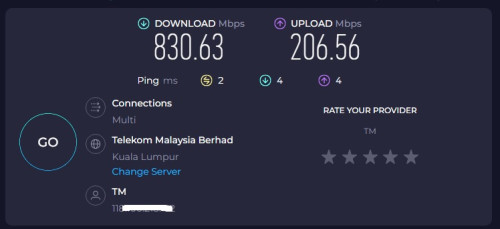
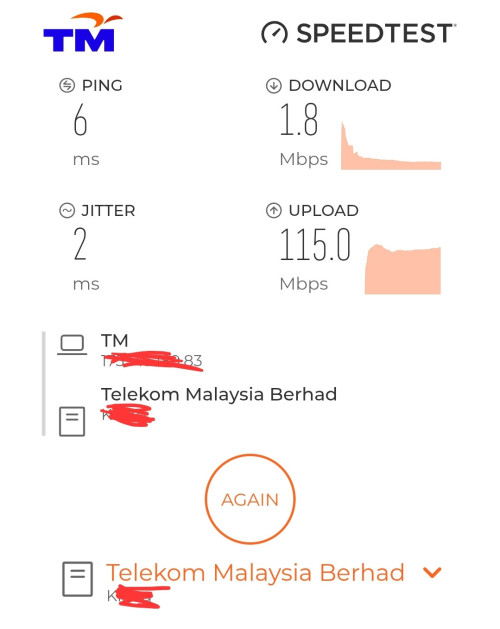
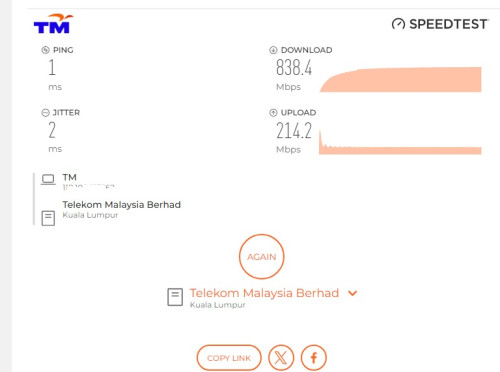
For the past 2 weeks my unifi download speed drop to 1mbps or 0 and upload speed normal evernight when is midnight then the speed is back to normal during day time. Using 800mbps speed This is very weird anyone knows what happenings?
speed at 6pm 4/may/2025 This day time speed night time i will upload again when it happens again
[url=https://pictr.com/image/xMfdBc] [/url] The low download speed is back 11/5/2025 3am After posting this unifi gave me peace for 6 days normal speed now that low download speed is back
12 may 1:40am speed drop again
Latest update 11am(12/5/2025) report to tm unifi technician came and check replace connector outside FOC said wear & tear due to weather . hope all goes well
This post has been edited by NormalName: May 12 2025, 11:37 AM
There is a possibility TM has severely oversold the bandwidth allotted to your respective areas. At night when more people are at home, everyone gets online, and when they're up and out of the house during the day, u get more bandwidth to use. Keep printscreen copies of your speedtest results with time and date for each test, and keep on complaining.
There is a possibility TM has severely oversold the bandwidth allotted to your respective areas. At night when more people are at home, everyone gets online, and when they're up and out of the house during the day, u get more bandwidth to use. Keep printscreen copies of your speedtest results with time and date for each test, and keep on complaining.
What many dont know is to make complaint direct to MCMC as well
trust me, they will settle your case faster than ever after make complaint to MCMC
This shit has been going on since 2020 with UNIFI. Oversell bandwidth, increase speeds just to comply with government regulations but they do not have enough international links and capacity to handle it. In the end speed upgrade from 100 to 800 but actual speed is only 5mbps now
This problem has been happening for a few years. Don't expect TM to do anything about it because if they care, they would have done something. It affects international site, not local sites. Root cause is most likely during certain hours, the traffic is routed to pass through a busy and congested international node and cause oversea traffic to slow down.
This post has been edited by vhs: May 4 2025, 12:05 PM
are you on a high-rise or landed property? which service do you usually download from? using a vpn?
i’ve been getting a consistent 800 mbps all the time. my old router (wdr4300) technically supported gigabit speeds, but it would occasionally drop to 100 mbps, so i got into the habit of checking my speed every time i booted up my pc.
since i replaced the router, i haven’t experienced any speed drops. actually, ever since i moved in, i’ve had full speed all the way. started with 300 mbps, then got a free upgrade to 500 mbps, and now 800 mbps. always maxed out, no issues.
that being said, i never trusted their router. i've been using my own since day one.
This post has been edited by incognitroll: May 4 2025, 12:53 PM
are you on a high-rise or landed property? which service do you usually download from? using a vpn?
i’ve been getting a consistent 800 mbps all the time. my old router (wdr4300) technically supported gigabit speeds, but it would occasionally drop to 100 mbps, so i got into the habit of checking my speed every time i booted up my pc.
since i replaced the router, i haven’t experienced any speed drops. actually, ever since i moved in, i’ve had full speed all the way. started with 300 mbps, then got a free upgrade to 500 mbps, and now 800 mbps. always maxed out, no issues.
that being said, i never trusted their router. i've been using my own since day one.
Landed mine drop to 0 mbps when midnight , what model router u using can intro
This post has been edited by NormalName: May 4 2025, 01:23 PM
Landed mine drop to 0 mbps when midnight , what model router u using can intro
using the ax1800 (ax23) is nothing special and feels outdated by today’s standards. anything in the rm200–400 range would be a nice upgrade over the stock router.
This post has been edited by incognitroll: May 4 2025, 01:56 PM
For the past 2 weeks my unifi download speed drop to 1mbps or 0 and upload speed normal evernight when is midnight then the speed is back to normal during day time. Using 800mbps speed This is very weird anyone knows what happenings?
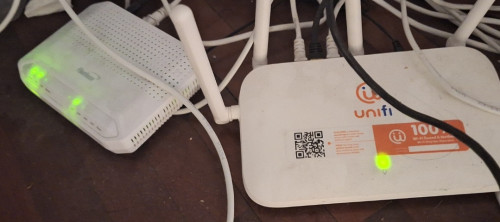
drop to 1 mbps , i would say is a router problem .
what router are u using. have u check settings .
Have you tried direct LAN cable to lan port and test with a capable PC ..the speed ??
todays router s given free by Unifi like FiberHome, DLink are perfectly good routers.
This post has been edited by Momo33: May 4 2025, 02:20 PM
are you on a high-rise or landed property? which service do you usually download from? using a vpn?
i’ve been getting a consistent 800 mbps all the time. my old router (wdr4300) technically supported gigabit speeds, but it would occasionally drop to 100 mbps, so i got into the habit of checking my speed every time i booted up my pc.
since i replaced the router, i haven’t experienced any speed drops. actually, ever since i moved in, i’ve had full speed all the way. started with 300 mbps, then got a free upgrade to 500 mbps, and now 800 mbps. always maxed out, no issues.
that being said, i never trusted their router. i've been using my own since day one.
wdr4300 is a very ancient router already by now bro - summore it is a free stock router
like I always said lah, always get a decent router
get the mid tier router from asus, tp-link is better, bigger ram that can handle bigger traffic, better soc. yes bandwidth is way more important than the latest router available in the market


 May 4 2025, 06:17 AM, updated 7 months ago


 [/url]

 Quote
Quote











 0.0176sec
 0.37
0.37
 5 queries
 GZIP Disabled