Welcome Guest ( Log In | Register )

Outline · [ Standard ] · Linear+

 Official TM UniFi High Speed Broadband Thread V43, READ 1ST PAGE FOR RELEVANT WIFI INFO!

views
     
BenYeeHua
post Aug 29 2025, 10:32 PM

Regular
******
Senior Member
1,873 posts

Joined: Nov 2010


QUOTE(PJng @ Aug 29 2025, 09:53 PM)
Until now who say price got different with what IP type?
Misleading other ppl
*
Because by tech, only static IP is meaningful to customer, lol. tongue.gif

Anyways, still testing the cloudflare, still need to bet luck at sliver thing to get fulll speed, else just 100kb/s download + 80ms and 80% chance get connection hang, lol. tongue.gif

I tested Firefox http2, not change, still depend on that sliver thing, and it will fallback to H2 when detect too high packet loss. laugh.gif
At least it is CloudFlare loadbalance issues, so just wait and see how la. tongue.gif

This post has been edited by BenYeeHua: Aug 29 2025, 10:32 PM
BenYeeHua
post Aug 30 2025, 02:15 PM

Regular
******
Senior Member
1,873 posts

Joined: Nov 2010


QUOTE(cyberic @ Aug 30 2025, 10:43 AM)
TM did stated it might proceed if user didn't answer call. There is risk. I submitted on 14 Aug, only received the call on 29 Aug. Some is faster and some is slow.
*
Last time I terminate my acc by going to TM point, u guess what?
It still going on for 2 months, and charged me extra RM 10 for their fault, which don't cut off within 30 days. sweat.gif

I already confirm nothing else should be done(including receive sms/call) from that TM point(mitc), yet still kena lol. laugh.gif
---
So far there is nothing for LOS issues, the signal stay the same during raining, guess Seremban just upgrade the fiber then. tongue.gif
Only left is the old CloudFlare issues la, SG bad and KUL random bad after 8 PM.

This post has been edited by BenYeeHua: Aug 30 2025, 02:16 PM
BenYeeHua
post Aug 30 2025, 11:59 PM

Regular
******
Senior Member
1,873 posts

Joined: Nov 2010


QUOTE(HayasakaAi @ Aug 30 2025, 11:40 PM)
don’t know about unifi but I subscribe CD fiber under Allo infra while subscribing to Time. No issue
*
I guess it depend on area, at my Uni area, the house got pulled 2-4 fiber, because port a lot, lol. laugh.gif
Even 1 ppl pulling via the Windows, yes, WINDOWS. laugh.gif
BenYeeHua
post Sep 26 2025, 11:45 PM

Regular
******
Senior Member
1,873 posts

Joined: Nov 2010


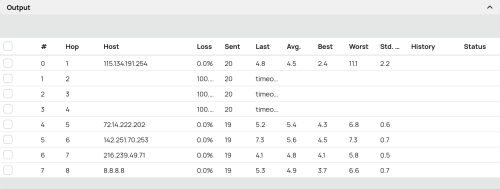
Wow, so much hang now...
CODE
traceroute to 8.8.8.8, 30 hops max, 52 bytes payload, ICMP mode
1   *
2   100.89.191.254  *                         RFC6598
                                             45.65 ms / 13.11 ms / 63.61 ms
3   10.233.97.55    *                         RFC1918
                                             64.12 ms / 14.12 ms / 43.56 ms
4   *
5   72.14.197.66    AS15169                   马来西亚 吉隆坡联邦直辖区 吉隆坡  about.google
                                             125.34 ms / 85.59 ms / 101.06 ms
6   192.178.98.147  AS15169                   马来西亚 吉隆坡联邦直辖区 吉隆坡  about.google
                                             431.11 ms / 444.40 ms / 509.19 ms
7   142.251.224.21  AS15169  [GOOGLE]         马来西亚 吉隆坡联邦直辖区 吉隆坡  about.google
                                             101.62 ms / 167.75 ms / 165.82 ms
8   8.8.8.8         AS15169                   GOOGLE.COM    about.google
   dns.google                                171.50 ms / 147.57 ms / 146.01 ms

Welcome to the country where 8.8.8.8 can get bottleneak lol. laugh.gif

Including other links to SG, HK etc.
But funny, speedtest to fast and digi malaysia are fine, both <15ms, guess they are high priority connection. brows.gif
---
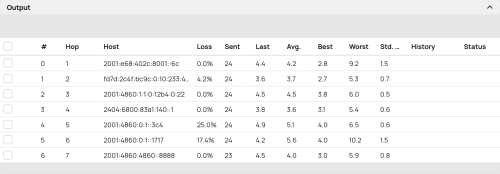
While IPv4 lagging, v6 fine, lol.
CODE
traceroute to 2001:4860:4860::8888, 30 hops max, 52 bytes payload, ICMP mode
1   *
2   [REMOVED]    AS4788   马来西亚  双文丹  tm.com.my
                                      7.62 ms / 7.02 ms / 9.06 ms
3   fd7d:2c4f:bc9c:0:10:233:44:25 *        RFC4193
                                      23.76 ms / 9.73 ms / 10.52 ms
4   2001:4860:1:1:0:12b4:0:22 AS15169  GOOGLE.COM GOOGLE.COM   about.google
                                      10.24 ms / 10.11 ms / 8.40 ms
5   2404:6800:83a1:40::1      AS15169  GOOGLE.COM GOOGLE.COM   about.google
                                      10.50 ms / 11.03 ms / 10.11 ms
6   2001:4860:4860::8888      AS15169  GOOGLE.COM GOOGLE.COM   about.google
   dns.google                         12.22 ms / 10.50 ms / 10.60 ms


This post has been edited by BenYeeHua: Sep 26 2025, 11:50 PM
BenYeeHua
post Sep 27 2025, 09:11 AM

Regular
******
Senior Member
1,873 posts

Joined: Nov 2010


QUOTE(sam240 @ Sep 27 2025, 01:00 AM)
» Click to show Spoiler - click again to hide... «

If no good for 8.8.8.8, is meaning we should set to other DNS ?
*
Not DNS issues, it is the IPv4 for my area bursted.
You can see the bottleneck is route #2 which is 100.89.191.254.

QUOTE(kwss @ Sep 27 2025, 12:10 AM)
Ok je...
user posted image

EDIT: Add IPv6
user posted image
*
Ya, yesterday night strange, only v4 bursted, v6 running like nothing happen, might be something happen at the CGNAT.

---
For DNS, it still depend.
Like Steam, using Google DNS bring me to server without throttled by TM, while 1.1.1.1 doing the reverse.

But, Google DNS kick me to HK IPv6 Aliyun, while 1.1.1.1 bring me to Malaysia IPv4 Aliyun(by not return any IPv6 address).
A lot of times Google DNS doing this, a far far away IPv6 server, so...

It is still kind of depend, like yesterday night, sure kick me to IPv6 solved the network issues. laugh.gif

This post has been edited by BenYeeHua: Sep 27 2025, 09:18 AM
BenYeeHua
post Sep 27 2025, 11:31 AM

Regular
******
Senior Member
1,873 posts

Joined: Nov 2010


QUOTE(QuantumEdge @ Sep 27 2025, 09:26 AM)
My side is different
Ipv6 severely throttles my speed in the night with 30-40% PL
The moment I switched to ipv4, full speed zero PL with normal ping(14ms...still horrible tbh)
Gave up trying to resolve this issue, going to rent a VPS
*
packet loss are same on my side, but yesterday night was, you wanna 90% packet loss at IPv4, or 30-40% packet loss at IPv6, bad or worst only 2 choice. doh.gif
BenYeeHua
post Sep 27 2025, 11:28 PM

Regular
******
Senior Member
1,873 posts

Joined: Nov 2010


QUOTE(kwss @ Sep 27 2025, 12:51 PM)
Can post your aliyun domain? It's a known issue with Aliyun DNS actually but just want to check it out myself. If the domain NS server is using Aliyun very high chance it's this problem.

IPv4 depends on your luck. TM use BGP AS pre-pending to load balance IPv4 prefix over different circuit. IPv6 don't have this issue.

So if your public / post-CGNAT IPv4 got load balanced to a congested path, you will have endless problem.

In a sense Maxis don't have this problem because they never do any of the prepending hack.
*
Using Google DNS DoH(chrome)
chrome://net-internals/?#dns

Resolved IP addresses of "h5api.m.taobao.com": ["2401:b180:7003::3e0","59.82.121.14"].
No alternative endpoints.

Resolved IP addresses of "h5api.m.taobao.com": ["59.82.121.14"].

Resolved IP addresses of "h5api.m.taobao.com": ["2408:4001:f10::2dd","47.246.165.34"].

3 times(wait for TTL timeout), different results.

Can be it asking by rotate in between 8888 8844(both IPv6) la.
----
First can understand, it is return oversea for both IPv6 and v4, and it is located at Zhe Jiang China(IPv6) and BeiJing China(IPv4)...
Second is strange, IPv6 missing.
Third one is more strange, BeiJing(IPv6) and SG(IPv4)

I was observed this strange F5 slowness when grabbing Red Packet here, so found out this IPv6 issues, but I never found out IPv4 also can be in China, until now. laugh.gif
https://huodong.taobao.com/wow/z/tbhome/pc-growth/tao-coin?
----
FYI, CloudFlare DoH is

Resolved IP addresses of "h5api.m.taobao.com": ["47.246.165.34"].

So if the only server is SG, going to CloudFlare solved the most, and it will not give you strange oversea IPv6 address.
But when server is MY or SG, like Lazada and Shopee, it is a headache to choose in between Google DNS and CloudFlare DNS...
(Most of the time both platform works, just sometimes it required me to turn off and on my phone WiFi, or cut off at chrome://net-internals/?#sockets by flush sockets pools, solved.)

Like steam, using Google DNS give full speed to upgrade Steam Beta client, while CloudFlare DNS have high chance getting slow speed during Night.
Guess it is solved on Steam side, as both giving same SG server now.

QUOTE(heLL_bOy @ Sep 27 2025, 04:18 PM)
Alicloud MY/SG/HK is running TM PNI shouldn't be a problem, only certain time there is a spike.

I am not sure about v6, whether is PNI or not.
*
As above, unsure why Google DNS prefer to jumping around. sweat.gif
This is also why I default to CloudFlare DNS, it might not giving the best Malaysia server as result, but it will ensure it is SG server. thumbsup.gif
BenYeeHua
post Sep 27 2025, 11:29 PM

Regular
******
Senior Member
1,873 posts

Joined: Nov 2010


QUOTE(3nf0rc3r @ Sep 27 2025, 01:19 PM)
Currently still using TP-link C1200, originally turbo upgrade to 300mbps for free with hyptv. But after 24 month they revised to higher price, refused to let me stay at cheaper price so I downgraded to 100mbps without hyptv.

Now I wonder if they offer SWU 500mbps will they provide new router.

Also Disney hotstar is just an account or do they provide TV box as well?
*
WoW, you still using AC1200v2?
It is always a bet that it gonna last 30 days uptime, or <24 hours uptime. laugh.gif

But yes, the NAT Boost is better than orange router la, now the skyworth router not bad without Nat Boost, I guess the processor higher raw power solved it. brows.gif

And yes, you can ask for new router, as they will prefer to upgrade your modem for higher speed stability, but it will be Modem + Router combo, if you wanna more stable, then you need to buy another router.
But, based on me tested for years, this skyworth combo router/modem good enough liao.

Even if they don't give a new one, you can ask for replacement and agree to resign 24 months, lol. tongue.gif

This post has been edited by BenYeeHua: Sep 27 2025, 11:32 PM
BenYeeHua
post Sep 29 2025, 09:12 AM

Regular
******
Senior Member
1,873 posts

Joined: Nov 2010


QUOTE(kwss @ Sep 28 2025, 12:40 AM)
BenYeeHua It is definitely Aliyun DNS problem.
Long story short I manually did the recursion. Damn this taobao has really deep CNAME and NS server.
For Google viewpoint, they did the recursion for me.

» Click to show Spoiler - click again to hide... «


EDIT:
I have a theory. They are doing this to game Google's algorithm.
Maybe having IPv6 address gives them better SEO score

EDIT 2:
Theory number 2: They don't do anycast, maybe don't even have a load balancer, hence they return individual server IP.

EDIT 3:
IPv6 address is slow because TM egress to France!!!
On AWS Singapore, Amazon actually has PNI with AS4837 CHINA UNICOM in Equinix SG1 so latency is 3x better:
CODE

--- unitbrain-guide-unit-v6-pub.m.taobao.com.gds.alibabadns.com ping statistics ---
100 packets transmitted, 100 received, 0% packet loss, time 7673ms
rtt min/avg/max/mdev = 77.357/77.406/77.626/0.039 ms, pipe 2, ipg/ewma 77.501/77.407 ms


- vs shipwrecked TM, 3x worse latency with 18% packet loss -

CODE

--- unitbrain-guide-unit-v6-pub.m.taobao.com.gds.alibabadns.com ping statistics ---
100 packets transmitted, 82 received, 18% packet loss, time 21316ms
rtt min/avg/max/mdev = 194.695/214.661/219.423/3.083 ms, pipe 2, ipg/ewma 215.310/210.466 ms

*
1. Possible, that explain why BiliBili which used Aliyun before also gaming Google DNS with IPv6, but only at US.
(It gone after not using AliYun)

2. Anycast only perform for certain IP address, they don't like that because how's China network works.
Like I said before, for Malaysia user, anycast IPv4 in China just redirect you via US, then China Telecom.(As TM default to that)
Having split IP address helps their complex China network work well, the quota is expensive, specially cross border.

Even transfer in between 3 big ISP causing a lot of issues, they had to setup 3 line for 3 ISP, and pay at least 10x of price for each line... sweat.gif
20 years ago they also split into 3 game server for 3 ISP, now just pull 3 line for servers la, also any Steam gamer in China just use booster(proxy) to redirect P2P traffic at server center, and only same Tencent oversea line available for all proxy.
Also lucky, China's video platform disabled PCDN for oversea customer, else it gonna be hell to watch any video over P2P, lol.

3. Yes, old news liao. laugh.gif
TM never useful to those China traffic, 20 years ago all line to China can get 50ms(just ensure it is 60.50.x.x high QoS), 10 years ago I can get 50ms by connect to China Mobile, now, going to HK also bottleneck liao. laugh.gif
BenYeeHua
post Sep 29 2025, 09:14 AM

Regular
******
Senior Member
1,873 posts

Joined: Nov 2010


QUOTE(ListenToTheWind @ Sep 28 2025, 11:45 PM)
Anyone got experience with Unifi Skyworth router + modem combo device?

Earlier this week TM suddenly replaced our existing Fiberhome modem (which was working fine) with the current Skyworth device. Since then, nightmare begin to happen, connection disconnect randomly sometime twice a days, sometime once every few days. When nobody home to reboot the device manually, files get out of sync.

Didn't manage to get through their 100 until now, keep suggesting to DIY through their app. Chat through their agent on app and all she does is restart the port but problem still persist.

Anyone got any tips that can configure the Skyworth so that it reconnect automatically when the connection drop?
*
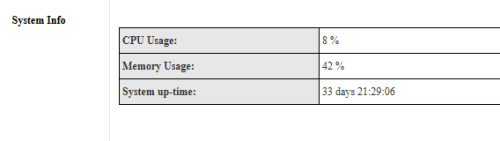
Nope, 2 years with GN630V, online at least 30 days.

user posted image

You should check the GPON uptime, then PPPoE uptime.

If GPON uptime > PPPoE uptime a lot, then having another router might solved it(If it is not on PPPoE server side issues).
If router uptime > GPON uptime, call tech to check the fiber.

QUOTE(ChenKaiWen @ Sep 29 2025, 09:00 AM)
TM provides the infrastructure to connect you to Maxis. Maxis handles the rest. But if the TM infrastructure in the area goes down often, then it will affect Maxis etc as well.
*
Yes, based on discussion here, the only problem is hardly to get both technical works together, either TM come and Maxis no come, or reverse. laugh.gif

This post has been edited by BenYeeHua: Sep 29 2025, 09:16 AM
BenYeeHua
post Sep 29 2025, 09:16 PM

Regular
******
Senior Member
1,873 posts

Joined: Nov 2010


QUOTE(kwss @ Sep 29 2025, 02:31 PM)
The only thing I am interested when it comes to networking + China is anti-censorship software from the people.

Their great firewall kills cross-border performance. They have 10gbps fiber to the home just like Singapore and Switzerland but it's useless to anything overseas, just like TM evening congestion.

US government already ban China Telecom in America. Basically what China Telecom does is offers Direct Connect (DX) and services to selected China company so user in America has great experience.

If you are AWS customer you can get one too.
https://aws.amazon.com/marketplace/pp/prodview-qnkjhp2vtw4fm

What DX does is basically bypass the great firewall, pending approval from the Party. I think all you need is an ICP license, which basically says you don't help their people bypass censorship and don't host any material the Party dislike.

I think the correct term is you must buy IP Transit from each and every big 3 state owned telco.
Their IX peering is congested on purpose so you must pay for IP transit to get great experience.
This is the foundation reason that cause PCDN to exist. Only China needs it. The rest of the world don't need to deal with this shit.
*
Yes, China is Business pay the price, while others is Customer pay the price, with some interesting like SG and Thailand is cheap Internet as solution.(SG I know, center is there, unsure Thailand etc)
And also HK already slowly taken control by 3 ISP in China, they provided a few cheap internet and getting famous, just it will be bad news for us, as it will means less traffic for oversea traffic. laugh.gif

As I recall got new cable incoming, just checked.
https://www.submarinenetworks.com/en/systems/intra-asia/alc
https://www.submarinecablemap.com/submarine...-link-cable-alc
RFS
2027 Q4

Should enough? hmm.gif
---Off-Topic, maybe I shared already? Really no memory liao lol.
» Click to show Spoiler - click again to hide... «

---
Anyways, back to real life experience, as long as I kick my Bilibili live stream video from m3u back to flv, there is stable connection available in Malaysia, the problem is the API call overhead(for m3u) is too high. sweat.gif
d1--ov-gotcha05b.bilivideo.com and d1--ov-gotcha05.bilivideo.com stable(can get <1s browser buffer), unstable when IPv4 unstable.
d1--ov-gotcha07b.bilivideo.com and d1--ov-gotcha07.bilivideo.com sometimes unstable(need buffer >2s), but got IPv6.

For m3u, only d1--ov-gotcha208b.bilivideo.com stable, quick check show it is TM and zenlayer MY.
Other like 207 207b, yuck.

» Click to show Spoiler - click again to hide... «

» Click to show Spoiler - click again to hide... «

---
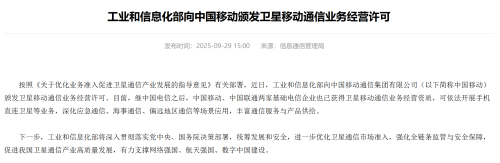
Another news for today, 3 China ISP got license to launch and operate Traffic/Internet satellite, so if lucky, Asia can get hand for sea customer to use the satellite, when 6G is ready? hmm.gif

This will greatly improve internet coverage in Asia, specially for forest country like us, only problem is price. tongue.gif

user posted image
BenYeeHua
post Sep 29 2025, 09:23 PM

Regular
******
Senior Member
1,873 posts

Joined: Nov 2010


QUOTE(Cendol_Pulut90 @ Sep 29 2025, 07:51 PM)
In my case the culprit actually 5Ghz wifi, all of sudden no internet but all devices connected to 2.4Ghz no issue at all.

My solution : login to skyworth go to Network > Wan and copy the PPPoe username password. Done copy, in same page, change the Router mode to Bridge mode, then save. Next switch on old fiberhome router and login. Go to Network> Wan, insert the user and pass, then save, reboot.

Then connect the cable in Lan 1 Skyworth to Wan port router fiberhome. wait 2 - 4 min and the connection should be up like old setup.
*
Did you try disable EasyMesh and WPA3?

So far, EasyMesh causing trouble when hotspot enabled nearby, and it will background scan causing spike, just like Windows.
I recommend this also, if your windows device got issues, but for Intel, set the roaming to restrain when high/good RSSI in driver settings enough liao, only MTK need this. laugh.gif
https://www.reddit.com/r/BoosteroidCommunit...wlan_optimizer/
https://www.martin-majowski.de/
(But latest Intel got removed, lol)
https://community.intel.com/t5/Wireless/Ple...ng/td-p/1623942
Android no need, all latest Android 12+ already enabled throttling background scan in dev settings.

Yes, EashMesh will perform another background scan, specially for hotspot, I turn on an unsetup smart socket and it caused my 2.4Ghz stop working.
EashMesh also not following the radar scan interval setup that you set in WiFi 5Ghz, so spike gonna happen from time to time.


WPA3 is no internet, yes.
Because the device connected by asking WPA3, but sometimes the router suddenly stop accepting WPA3 and only allow WPA2, your device will stop connecting as it is not running as WPA3.
After I set to WPA2 only, all my Android device asking me to forget the network or refuse to connect, as it disallow WPA2 handshake. sweat.gif

This post has been edited by BenYeeHua: Sep 29 2025, 09:25 PM
BenYeeHua
post Sep 30 2025, 11:57 PM

Regular
******
Senior Member
1,873 posts

Joined: Nov 2010


QUOTE(kwss @ Sep 29 2025, 10:09 PM)
BenYeeHua
Whatever happen to bilibili is not TM fault. A lot of China content provider sucks.

» Click to show Spoiler - click again to hide... «


Also don't even think you can do DX without physical presence in China. ICP license demand you to be physically there. Anything happen they can kidnap you. They are commie after all.

Another problem with ICP license is this: You must apply for every single DX provider you connect with.
The Party already covered left right and center that nobody climb the wall even if they are rich.

So yea, network operator do not want to hear about China, unless they are from China.
User experience varies depending on telco, not because the telco care, but because by sheer luck the telco / upstream peer with the China service you use.
*
Yes, agree you at tech point of view, the money customer saved for subs any ISP at lower cost, not just bring them basic access of internet, but also bring them to the evil part of who gonna bear the cost.
And well, it is also them, as hidden cost.

Now they just stuck with most video bitrate around 4Mbps, PCDN getting them ban for uploading anything to cloud etc, even live streamer also get such issues and had to sign up for RM 800 plans for just pure upload without throttling.
Even if PCDN implement well, it can save cost by having mostly local traffic, but nope, all they want is to sell those server/service/content provider expensive quota, and they only dare to ban ISP's customer to "solve" the issues. laugh.gif
(Another reason is they no need to pull a lot of local fiber, this one I am kind of unsure on tech part la, like how many it gonna take to fulfill the requirement for PCDN.)

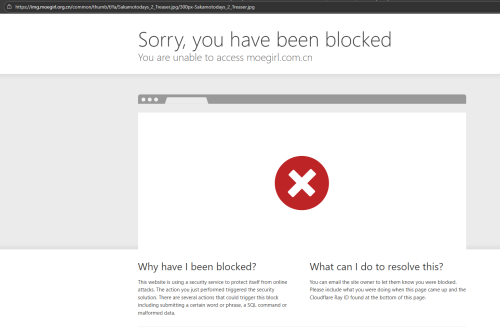
And not just that, 1 hour ago, I get block again, because I am oversea IP.
https://zh.moegirl.org.cn/Mainpage
https://img.moegirl.org.cn/common/thumb/f/f...s_2_Treaser.jpg
user posted image
The orig pic is fine, just thumb over IPv6, lol.

Still, any place has it own network issues la, like TM, 10 years ago, they dare to throttle any ADSL to Google traffic as low as 480kbps, including Google search, and it only solved after fiber online....
That time, the only thing you can hope for YouTube full speed, is you get kick/chosen by Google to connect TM peer server, and DNS give you TM peer IP. sweat.gif
BenYeeHua
post Sep 30 2025, 11:57 PM

Regular
******
Senior Member
1,873 posts

Joined: Nov 2010


QUOTE(Cendol_Pulut90 @ Sep 29 2025, 09:44 PM)
I did try disable the Easymesh and still the problem happened in 5Ghz wifi. Regarding the WPA3 i havent change / test the configuration.

So should i only use wpa 2 and disable EasyMesh ?
*
Just take a try first, should be something like radar detection and WPA3.
If same, then it means router issues.
BenYeeHua
post Oct 19 2025, 09:55 PM

Regular
******
Senior Member
1,873 posts

Joined: Nov 2010


And back for complaints, lol.

1. zenlayer at Malaysia broken, Tencent side working.
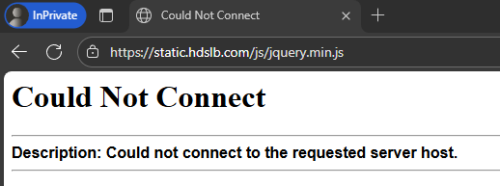
https://static.hdslb.com/js/jquery.min.js

If connect to Zenlayer like 2602:ffe4:c20:110::10d or 162.128.167.237, failed to loaded.
If connect to tencent MY like 43.174.2.195, success

First case broken in MY, last like few weeks.
Should be something broken from MY to HK/CN, at least for Zenlayer.

Edit: check back another browser, after timeout, I get this message, lol.
user posted image
So yup, Zenlayar to HK/CN. tongue.gif

---
2. After power cut off and reboot, IPv4 routing from 175.141.17x.x to cloudflare MY broken, like others
IPv4/v6 having 80ms latency to CF MY, but IPv6 can reach higher speed without high packet loss, v4 can't.
» Click to show Spoiler - click again to hide... «


Funny, download overloaded and only got 100-1024 kbps, while upload 20-50M lol.

For HoYoVerse game, they use CloudFlare for unknown reason, using special CF IP 104.18.13.147, all HoYo game broken at night, stop login because failed to connect or timeout.
Yesterday testing around 11 PM, found out random jumping at TM side, including router #2- router #N not responding to traceroute.

Guess issues on TM side, this time?
Gonna test a few more days, might try reboot router to jump back 115.134.x.x if still the same.
---
3. Amazon MY having issues after power and reboot, unsure SG affected or not, gonna test later 0 AM.

Amazon MY which is sg-public-api.hoyolab.com IP address 54.192.117.45 etc failed to respond on time, while it is holding the previous request, it can still respond to another next few request lol.

As the main server is at SG, already write host file to connect directly to Amazon SG, gonna see it works at 0 AM or not.
---
4. For Tencent, QQ server already slow upload/download for image at night, last for 1 month liao.
But not that CloudFlare slow, still got 0.1-10 Mbps la, lol.

So far that's it, nothing break too much, until you use those imfamous website, or CloudFlare website lol. laugh.gif

---
Oh ya, forget, the WARP to KUL and Johor is getting broken a lot of times, it is because the connection/routing keep getting changed, so it hang the connection until you reconnect to WARP again.
But funny enough, Johor still got lower latency 10ms and higher speed test/full speed, lol.


This post has been edited by BenYeeHua: Oct 19 2025, 10:06 PM
BenYeeHua
post Oct 19 2025, 10:01 PM

Regular
******
Senior Member
1,873 posts

Joined: Nov 2010


QUOTE(GamersFamilia @ Oct 19 2025, 04:08 PM)
True, me myself got 2 prepaid lines so if unifi down for a while, it doesn't stop me to online
*
So far unifi 99% uptime for me la, the only problem is only power cut off few days ago, then back online lol.

After power back online, can see inside the router, the fiber got signal/reading, but no TX packet received, lol. laugh.gif
Surprised the mobile line still running while power off. tongue.gif

Or, when I reboot router, and get shared IP address with those bots, and caused blacklist at server side. doh.gif sweat.gif
Still, public IP is a should thing to get for UniFi users, as there is lot of bots running around and MCMC don't care about it. sweat.gif
BenYeeHua
post Nov 11 2025, 10:05 PM

Regular
******
Senior Member
1,873 posts

Joined: Nov 2010


QUOTE(jasontanky @ Nov 8 2025, 10:23 PM)
Cloudflare problem again
*
And again today, they send cloudflare-dns.com to blackhole lol.
Now all using cloudflare-dns.com as DoH will keep getting DNS error because heavy packet loss. rclxms.gif

3 Pages < 1 2 3Top
 

Change to:
| Lo-Fi Version
0.1428sec    0.52    7 queries    GZIP Disabled
Time is now: 6th December 2025 - 03:06 AM