Welcome Guest ( Log In | Register )

Outline · [ Standard ] · Linear+

 Official TM UniFi High Speed Broadband Thread V43, READ 1ST PAGE FOR RELEVANT WIFI INFO!

views
     
heLL_bOy
post Jul 15 2025, 01:42 AM

Regular
******
Senior Member
1,350 posts

Joined: Nov 2004
From: HEAVEN & HELL


QUOTE(kwss @ Jul 15 2025, 12:34 AM)
You wrote TELIA but your screenshot shows ARELION.
Here is mine from Arelion:
CODE

Router: ash-b2 / Ashburn (Equinix)
Command: traceroute ipv4 115.134.x.x timeout 1 source Loopback0

Tracing the route to 115.134.x.x

1   *
   ash-bb2-link.ip.twelve99.net (62.115.141.51) 2 msec  1 msec
2   *  *
   ewr-bb2-link.ip.twelve99.net (62.115.136.200) 6 msec
3  chi-bb2-link.ip.twelve99.net (62.115.132.135) 70 msec  *  *
4   *  *  *
5  den-bb2-link.ip.twelve99.net (62.115.140.185) 43 msec
   den-bb2-link.ip.twelve99.net (62.115.137.114) 297 msec
   den-bb2-link.ip.twelve99.net (62.115.140.185) 43 msec
6   *  *  *
7   *  *  *
8   *  *  *
9  telekom-malaysia-inc.e0-2.core3.sjc2.he.net (64.71.148.166) 238 msec  238 msec  238 msec
10  *  *  *
11 115.134.179.x.x msec  278 msec  247 msec


Notice Arelion dump my traffic to HE as well on the exact same router. Latency okay.
Everything else is blinded from MPLS circuit, shortcut straight to the BNG.

But this is a different problem from your Singapore egress. That one is because it route to France.
Mine:
CODE

core2.sin1.he.net> traceroute 115.134.x.x source 216.218.252.9
 traceroute to 115.134.x.x (115.134.x.x), 30 hops max, 60 byte packets
1  * * *
2  10.55.108.155 (10.55.108.155)  43.783 ms  47.473 ms  44.243 ms
3  10.55.108.98 (10.55.108.98)  45.484 ms  44.574 ms  45.222 ms
4  10.55.52.27 (10.55.52.27)  39.889 ms  39.836 ms  50.679 ms
5  * * *
6  115.134.x.x (115.134.x.x)  45.348 ms  45.702 ms  52.435 ms


Yours:
CODE

core2.sin1.he.net> traceroute 175.136.0.0  source 216.218.252.9
 traceroute to 175.136.0.0 (175.136.0.0), 30 hops max, 60 byte packets
1  * * *
2  216.66.89.226 (216.66.89.226)  170.901 ms  170.793 ms  170.944 ms <- telekom-malaysia-inc.e0-33.switch1.mrs1.he.net
3  * * *
4  * * *

MRS = ICAO airport code

BGP Output:
CODE

core2.sin1.he.net> show ip bgp routes detail 175.136.0.0
 Number of BGP Routes matching display condition : 4
Status A:AGGREGATE B:BEST b:NOT-INSTALLED-BEST C:CONFED_EBGP D:DAMPED
      E:EBGP H:HISTORY I:IBGP L:LOCAL M:MULTIPATH m:NOT-INSTALLED-MULTIPATH
      S:SUPPRESSED F:FILTERED s:STALE x:BEST-EXTERNAL
RPKI State V: Valid I: Invalid N: Not found ?: Undefined
1         Prefix: 175.136.0.0/18, Rx path-id:0x00000000, Tx path-id:0x039e0001, rank:0x00000001,  Status: BI,  Age: 4d10h23m33s
        NEXT_HOP: 216.66.89.226, Metric: 1364, Learned from Peer: 216.218.253.52 (6939)
         LOCAL_PREF: 140,  MED: 0,  ORIGIN: igp,  Weight: 0,  RPKI State: N, GROUP_BEST: 1
        AS_PATH: 4788
           COMMUNITIES: 6939:1000 6939:1111 6939:7384 6939:8250 6939:9002
2         Prefix: 175.136.0.0/18, Rx path-id:0x00000000, Tx path-id:0x039a0001, rank:0x00000002,  Status: I,  Age: 4d10h48m22s
        NEXT_HOP: 64.71.148.166, Metric: 1765, Learned from Peer: 216.218.252.199 (6939)
         LOCAL_PREF: 140,  MED: 0,  ORIGIN: igp,  Weight: 0,  RPKI State: N, GROUP_BEST: 0
        AS_PATH: 4788
           COMMUNITIES: 6939:1000 6939:1111 6939:7309 6939:8840 6939:9001
3         Prefix: 175.136.0.0/18, Rx path-id:0x00000000, Tx path-id:0x039f0001, rank:0x00000003,  Status: I,  Age: 4d10h45m23s
        NEXT_HOP: 64.71.148.166, Metric: 1765, Learned from Peer: 216.218.253.63 (6939)
         LOCAL_PREF: 140,  MED: 0,  ORIGIN: igp,  Weight: 0,  RPKI State: N, GROUP_BEST: 0
        AS_PATH: 4788
           COMMUNITIES: 6939:1000 6939:1111 6939:7309 6939:8840 6939:9001
4         Prefix: 175.136.0.0/18, Rx path-id:0x00000000, Tx path-id:0x03210001, rank:0x00000004,  Status: Ex,  Age: 4d12h5m7s
        NEXT_HOP: 74.82.46.50, Metric: 0, Learned from Peer: 74.82.46.50 (4788)
         LOCAL_PREF: 140,  MED: 0,  ORIGIN: igp,  Weight: 0,  RPKI State: N, GROUP_BEST: 1
        AS_PATH: 4788 4788
           COMMUNITIES: 6939:1000 6939:7282 6939:8702 6939:9003
      Last update to IP routing table: 4d10h23m33s


From here, you can see path 1 is chosen BUT the optimal path is actually path 4!
So bring this up to HE.

Finally, I want to stress that you must separate your problem down to individual endpoint. You see HE, you lump them all into one problem. In reality they are distinct problem with a different root cause.
*
my screenshot test all is using AWS EAST region itself, not any third party ip transit result. Because each provider will have different router host and different BGP community connecting it cannot be same.

And above tested ip TM egress is using AS1299 not even using AS6939.

This post has been edited by heLL_bOy: Jul 15 2025, 01:43 AM
heLL_bOy
post Jul 15 2025, 02:00 AM

Regular
******
Senior Member
1,350 posts

Joined: Nov 2004
From: HEAVEN & HELL


QUOTE(kwss @ Jul 15 2025, 01:47 AM)
Yo man you cannot be serious. It clearly shows they traverse the exact same router with exact same IP.

I even drill down the problem to be specific enough for you to report to NOC, both TM and HE.

I don't know what you want. I'm giving free diagnostic to you and but keep spinning and spinning with different thing.
*
i just provide what i see as a proof, not any third party result as proof and showing different things.

thanks for your free diagnostic, maybe we are on different views on this matter.


heLL_bOy
post Jul 15 2025, 09:42 PM

Regular
******
Senior Member
1,350 posts

Joined: Nov 2004
From: HEAVEN & HELL


QUOTE(evilhomura89 @ Jul 15 2025, 09:18 PM)
Any idea what can be done as a customer to report this to the relevant party (MCMC)?
We're not technically sound to explain this to CS/engineers but at the same time we're suffering from slow speed/congestion
*
Is hard for TM do the adjustment, at most they only do egress part routing change. They wouldn't care much on ingress routing issue. As in the past i trying to do so many reports and feedback they always say " no problem " in their end.

For example for myself like my Virtual Machine suffering loss packet or congestion or speed issue, i just contact their support asking for help to change their ingress routing from the current to another (*remarks* you have to find out others upstream which TM side is not congested during peak hours) everything solved no loss packet no congestion issue biggrin.gif

This post has been edited by heLL_bOy: Jul 15 2025, 09:44 PM
heLL_bOy
post Jul 15 2025, 10:52 PM

Regular
******
Senior Member
1,350 posts

Joined: Nov 2004
From: HEAVEN & HELL


QUOTE(PowerSlide @ Jul 15 2025, 10:20 PM)
my issue is back, friday and saturday its fine then y'day back to packet loss high ping again
*
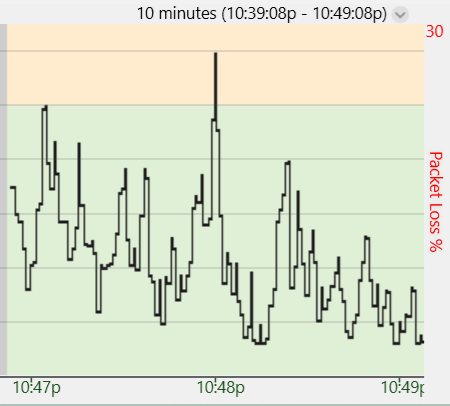
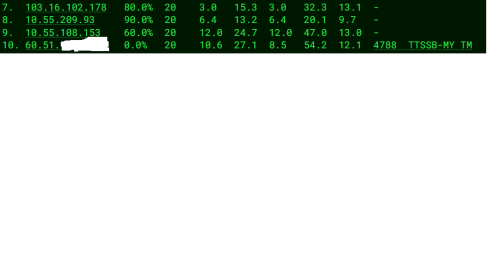
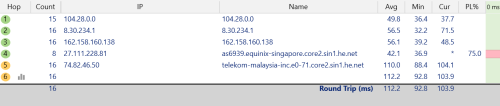
its seem like TM egress side (Equinix SG) causing the issue. i try using DO do a test that they using Equinix for TM Egress and ingress is SGIX is same as G-core route.

TM egress
user posted image

DO ingress
user posted image
heLL_bOy
post Aug 6 2025, 09:46 PM

Regular
******
Senior Member
1,350 posts

Joined: Nov 2004
From: HEAVEN & HELL


QUOTE(PJng @ Aug 6 2025, 09:25 PM)
load forum also slow
*
Cloudflare ingress to TM issue cause this.


QUOTE(PalakOtakHang @ Aug 6 2025, 09:27 PM)
i ping google also high ping. WadaF. International routing also gg, all ping like shit. Is it just me?
*
Google ping was normal to me.
heLL_bOy
post Aug 13 2025, 04:44 PM

Regular
******
Senior Member
1,350 posts

Joined: Nov 2004
From: HEAVEN & HELL


QUOTE(QuantumEdge @ Aug 8 2025, 05:38 PM)
Sorry, I'm not that tech savvy. May I know what you meant screenshot of MyIX?
Been comparing my DNS host to someone that is using controld as well
Turns out his traffic gets routed to xsp-h03 while mine get tossed to xssp-h05 consistently
Singapore host vs Tokyo host
At the moment cloudflare is normal for me, no high latency or packet loss
Going to test with cloudflare DNS in a moment, these are with controld

fl=56f175
h=speed.cloudflare.com
ip=2001:e68:5453:4bf1:7d7e:812d:19bf:86f7
ts=1754645744.24
visit_scheme=https
uag=Mozilla/5.0 (Windows NT 10.0; Win64; x64) AppleWebKit/537.36 (KHTML, like Gecko) Chrome/138.0.0.0 Safari/537.36
colo=KUL
sliver=none
http=http/1.1
loc=MY
tls=TLSv1.3
sni=plaintext
warp=off
gateway=off
rbi=off
kex=X25519MLKEM768

1    <1 ms    <1 ms    <1 ms  2001:e68:5453:4bf1::1
  2    5 ms    3 ms    3 ms  2001:e68:402c:8001::b3
  3    12 ms    12 ms    10 ms  2001:e68::b:4010
  4    44 ms    44 ms    42 ms  2400:8800:1f01:19::1
  5  108 ms    *        *    2400:8800:1f11:59::1
  6    98 ms  100 ms  100 ms  2400:8800:1f11:59::2
  7    *        *        *    Request timed out.
  8  100 ms  100 ms    99 ms  2403:2500:400::3
  9    97 ms    99 ms    98 ms  controld-edge1-tyo.anycast.net [2403:2500:400:20::ce5]
10  100 ms    98 ms  100 ms  freedns.controld.com [2606:1a40::22]
*
freedns.controld.com IPv6 ping from Maxis

CODE

PING 2606:1a40::11 (2606:1a40::11) with 64 bytes of data:
64 bytes from 2606:1a40::11 ttl=56 time=13ms
64 bytes from 2606:1a40::11 ttl=56 time=12ms
64 bytes from 2606:1a40::11 ttl=56 time=13ms


heLL_bOy
post Aug 13 2025, 11:51 PM

Regular
******
Senior Member
1,350 posts

Joined: Nov 2004
From: HEAVEN & HELL


QUOTE(QuantumEdge @ Aug 13 2025, 05:13 PM)
Control D Troubleshooting - Wed, 13 Aug 2025 09:06:24 UTC
---------------------------------------------------------
IPv4 Address      |  xxxxxxxxxxxxx
IPv4 ISP          |  4788 (TM Net, MY)
IPv6 Address      |  N/A
IPv6 ISP          |  N/A
Using Control D  |  XSP
Resolver          |  xxxxxxxxx
DNS Protocol      |  DNS-over-TLS
DNS Latency      |  9.07ms
DNS Host          |  xsp-h04
DNS Source IP    |  xxxxxxxxx
Proxy Authorized  |  No
Null Routed      |  No
Proxy Latency    |  7.76ms
Proxy Host        |  xsp-h02
Proxy Source IP  | xxxxxxxx

Switched to IPV4, perfectly fine now
Still, once contract finished I'm going to switch back to Maxis
At least I dont need to deal with weird routing issues
*
Actually got good and bad factor on each ISP in malaysia especially in routing terms.
heLL_bOy
post Aug 18 2025, 11:10 PM

Regular
******
Senior Member
1,350 posts

Joined: Nov 2004
From: HEAVEN & HELL


QUOTE(blacktubi @ Aug 18 2025, 08:36 PM)
I suspect congestion between TM and MYIX

Try doing a speedtest wit MYIX selected as the server
*
Main root cause is Cloudflare itself, their ingress bgp always sending to TM congestion traffic path.
heLL_bOy
post Aug 21 2025, 01:01 AM

Regular
******
Senior Member
1,350 posts

Joined: Nov 2004
From: HEAVEN & HELL


QUOTE(BenYeeHua @ Aug 20 2025, 10:58 PM)
JHB also the same I guess.
Installed 1.1.1.1 app and switch Tunnel protocol to MASQUE, it will redirect you from SG to JHB, and yes it is fast, but every 30-90s all line no data incoming/outgoing for >20s, unusable. doh.gif
----
TM Seremban(or Melaka, unsure which one I connected) fiber somehow bursted tonight, hmm.

» Click to show Spoiler - click again to hide... «


Upload fine, just download, hmm...
Oversell? laugh.gif
----
After 3 hours of issues, the latency getting a little bit better, jumping in between 70-110ms now.
» Click to show Spoiler - click again to hide... «

*
162.158.24.253 belong to KUL location not JHB, But my ping to KUL is normal 10ms no ping timeout, the only problem is SG

for SG location their ingress routing is using HE SG laugh.gif

every night is exploding when peak hours.


This post has been edited by heLL_bOy: Aug 21 2025, 01:03 AM
heLL_bOy
post Aug 26 2025, 01:37 AM

Regular
******
Senior Member
1,350 posts

Joined: Nov 2004
From: HEAVEN & HELL


QUOTE(BenYeeHua @ Aug 25 2025, 09:11 PM)
Even small country will faced inter-ISP broadband issues, lol.

» Click to show Spoiler - click again to hide... «

Let us go to Digi via SG, lol. laugh.gif
*
Should be this prefix routing wrong for ingress.

Digi fiber ip prefix got PNI with TM ping only >10ms

heLL_bOy
post Aug 26 2025, 08:56 PM

Regular
******
Senior Member
1,350 posts

Joined: Nov 2004
From: HEAVEN & HELL


QUOTE(BenYeeHua @ Aug 26 2025, 12:47 PM)

» Click to show Spoiler - click again to hide... «

Tested again, 12:30 PM.
I guess because TM user too many, so this routing is to ensure Digi user got better experience?.... hmm.gif

*
I found the problem already, Is Digi side ingress routing to TM ip prefix some is sending their traffic using TM PNI (10ms) and some is using HE SG (90ms-100ms)


heLL_bOy
post Sep 12 2025, 12:55 PM

Regular
******
Senior Member
1,350 posts

Joined: Nov 2004
From: HEAVEN & HELL


QUOTE(IccyAsd @ Sep 12 2025, 07:23 AM)
anyone can help confirm if public IP is still an option for Unifi 300mbps> ?

Recent unifi agent told only business package allowed to request for public IP.
*
Yes, still possible to get a public IP address, provided you have a valid reason.


heLL_bOy
post Sep 19 2025, 01:44 PM

Regular
******
Senior Member
1,350 posts

Joined: Nov 2004
From: HEAVEN & HELL


Below is list that source ingress traffic to TM having issue,

HKIX
Cogent HK
HE SG
MYIX (200G)
Arelion HK


From my observation in the past two weeks is been happening till to date.

for HKIX and Cogent HK randomly timing spike and loss packet, i suspected some attacks to TM network.


heLL_bOy
post Sep 27 2025, 04:18 PM

Regular
******
Senior Member
1,350 posts

Joined: Nov 2004
From: HEAVEN & HELL


QUOTE(BenYeeHua @ Sep 27 2025, 09:11 AM)

But, Google DNS kick me to HK IPv6 Aliyun, while 1.1.1.1 bring me to Malaysia IPv4 Aliyun(by not return any IPv6 address).
A lot of times Google DNS doing this, a far far away IPv6 server, so...

It is still kind of depend, like yesterday night, sure kick me to IPv6 solved the network issues. laugh.gif
*
Alicloud MY/SG/HK is running TM PNI shouldn't be a problem, only certain time there is a spike.

I am not sure about v6, whether is PNI or not.
heLL_bOy
post Sep 28 2025, 09:54 PM

Regular
******
Senior Member
1,350 posts

Joined: Nov 2004
From: HEAVEN & HELL


QUOTE(BenYeeHua @ Sep 27 2025, 11:28 PM)
As above, unsure why Google DNS prefer to jumping around. sweat.gif
This is also why I default to CloudFlare DNS, it might not giving the best Malaysia server as result, but it will ensure it is SG server. thumbsup.gif
*
Because every DNS provider work differently, just choose which you think is suitable for you biggrin.gif
heLL_bOy
post Sep 28 2025, 09:57 PM

Regular
******
Senior Member
1,350 posts

Joined: Nov 2004
From: HEAVEN & HELL


QUOTE(Haru97 @ Sep 28 2025, 09:39 PM)
Entire Unifi network is down, after public ipv4 gateway out to the internet is broken, not your house issue.

Target Name: one.one.one.one
        IP: 1.1.1.1
  Date/Time: 9/28/2025 9:28:57 PM - 9/28/2025 9:38:57 PM

Hop  Sent  PL%    Min    Max    Avg  Host Name / [IP]
  1    51    0  0.39  0.65  0.50  192.168.88.1 [192.168.88.1]
  2    52    0  1.37  5.42  3.22  218.111.255.254 [218.111.255.254]
  3    48  54  8.14  71.38  12.61  10.55.51.35 [10.55.51.35]
  4    52  12  4.56  32.73  8.36  10.55.52.31 [10.55.52.31]
  5    52  21  10.14  20.77  15.43  10.55.37.84 [10.55.37.84]
  6    49  14  6.09  67.31  15.45  162.158.24.253 [162.158.24.253]
  7    49  16  7.90  19.52  15.32  one.one.one.one [1.1.1.1]
*
Only previous week encounter some loss packet and high ping when their ingress bgp mess up.

till to date my connectivity to Cloudflare KUL not even a single loss packet. I guess is local congestion


heLL_bOy
post Sep 28 2025, 11:06 PM

Regular
******
Senior Member
1,350 posts

Joined: Nov 2004
From: HEAVEN & HELL


QUOTE(Haru97 @ Sep 28 2025, 10:00 PM)
High probably get ddosed on AS4788? Or some intern pushed a bad config to the bgp router
*
i just do a test on your ip subnet gateway 218.111.255.254, its seem unusual high possible ddos attacked.

and i try another subnet 218.111.239.254 doesn't have this issue.
heLL_bOy
post Sep 28 2025, 11:34 PM

Regular
******
Senior Member
1,350 posts

Joined: Nov 2004
From: HEAVEN & HELL


QUOTE(panda37 @ Sep 28 2025, 11:17 PM)
300mbps package but only getting 18mbps on fast.com... it is unifi issue right

dont think i am troublesome and keep asking plz... coz just scolded by parents  cry.gif
*
Ya, its not normal, how about try to a reset on onu and router get a new ip and do a test again?
heLL_bOy
post Sep 28 2025, 11:37 PM

Regular
******
Senior Member
1,350 posts

Joined: Nov 2004
From: HEAVEN & HELL


QUOTE(fruitie @ Sep 28 2025, 11:32 PM)
Surprisingly using Maxis but on UniFi infra is not affected. Full speed here.
*
Maxis using its own upstream not TM, nothing is affected whenever TM has issue.

unless unifi last mile to maxis got congestion issue only may bring up this.
heLL_bOy
post Oct 21 2025, 06:11 PM

Regular
******
Senior Member
1,350 posts

Joined: Nov 2004
From: HEAVEN & HELL


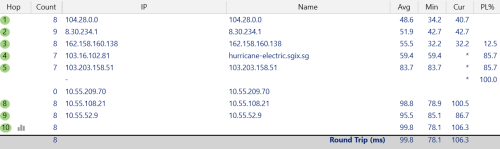
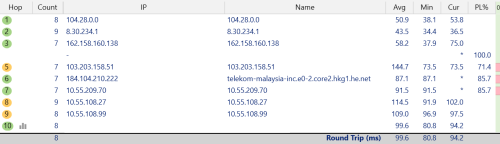
There are 3 different egress routing from Cloudflare KUL to TM.

user posted image

Above this route often having loss packet issue. (SGIX to BBIX HK to HE to TM)


user posted image

Above this route sometime only will having loss packet issue. (BBIX HK to HE to TM)


user posted image

Above this route so far tested no loss packet issue. (Equinix SG to HE to TM)


TM only use Cloudflare PNI for ingress to Cloudflare KUL.

and TM use Cloudflare PNI JHB for both direction for warp services.

This post has been edited by heLL_bOy: Oct 21 2025, 06:15 PM

3 Pages < 1 2 3 >Top
 

Change to:
| Lo-Fi Version
0.0214sec    0.43    7 queries    GZIP Disabled
Time is now: 5th December 2025 - 02:30 PM