

QUOTE(e 3 h y 0 r @ Dec 13 2024, 11:55 AM)
woohooo thanks! 

once installed the DIMM, kindly update here yaSuggest me ram size please, current 2x8gb
|
|
 Dec 13 2024, 11:58 AM Dec 13 2024, 11:58 AM
|
 
Junior Member
916 posts Joined: Jun 2007 From: Selangor 
|
QUOTE(e 3 h y 0 r @ Dec 13 2024, 11:55 AM) woohooo thanks! once installed the DIMM, kindly update here ya |
|
|
|
|
|
Dec 13 2024, 12:09 PM
|

Senior Member
1,523 posts Joined: Apr 2005 From: too far to see 
|
QUOTE(e 3 h y 0 r @ Dec 13 2024, 11:55 AM) woohooo thanks! 8+8+16+16 is an odd combinationhttps://www.blackview.hk/blog/computers/can...l%20performance. ... Yes, you can mix 8GB and 16GB RAM if they are the same type and compatible with your motherboard. The system will run, but it might not use full dual-channel performance. ... https://www.quora.com/Can-I-add-16GB-to-my-...GB-in-the-other ...Matching RAM: It is generally recommended to use RAM modules of the same capacity, speed, and timings for optimal performance. While it is possible to mix different capacities, such as 8GB and 16GB, it may result in the RAM running in asynchronous mode, which can affect performance [3]. ... but yeah, you can Try to play around 16GB + 16GB startup.....feel the diff 8+8+16+16 startup....feel the diff, see see which works the best 16+16 for me is good enough thou, i be hoping to donate or sell 8GB ram to fund back myself....lol ...current clockspeed is 3200hz, so i'll just get 16gb x 2 same clock speed right? - if you want to mix them. yes This post has been edited by taitianhin: Dec 13 2024, 12:15 PM |
|
|
Dec 13 2024, 12:29 PM
|

Senior Member
3,918 posts Joined: Jan 2003 From: Paris 
|
QUOTE(taitianhin @ Dec 13 2024, 12:09 PM) 8+8+16+16 is an odd combination got it, maybe i'll get back same model 8+8 or remove the old one and add a new 16+16https://www.blackview.hk/blog/computers/can...l%20performance. ... Yes, you can mix 8GB and 16GB RAM if they are the same type and compatible with your motherboard. The system will run, but it might not use full dual-channel performance. ... https://www.quora.com/Can-I-add-16GB-to-my-...GB-in-the-other ...Matching RAM: It is generally recommended to use RAM modules of the same capacity, speed, and timings for optimal performance. While it is possible to mix different capacities, such as 8GB and 16GB, it may result in the RAM running in asynchronous mode, which can affect performance [3]. ... but yeah, you can Try to play around 16GB + 16GB startup.....feel the diff 8+8+16+16 startup....feel the diff, see see which works the best 16+16 for me is good enough thou, i be hoping to donate or sell 8GB ram to fund back myself....lol ...current clockspeed is 3200hz, so i'll just get 16gb x 2 same clock speed right? - if you want to mix them. yes |
|
|
Dec 13 2024, 12:31 PM
|
|
Senior Member
1,523 posts Joined: Apr 2005 From: too far to see
|
QUOTE(Baconateer @ Dec 13 2024, 10:43 AM) 2 X 16GB ram Basically he just replied the answer on first postLOL |
|
|
Dec 13 2024, 12:33 PM
Show posts by this member only | IPv6 | Post
#45
|

Senior Member
5,088 posts Joined: Jun 2013 From: Blue Planet
|
QUOTE(taitianhin @ Dec 13 2024, 12:31 PM) Basically he just replied the answer on first post TS shouldnt try to use all 4 RAM slots for stability issuesLOL 2 slots is the best |
|
|
Dec 13 2024, 12:37 PM
|
|
Senior Member
3,918 posts Joined: Jan 2003 From: Paris
|
QUOTE(taitianhin @ Dec 13 2024, 12:31 PM) Basically he just replied the answer on first post hehhe, but appreciate everyone's input because i'm a noob. at least today i understand alot more about ram.LOL QUOTE(Baconateer @ Dec 13 2024, 12:33 PM) TS shouldnt try to use all 4 RAM slots for stability issues got it, so i guess 16 x 2 then, if i get lucky in my trades later then 32 x 2 heheh2 slots is the best |
|
|
|
|
|
 Dec 13 2024, 12:43 PM Dec 13 2024, 12:43 PM
|
|
Senior Member
3,918 posts Joined: Jan 2003 From: Paris
|
i've been here since 21 years ago, can't believe this place still rocking and have super friendly and kind members since day 1. vibes here never changed!
we need communities like u guys to answer our noob questions so we too get educated easily than googling and reading hours of gibberish. Hopefully future Ai can copy your kindness too! Can't wait to send my com for cleaning and get new rams and check out the upgrade. Thank you once again to those who replied me! I'll send u guys bubble tea when I'm back in Msia provided your area have grab. DM me yo, appreciate your help!   |
|
|
Dec 13 2024, 12:48 PM
|
|
Senior Member
1,523 posts Joined: Apr 2005 From: too far to see
|
QUOTE(e 3 h y 0 r @ Dec 13 2024, 12:37 PM) hehhe, but appreciate everyone's input because i'm a noob. at least today i understand alot more about ram. The Gigabyte AORUS GA-AX370-Gaming 5 motherboard was first available on February 22, 2017got it, so i guess 16 x 2 then, if i get lucky in my trades later then 32 x 2 heheh If next few trading is good....maybe get a new lappy? QUOTE(e 3 h y 0 r @ Dec 13 2024, 12:43 PM) i've been here since 21 years ago, can't believe this place still rocking and have super friendly and kind members since day 1. vibes here never changed! At KL's KL city. we need communities like u guys to answer our noob questions so we too get educated easily than googling and reading hours of gibberish. Hopefully future Ai can copy your kindness too! Can't wait to send my com for cleaning and get new rams and check out the upgrade. Thank you once again to those who replied me! I'll send u guys bubble tea when I'm back in Msia provided your area have grab. DM me yo, appreciate your help! Anything also has....lol This post has been edited by taitianhin: Dec 13 2024, 12:50 PM |
|
|
Dec 13 2024, 01:12 PM
|
|
Senior Member
3,918 posts Joined: Jan 2003 From: Paris
|
QUOTE(taitianhin @ Dec 13 2024, 12:48 PM) The Gigabyte AORUS GA-AX370-Gaming 5 motherboard was first available on February 22, 2017 yeah super old pc, waiting for better ram so i can load more chart and profit more for superpower pc, then i'll be back to ask for recommendation again hehehh If next few trading is good....maybe get a new lappy? At KL's KL city. Anything also has....lol |
|
|
Dec 13 2024, 03:09 PM
|

Senior Member
2,706 posts Joined: Apr 2017
|
QUOTE(e 3 h y 0 r @ Dec 13 2024, 12:29 PM) got it, maybe i'll get back same model 8+8 or remove the old one and add a new 16+16 For an old build it will prolly do XMP stable a lil better with 16+16 match pair (2 sticks in a pack instead of individual packaging) rather than shooting for 8+8+8+8 config. More than likely you might not able to boot into XMP 3200 or have stabily issues in Windows.Also to go with your existing 8+8, its most likely your wont be able to buy new a pair of RAM that exact match yours that are few years old. To run 4x sticks ideally they are made within the same production batch of each other, like I have ( https://forum.lowyat.net/index.php?showtopi...ost&p=107604668 ) but even so I couldnt get full XMP (thats more coz of the CPU IMC tho). For your use case where your using to cari makan, imho swap out the old RAMs and change with paired 16+16. Make sure the seller give you in pair package like below 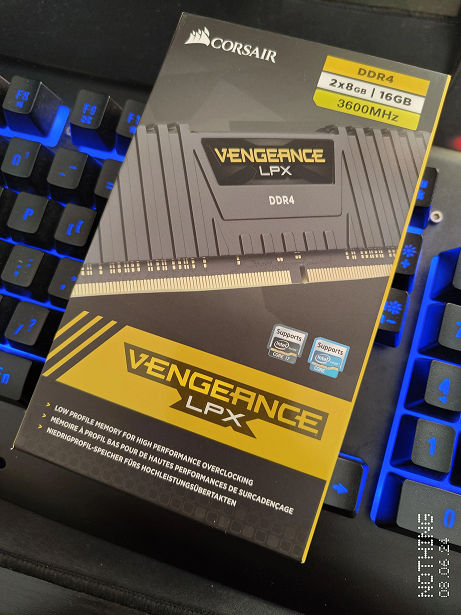 Corsair sells them in pair units too for best XMP compatability. |
|
|
Dec 14 2024, 04:01 PM
|

Senior Member
1,104 posts Joined: Jul 2008
|
QUOTE(babylon52281 @ Dec 13 2024, 03:09 PM) For an old build it will prolly do XMP stable a lil better with 16+16 match pair (2 sticks in a pack instead of individual packaging) rather than shooting for 8+8+8+8 config. More than likely you might not able to boot into XMP 3200 or have stabily issues in Windows. Also to go with your existing 8+8, its most likely your wont be able to buy new a pair of RAM that exact match yours that are few years old. To run 4x sticks ideally they are made within the same production batch of each other, like I have ( https://forum.lowyat.net/index.php?showtopi...ost&p=107604668 ) but even so I couldnt get full XMP (thats more coz of the CPU IMC tho). For your use case where your using to cari makan, imho swap out the old RAMs and change with paired 16+16. Make sure the seller give you in pair package like below Corsair sells them in pair units too for best XMP compatability. QUOTE most likely your wont be able to buy new a pair of RAM that exact match QUOTE you might not able to boot into XMP 3200 or have stabily issues in Windows. This is solid advice, TS use his PC to "cari makan". Running multiple different RAM stick might cause instability and even might not enable XMP, you wouldn't know until you run it. BSD, BIOS failed to load settings etc, you name it. Because few days ago I just upgraded my ram from 16 > 64gb. Even the brand motherboard stated, the supported memory can support up to DDR4 3600mhz, but in fact, when boot up, my BIOS can't boot into windows and I have to manually lower the frequency to 3466mhz. Higher than that will cause BIOS reset. After some research I found that higher RAM frequency puts more stress on CPU hence requires higher voltages hence it can't boot properly. Also thanks babylon52281 and TristanX for his advice and recommendation before I'm getting my RAM. babylon52281 liked this post
|
|
|
Dec 17 2024, 10:52 AM
|
|
Senior Member
3,918 posts Joined: Jan 2003 From: Paris
|
QUOTE(babylon52281 @ Dec 13 2024, 03:09 PM) For an old build it will prolly do XMP stable a lil better with 16+16 match pair (2 sticks in a pack instead of individual packaging) rather than shooting for 8+8+8+8 config. More than likely you might not able to boot into XMP 3200 or have stabily issues in Windows. Also to go with your existing 8+8, its most likely your wont be able to buy new a pair of RAM that exact match yours that are few years old. To run 4x sticks ideally they are made within the same production batch of each other, like I have ( https://forum.lowyat.net/index.php?showtopi...ost&p=107604668 ) but even so I couldnt get full XMP (thats more coz of the CPU IMC tho). For your use case where your using to cari makan, imho swap out the old RAMs and change with paired 16+16. Make sure the seller give you in pair package like below Corsair sells them in pair units too for best XMP compatability. QUOTE(Rainings @ Dec 14 2024, 04:01 PM) This is solid advice, TS use his PC to "cari makan". Running multiple different RAM stick might cause instability and even might not enable XMP, you wouldn't know until you run it. so the best choice is to remove my current 8+8 and get a new 16+16 with the same 3200mhz?BSD, BIOS failed to load settings etc, you name it. Because few days ago I just upgraded my ram from 16 > 64gb. Even the brand motherboard stated, the supported memory can support up to DDR4 3600mhz, but in fact, when boot up, my BIOS can't boot into windows and I have to manually lower the frequency to 3466mhz. Higher than that will cause BIOS reset. After some research I found that higher RAM frequency puts more stress on CPU hence requires higher voltages hence it can't boot properly. Also thanks babylon52281 and TristanX for his advice and recommendation before I'm getting my RAM. |
|
|
Dec 17 2024, 12:09 PM
|
|
Senior Member
2,706 posts Joined: Apr 2017
|
QUOTE(e 3 h y 0 r @ Dec 17 2024, 10:52 AM) so the best choice is to remove my current 8+8 and get a new 16+16 with the same 3200mhz? Yes considering how important this PC running to your livelihood |
|
|
|
|
|
Dec 17 2024, 01:22 PM
|
|
Senior Member
3,918 posts Joined: Jan 2003 From: Paris
|
QUOTE(babylon52281 @ Dec 17 2024, 12:09 PM) Yes considering how important this PC running to your livelihood got it! |
|
|
Dec 18 2024, 11:35 AM
|
|
Senior Member
1,104 posts Joined: Jul 2008
|
QUOTE(e 3 h y 0 r @ Dec 17 2024, 10:52 AM) so the best choice is to remove my current 8+8 and get a new 16+16 with the same 3200mhz? yes before getting your ram stick, kindly refer your motherboard memory support list.https://www.gigabyte.com/Motherboard/GA-AX3...ort#support-doc They listed all qualified ram stick for your motherboard, since your motherboard state it can support up to 3200mhz, i wouldn't recommend getting the speed higher than 3200mhz This is the note from the pdf.  Attached File(s)  mb_memory_ga_ax370_gaming5_pinnacle_v4.pdf ( 223.1k )
Number of downloads: 33
mb_memory_ga_ax370_gaming5_pinnacle_v4.pdf ( 223.1k )
Number of downloads: 33 |
|
|
Dec 18 2024, 11:55 AM
|
|
Senior Member
3,918 posts Joined: Jan 2003 From: Paris
|
QUOTE(Rainings @ Dec 18 2024, 11:35 AM) yes before getting your ram stick, kindly refer your motherboard memory support list. oh my, what if can't find in the list?https://www.gigabyte.com/Motherboard/GA-AX3...ort#support-doc They listed all qualified ram stick for your motherboard, since your motherboard state it can support up to 3200mhz, i wouldn't recommend getting the speed higher than 3200mhz This is the note from the pdf. |
|
|
Dec 18 2024, 12:04 PM
|
|
Senior Member
1,104 posts Joined: Jul 2008
|
QUOTE(e 3 h y 0 r @ Dec 18 2024, 11:55 AM) oh my, what if can't find in the list? Then wish you best of luck  but you should be able to find the ram stick from the list. |
|
|
Dec 20 2024, 09:29 AM
|
 
Elite
15,694 posts Joined: Mar 2008
|
QUOTE(e 3 h y 0 r @ Dec 17 2024, 10:52 AM) so the best choice is to remove my current 8+8 and get a new 16+16 with the same 3200mhz? Official support for 2 DIMMs is 2933MT for Ryzen 2000. You could get Kingston Fury Beast 32GB Kit (3200MT) and use it's 2933MT at XMP Profile 2.You could run 4 sticks at lower speed, i.e. 2133MT if you don't mind. For browsing the speed doesn't matter too much. QUOTE(e 3 h y 0 r @ Dec 18 2024, 11:55 AM) oh my, what if can't find in the list? Mostly likely still work, but could be not playing well at the rated speed.  Also newer BIOS contains some tweaks that allow better memory compatibility, so do try it out too! This post has been edited by kingkingyyk: Dec 20 2024, 09:36 AM |
|
|
Dec 21 2024, 06:29 AM
|
|
Senior Member
3,918 posts Joined: Jan 2003 From: Paris
|
removed my old 16gb and added this 2 x 16gb https://www.corsair.com/us/en/p/memory/cmk3...32gx4m2e3200c16
everything seems stable, xmr profile activated. running 3200 but now my cpu is spiking high if high usage. already clean the entire pc with cpu new thermal paste 

|
|
|
Dec 21 2024, 09:09 AM
|
|
Senior Member
2,706 posts Joined: Apr 2017
|
QUOTE(e 3 h y 0 r @ Dec 21 2024, 06:29 AM) removed my old 16gb and added this 2 x 16gb https://www.corsair.com/us/en/p/memory/cmk3...32gx4m2e3200c16 Your CPU TJMAX is 85oC so you got way below it, should be no problems for noweverything seems stable, xmr profile activated. running 3200 but now my cpu is spiking high if high usage. already clean the entire pc with cpu new thermal paste |
| Change to: |  0.0213sec 0.0213sec
 0.71 0.71
 6 queries 6 queries
 GZIP Disabled GZIP Disabled
Time is now: 22nd December 2025 - 12:29 PM |
 Quote
Quote