Welcome Guest ( Log In | Register )

Outline · [ Standard ] · Linear+

 Suggest me ram size please, current 2x8gb

views
     
kingkingyyk
post Dec 29 2024, 10:13 AM

10k Club
Group Icon
Elite
15,694 posts

Joined: Mar 2008
QUOTE(e 3 h y 0 r @ Dec 29 2024, 09:08 AM)
how do i check in future if its downclocked? where do i see in hwmonitor?
rclxm9.gif is windows 11 necessary? 32gb is not enough oh my.... should i get another 32gb now?
*
https://www.amd.com/en/products/software/ry...r.html#download

QUOTE(e 3 h y 0 r @ Dec 29 2024, 09:09 AM)
anyone here know how to OC safely with my current board?
https://www.aorus.com/en-my/motherboards/GA...0/Specification
*
Diminishing returns, no need. wink.gif
babylon52281
post Dec 29 2024, 08:53 PM

Look at all my stars!!
*******
Senior Member
2,707 posts

Joined: Apr 2017
QUOTE(e 3 h y 0 r @ Dec 29 2024, 09:09 AM)
anyone here know how to OC safely with my current board?
https://www.aorus.com/en-my/motherboards/GA...0/Specification
*
https://www.pcmag.com/reviews/amd-ryzen-7-2700x
"Overclocking
At first, I overclocked the Ryzen 7 2700X using the BIOS on the MSI X470 Gaming M7 AC. This method involved slightly raising the core frequency, testing for stability, raising it again, and testing for stability again until the system fails to boot or becomes unresponsive, then systematically raising the core voltage until stability is once again achieved. All the while, I kept an eye on the processor's core temperature under load to make sure our Cooler Master MasterLiquid ML240L RGB closed-loop cooler was keeping up with the heat output. Like on all Ryzen processors, the multiplier on the Ryzen 7 2700X is fully unlocked, making reliable overclocking fairly straightforward.

I managed to get Windows stable enough to run Cinebench R15 while the Ryzen 7 2700X was clocked (all-cores) at 4.4GHz, 4.35GHz, and 4.325GHz, but I encountered stability problems at all speeds in Handbrake. The highest score I ever got in Cinebench was 1,965 (all cores) and 181 (single core), but to get results in the rest of the tests, I had to back off. In the motherboard's BIOS menu, leaving the CPU voltage set to "Auto" actually produced the most consistently stable experience, and my highest reliable scores were achieved with the core speed set to 4.3GHz. I also fiddled with a few other settings in the BIOS, such as the CPU Loadline Calibration modes, and I tried minor tweaks to the CPU Base Clock, with limited success."

All you need to watch out for is keeping temps below TJMAX https://www.techpowerup.com/cpu-specs/ryzen-7-2700x.c2011
TSe 3 h y 0 r
post Dec 31 2024, 03:25 PM

L e 3 h y 0 r 1
*******
Senior Member
3,918 posts

Joined: Jan 2003
From: Paris


memory hitting 93% , slowing down, should have bought additional 32gb ranting.gif


Attached thumbnail(s)
Attached Image
Rainings
post Dec 31 2024, 08:54 PM

Regular
******
Senior Member
1,104 posts

Joined: Jul 2008
QUOTE(e 3 h y 0 r @ Dec 29 2024, 09:08 AM)
how do i check in future if its downclocked? where do i see in hwmonitor?
rclxm9.gif is windows 11 necessary? 32gb is not enough oh my.... should i get another 32gb now?
*
QUOTE(e 3 h y 0 r @ Dec 31 2024, 03:25 PM)
memory hitting 93% , slowing down, should have bought additional 32gb  ranting.gif
*
Microsoft will drop support for win 10 by the end of next year, so win 10 machine will become vulnerable.
Continue to use win10 is not safe when no more security updates.
GG, max out before win 11 upgrade, win 11 uses even more ram by default. sweat.gif
I can easily used 16gb ram just using firefox with less than 10 tabs.

This post has been edited by Rainings: Dec 31 2024, 09:19 PM
babylon52281
post Jan 1 2025, 08:37 AM

Look at all my stars!!
*******
Senior Member
2,707 posts

Joined: Apr 2017
QUOTE(e 3 h y 0 r @ Dec 31 2024, 03:25 PM)
memory hitting 93% , slowing down, should have bought additional 32gb  ranting.gif
*
If you run another 2 sticks (total 4 RAM) you may not get full XMP or stability on your system. I suspect your trading site is using as much RAM as available regardless 16GB, 32 or 64GB.
Omochao
post Jan 1 2025, 06:49 PM

Enthusiast
*****
Junior Member
835 posts

Joined: Nov 2007
From: Land of Forgotten
QUOTE(e 3 h y 0 r @ Dec 31 2024, 03:25 PM)
memory hitting 93% , slowing down, should have bought additional 32gb  ranting.gif
*
at this rate I think is even pointless to get more RAM, this is something due to the tabs or the website that you are on is so RAM power hungry .
xxboxx
post Jan 3 2025, 10:29 AM

The mind is for having ideas, not holding them
*******
Senior Member
5,261 posts

Joined: Oct 2004
From: J@Y B33


QUOTE(Rainings @ Dec 31 2024, 08:54 PM)
Microsoft will drop support for win 10 by the end of next year, so win 10 machine will become vulnerable.
Continue to use win10 is not safe when no more security updates.
GG, max out before win 11 upgrade, win 11 uses even more ram by default.  sweat.gif
I can easily used 16gb ram just using firefox with less than 10 tabs.
*
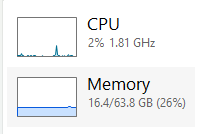
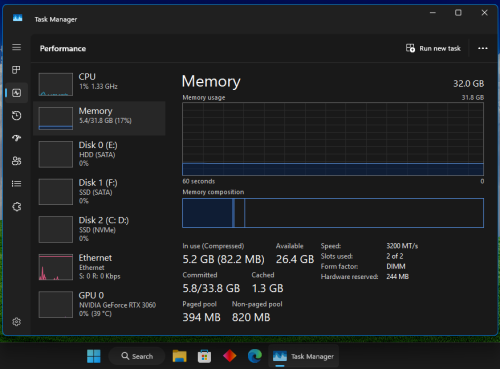
I feel recent update to Win11 have significantly reduce it's memory usage. I have browsers with tons of tabs taking up 6GB of memory plus few other programs running but my memory usage is only 16GB

user posted image

user posted image


Rainings
post Jan 3 2025, 11:50 AM

Regular
******
Senior Member
1,104 posts

Joined: Jul 2008
QUOTE(xxboxx @ Jan 3 2025, 10:29 AM)
I feel recent update to Win11 have significantly reduce it's memory usage. I have browsers with tons of tabs taking up 6GB of memory plus few other programs running but my memory usage is only 16GB

user posted image

user posted image
*
hmm that's weird, are you using win 11 pro or win 11 home?

I performed fresh install, install back all the same and updated apps that i use. Same browsers with tabs and plugins etc.
when boot up without launching any apps it already taken around 7gb ram.
on win10, it's around 5gb ram.

My browser ram usage is relatively the same as win 10, but by default it looks like system uses more ram compare to win10.
On task bar, I can see a new process running called "secure system" it uses around 200mb ram and i rmb on win10 this process wasn't there.
which make sense because win 11 require secure boot and uefi.
I also found that when shutting down, it takes a couple of seconds longer compare to win10, my screen will went dark for longer before the power cut.

I wasn't worry or anything because i have upgraded to 64gb.
PJng
post Jan 3 2025, 02:44 PM

10k Club
********
All Stars
12,062 posts

Joined: Oct 2017


QUOTE(xxboxx @ Jan 3 2025, 10:29 AM)
I feel recent update to Win11 have significantly reduce it's memory usage. I have browsers with tons of tabs taking up 6GB of memory plus few other programs running but my memory usage is only 16GB

user posted image

user posted image
*
Not only me notice, i also notice the same, latest win 11 update use less RAM compare to old version, even pc come with many bloatware keep running
xxboxx
post Jan 4 2025, 11:59 PM

The mind is for having ideas, not holding them
*******
Senior Member
5,261 posts

Joined: Oct 2004
From: J@Y B33


QUOTE(Rainings @ Jan 3 2025, 11:50 AM)
hmm that's weird, are you using win 11 pro or win 11 home?

I performed fresh install, install back all the same and updated apps that i use. Same browsers with tabs and plugins etc.
when boot up without launching any apps it already taken around 7gb ram.
on win10, it's around 5gb ram.

My browser ram usage is relatively the same as win 10, but by default it looks like system uses more ram compare to win10.
On task bar, I can see a new process running called "secure system" it uses around 200mb ram and i rmb on win10 this process wasn't there.
which make sense because win 11 require secure boot and uefi.
I also found that when shutting down, it takes a couple of seconds longer compare to win10, my screen will went dark for longer before the power cut.

I wasn't worry or anything because i have upgraded to 64gb.
*
11 Pro 24H2

On my another PC running Win 11 Pro too but I only use it for watching video, from cold boot only use almost 5GB RAM
PJng
post Jan 5 2025, 11:27 PM

10k Club
********
All Stars
12,062 posts

Joined: Oct 2017


QUOTE(Rainings @ Jan 3 2025, 11:50 AM)
hmm that's weird, are you using win 11 pro or win 11 home?

I performed fresh install, install back all the same and updated apps that i use. Same browsers with tabs and plugins etc.
when boot up without launching any apps it already taken around 7gb ram.
on win10, it's around 5gb ram.

My browser ram usage is relatively the same as win 10, but by default it looks like system uses more ram compare to win10.
On task bar, I can see a new process running called "secure system" it uses around 200mb ram and i rmb on win10 this process wasn't there.
which make sense because win 11 require secure boot and uefi.
I also found that when shutting down, it takes a couple of seconds longer compare to win10, my screen will went dark for longer before the power cut.

I wasn't worry or anything because i have upgraded to 64gb.
*
just turn on pc, fast boot

user posted image

most background process used memory is ms defender (220-250MB), hp omen gaming hub (120-150MB)

i still no idea why non paged pool so high, sometime can over 1GB
TSe 3 h y 0 r
post Jan 8 2025, 02:55 AM

L e 3 h y 0 r 1
*******
Senior Member
3,918 posts

Joined: Jan 2003
From: Paris


QUOTE(xxboxx @ Jan 3 2025, 10:29 AM)
I feel recent update to Win11 have significantly reduce it's memory usage. I have browsers with tons of tabs taking up 6GB of memory plus few other programs running but my memory usage is only 16GB

user posted image

user posted image
*
i'm super heavy trader, each of the trading tabs that i open uses alot of memory, not sure why.


Attached thumbnail(s)
Attached Image Attached Image
babylon52281
post Jan 8 2025, 08:34 AM

Look at all my stars!!
*******
Senior Member
2,707 posts

Joined: Apr 2017
QUOTE(e 3 h y 0 r @ Jan 8 2025, 02:55 AM)
i'm super heavy trader, each of the trading tabs that i open uses alot of memory, not sure why.
*
Its okay, your hitting CPU limit before maxing out your RAM buffer

Have you tried a clean reinstall of Windows and browser, just only add what is necessary?
xxboxx
post Jan 10 2025, 11:45 PM

The mind is for having ideas, not holding them
*******
Senior Member
5,261 posts

Joined: Oct 2004
From: J@Y B33


QUOTE(e 3 h y 0 r @ Jan 8 2025, 02:55 AM)
i'm super heavy trader, each of the trading tabs that i open uses alot of memory, not sure why.
*
Because each tab for trading are running a lot of scripts for the graphs and other data. Either limit your tabs or get more RAM and powerful CPU.
ben3003
post Jan 21 2025, 10:01 AM

10k Club
********
All Stars
10,859 posts

Joined: Jan 2003
From: Sarawak


hi guys, tumpang thread, if solely for gaming, im thinking if make games smoother and no like sudden hiccup, my current 16gb ram worth go 32gb? currently ddr4 2x8gb 3200mhz. not planning do any OC etc.
babylon52281
post Jan 21 2025, 12:52 PM

Look at all my stars!!
*******
Senior Member
2,707 posts

Joined: Apr 2017
QUOTE(ben3003 @ Jan 21 2025, 10:01 AM)
hi guys, tumpang thread, if solely for gaming, im thinking if make games smoother and no like sudden hiccup, my current 16gb ram worth go 32gb? currently ddr4 2x8gb 3200mhz. not planning do any OC etc.
*
Extra RAM will help if your average vs 1% lows are big gap. But DDR4 RAM are still affordable so why not anyways. But you might not get stability at 3200MHZ so if that happens you need to back a bit to 3000MHZ or so.
Baconateer
post Jan 21 2025, 12:55 PM

Meh..... (TM)
*******
Senior Member
5,088 posts

Joined: Jun 2013
From: Blue Planet


QUOTE(ben3003 @ Jan 21 2025, 10:01 AM)
hi guys, tumpang thread, if solely for gaming, im thinking if make games smoother and no like sudden hiccup, my current 16gb ram worth go 32gb? currently ddr4 2x8gb 3200mhz. not planning do any OC etc.
*
sudden hiccup could be related to lack of VRAM rather thn RAM

6 Pages « < 4 5 6Top
 

Change to:
| Lo-Fi Version
0.0231sec    0.54    6 queries    GZIP Disabled
Time is now: 23rd December 2025 - 07:09 AM