Welcome Guest ( Log In | Register )

Outline · [ Standard ] · Linear+

 Deco x10 not working with unifi

views
     
TS99problems
post Nov 7 2024, 07:51 AM, updated 2y ago

Getting Started
**
Junior Member
134 posts

Joined: Sep 2012
From: Subang Jaya


Hey guys, looking for tech support as im going crazy trying to set this up for my parents 😭

I’ve got the pppoe username and password correct (as i had to reset it on the phone with unifi), yet it still didnt work. Then i read somewhere to do the vlan, which i did, i tried all variety of options - like from selecting unifi preset, custom and putting in vlan 500 etc, or even Bridge. Not working!

I also tried setting the decos as access point instead of router mode (just for the hell of it), not working either

It’ll just stay solid red on the deco. The modem looks fine all colors are good. Modem is a huawei echolife


Now even worse - i tried to plug in the old router back in, didnt work, so i reset and did everything back again (pppoe etc)… its not working either!!! 😂😂😭 pulling my hair out at this point

What am i missing? Lol
fireballs
post Nov 7 2024, 07:59 AM

10101
*******
Senior Member
5,650 posts

Joined: Mar 2012
got plug in the right hole at echolife?
acbc
post Nov 7 2024, 08:03 AM

Look at all my stars!!
*******
Senior Member
9,048 posts

Joined: Jan 2003
If not compatible, set the Deco as AP only.
JohnMax
post Nov 7 2024, 08:08 AM

On my way
****
Senior Member
544 posts

Joined: Jul 2007
From: A Place call Die no one knows..


Mine in Wi-Fi Router mode. Can't remember what brand is my ONU already.

user posted image
TS99problems
post Nov 7 2024, 08:33 AM

Getting Started
**
Junior Member
134 posts

Joined: Sep 2012
From: Subang Jaya


QUOTE(fireballs @ Nov 7 2024, 07:59 AM)
got plug in the right hole at echolife?
*
Lan1 right?

QUOTE(acbc @ Nov 7 2024, 08:03 AM)
If not compatible, set the Deco as AP only.
*
Tried, not working too

QUOTE(JohnMax @ Nov 7 2024, 08:08 AM)
Mine in Wi-Fi Router mode.  Can't remember what brand is my ONU already.

user posted image
*
I set this exact preset also cannot work 😭
Momo33
post Nov 7 2024, 08:53 AM

Regular
******
Senior Member
1,448 posts

Joined: Oct 2019
My guess is you are not gettin a IP Address .
its will show NO internet. at the Internet Icon

check if you get correct IP address.
check if you get the Gateway correct

log in router page. see u got correct ip.

IP Address:
202.188xxxx
Subnet Mask:
255.255.255.255
Default Gateway:
202.188.xxx
Primary DNS:
202.188.18.188


Get your router System Log and post here.
clear ALL first .
Power off and ON .

you will see logs as below , its will show if the sequence is correct and u get a IP address. sucessfully

sample
2024-11-07 08:39:36 Access Control NOTICE [24542] Flush conntrack table succeeded

2024-11-07 08:39:36 Access Control INFO [24542] Function enabled

2024-11-07 08:39:35 Access Control DEBUG [24542] black list add mac: 70

2024-11-07 08:39:35 Access Control INFO [24542] Service stop

2024-11-07 07:12:12 ICMPV6 INFO [11959] send advertisement(RA) with prefixf::/64 and mtu <null>

2024-11-07 07:12:12 ICMPV6 INFO [11959] receive solicit(RS) from ::

2024-11-07 07:12:08 ICMPV6 INFO [11959] send advertisement(RA) with prefix


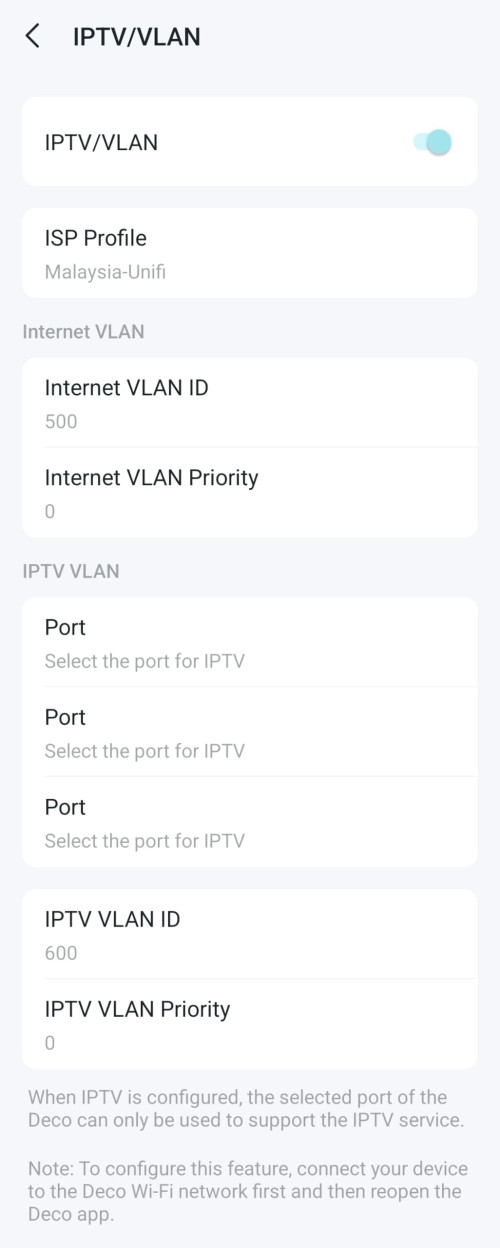
IPTV/VLAN
Configure IPTV/VLAN settings if you want to enjoy IPTV or VoIP service, or if your ISP requires VLAN tags.

or use mode custom , mean do need to set IPTV
and all ports for internet only.

IPTV/VLAN:
Enable
Mode:
Custom
Internet VLAN:
VLAN ID:
500
VLAN Priority:
0
802.1Q Tag for Internet
IPTV VLAN: uncheck


This post has been edited by Momo33: Nov 7 2024, 09:03 AM
acbc
post Nov 7 2024, 09:00 AM

Look at all my stars!!
*******
Senior Member
9,048 posts

Joined: Jan 2003
QUOTE(99problems @ Nov 7 2024, 08:33 AM)
Lan1 right?
Tried, not working too
I set this exact preset also cannot work 😭
*
First, u need to get the old router to work again. Resetting will restore it to factory default. U will then need to key back the username, password, VLANs back.

Refer here, https://kevron2u.com/tm-unifi-maxis-fibre-v...ting-at-router/

Once done, factory reset the Deco and use the app to set it up again. This time, as AP only.

Before doing this, make sure the stock router is working and connected.
Momo33
post Nov 7 2024, 09:12 AM

Regular
******
Senior Member
1,448 posts

Joined: Oct 2019
QUOTE(99problems @ Nov 7 2024, 08:51 AM)
Hey guys, looking for  tech support as im going crazy trying to set this up for my parents 😭

I’ve got the pppoe username and password correct (as i had to reset it on the phone with unifi), yet it still didnt work. Then i read somewhere to do the vlan, which i did, i tried all variety of options - like from selecting unifi preset, custom and putting in vlan 500 etc, or even Bridge. Not working!

I also tried setting the decos as access point instead of router mode (just for the hell of it), not working either

It’ll just stay solid red on the deco. The modem looks fine all colors are good. Modem is a huawei echolife
Now even worse - i tried to plug in the old router back in, didnt work, so i reset and did everything back again (pppoe etc)… its not working either!!! 😂😂😭 pulling my hair out at this point

What am i missing? Lol
*
AP mode only work if you connecting to a main router .
note not fiber modem .


SilentVampire
post Nov 7 2024, 09:16 AM

Networking Enthusiast
*******
Senior Member
5,714 posts

Joined: Mar 2007


Updated to latest firmware on the Deco X10? Checked pppoe username and password and double confirm that it is correct?
TS99problems
post Nov 7 2024, 10:04 AM

Getting Started
**
Junior Member
134 posts

Joined: Sep 2012
From: Subang Jaya


QUOTE(Momo33 @ Nov 7 2024, 08:53 AM)
My guess is you are not gettin a IP Address . 
its   will show NO internet.  at the Internet Icon

check if you get  correct IP  address.
check  if you get the Gateway  correct

log in router page.  see u got correct  ip.

IP Address:
202.188xxxx
Subnet Mask:
255.255.255.255
Default Gateway:
202.188.xxx
Primary DNS:
202.188.18.188
Get  your router System  Log  and post here. 
clear  ALL  first .
Power off and ON .

you will see logs as below ,   its will show if the sequence  is correct  and u get a IP address. sucessfully

sample

» Click to show Spoiler - click again to hide... «

*
Yes. No internet symbol if i go to ip router webpage
I tried again now, set vlan mode as custom and only for internet as u suggested. I check now it show my ip address as 172.23.xxx, gateway same, primary dns 10.54.126.1, no internet yet 😂

And system log.. attachment: [attachmentid=11505603]

Seems there’s errors, failed everywhere 💀💀

Also note i tried doing with the previous router, archer a6 tp link, and also same issue, it does say 0.0.0.0 at ip address

Is the modem gila already? 😂😂

This post has been edited by 99problems: Nov 7 2024, 06:25 PM
TS99problems
post Nov 7 2024, 10:09 AM

Getting Started
**
Junior Member
134 posts

Joined: Sep 2012
From: Subang Jaya


QUOTE(acbc @ Nov 7 2024, 09:00 AM)
First, u need to get the old router to work again. Resetting will restore it to factory default. U will then need to key back the username, password, VLANs back.

Refer here, https://kevron2u.com/tm-unifi-maxis-fibre-v...ting-at-router/

Once done, factory reset the Deco and use the app to set it up again. This time, as AP only.

Before doing this, make sure the stock router is working and connected.
*
Unfortunately they went and throw the original router 😭😭😂 cause few years back i set up for them with Tp link archer a6, and it was actually seamless, no issue.

Now i tried using the same router, archer a6, also cannot. What the heck 😂😂 it was working fine just yesterday before i started setting up decos

QUOTE(SilentVampire @ Nov 7 2024, 09:16 AM)
Updated to latest firmware on the Deco X10? Checked pppoe username and password and double confirm that it is correct?
*
Its first time setup and cant even access internet now to update :-( theres no usb port on deco either right
But yes, pppoe id and password triple checked already 😂
SilentVampire
post Nov 7 2024, 10:41 PM

Networking Enthusiast
*******
Senior Member
5,714 posts

Joined: Mar 2007


QUOTE(99problems @ Nov 7 2024, 10:04 AM)
Yes. No internet symbol if i go to ip router webpage
I tried again now, set vlan mode as custom and only for internet as u suggested. I check now it show my ip address as 172.23.xxx, gateway same, primary dns 10.54.126.1, no internet yet 😂

And system log.. attachment: [attachmentid=11505603]

Seems there’s errors, failed everywhere 💀💀

Also note i tried doing with the previous router, archer a6 tp link, and also same issue, it does say 0.0.0.0 at ip address

Is the modem gila already? 😂😂
*
172.23.x.x is indicating you are getting private IP. Last resort is calling TM or someone technical who can troubleshoot the issue with you on-site. Otherwise, you won’t know what the issue is.
Omochao
post Nov 7 2024, 11:46 PM

Enthusiast
*****
Junior Member
835 posts

Joined: Nov 2007
From: Land of Forgotten
sounds to me like a MAC address lock. your current ont is locked to a certain MAC address before it gets assignef with an IP Address

This post has been edited by Omochao: Nov 7 2024, 11:46 PM
Momo33
post Nov 8 2024, 09:12 AM

Regular
******
Senior Member
1,448 posts

Joined: Oct 2019
QUOTE(99problems @ Nov 7 2024, 11:04 AM)
Yes. No internet symbol if i go to ip router webpage
I tried again now, set vlan mode as custom and only for internet as u suggested. I check now it show my ip address as 172.23.xxx, gateway same, primary dns 10.54.126.1, no internet yet 😂

And system log.. attachment: [attachmentid=11505603]

Seems there’s errors, failed everywhere 💀💀

Also note i tried doing with the previous router, archer a6 tp link, and also same issue, it does say 0.0.0.0 at ip address

Is the modem gila already? 😂😂
*
1. seem you not get the correct IP ,
do a RESET of the router. there is a small hole with reset button.

At this point your issue is not getting the correct IP from unifi after the router ''talk'' to TM server.
it could be the TM server issue.

i did not see the system logs . did u attach ??
in the logs can see the two way msg between router /server.
can see if pasword fail, etc..

2. set back VLAN to unifi . the problem is not here . the problem is in No 1 above.

3. my suspect is also the TM server giving u wrong ip .

4. try to get another router. to test. i have to loan u if you are near subang .
5. Last choice get TM service . maybe need to pay .
6. really double check your passwords. type it in every word ...not cut and paste.


Change to:
| Lo-Fi Version
0.0185sec    0.51    5 queries    GZIP Disabled
Time is now: 14th December 2025 - 06:41 AM