


As usual, POS tracking page still says “In transit”


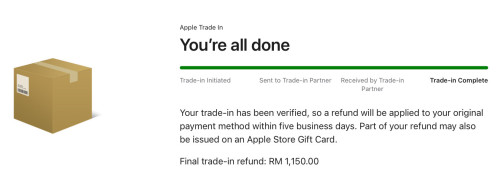
I guess now have to wait and see if really “within five business days” or if kena taichi left-right.

This post has been edited by dev/numb: Nov 19 2024, 11:37 PM
[2024] iPad Mini with A17 Pro chip
|
|
 Nov 19 2024, 11:22 PM Nov 19 2024, 11:22 PM
Return to original view | Post
#21
|
 
Junior Member
691 posts Joined: Nov 2021 
|
Lolwut, so fast ah. Yesterday evening picked up by courier, today approved already? Sure or not?!
As usual, POS tracking page still says “In transit” I guess now have to wait and see if really “within five business days” or if kena taichi left-right. This post has been edited by dev/numb: Nov 19 2024, 11:37 PM |
|
|
|
|
|
Nov 20 2024, 04:36 PM
Return to original view | Post
#22
|
|
Junior Member
691 posts Joined: Nov 2021
|
QUOTE(ericlaiys @ Nov 20 2024, 07:33 AM) Your side action completed. Good in transit. May be go to apple trx to do final verification Courier = POSWhich courier? Why it say part of refund go to apple gift card? Which bank cc that you use? I am going to do mine next as Mac mini option trade in only via online. Went to apple trx but cannot due.  Used debit card this time. Maybank Visa. I don’t think its delivered to TRX. Apple has another site/partner to evaluate trade-ins sent via courier. Likely your Mac will be handled by the same site if you opt for trade-in. The shipping label for my courier only showed another logistics company (Schenker Logistics, Bkt Jelutong), so no idea where the actual final destination is. The part gift card thing only applies in certain situations. Here’s a crop of the email I received yesterday; 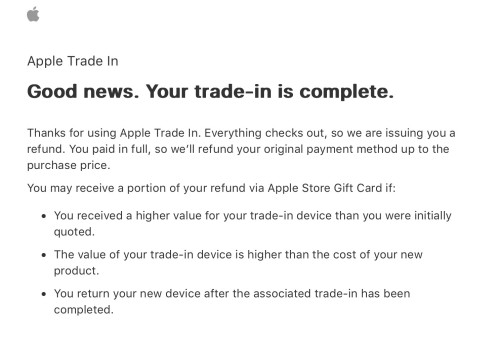 None of the scenarios above apply to me, so I expect the promised trade-in offer to be credited straight into the account tied to the debit card used. Will post full timeline/breakdown of my trade-in process once I get the money. This post has been edited by dev/numb: Nov 20 2024, 08:09 PM ericlaiys liked this post
|
|
|
Nov 20 2024, 04:48 PM
Return to original view | Post
#23
|
|
Junior Member
691 posts Joined: Nov 2021
|
QUOTE(andrewtho @ Nov 20 2024, 11:12 AM) first experience picking up from Apple Store. Good glass, Hoda. Maintains oleophobic properties for a lot longer than many competing brands. Also full coverage, so no trap for dust around the front camera.love how seamless the experience was, managed to open myself without any staff opening it for me (ahem Machines) and had a corner to myself to install my own TG. the experience here is top notch! |
|
|
Nov 21 2024, 05:34 PM
Return to original view | Post
#24
|
|
Junior Member
691 posts Joined: Nov 2021
|
QUOTE(fruitie @ Nov 21 2024, 05:01 PM) I got the so-called 720 casing. The taobao one you shared previously? Lucky you, managed to find case you like. I’m still searching. My mini 6 was attached to the Apple folio for 2.5 yrs, and when I removed it the other day I was shocked how thin and light the mini actually was. Those magnets damn heavy. Currently looking for thinnest possible non closing case, but maybe my search king-fu not good. Results thus far have been disappointing. It is good, but I chose white milk, which is not a good idea, though it is good-looking and easy to get dirty. That said, I'm still happy with the purchase. I will just apply the free tempered glass protector. |
|
|
Nov 23 2024, 12:49 PM
Return to original view | Post
#25
|
|
Junior Member
691 posts Joined: Nov 2021
|
As promised, here’s the full breakdown/timeline of my switch from iPad mini 6 to 7 through Apple MY;
10/11/2024 Ordered iPad mini 7 [Wi-Fi 128GB) online at Apple Malaysia. Selected device trade-in for my mini 6 (Wi-Fi 64GB). Apple offered RM1,150. Maybank and CIMB were listed as the “partnering banks” in Apple’s checkout page, so decided to use FPX via Maybank Visa debit card (my credit cards are from other banks) hoping for less complications related to the trade-in process (because fruitie’s tragic RHB story scared me already) later on. 11/11/2024 - 14/11/2024 New iPad min7 shipped out on 11 Nov and arrived at my doorstep on 14 Nov. Invoice and shipping updates received via email throughout the process. No engraving, so shipped from Apple’s Singapore facility. SG-KL-JB via DHL. 15/11/2024 Did not receive any new email asking me to select trade-in method, even though 24hrs passed. Decided to call Apple Support for help. The rep organised Pos Malaysia pickup for me on 18/11/2024. 18/11/2014 Pos Malaysia picked up my old iPad mini 6 in the evening. They don’t provide the dedicated box for iPad returns/trade-ins shown on Apple’s website. You’re supposed to place your iPad into a medium white envelope (has bubble-wrap inner lining) and then place that into a box before slapping on a Pos sticker. Then you put it into another foil cover and slap on the shipping label. Remember to take photos of the packing and shipping label. Also, if you feel the protection isn’t enough, wrap your iPad in a bit more bubble-wrap beforehand, or use some of those airbag things you often get from Shopee deliveries to stop your envelope moving around inside the shipping box. *Neither Apple nor Pos will give you an exact pick-up time so you could end up wasting a whole day waiting for courier dude to arrive. If you have the means, I think it would be better to drop off the package yourself. Apple will provide compatible courier branches near your address as well as a trade-in ref number. 19/11/2024 Trade-in in arrived and processed within one day (yes, I was very surprised). Received email stating everything was in order and they would refund me within 5 business days. Interestingly, they use the term “refund” for trade-ins as well. Likely some sort of offsetting related to accounting department in order to class it as a single product transaction. 22/11/2024 Promised trade-in amount credited into my account that was tied to the debit card. The partner merchant was listed as Razer according to my account transaction history. Also, the date was listed as 21/11/2024 so I assume there’s a 1 day float period for FPX or debit card related refunds. TL;DR Overall I’d say it’s a smooth process, but the initiation of trade-in and clarity of messaging related to it needs to be better. Anything related to Apple or their longstanding logistics partner (eg: DHL) is smooth as butter, but stuff that requires Apple liaising with a local partner can get a bit lumpy. This post has been edited by dev/numb: Nov 23 2024, 12:50 PM |
|
|
Dec 1 2024, 07:18 PM
Return to original view | Post
#26
|
|
Junior Member
691 posts Joined: Nov 2021
|
QUOTE(miyakochan89 @ Dec 1 2024, 12:37 PM) Hey guys, when I’m using the iPad mini on vertical mode, the fonts get very small when browsing. Any ways to make it bigger by default? First you can try Settings > Display & Brightness > Text Size This should enlarge texts on all apps that support dynamic font sizing. But you said “when browsing” so if it is for websites (this forum for example) then maybe you need to do a bit extra. Tap the view control on the address bar and wait for the small A big A thing in the top centre, and then size to your liking. The downside is that you will need to do this manually each time, I think. If you use Safari as your browser, you can look at this extension; https://apps.apple.com/my/app/web-font-chan...ex/id1597034898 Need to pay though. I think only the Pro upgrade allows you to save site-specific font settings. Currently I think Lifetime Pro is on Black Friday sale (RM4.99) but I don’t use this app so not 100% sure if you can fix different sizing for portrait and landscape more or not. This post has been edited by dev/numb: Dec 1 2024, 07:21 PM |
|
|
|
|
|
Dec 2 2024, 10:54 PM
Return to original view | Post
#27
|
|
Junior Member
691 posts Joined: Nov 2021
|
Normally prefer PET films for iPad screen protection, but couldn’t locate my preferred brand Power Support anywhere locally, so went for tempered glass this time. Found a SG merchant on Shopee selling this. Never knew Bellemond made tempered glass protectors. Always thought they sold those paper type films only. Application was a pain (mostly because I suck at aligning) but the quality seems to be excellent.
Still obsessed with finding the thinnest possible setup. Anyone tried Mojoskins from Shopee? They’re (afaik) the only local skin producers that offer sizes for iPads. Those overseas branded offerings like Dbrand are damn expensive once I include shipping, even with Black Friday discounts. Wanna try local but scared the quality lousy or will leave residue. This post has been edited by dev/numb: Dec 3 2024, 12:25 AM |
|
|
Dec 3 2024, 01:56 PM
Return to original view | Post
#28
|
|
Junior Member
691 posts Joined: Nov 2021
|
QUOTE(GamersFamilia @ Dec 3 2024, 10:50 AM) 1 or 2 games enough for me , just incase got bored while on moving Just a couple of games should be fine, unless you plan to play console ports from SquareEnix or Ubisoft which can take up around 30GB per game. I’m currently playing Fantasian and Football Manager 2024 (via Apple Arcade 3mths trial) and still have around 80GB free on my 128GB set. Just make sure you don’t get near 90% of total storage, or read/write performance might take a hit. This post has been edited by dev/numb: Dec 3 2024, 01:57 PM |
|
|
Dec 5 2024, 05:25 PM
Return to original view | Post
#29
|
|
Junior Member
691 posts Joined: Nov 2021
|
QUOTE(fruitie @ Dec 5 2024, 03:30 PM) Ya, I found all these from Google too. I guess most of them don't apply to my case. I will do a factory reset if it restarts again next time. If unattended, iPhones will auto-reboot after a few days of inactivity. This is a security feature because once the device reboots it goes into BFU (before first unlock) mode which is supposedly more resistant to hacking tools. Previously it was 7 days if not mistaken. After iOS 18, it went down to 3 days. There was news about this recently where US police were unhappy because some suspect’s phone rebooted and they couldn’t used their hacking tools to unlock it. The same feature may also be present in iPadOS.Edit: Sorry, giggs_509 already shared the necessary info.. Just ignore my post. I had this tab open and went to do something so didn’t see the newer posts when I came back. This post has been edited by dev/numb: Dec 5 2024, 05:29 PM fruitie liked this post
|
|
|
Dec 11 2024, 01:15 AM
Return to original view | Post
#30
|
|
Junior Member
691 posts Joined: Nov 2021
|
QUOTE(Ibrahim@@ @ Dec 10 2024, 05:43 PM) still the same de .. after factory reset ... after log in contact number and password .. same de .. Disclaimer: I don’t use Facebook, so just offering some suggestions based on web searches. Firstly, what does the error message say, and is there an error code? If it is Error Code 2, maybe try the solutions mentioned here; https://www.partitionwizard.com/partitionma...ror-code-2.html Aside from that, the only other hits I found were on Reddit, including that thread linked above suggesting using your phone number. You mentioned factory reseting your iPad, but if you restored from backup then maybe the same bugged network settings also got restored. Try just resetting the network settings and then attempt to login to fb using phone number. Also on the reddit thread linked above, scroll down to the post by u/Educational-Lake-215 and try following those instructions. I wonder if this affects both wi-fi and cellular iPads or just the wi-fi only models. My amateur ‘hypothesis’ is that the fb app is failing your login attempt because it can’t access cellular connectivity on wi-fi only iPads. This post has been edited by dev/numb: Dec 11 2024, 01:17 AM Ibrahim@@ liked this post
|
|
|
Dec 26 2024, 12:57 AM
Return to original view | Post
#31
|
|
Junior Member
691 posts Joined: Nov 2021
|
QUOTE(miyakochan89 @ Dec 25 2024, 07:46 PM) for those using the ipad folio original, is it worth the price? Or it's best to just use other cases? For me, not worth it. The original Apple folio cover I got for my previous mini 6 looks like crap now. Peeling all over and the hinge part is loose and wobbly. The other downside is that it adds a lot of thickness and weight (thanks to the magnets) to the mini’s slim naked feeling. Also take note that the cover will slide around if you have a tempered glass screen protector installed. Currently using a clone folio (from Shopee) that allows me to detach the front flap and just have a thin back cover stuck on the iPad. I fold the front flap into a toblerone bar shape permanently and just attach it to the back when I want to prop the device up to watch media (which is very rare for me). Around 1/4 the price of the original folio. This post has been edited by dev/numb: Dec 26 2024, 03:20 AM |
|
|
Mar 13 2025, 05:33 PM
Return to original view | Post
#32
|
|
Junior Member
691 posts Joined: Nov 2021
|
QUOTE(fruitie @ Mar 11 2025, 10:51 PM) How to have emoji on the keyboard like on iPhone? I need to select emoji from the language selection aka the globe icon. On my iPhone, the emoji icon is just next to the number. I think it depends on the number of keyboards/languages you have enabled in Settings > General > Keyboard. If just 2 selected (eg: English and Emoji), then you will have the emoji icon. If more than 2, then globe. |
| Change to: |  0.0232sec 0.0232sec
 0.71 0.71
 7 queries 7 queries
 GZIP Disabled GZIP Disabled
Time is now: 17th December 2025 - 04:54 PM |
 Quote
Quote