Outline ·
[ Standard ] ·
Linear+
DNB and 2nd 5G network: needed or not?
|
petrofsky77
|
 Nov 4 2025, 03:04 PM Nov 4 2025, 03:04 PM
|

|
Anybody using UM Ultra 5G & YES 5G Advanced? What are the speeds you are getting for either one? My house area currently have both, and I am also using both (UMobile on my phone, Yes on my 5G modem router). Although my YES line is already on 5G SA, speed seems underwhelming esp during peak hours, only getting somewhere around 60-80++Mbps, while Umobile can easily reach up to 230MBps during peak hours.
|
|
|
|
|
|
petrofsky77
|
Nov 4 2025, 08:12 PM
|
|
|
QUOTE(NagaK @ Nov 4 2025, 07:36 PM) This is what best speed I can get with UM Ultra 5G near SMK high school Klang Dayum now that is blazing fast. This post has been edited by petrofsky77: Nov 4 2025, 08:12 PM |
|
|
|
|
|
petrofsky77
|
Nov 5 2025, 10:53 AM
|
|
|
QUOTE(shaun_kok @ Nov 5 2025, 06:16 AM) I can access Yes 5G Advanced (5G SA), on off peak hours 5G speeds are on around 60+ Mbps if I lock to 5G N28 only, speed is better if both bands are used (N28+78), around 420Mbps. Haven't test it on peak time yet, but I expect it to be very slow due to congestion in my area. My 5G modem router has the ability to lock to either 5G SA, 5G NSA or Auto. Currently left it at auto, so no 4G bands being utilized now. Shoudl I change it back to 5G NSA instead? |
|
|
|
|
|
petrofsky77
|
Nov 6 2025, 10:17 AM
|
|
|
QUOTE(shaun_kok @ Nov 5 2025, 04:00 PM) You can try and see, if there is any router settings that can allow you to lock to N78, if you can do so, try locking to N78 first - it is known that locking to N78 will improve the performance (maybe slightly). So consider confirm MY only using band N78 for 5G? No other bands right? |
|
|
|
|
|
petrofsky77
|
Nov 6 2025, 10:27 AM
|
|
|
QUOTE(Epic_winner091 @ Nov 6 2025, 12:09 AM) SA won't fix congestion unfortunately. The congestion (or lack of reasonable bandwidth thereof) is solely on YES part. I don't see this happening in UM Ultra 5G as I am able to get at least 200Mbps down even during peak hours in my area. |
|
|
|
|
|
petrofsky77
|
Nov 6 2025, 11:27 AM
|
|
|
QUOTE(Epic_winner091 @ Nov 6 2025, 11:12 AM) DNB2 vs DNB1. Same location. 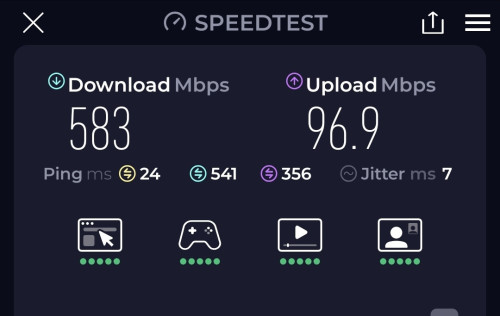  Point of reference? Which telco? Device used? |
|
|
|
|
|
petrofsky77
|
Nov 7 2025, 11:36 AM
|
|
|
QUOTE(shaun_kok @ Nov 7 2025, 05:36 AM) As on now, only N28 (700MHz) and N78 (3500MHz) are set aside and used for 5G in Malaysia - and may remain so for a foreseeable future. N28 is only used for 5G SA, while N78 is used for both NSA (combined with B28 LTE DSS) and SA networks. mmWave is assigned, but not used (short range, easily blocked by hands, glass and so on). Some American, Australian, and Japanese phone models have mmWave included, but not elsewhere - even when included, the coverage is very very low. Other bands are "4G only bands" for now, despite it is used for 5G in other countries. My modem still shows that I'm connected to only N78, even though I've lock band to N28 + N78. I've also set the modem to run exclusively on 5G SA mode only, but speeds under YES 5G Advanced is still underwhelming IMO. The only reason for me sticking to YES till now is it's torrenting abilities. UHome 5G unfortunately block P2P packets. |
|
|
|
|



 Quote
Quote

 0.0138sec
 0.32
0.32
 7 queries
 GZIP Disabled