Welcome Guest ( Log In | Register )

Bump Topic Topic Closed RSS Feed
3 Pages  1 2 3 >Bottom

Outline · [ Standard ] · Linear+

 Second-hand GPU doesnt work, help needed

views
     
TSMinimalist2022
post Feb 23 2024, 10:03 PM, updated 2y ago

New Member
*
Junior Member
19 posts

Joined: Aug 2022
Hi, Sifus. Please help me on this.

» Click to show Spoiler - click again to hide... «


» Click to show Spoiler - click again to hide... «


Update 2:
Received another RTX 3080 of different model from someone else. Had been using for two days, seems to be all good. Thanks for those who actually helped me diagnose the issues. Closing this topic.

Also giving credit where credit is due, thanks to Babylon for giving helpful information. Read everything and picked up a lot. I hope in the future he can at least teach better without mocking or jabbing though, since not everyone is as knowledgeable. So I'll leave the info he has left here.

This post has been edited by Minimalist2022: Mar 20 2024, 09:26 AM

tvcat
post Feb 23 2024, 10:35 PM

Mr. Dumb Dumb
*******
Senior Member
2,919 posts

Joined: Nov 2004


Make sure the power cable to the 3080 is the correct one.

Try reseat the RAM or if it is more than one stick than try a single RAM at a time at different slot.

Or try the 3080 on another system.
SUSifourtos
post Feb 23 2024, 10:37 PM

Look at all my stars!!
*******
Senior Member
2,256 posts

Joined: Feb 2012


1. no fan even CPU Fan?

2. Plug in back old GPU everything Works?

3. which slot you installed your GPU??

4. do power flush with new GPU

5. a PIC of all angle, how you install the NEW GPU.
TristanX
post Feb 23 2024, 10:44 PM

Where is my stars?
Group Icon
Elite
24,351 posts

Joined: Nov 2004
From: Setapak, Kuala Lumpur


Make sure you use one cable per 8-pin pcie. Do not use single cable for two 8-pin pcie.
TSMinimalist2022
post Feb 23 2024, 11:22 PM

New Member
*
Junior Member
19 posts

Joined: Aug 2022
QUOTE(tvcat @ Feb 23 2024, 10:35 PM)
Make sure the power cable to the 3080 is the correct one.

Try reseat the RAM or if it is more than one stick than try a single RAM at a time at different slot.

Or try the 3080 on another system.
*
1. Its definitely the correct cable(s), PCIe.
2. My RAM is 4x8GB (I realised I have forgotten to list the configuration), and I also tested one by one.
3. No other system available at the moment, sadly.
TSMinimalist2022
post Feb 23 2024, 11:29 PM

New Member
*
Junior Member
19 posts

Joined: Aug 2022
QUOTE(ifourtos @ Feb 23 2024, 10:37 PM)
1. no fan even CPU Fan?

2. Plug in back old GPU everything Works?

3. which slot you installed your GPU??

4. do power flush with new GPU

5. a PIC of all angle, how you install the NEW GPU.
*
1. No, not even one fan. Its only with this RTX 3080 that it wouldnt start. Without it, or with the old GTX 980, everything is fine.

2. Yes.

3. There are 2 slots on the motherboard. I tried both, no luck.

4. Tried, no luck.

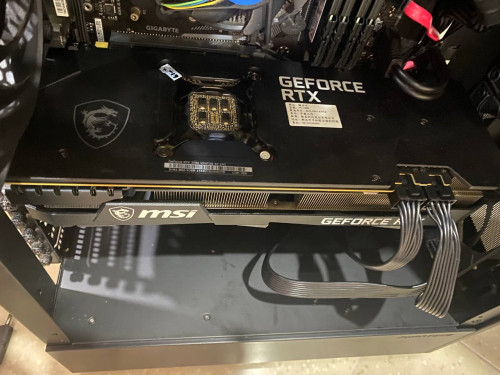
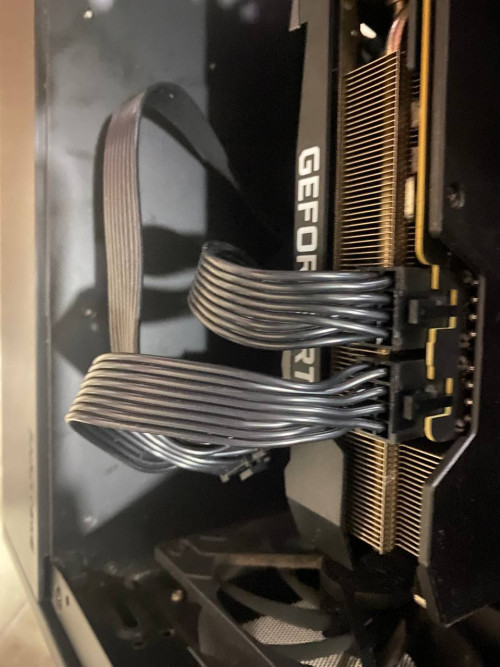
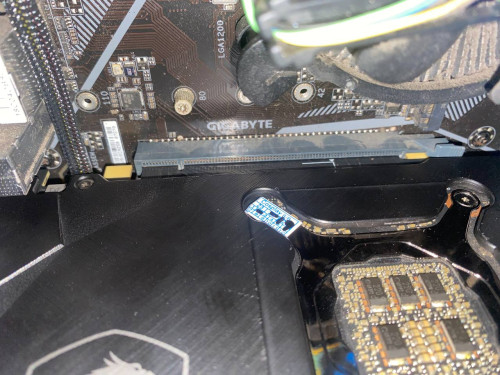
5. Not sure which angles are useful to you. Let me know if you need more / clearer angles.

And I tried separate cables (1 per 8 pin) and same cable (1 for both 8s), still no luck.

user posted image
user posted image
user posted image
SUSifourtos
post Feb 24 2024, 12:03 AM

Look at all my stars!!
*******
Senior Member
2,256 posts

Joined: Feb 2012


user posted image


https://linustechtips.com/topic/1026041-com...-graphics-card/


very weird.

even Faulty GPU can boot.

from your description. the entire PC refuse to TURN ON.


" you have a short in your pc "

i hope is not your GPU caused the short.

but seeing from the picture, is very tight.


TSMinimalist2022
post Feb 24 2024, 08:29 AM

New Member
*
Junior Member
19 posts

Joined: Aug 2022
QUOTE(ifourtos @ Feb 24 2024, 12:03 AM)
user posted image
https://linustechtips.com/topic/1026041-com...-graphics-card/
very weird.

even Faulty GPU can boot.

from your description. the entire PC refuse to TURN ON.
" you have a short in your pc "

i hope is not your GPU caused the short.

but seeing from the picture, is very tight.
*
I hope not too. Today I'll have more time to test it out, and with another system. The journey continues... Thanks for helping.
Dothan
post Feb 24 2024, 08:40 AM

Dingle Berries
******
Senior Member
1,054 posts

Joined: Jan 2003


How come your power cable to mobo EATX connector is routed UNDER the GPU? It should be routed BELOW the mobo.

kurangak
post Feb 24 2024, 08:45 AM

certified /k addict
******
Senior Member
1,170 posts

Joined: Apr 2011
From: Deus Vult


when u say u uninstall your driver, did u use DDU to do so?
SUSifourtos
post Feb 24 2024, 09:11 AM

Look at all my stars!!
*******
Senior Member
2,256 posts

Joined: Feb 2012


QUOTE(kurangak @ Feb 24 2024, 08:45 AM)
when u say u uninstall your driver, did u use DDU to do so?
*
Cant power on, not even POST...

no Disk drive also can boot. how can this be driver problem?
TSMinimalist2022
post Feb 24 2024, 10:27 AM

New Member
*
Junior Member
19 posts

Joined: Aug 2022
QUOTE(kurangak @ Feb 24 2024, 08:45 AM)
when u say u uninstall your driver, did u use DDU to do so?
*
Yes I did. And I just tried on a different system. It sparked and smoked... I guess its DOA. Going to ask seller for an exchange. Thanks for helping.
TSMinimalist2022
post Feb 24 2024, 10:28 AM

New Member
*
Junior Member
19 posts

Joined: Aug 2022
QUOTE(Dothan @ Feb 24 2024, 08:40 AM)
How come your power cable to mobo EATX connector is routed UNDER the GPU? It should be routed BELOW the mobo.
*
Not sure what you mean by this but if you are referring to the left braided cable, it is not a power cable.
babylon52281
post Feb 24 2024, 12:20 PM

Look at all my stars!!
*******
Senior Member
2,700 posts

Joined: Apr 2017
QUOTE(Minimalist2022 @ Feb 23 2024, 10:03 PM)
Hi, Sifus. Please help me on this.

Recently I decided to upgrade my GPU, so I bought a second-hand RTX 3080 (MSI Ventus 3X 10G). When I first installed, it was working nicely. I left my PC on and then went for my job.

When I returned, the PC was shut down. I could not turn it on anymore. I swapped my old GPU back, and the PC turns on again.

I assumed it was a PSU problem (previously it was a Corsair CV 550) with lacking power, so I decided to get a new PSU (upgraded to Corsair RM750e). Tried it out, the problem still persisted with only the new GPU.

I reset my CMOS, uninstalled drivers, tested one by one but no luck.

For more description, I press the power button, but no fans spun, there is no sound.

Here are my specs:
Intel i5 10400F
HyperX 32GB (4x8) DDR4 2666 MHz
MSI GTX 980 -> MSI Ventus 3x RTX 3080 10G
Gigabyte B460M DS3H V2 (with latest bios)
Corsair CV 550 -> Corsair RM750e
Seagate Barracuda 500GB

I have contacted the seller but right now it is out of working hours, so perhaps you can provide me an insight. Thanks.
*
Adoi, 3080 required min 700W PSU and in practical needs about 850-1000W due to 30series transient spike. Somemore CV550W unit is D tier, totally not Not NOT! suited for a high powered GPU in 3070-3080 segment. Ur lucky that puny 550W unit did not fry, or perhaps it did and took down ur GPU as well.

Even that RM750e is barely boleh pakai, your taking a chance there if still getting another 3080. Up it to a 850W A tier at least.

PS when you go high end your gotta make sure the other components can support it too

This post has been edited by babylon52281: Feb 24 2024, 12:23 PM
TSMinimalist2022
post Feb 24 2024, 01:22 PM

New Member
*
Junior Member
19 posts

Joined: Aug 2022
QUOTE(babylon52281 @ Feb 24 2024, 12:20 PM)
Adoi, 3080 required min 700W PSU and in practical needs about 850-1000W due to 30series transient spike. Somemore CV550W unit is D tier, totally not Not NOT! suited for a high powered GPU in 3070-3080 segment. Ur lucky that puny 550W unit did not fry, or perhaps it did and took down ur GPU as well.

Even that RM750e is barely boleh pakai, your taking a chance there if still getting another 3080. Up it to a 850W A tier at least.

PS when you go high end your gotta make sure the other components can support it too
*
Thanks for the advice but I have to disagree with this. It's not a no-brand power supply, could you explain why it will "take down" my GPU? Surely, at most if not enough power it will just shut down the entire thing. But I agree it is inadequate, so I decided to change it. I followed Nvidia recommended minimum power at 750W, and RMx is an A-tier PSU.


SUSifourtos
post Feb 24 2024, 01:29 PM

Look at all my stars!!
*******
Senior Member
2,256 posts

Joined: Feb 2012


QUOTE(babylon52281 @ Feb 24 2024, 12:20 PM)
Adoi, 3080 required min 700W PSU and in practical needs about 850-1000W due to 30series transient spike. Somemore CV550W unit is D tier, totally not Not NOT! suited for a high powered GPU in 3070-3080 segment. Ur lucky that puny 550W unit did not fry, or perhaps it did and took down ur GPU as well.

Even that RM750e is barely boleh pakai, your taking a chance there if still getting another 3080. Up it to a 850W A tier at least.

PS when you go high end your gotta make sure the other components can support it too
*
QUOTE(Minimalist2022 @ Feb 24 2024, 01:22 PM)
Thanks for the advice but I have to disagree with this. It's not a no-brand power supply, could you explain why it will "take down" my GPU? Surely, at most if not enough power it will just shut down the entire thing. But I agree it is inadequate, so I decided to change it. I followed Nvidia recommended minimum power at 750W, and RMx is an A-tier PSU.
*
u are right, totally nonsense.


no psu design to break when 100%
and GPU not always run on full power mode.

even NVIDIA official didnt say u need 850w for 3080

his opinion is inaccurate
SUSifourtos
post Feb 24 2024, 01:31 PM

Look at all my stars!!
*******
Senior Member
2,256 posts

Joined: Feb 2012


if sparked

something melted and caused shorted like i mentioned.


i guess, this is a mining card?
babylon52281
post Feb 24 2024, 06:06 PM

Look at all my stars!!
*******
Senior Member
2,700 posts

Joined: Apr 2017
QUOTE(Minimalist2022 @ Feb 24 2024, 01:22 PM)
Thanks for the advice but I have to disagree with this. It's not a no-brand power supply, could you explain why it will "take down" my GPU? Surely, at most if not enough power it will just shut down the entire thing. But I agree it is inadequate, so I decided to change it. I followed Nvidia recommended minimum power at 750W, and RMx is an A-tier PSU.
*
Trusting a brandname to be consistent is a real fallacy which most companies hope their customer to blindly rely on. This is why the PSU Tier List exist.

While Corsair higher end PSU are good quality stuff their basic & cheaper options are really just budget stuff with Corsair name tacked on. Your CV550 is a D tier rated unit only suited for igpu builds and you shoved a 3080 into it. LOL

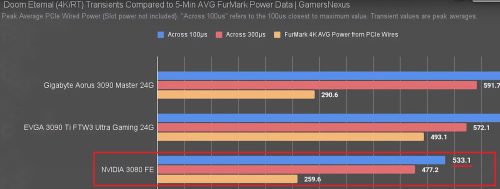
Transient on 30series is a well documented issue and GN had done an indepth review on it


You can disgree but GN is a well trusted PC hardware reviewer and they present facts to back that up

A 3080 has transient that draws nearly the whole capacity of your 550W unit (which actually has a real capacity of 528W), what about the others like CPU, Mobo, RAM, fans & storage?
user posted image

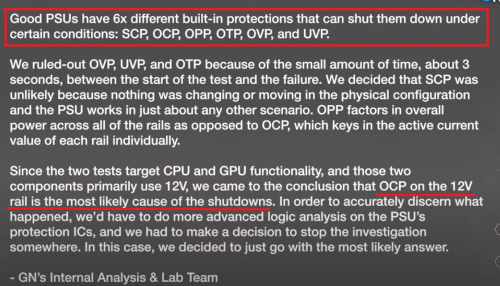
And this is what GN deduced from their investigation; the trip happen on the 12V which triggered OCP
user posted image

Now see, good PSUs has good & complete protection. Cheap & budget PSUs typically lack full coverage and even if it stated to have OCP it may not be fully effective and overcurrent in the 12V rails could have passed on. Guess what, your GPU 8pin supply is directly connected to the PSU 12V rails.

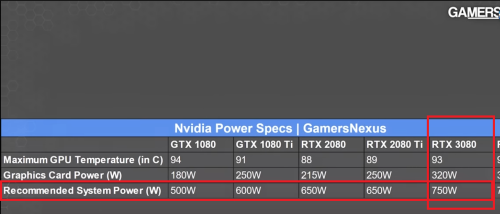
This is the wattage unit GN reco to use. So its needed nearly 50% more than your 550W unit could handle!
user posted image

Yes, you gotten a 750W A tier PSU but thats only AFTER shit happen isnt it? Its likely your GPU is ady killed before you upgrade to the 750W. And this is the bare minimum that GN recos you havent factored in if you will upgrade anything in the future or that PSU ages and thus its ability to handle "real" 750W will deteriorate with time. Mate, if you can afford a 750W A tier PSU, an 850W A tier unit isnt that much more costly.

This post has been edited by babylon52281: Feb 24 2024, 06:15 PM
babylon52281
post Feb 24 2024, 06:14 PM

Look at all my stars!!
*******
Senior Member
2,700 posts

Joined: Apr 2017
QUOTE(ifourtos @ Feb 24 2024, 01:29 PM)
u are right, totally nonsense.
no psu design to break when 100%
and GPU not always run on full power mode.

even NVIDIA official didnt say u need 850w for 3080

his opinion is inaccurate
*
Its between your words and GN. And far more in the internet community trust GN.
kopiride
post Feb 24 2024, 07:15 PM

Enthusiast
*****
Junior Member
783 posts

Joined: Jan 2003
QUOTE(babylon52281 @ Feb 24 2024, 06:06 PM)
Trusting a brandname to be consistent is a real fallacy which most companies hope their customer to blindly rely on. This is why the PSU Tier List exist.

While Corsair higher end PSU are good quality stuff their basic & cheaper options are really just budget stuff with Corsair name tacked on. Your CV550 is a D tier rated unit only suited for igpu builds and you shoved a 3080 into it. LOL

Transient on 30series is a well documented issue and GN had done an indepth review on it


You can disgree but GN is a well trusted PC hardware reviewer and they present facts to back that up

A 3080 has transient that draws nearly the whole capacity of your 550W unit (which actually has a real capacity of 528W), what about the others like CPU, Mobo, RAM, fans & storage?
user posted image

And this is what GN deduced from their investigation; the trip happen on the 12V which triggered OCP
user posted image

Now see, good PSUs has good & complete protection. Cheap & budget PSUs typically lack full coverage and even if it stated to have OCP it may not be fully effective and overcurrent in the 12V rails could have passed on. Guess what, your GPU 8pin supply is directly connected to the PSU 12V rails.

This is the wattage unit GN reco to use. So its needed nearly 50% more than your 550W unit could handle!
user posted image

Yes, you gotten a 750W A tier PSU but thats only AFTER shit happen isnt it? Its likely your GPU is ady killed before you upgrade to the 750W. And this is the bare minimum that GN recos you havent factored in if you will upgrade anything in the future or that PSU ages and thus its ability to handle "real" 750W will deteriorate with time. Mate, if you can afford a 750W A tier PSU, an 850W A tier unit isnt that much more costly.
*
I agree with this. But some people really still don't believe because it works for them. They proof that, hey I use some lower powered GPU and no issue it works. Well, it works until it didn't. Then they will be wondering why it died. It's hard to convince them but glad u made an effort.

3 Pages  1 2 3 >Top
Topic ClosedOptions
 

Change to:
| Lo-Fi Version
0.0192sec    0.40    5 queries    GZIP Disabled
Time is now: 13th December 2025 - 06:37 PM