


Quick question.. do you guys able to obtain Global IPv6 address?

Other ISP Celcom Home Fiber ipv6, Regarding ipv6 with Celcom
|
|
  Jan 13 2024, 11:53 AM, updated 2y ago Jan 13 2024, 11:53 AM, updated 2y ago
Show posts by this member only | IPv6 | Post
#1
|
 
Newbie
12 posts Joined: Dec 2005 From: Most Advanced City On Earth   
|
Anyone else using Celcom Home Fiber?
Quick question.. do you guys able to obtain Global IPv6 address? |
|
|
|
|
|
Jan 13 2024, 01:29 PM
Show posts by this member only | Post
#2
|

Senior Member
5,296 posts Joined: Nov 2006
|
QUOTE(h4cker_501 @ Jan 13 2024, 11:53 AM) Anyone else using Celcom Home Fiber? Don't waste time on ipv6 is still unmature yet. Some ISP have better ipv4 connection then ipv6 Quick question.. do you guys able to obtain Global IPv6 address?  |
|
|
Jan 13 2024, 06:00 PM
Show posts by this member only | IPv6 | Post
#3
|

Senior Member
2,096 posts Joined: Aug 2009 From: Shithole Klang
|
No. Technically you get routed ipv6, but not delegated. So its only functioning in router. Not in lan. h4cker_501 liked this post
|
|
|
Jan 13 2024, 08:57 PM
Show posts by this member only | Post
#4
|
|
Junior Member
112 posts Joined: Sep 2009
|
🤔🤔 .. We actually who should ask u Mr @h4cker_501 .. 🤔🤔 h4cker_501 liked this post
|
|
|
Jan 14 2024, 09:34 AM
Show posts by this member only | IPv6 | Post
#5
|

Junior Member
339 posts Joined: Mar 2010 From: Shah Alam 
|
QUOTE(OlgaC4 @ Jan 13 2024, 01:29 PM) Don't waste time on ipv6 is still unmature yet. Some ISP have better ipv4 connection then ipv6 No problems with Unifi IPv6 here. h4cker_501 liked this post
|
|
|
Jan 14 2024, 10:52 AM
Show posts by this member only | IPv6 | Post
#6
|
|
Junior Member
109 posts Joined: Apr 2020
|
QUOTE(OlgaC4 @ Jan 13 2024, 01:29 PM) Don't waste time on ipv6 is still unmature yet. Some ISP have better ipv4 connection then ipv6 No problem with TIME IPv6 and Unifi IPv6 here.Routing even better with IPv6 enabled. h4cker_501 liked this post
|
|
|
|
|
|
Jan 14 2024, 11:09 AM
Show posts by this member only | IPv6 | Post
#7
|
|
Senior Member
5,296 posts Joined: Nov 2006
|
QUOTE(twice1020 @ Jan 14 2024, 10:52 AM) No problem with TIME IPv6 and Unifi IPv6 here. That is general statement.Routing even better with IPv6 enabled. |
|
|
Jan 14 2024, 12:40 PM
Show posts by this member only | IPv6 | Post
#8
|
|
Junior Member
112 posts Joined: Sep 2009
|
U should mention ur router model boh! h4cker_501 liked this post
|
|
|
Jan 14 2024, 02:43 PM
Show posts by this member only | IPv6 | Post
#9
|
|
Newbie
12 posts Joined: Dec 2005 From: Most Advanced City On Earth
|
QUOTE(msrazi @ Jan 14 2024, 12:40 PM) U should mention ur router model boh! My bad for not mentioning the exact model of the router. It is an OEM Model Name:RN685. It seemed that even though the router came pre-configured with Celcom Home2 Profile with dual-stack ipv4/ipv6 with ipv6 wan mode set to Stateless Address Auto-Configuration (SLAAC) ... Celcom is not actually providing true global ipv6 address and instead left me (maybe the rest included) to only just have link-local ipv6 . This is 2024. All major ISP especially servicing fiber optic should be mandatory to provide ipv6. kk2628 liked this post
|
|
|
 Jan 14 2024, 02:47 PM Jan 14 2024, 02:47 PM
Show posts by this member only | IPv6 | Post
#10
|
|
Newbie
12 posts Joined: Dec 2005 From: Most Advanced City On Earth
|
QUOTE(twice1020 @ Jan 14 2024, 10:52 AM) No problem with TIME IPv6 and Unifi IPv6 here. This is true..Routing even better with IPv6 enabled. I have multiple subscriptions of fiber optic at the moment including TM-Unifi. I have no problem with ipv6 on TM Unifi. packet header transfer way faster with ipv6 and this can also mitigate carrier grade network address translation with ease. the 128 bit hextets has enormous amount of host spaces to play with for multiple subnets. This post has been edited by h4cker_501: Jan 14 2024, 02:48 PM |
|
|
Jan 14 2024, 02:52 PM
Show posts by this member only | IPv6 | Post
#11
|
|
Newbie
12 posts Joined: Dec 2005 From: Most Advanced City On Earth
|
QUOTE(failed.hashcheck @ Jan 13 2024, 06:00 PM) No. I think you're the only who actually answered my question as to have or using celcom home fiber.Technically you get routed ipv6, but not delegated. So its only functioning in router. Not in lan. thank you for validating. |
|
|
Jan 15 2024, 10:15 AM
Show posts by this member only | IPv6 | Post
#12
|
|
Junior Member
112 posts Joined: Sep 2009
|
May I know how do u guys justify getting public ipv6 or not? From router WAN ipv6 or ur LAN clients ipv6? h4cker_501 liked this post
|
|
|
Jan 15 2024, 04:50 PM
Show posts by this member only | IPv6 | Post
#13
|
|
Newbie
12 posts Joined: Dec 2005 From: Most Advanced City On Earth
|
QUOTE(msrazi @ Jan 15 2024, 10:15 AM) May I know how do u guys justify getting public ipv6 or not? From router WAN ipv6 or ur LAN clients ipv6? Hi! yes sure 🙂🎈as per picture for reference. this is how we breakdown an IPv6 address/ the first hextet is what we call /3 IANA global prefix - followed by /23 regional registry - followed by /32 provider prefix - followed by /48 site prefix - followed by /64 subnet prefix answering your question.. on our workstation if we do the ipconfig command on windows and failed to obtain/receive an IANA global prefix address of an ipv6.. it means that the router failed to obtain realworld ipv6 from ISP. normally, anywhere on earth... if we see our ipv6 starts or begins with 2001 .. it means that this ipv6 address is routable across the Wide Area Network otherwise known as the internet. that is 1% about how to basically understand ipv6 🎈🙂🎈 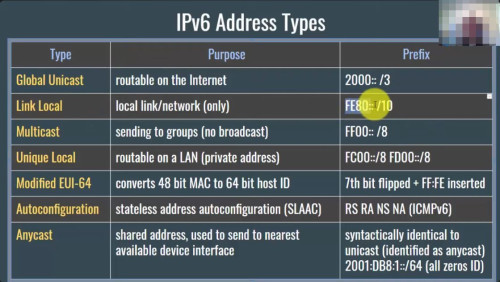 |
|
|
|
|
|
Jan 16 2024, 08:48 AM
|
|
Junior Member
112 posts Joined: Sep 2009
|
ISP not assign an address for IPv6 network compare to IPv4. They actually assign a prefix either /48 /56 /64. Ur router will advertise this prefix on router network where IPv6 enabled clients in the network will receive the advertisement & pick 1 or more addresses & will check to make sure no other clients in the network use those addresses & it's configured. No DHCP required. Btw if ur pppoe connection is ipv4/ipv6 dua stack, u should have public ipv6 assign for pppoe & router. Check it in router system info. U can try to use build-in to ping ipv6 test site if available. Ur real problem boh ku is no ipv6 gateway, only ipv4 gateway. Seem ur router not enabled by default the ipv6 gateway. Depend on router brands, in pppoe setting should have options to config ipv6 as default gateway instead of ipv4..and u can laugh. Good luck boh! h4cker_501 liked this post
|
|
|
Jan 16 2024, 03:36 PM
Show posts by this member only | IPv6 | Post
#15
|
|
Newbie
12 posts Joined: Dec 2005 From: Most Advanced City On Earth
|
QUOTE(msrazi @ Jan 16 2024, 08:48 AM) ISP not assign an address for IPv6 network compare to IPv4. They actually assign a prefix either /48 /56 /64. I am afraid that is the case..Ur router will advertise this prefix on router network where IPv6 enabled clients in the network will receive the advertisement & pick 1 or more addresses & will check to make sure no other clients in the network use those addresses & it's configured. No DHCP required. Btw if ur pppoe connection is ipv4/ipv6 dua stack, u should have public ipv6 assign for pppoe & router. Check it in router system info. U can try to use build-in to ping ipv6 test site if available. Ur real problem boh ku is no ipv6 gateway, only ipv4 gateway. Seem ur router not enabled by default the ipv6 gateway. Depend on router brands, in pppoe setting should have options to config ipv6 as default gateway instead of ipv4..and u can laugh. Good luck boh! my OEM router is provided by Celcom  |
|
|
Jan 16 2024, 05:58 PM
Show posts by this member only | IPv6 | Post
#16
|
|
Junior Member
112 posts Joined: Sep 2009
|
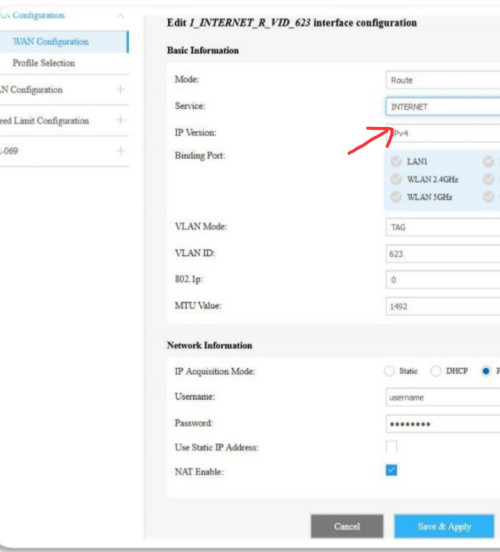 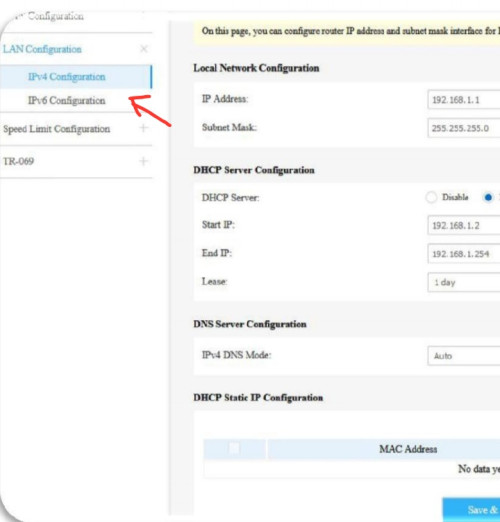 Can u share the page when ip version set to ipv4/ipv6? h4cker_501 liked this post
|
|
|
Jan 17 2024, 01:19 AM
Show posts by this member only | IPv6 | Post
#17
|
|
Junior Member
112 posts Joined: Sep 2009
|
Forgot to mention ipv4/ipv6 dual stack router need DS-Lite B4 ipv6 address to connect to internet IPV4/IPV6 Dual-Stack (avoid dual stack wtf routers). 1) PPPOE set ipv6 only. 2) -Set Default Gateway. -DS-Lite must be enabled. -Manual DS-Lite B4 ip: ipv6 gateway. 3) Save + connect. 4) Check ipv6 internet for ipv6 address using devices ie phone. 5) Now ur router clients has own Public ipv6. No more share router Public ipv4. 6) Set PPPOE back to ipv4/ipv6. Just for ur reference: https://www.celcom.com.my/sites/default/fil...lines-RN685.pdf This post has been edited by msrazi: Jan 17 2024, 01:20 AM yathavan101 and h4cker_501 liked this post
|
|
|
Jun 22 2024, 03:38 AM
|
|
Newbie
1 posts Joined: Feb 2015
|
I really wish Celcom was better. This is really disapointing. I will be moving back to TM Unifi when I get the chance
|
|
|
Feb 6 2025, 06:31 PM
|
|
Junior Member
214 posts Joined: May 2017
|
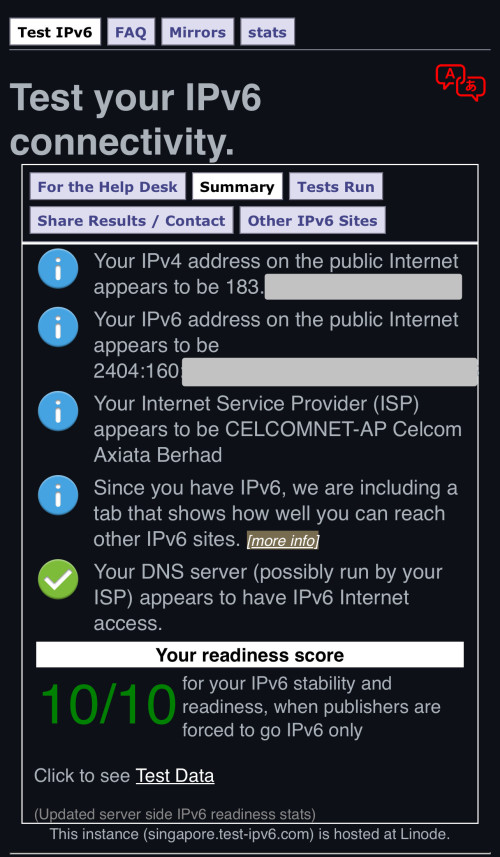
ran a proxy on the router and connect to it, able to use IPv6 on Celcom. still cannot figure out how to get it delegated to local clients.
 |
|
|
Feb 14 2025, 06:11 PM
|
|
Junior Member
214 posts Joined: May 2017
|
Not sure if Celcom changed anything. all my local devices are able to get ipv6 GUA now
|
| Change to: |  0.0309sec 0.0309sec
 0.92 0.92
 5 queries 5 queries
 GZIP Disabled GZIP Disabled
Time is now: 16th December 2025 - 01:36 PM |
 Quote
Quote