

🤔🤔 ..
We actually who should ask u Mr @h4cker_501 .. 🤔🤔
Other ISP Celcom Home Fiber ipv6, Regarding ipv6 with Celcom
Other ISP Celcom Home Fiber ipv6, Regarding ipv6 with Celcom
|
|
 Jan 13 2024, 08:57 PM Jan 13 2024, 08:57 PM
Return to original view | Post
#1
|
 
Junior Member
112 posts Joined: Sep 2009  
|
🤔🤔 .. We actually who should ask u Mr @h4cker_501 .. 🤔🤔 h4cker_501 liked this post
|
|
|
|
|
|
Jan 14 2024, 12:40 PM
Return to original view | IPv6 | Post
#2
|
|
Junior Member
112 posts Joined: Sep 2009
|
U should mention ur router model boh! h4cker_501 liked this post
|
|
|
Jan 15 2024, 10:15 AM
Return to original view | IPv6 | Post
#3
|
|
Junior Member
112 posts Joined: Sep 2009
|
May I know how do u guys justify getting public ipv6 or not? From router WAN ipv6 or ur LAN clients ipv6? h4cker_501 liked this post
|
|
|
Jan 16 2024, 08:48 AM
Return to original view | Post
#4
|
|
Junior Member
112 posts Joined: Sep 2009
|
ISP not assign an address for IPv6 network compare to IPv4. They actually assign a prefix either /48 /56 /64. Ur router will advertise this prefix on router network where IPv6 enabled clients in the network will receive the advertisement & pick 1 or more addresses & will check to make sure no other clients in the network use those addresses & it's configured. No DHCP required. Btw if ur pppoe connection is ipv4/ipv6 dua stack, u should have public ipv6 assign for pppoe & router. Check it in router system info. U can try to use build-in to ping ipv6 test site if available. Ur real problem boh ku is no ipv6 gateway, only ipv4 gateway. Seem ur router not enabled by default the ipv6 gateway. Depend on router brands, in pppoe setting should have options to config ipv6 as default gateway instead of ipv4..and u can laugh. Good luck boh! h4cker_501 liked this post
|
|
|
Jan 16 2024, 05:58 PM
Return to original view | IPv6 | Post
#5
|
|
Junior Member
112 posts Joined: Sep 2009
|
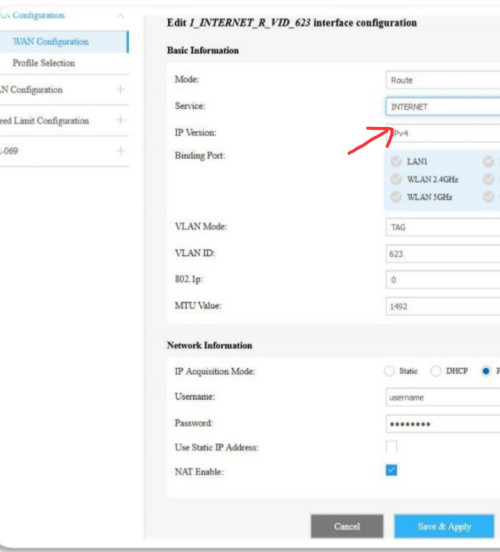 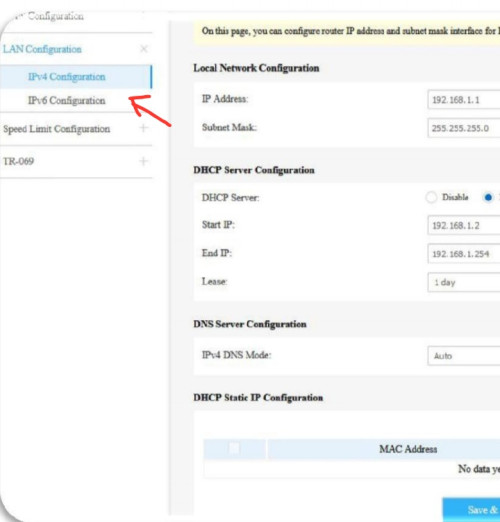 Can u share the page when ip version set to ipv4/ipv6? h4cker_501 liked this post
|
|
|
Jan 17 2024, 01:19 AM
Return to original view | IPv6 | Post
#6
|
|
Junior Member
112 posts Joined: Sep 2009
|
Forgot to mention ipv4/ipv6 dual stack router need DS-Lite B4 ipv6 address to connect to internet IPV4/IPV6 Dual-Stack (avoid dual stack wtf routers). 1) PPPOE set ipv6 only. 2) -Set Default Gateway. -DS-Lite must be enabled. -Manual DS-Lite B4 ip: ipv6 gateway. 3) Save + connect. 4) Check ipv6 internet for ipv6 address using devices ie phone. 5) Now ur router clients has own Public ipv6. No more share router Public ipv4. 6) Set PPPOE back to ipv4/ipv6. Just for ur reference: https://www.celcom.com.my/sites/default/fil...lines-RN685.pdf This post has been edited by msrazi: Jan 17 2024, 01:20 AM yathavan101 and h4cker_501 liked this post
|
| Change to: |  0.0340sec 0.0340sec
 1.10 1.10
 6 queries 6 queries
 GZIP Disabled GZIP Disabled
Time is now: 17th December 2025 - 06:22 AM |
 Quote
Quote