Welcome Guest ( Log In | Register )

328 Pages « < 319 320 321 322 323 > » Bottom

Outline · [ Standard ] · Linear+

 Samsung Galaxy S24 Series Discussion Thread, Galaxy AI is coming

views
     
edtai
post Sep 17 2025, 08:40 AM

Enthusiast
*****
Senior Member
966 posts

Joined: Jun 2011
After few days of testing with different setting including airplane mode during sleep. Obviously the Android OS is "naturally" drains battery after certain period of usage regardless which mode you set including airplane mode. The only solution is to hard reset the phone as similar to old Android OS, that i normally did to those previous phones once a year. But I am lazy today to do so now to backup, setting again all apps, arrangement of the orientation of apps on home screen and so on...
I think I just live with the normal drain battery of the phone as it is still remains at once charge per day basic.
azhar75
post Sep 17 2025, 08:57 AM

10k Club
********
All Stars
17,220 posts

Joined: Dec 2015


Don't compare phone vs tablet:
1) Tablet has bigger battery supply. 1 % means 1% of 8,000 mAh (80 mAh) vs 10% of 5,000 (50 mAh)

2) Most tablets don't have #5G_is_fake SIM slots. Also, they do not have dual SIM slots. The high overnight drain is usually due to #5G_is_fake handshake "running" in the background.
aspire2oo6
post Sep 17 2025, 09:43 AM

Banned
*********
All Stars
35,468 posts

Joined: Oct 2006

QUOTE(edtai @ Sep 17 2025, 08:40 AM)
After few days of testing with different setting including airplane mode during sleep. Obviously the Android OS is "naturally" drains battery after certain period of usage regardless which mode you set including airplane mode. The only solution is to hard reset the phone as similar to old Android OS, that i normally did to those previous phones once a year. But I am lazy today to do so now to backup, setting again all apps, arrangement of the orientation of apps on home screen and so on...
I think I just live with the normal drain battery of the phone as it is still remains at once charge per day basic.
*
When I was using Samsung, this was my routine:

1. Flight mode on schedule – Set the phone to automatically go into flight mode at certain times or locations.
2. Deep Sleep apps – In battery settings, put most apps into Deep Sleep so they don’t send notifications or drain battery in the background. Only keep important ones active (e.g. banking apps, Samsung Pay, WhatsApp).
3. Screen brightness – Turn off auto-brightness and fix it at 30% to save power.
4. After major OS updates – Always format (reset) the phone to keep it running smooth and clean.
chongkiatz
post Sep 17 2025, 10:20 AM

Look at all my stars!!
*******
Senior Member
6,748 posts

Joined: Sep 2008
From: Kuala Terengganu
QUOTE(edtai @ Sep 17 2025, 08:40 AM)
After few days of testing with different setting including airplane mode during sleep. Obviously the Android OS is "naturally" drains battery after certain period of usage regardless which mode you set including airplane mode. The only solution is to hard reset the phone as similar to old Android OS, that i normally did to those previous phones once a year. But I am lazy today to do so now to backup, setting again all apps, arrangement of the orientation of apps on home screen and so on...
I think I just live with the normal drain battery of the phone as it is still remains at once charge per day basic.
*
Why dont u try to clear caches in Recovery mode , some user claim it do help on draining battery smile.gif
PJng
post Sep 17 2025, 10:45 AM

10k Club
********
All Stars
12,039 posts

Joined: Oct 2017


My plan don have 5G, old phone also no 5G
Tablet 5100mah, phone 4500mah, both in 4G, and also only 1 sim
edtai
post Sep 17 2025, 01:30 PM

Enthusiast
*****
Senior Member
966 posts

Joined: Jun 2011
QUOTE(aspire2oo6 @ Sep 17 2025, 09:43 AM)
When I was using Samsung, this was my routine:

1. Flight mode on schedule – Set the phone to automatically go into flight mode at certain times or locations.
2. Deep Sleep apps – In battery settings, put most apps into Deep Sleep so they don’t send notifications or drain battery in the background. Only keep important ones active (e.g. banking apps, Samsung Pay, WhatsApp).
3. Screen brightness – Turn off auto-brightness and fix it at 30% to save power.
4. After major OS updates – Always format (reset) the phone to keep it running smooth and clean.
*
I have done most of the items:
1. Tried but not much different.
2. Yes. Mostly all apps are in deep sleep mode. Also, notification also set to only important matters like payment or transactions excluded the general, marketing and misc. type of notification. Lazada and Shopee set to silent and notification... LOL. You all definately should know how these two apps can spam your inbox one...
3. I set the screen brightness to adative mode with dark mode on.
4. Not doing hard reset after OS update.. Too many things to do prior and after OS update. hahaha. Just let it be.
5. Clear phone cache from time to time. But it does not help though.
edtai
post Sep 17 2025, 01:31 PM

Enthusiast
*****
Senior Member
966 posts

Joined: Jun 2011
QUOTE(chongkiatz @ Sep 17 2025, 10:20 AM)
Why dont u try to clear caches in Recovery mode , some user claim it do help on draining battery  smile.gif
*
I clear phone cache from time to time. But it does not help though.
chongkiatz
post Sep 17 2025, 01:39 PM

Look at all my stars!!
*******
Senior Member
6,748 posts

Joined: Sep 2008
From: Kuala Terengganu
QUOTE(edtai @ Sep 17 2025, 01:31 PM)
I clear phone cache from time to time. But it does not help though.
*
Do u clear on Recovery Mode?


edtai
post Sep 17 2025, 04:23 PM

Enthusiast
*****
Senior Member
966 posts

Joined: Jun 2011
QUOTE(chongkiatz @ Sep 17 2025, 01:39 PM)
Do u clear on Recovery Mode?

*
Of course. That's the way to clear cache. Anyway, thank you for sharing.

This post has been edited by edtai: Sep 17 2025, 04:25 PM
PJng
post Sep 17 2025, 04:26 PM

10k Club
********
All Stars
12,039 posts

Joined: Oct 2017


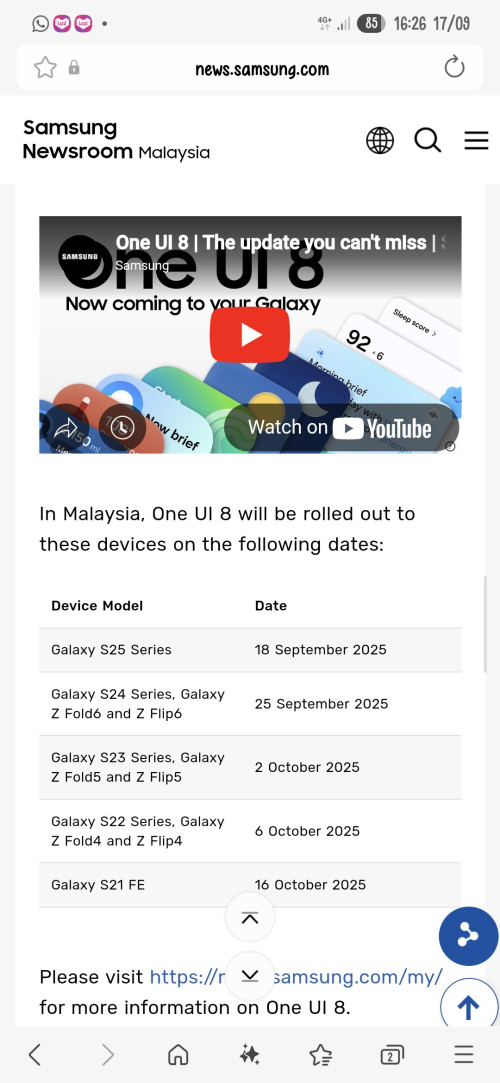
https://news.samsung.com/my/samsung-begins-...-galaxy-devices

user posted image
aspire2oo6
post Sep 17 2025, 04:26 PM

Banned
*********
All Stars
35,468 posts

Joined: Oct 2006

QUOTE(edtai @ Sep 17 2025, 01:30 PM)
I have done most of the items:
1.  Tried but not much different.
2.  Yes. Mostly all apps are in deep sleep mode. Also, notification also set to only important matters like payment or transactions excluded the general, marketing and misc. type of notification. Lazada and Shopee set to silent and notification... LOL. You all definately should know how these two apps can spam your inbox one...
3. I set the screen brightness to adative mode with dark mode on.
4. Not doing hard reset after OS update.. Too many things to do prior and after OS update. hahaha. Just let it be.
5. Clear phone cache from time to time. But it does not help though.
*
Happen to my previous s24u. I got bugged after OS update some apps when I open show black screen. Then laggy. So I am forced to hard reset after that the phone so smooth like butter
edan1979
post Sep 17 2025, 05:11 PM

*GruMpy_MoDe*
*******
Senior Member
5,511 posts

Joined: Jun 2006
From: On Earth.


QUOTE(PJng @ Sep 17 2025, 04:26 PM)
woah... this early?
PJng
post Sep 17 2025, 05:18 PM

10k Club
********
All Stars
12,039 posts

Joined: Oct 2017


QUOTE(edan1979 @ Sep 17 2025, 05:11 PM)
woah... this early?
*
Hope no critical bug and samsung remove that page like one ui 7
PJng
post Sep 17 2025, 05:21 PM

10k Club
********
All Stars
12,039 posts

Joined: Oct 2017


QUOTE(aspire2oo6 @ Sep 17 2025, 04:26 PM)
Happen to my previous s24u. I got bugged after OS update some apps when I open show black screen. Then laggy. So I am forced to hard reset after that the phone so smooth like butter
*
Me only once when note 10 lite after big one ui update, break my samsung pay, wave several terminal will cause terminal hang, even try mcd counter cause he POS hang, need wait staff restart he POS, i keep reinstall samsung pay because it keep download older version as i compare version number on this forum
edan1979
post Sep 17 2025, 05:32 PM

*GruMpy_MoDe*
*******
Senior Member
5,511 posts

Joined: Jun 2006
From: On Earth.


QUOTE(PJng @ Sep 17 2025, 05:18 PM)
Hope no critical bug and samsung remove that page like one ui 7
*
currently using the leak 8.0 ui... I don't have any problem with it. yet.
1024kbps
post Sep 17 2025, 11:56 PM

李素裳
*******
Senior Member
6,012 posts

Joined: Feb 2007


QUOTE(edtai @ Sep 17 2025, 08:40 AM)
After few days of testing with different setting including airplane mode during sleep. Obviously the Android OS is "naturally" drains battery after certain period of usage regardless which mode you set including airplane mode. The only solution is to hard reset the phone as similar to old Android OS, that i normally did to those previous phones once a year. But I am lazy today to do so now to backup, setting again all apps, arrangement of the orientation of apps on home screen and so on...
I think I just live with the normal drain battery of the phone as it is still remains at once charge per day basic.
*
For Samsung table, i actually activate the super battery saver, overnight drain is very low
i dont like to shut down the device due to use of physical button, i mean if every day on and off the button will wear out very fast.
i have 3 dead phones due to failed power button, so as long as i have option not to shutdown and power-on, i will try to use super battery saver.
For my lappy, and HTPC, as long as it received AC power, it will automatic power-on, for shutdown i just use start menu.
My work lappy i also never shutdown, since Dell and Win10/11 is optimized at idle drain, after work it just close the lid and put it back to locker, tomorrow continue to work as soon as open the lid, no need to wait for booting

Hard reset can be exhausting because you need to set up every time, but it's useless if you cant identify the root cause eg you keep using back the buggy app the caused overnight drain, for example shopee is considered vampire app, shit can send you notification every few hours if you dont restrict it.
what i do is, for every app that i consider low priority, i will not let it run it background, optimize the app, disable notifications.

edtai
post Sep 18 2025, 08:37 AM

Enthusiast
*****
Senior Member
966 posts

Joined: Jun 2011
QUOTE(1024kbps @ Sep 17 2025, 11:56 PM)
For Samsung table, i actually activate the super battery saver, overnight drain is very low
i dont like to shut down the device due to use of physical button, i mean if every day on and off the button will wear out very fast.
i have 3 dead phones due to failed power button, so as long as i have option not to shutdown and power-on, i will try to use super battery saver.
For my lappy, and HTPC, as long as it received AC power, it will automatic power-on, for shutdown i just use start menu.
My work lappy i also never shutdown, since Dell and Win10/11 is optimized at idle drain, after work it just close the lid and put it back to locker, tomorrow continue to work as soon as open the lid, no need to wait for booting

Hard reset can be exhausting because you need to set up every time, but it's useless if you cant identify the root cause eg you keep using back the buggy app the caused overnight drain, for example shopee is considered vampire app, shit can send you notification every few hours if you dont restrict it.
what i do is, for every app that i consider low priority, i will not let it run it background, optimize the app, disable notifications.
*
Yes. I am doing almost the same like you. I use Mode and Routines to set the phone to
1) battery saving mode,
2) close all the apps,
3) Bluetoooh & NFC off,
4) Data saver,
5) Auto sycn data off,
6) Do not Disturb.
I do not include Airplane mode in case of any emergency call from selected contacts. I think I should modify this Sleep Mode so that to include
7) Airplane On
8) Wifi On
Let see how the battery drain trend tonight.

I have tried hard reset before and use backup to reinstall previous phone setting, apps and etc to save time. It is not so effective to bring back to low battery drain status. So, I have to install all apps one by one, redo the setting of email, phone home screen orientation, settting and others bla bla bla to make sure it is fully new installation and setup. Then it only works and battery drain is low. When I was young, I don't mind to do it especially every time after installation of of new OS... But not for now.. LOL...
aspire2oo6
post Sep 18 2025, 09:45 AM

Banned
*********
All Stars
35,468 posts

Joined: Oct 2006

QUOTE(edtai @ Sep 18 2025, 08:37 AM)
Yes. I am doing almost the same like you. I use Mode and Routines to set the phone to
1) battery saving mode,
2) close all the apps,
3) Bluetoooh & NFC off,
4) Data saver,
5) Auto sycn data off,
6) Do not Disturb.
I do not include Airplane mode in case of any emergency call from selected contacts. I think I should modify this Sleep Mode so that to include
7) Airplane On
8) Wifi On
Let see how the battery drain trend tonight.

I have tried hard reset before and use backup to reinstall previous phone setting, apps and etc to save time. It is not so effective to bring back to low battery drain status. So, I have to install all apps one by one, redo the setting of email, phone home screen orientation, settting and others bla bla bla to make sure it is fully new installation and setup. Then it only works and battery drain is low. When I was young, I don't mind to do it especially every time after installation of of new OS... But not for now.. LOL...
*
calls and data still works in airplane mode if you are connected on wifi. They call it wifi calling.
alternative just charge when needed?

If the phone can last a day already bonus. So your definition battery drain phone dies within 4 to 5 hours like note 10 series then that is a serious issue.

Dineesh
post Sep 18 2025, 09:48 AM

On my way
****
Junior Member
619 posts

Joined: Dec 2012

Here's to hoping that they stick to this schedule this time and the update doesn't have major issues

QUOTE(PJng @ Sep 17 2025, 04:26 PM)
aspire2oo6
post Sep 18 2025, 11:59 AM

Banned
*********
All Stars
35,468 posts

Joined: Oct 2006

QUOTE(1024kbps @ Sep 17 2025, 11:56 PM)
For Samsung table, i actually activate the super battery saver, overnight drain is very low
i dont like to shut down the device due to use of physical button, i mean if every day on and off the button will wear out very fast.
i have 3 dead phones due to failed power button, so as long as i have option not to shutdown and power-on, i will try to use super battery saver.
For my lappy, and HTPC, as long as it received AC power, it will automatic power-on, for shutdown i just use start menu.
My work lappy i also never shutdown, since Dell and Win10/11 is optimized at idle drain, after work it just close the lid and put it back to locker, tomorrow continue to work as soon as open the lid, no need to wait for booting

Hard reset can be exhausting because you need to set up every time, but it's useless if you cant identify the root cause eg you keep using back the buggy app the caused overnight drain, for example shopee is considered vampire app, shit can send you notification every few hours if you dont restrict it.
what i do is, for every app that i consider low priority, i will not let it run it background, optimize the app, disable notifications.
*
after switch to apple I stop having battery anxiety. Yes even using windows or Mac I dont shut down my device.

328 Pages « < 319 320 321 322 323 > » Top
 

Change to:
| Lo-Fi Version
0.0212sec    0.70    6 queries    GZIP Disabled
Time is now: 4th December 2025 - 12:01 AM