Welcome Guest ( Log In | Register )

Outline · [ Standard ] · Linear+

 Samsung Galaxy S24 Series Discussion Thread, Galaxy AI is coming

views
     
1024kbps
post Sep 12 2025, 07:32 PM

李素裳
*******
Senior Member
6,012 posts

Joined: Feb 2007


QUOTE(edtai @ Sep 12 2025, 08:50 AM)
How or where to check the apps running behind and causing high battery drains? My phone has 10% of battery drain overnight (7hrs). I did restart and clear/wipe phone cache but the battery drain is still the same.
*
For posting question about battery drain,
at least post the screenshot for the Setting > Battery info
Even if you ask AI , AI will ask you back the same question sweat.gif

can be found within the Setting > battery?

Android version 14 or better should be able to check what app is draining the battery
For my standard setting across my devices

1. Location scanning for BT/Wifi off, unless required
2. data saver on, most app still functional, except google drive and spotify, but can be whitelisted
3. app notification, just turn off for non essential one, unless you running business with it eg tiktok shopee, normal ppl have them enabled all the time lol, or just silence it, less vibration = less battery drained
4. AOD, if your app silenced it will not show up in AOD.
5. sleep standby optimization, this one basically turn-off your data when you sleep.
6. just enable airplane mode when you sleep, unless you're required 24H on-call
7. Disable video sharpening, HDR, Video Color boost, some of these might be OS specific (aka Oneplus Color os.)
if you still see draining, you probably need disable non essential apps.


1024kbps
post Sep 14 2025, 12:33 PM

李素裳
*******
Senior Member
6,012 posts

Joined: Feb 2007


QUOTE(edtai @ Sep 14 2025, 09:06 AM)
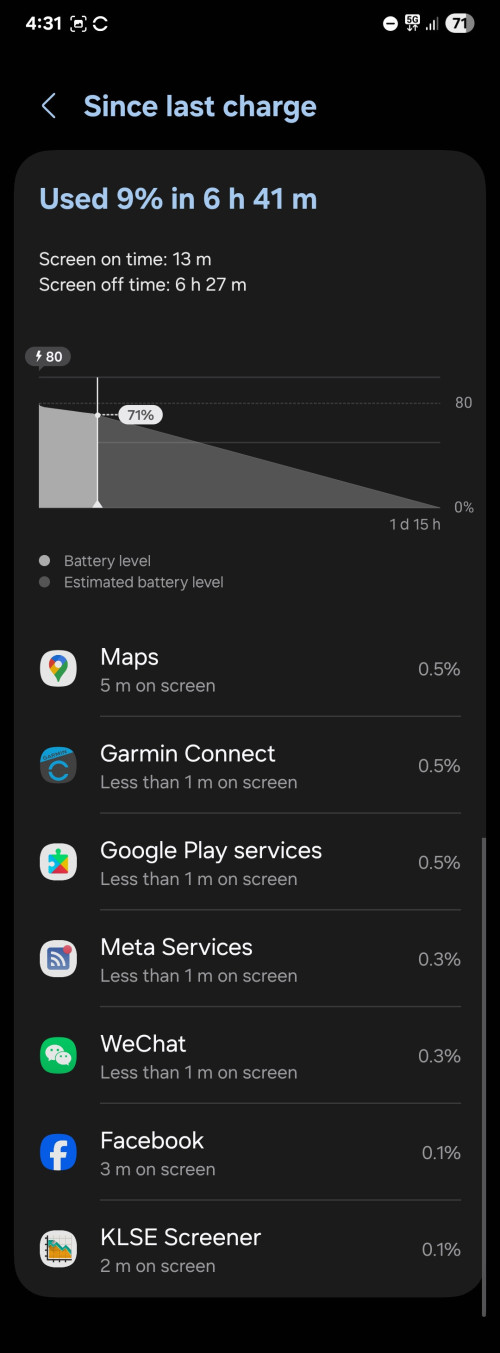
Need your guys kind advices on improvement of battery.

user posted image
*
For more drastic measure, you have to use naptime, by francisco franco, too bad he no longer further developing the app
Samsung phone i have never tried but all my Op phone have it, you need to use ADB issue commands plus disable something in developer mode,

Phone will work like usual but the app force aggressive doze and auto battery saver as soon the phone locked
low priority notification is suppressed until you pickup the phone
1024kbps
post Sep 16 2025, 06:41 PM

李素裳
*******
Senior Member
6,012 posts

Joined: Feb 2007


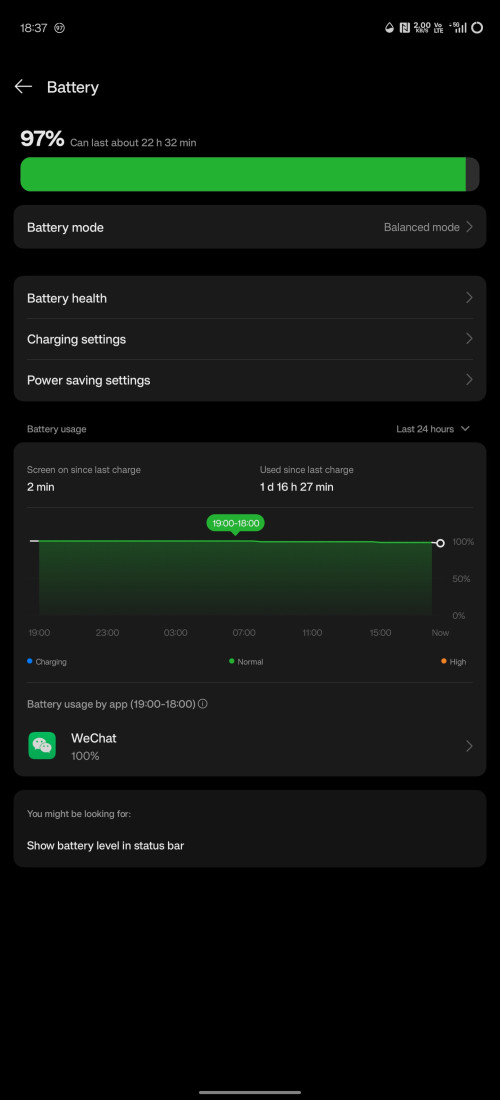
My op 12 idle drain, was on airplane mode for a day lol
for enable adb debugging and installing naptime is just onetime pain, after that your phone battery drain will improve drastically
but expect less incoming non essential notification due to the nature of aggressive doze

user posted image
1024kbps
post Sep 16 2025, 11:22 PM

李素裳
*******
Senior Member
6,012 posts

Joined: Feb 2007


QUOTE(Syok Your Mom @ Sep 16 2025, 07:44 PM)
Looking normal to me since you need to plug in the USB cable. Android Fons are like that. No matter what you do the battery will drain like leaking
*
it's for enable ADB commands only, after enabled naptime will work and stay with the phone until you fully reset the phone.
sadly android idle drain is very bad, android power saving feature still need a lot of works.

Tab s10 ultra is the only android i have tried that do not need naptime, 24h drain is only 2%
1024kbps
post Sep 17 2025, 12:09 AM

李素裳
*******
Senior Member
6,012 posts

Joined: Feb 2007


QUOTE(PJng @ Sep 16 2025, 11:35 PM)
as i use several samsung device, phone battery drain is faster that tablet, capacity does not matter
example my old note 10 lite, after 3 years use, overnight can drain 10%, but my tab a7 lite recent test after fully charge, wakeup left 95%, yes, now is 3 years old
normally when i sleep turn off wifi, data, bluetooth, location i left ON, not in air plane mode
*
when install app, best is not dont enable notification or silent, a lot of apps request tons of permissions
and Banking app too, most of the Malaysia banking app is poorly optimized, plus they scan list of running service when you open it and tell you you need to disable this uninstall that.
This practice eat a lot of resources, Singapore banking app stopped adopting this scanning method since a lot apps and accessibility service a legit, when your app received a lot of complains or 1 star rating on Google play, no body would want to bank with you lol

only Malaysia banking app tell you otherwise, they even tell your stock OS function such as screen recorder might cause security issue...
1024kbps
post Sep 17 2025, 01:27 AM

李素裳
*******
Senior Member
6,012 posts

Joined: Feb 2007


QUOTE(PJng @ Sep 17 2025, 12:19 AM)
Oh this also maybe why tablet use less power, all thosr app only install on phone, on tablet basic app
Some app keep on pop up enable notification if i disable notification, banking app, JPJ app
*
When you enable notification, it wakes your phone if you have AOD and motor vibrate also use power.
One or two apps still acceptable, shopping app like shopee can send tons of notification it's almost a spam
plus IG/FB/WA, shit ton of batt juice gone.

Malaysian banking app are way behind in terms of experience and updates, for example Standard Chartered, UI almost looked like designed for Android Kitkat and been staying like that ever since.
App that have regular update, enforce minimum OS version does not need to detect harmful app or accessibility, it's crazy that you need to disable launcher function just to use your Banking app.
1024kbps
post Sep 17 2025, 11:56 PM

李素裳
*******
Senior Member
6,012 posts

Joined: Feb 2007


QUOTE(edtai @ Sep 17 2025, 08:40 AM)
After few days of testing with different setting including airplane mode during sleep. Obviously the Android OS is "naturally" drains battery after certain period of usage regardless which mode you set including airplane mode. The only solution is to hard reset the phone as similar to old Android OS, that i normally did to those previous phones once a year. But I am lazy today to do so now to backup, setting again all apps, arrangement of the orientation of apps on home screen and so on...
I think I just live with the normal drain battery of the phone as it is still remains at once charge per day basic.
*
For Samsung table, i actually activate the super battery saver, overnight drain is very low
i dont like to shut down the device due to use of physical button, i mean if every day on and off the button will wear out very fast.
i have 3 dead phones due to failed power button, so as long as i have option not to shutdown and power-on, i will try to use super battery saver.
For my lappy, and HTPC, as long as it received AC power, it will automatic power-on, for shutdown i just use start menu.
My work lappy i also never shutdown, since Dell and Win10/11 is optimized at idle drain, after work it just close the lid and put it back to locker, tomorrow continue to work as soon as open the lid, no need to wait for booting

Hard reset can be exhausting because you need to set up every time, but it's useless if you cant identify the root cause eg you keep using back the buggy app the caused overnight drain, for example shopee is considered vampire app, shit can send you notification every few hours if you dont restrict it.
what i do is, for every app that i consider low priority, i will not let it run it background, optimize the app, disable notifications.
1024kbps
post Sep 23 2025, 06:47 PM

李素裳
*******
Senior Member
6,012 posts

Joined: Feb 2007


QUOTE(PJng @ Sep 23 2025, 10:36 AM)
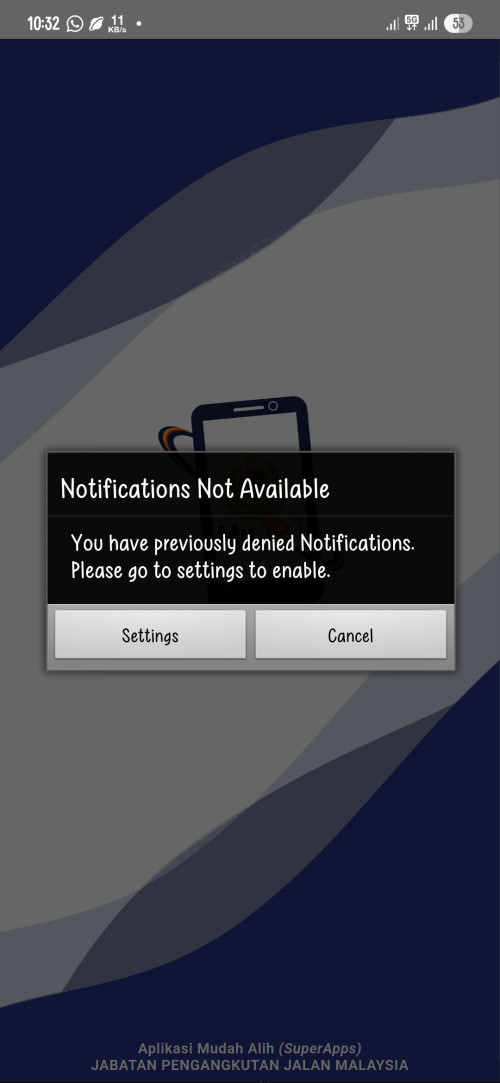
Not related to phone, why some app so aggrasive need to show notification, example JPJ app
Is it not posible to not keep notify?

user posted image
*
Enable it but mute sound
also UI from Kitkat era... collect so many saman but no money to upgrade app? sweat.gif
1024kbps
post Sep 24 2025, 07:13 PM

李素裳
*******
Senior Member
6,012 posts

Joined: Feb 2007


QUOTE(skylinelover @ Sep 24 2025, 02:22 PM)
Developer need 2 be fired laugh.gif laugh.gif
*
Dev still have to listen to their manager lol
fire the manager instead
1024kbps
post Oct 2 2025, 07:16 PM

李素裳
*******
Senior Member
6,012 posts

Joined: Feb 2007


QUOTE(azhar75 @ Sep 27 2025, 02:27 PM)
It's logic... the more Automatic Idiot AI running in the background, the more energy consumption secretly killing the power supply...
*
AI...
they let us AI use for free, in exchange you will allow your private date uploaded to their server for training and refining their AI, it's on by default and can be turned off.
If seldom use just turn off lol

I use VSCode for my powershell scripting, can be very useful at time eg, generating similar functions for different codes, code generations
but they sometimes still make mistake.

I seldom use it on my phone except when translating my air ticket in Adobe reader for my chinese friends


Change to:
| Lo-Fi Version
0.3174sec    0.64    7 queries    GZIP Disabled
Time is now: 3rd December 2025 - 05:38 PM