Welcome Guest ( Log In | Register )

Bump Topic Topic Closed RSS Feed

Outline · [ Standard ] · Linear+

Unifi Official TM UniFi High Speed Broadband Thread V42, READ 1ST PAGE FOR RELEVANT WIFI INFO!

views
     
Yluxion
post Jan 2 2025, 09:23 PM

On my way
****
Junior Member
543 posts

Joined: Sep 2005
From: Sri Petaling, KL


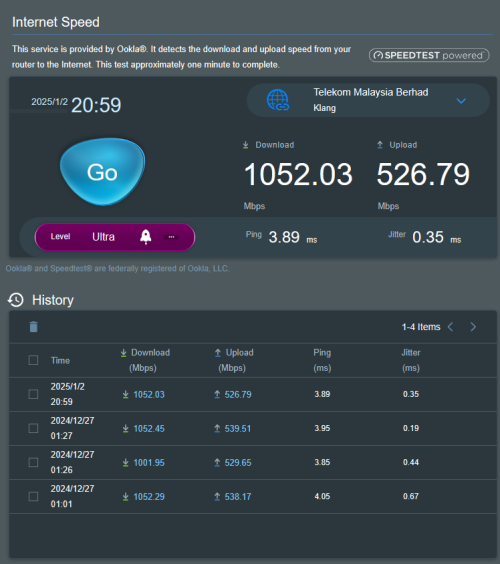
Reporting for my unifi free upgrade from 800Mbps to 1Gbps:

18 Dec - whatsapp (unifi) msg notifying for free upgrade. Submitted my application on that day.
20 Dec - call from unifi via +60379647000, for confirmation of application, T&C explanation & preferred appointment time.
24 Dec - SMS from 61000 informing of modification order successfully processed.
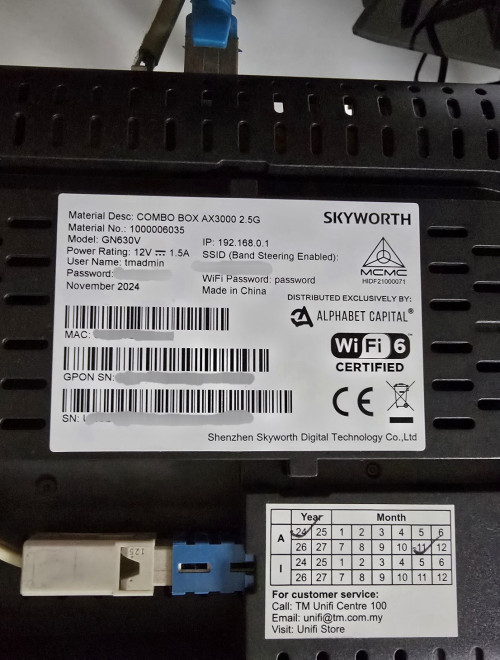
26 Dec - technicians come over, being given Skyworth GN630V 2.5G combo box by the technicians on that day.

Unfortunately, they tell me that they are not familiar with combo box thus unable help me set it as bridge mode. sweat.gif

After trials and errors, takes me 90+ minutes to successfully set it as bridge mode while using my own router. (Asus RT-AX86U Pro)
So far so good for the past 7 days, smooth sailing. thumbsup.gif

user posted image
Yluxion
post Jan 2 2025, 11:18 PM

On my way
****
Junior Member
543 posts

Joined: Sep 2005
From: Sri Petaling, KL


QUOTE(PRSXFENG @ Jan 2 2025, 09:51 PM)
Hmm, they are breaking the barrier of 940Mbps

and I just searched

https://en.skyworthdigital.com/products-detail/ProId/79.html
I dont remember that being there
and Wayback Machine confirms it

https://web.archive.org/web/20240528041624/...l/ProId/79.html

this snapshot of the website from 2024 didnt have that line

Yluxion could you provide more info about the one you received? I think it's the first time the forum has seen this version show up

So, it may be like the D-Link, new hardware version with 2.5Gbps port?
*
user posted image

There's a single 2.5G port for the black one. While the white one (GN360V) ports are all 1G ports.
Yluxion
post Jan 13 2025, 10:28 PM

On my way
****
Junior Member
543 posts

Joined: Sep 2005
From: Sri Petaling, KL


QUOTE(waja7968 @ Jan 13 2025, 05:13 PM)
Can you share what you set on TM ONU combo router?

My a bit weird, use TM ONU combo router  as default, speed test can reach 900mbps plus and landline telephone port is working. But using TM ONU combo as bridge then speed test can reach up to 600mps plus only and landline telephone port not working.
What I did is make a few changes below in ' INTERNET_R_VID_500
   1) Mode change from route to bridge
   2) Binding Port only for LAN1(2.5GE), the rest uncheck
   3) VLAN TAG mode change to Transparent
   4) Disable all WLAN(2.4GHz, 5 GHz and Mesh)
*
I reset the Combo Box and then login into it, go straight to 'Bridge Mode' tab and setup from there. Didn't touch any VLAN TAG setting at all.
My VOIP and internet have been functioning well thus far. (No disconnection)

Information you must have in hand BEFORE you decided to reset the combo box:

1. Combo Box network UI login username & password

2. SSID & password

(these 2 can refer to the sticker at the bottom of combo box before you proceed to hard reset)

3. Your unifi WAN PPOE username & password

4. VOIP:
> SVC Number: 60312345678 (example)
> Account: +60312345678@ims.tm.com.my (example)
> SVC Password: (6 digits password)

This post has been edited by Yluxion: Jan 13 2025, 10:31 PM
Yluxion
post Jan 18 2025, 05:16 PM

On my way
****
Junior Member
543 posts

Joined: Sep 2005
From: Sri Petaling, KL


QUOTE(exsinner @ Jan 18 2025, 04:26 PM)
What was the issue with bridge mode with skyworth? An acquaintance of mine tried to setup bridge mode but his router wont connect to the internet.
*
I've set both white & black Skyworth GN630V combo box in Bridge Mode. One in the office, another one at home.

Both have been running smoothly thus far. (white one since June 2024, black one since Dec 2024)

I hard reset the Skyworth combo box, then login to it & straight go to Bridge Mode tab and set up from there.

You can refer to post #8703. https://forum.lowyat.net/topic/5424552/+8700#

This post has been edited by Yluxion: Jan 18 2025, 05:19 PM
Yluxion
post Jan 18 2025, 05:55 PM

On my way
****
Junior Member
543 posts

Joined: Sep 2005
From: Sri Petaling, KL


QUOTE(exsinner @ Jan 18 2025, 05:20 PM)
So just reset the combo box, run web gui setup and set to bridge mode. Thats all?
Yeah. That's pretty much it, together with VOIP setup.

What about GPON password? It it unnecessary
Nope. I didn't touch any GPON setting. 
*
This post has been edited by Yluxion: Jan 18 2025, 05:55 PM

Topic ClosedOptions
 

Change to:
| Lo-Fi Version
0.4688sec    0.34    7 queries    GZIP Disabled
Time is now: 6th December 2025 - 10:34 AM