

QUOTE(OKLY @ Oct 11 2024, 09:26 PM)
I see, the routing on TM is mehh during peak hours so I'm not too sure if you'll get even angrier. 

How bad? I heard disabling ipv6 helps?
Unifi Official TM UniFi High Speed Broadband Thread V42, READ 1ST PAGE FOR RELEVANT WIFI INFO!
|
|
 Oct 11 2024, 10:00 PM Oct 11 2024, 10:00 PM
Return to original view | IPv6 | Post
#41
|
 
Senior Member
1,601 posts Joined: Jan 2016  
|
QUOTE(OKLY @ Oct 11 2024, 09:26 PM) I see, the routing on TM is mehh during peak hours so I'm not too sure if you'll get even angrier. How bad? I heard disabling ipv6 helps? |
|
|
|
|
|
Oct 11 2024, 10:31 PM
Return to original view | IPv6 | Post
#42
|
|
Senior Member
1,601 posts Joined: Jan 2016
|
QUOTE(YoungMan @ Oct 11 2024, 10:08 PM) Never mind, if not good can switch again after 2 years. That is provided he is not stuck on some of the plan with 3 years contract. By that time can make better choice as already experience both providers, not only hearsay from forum. QUOTE(kwss @ Oct 11 2024, 10:16 PM) Some are better with IPv6, some are better with IPv4, depending on time of day. Haiz, not much options around now...My use case with AWS, sometimes both go to SG. Sometimes IPv4 end up in US but IPv6 still in SG. Sometimes both in HK. That's just CloudFront. I was told by agent that Time may install DP behind my house since they're expanding their coverage for anded properties, however...I'm not seeing anything being done yet and my own experience with time isn't that good... especially for routing to china Maxis wise routing and stability no issues, just expensive Digi Celcom not interested, from what I've heard basically Unifi copy n paste Allo is available, but they lacks technicians and comes with frequent downtime I'm only choosing unifi because of the months rebate+ free unifi TV My previous experience with them were quite bad, twitter Facebook YouTube loads slowly in the night Ping to NA was so high that I need to mine the same block of diamonds 3 times in order for it to register |
|
|
Oct 19 2024, 12:10 PM
Return to original view | IPv6 | Post
#43
|
|
Senior Member
1,601 posts Joined: Jan 2016
|
QUOTE(roams.behinds @ Oct 19 2024, 11:25 AM) My father is account owner. Can i go on behalf? No, need your father to visit TMpoint instead |
|
|
Oct 24 2024, 11:22 AM
Return to original view | IPv6 | Post
#44
|
|
Senior Member
1,601 posts Joined: Jan 2016
|
 Anyone here using Skyworth GN630V? How do you put this into bridge mode ya |
|
|
Oct 24 2024, 05:18 PM
Return to original view | Post
#45
|
|
Senior Member
1,601 posts Joined: Jan 2016
|
QUOTE(emilyngsc @ Oct 24 2024, 11:40 AM) Thanks, I ended up reusing ZTE F620 instead of the combo unitPlug and play, not reconfiguration required |
|
|
Oct 27 2024, 10:17 PM
Return to original view | IPv6 | Post
#46
|
|
Senior Member
1,601 posts Joined: Jan 2016
|
QUOTE(shamsul_LP @ Oct 26 2024, 03:31 PM) hi guys. want to ask. today tech come and install new skyworth combo boc AX3000(white one). Is it better than my tplink AX1800? That combo box is s*it, use back your own router tng55 liked this post
|
|
|
|
|
|
Oct 28 2024, 07:30 AM
Return to original view | IPv6 | Post
#47
|
|
Senior Member
1,601 posts Joined: Jan 2016
|
QUOTE(shamsul_LP @ Oct 27 2024, 11:20 PM) hi guys. i want to ask. if i want to change my sister router, i just have to change the user name and password for PPPoe right? mine 300mbps, my sister 100mbps one. or have other setting to change for skyworth GN630? QUOTE(shamsul_LP @ Oct 27 2024, 11:22 PM) use mine now. want to give rhe combo for my sister. her modem is the oldest one My suggestion would be reuse back your old setup, I belive you are able to use back your old ONU+router plug and play right?For your sister, I suggest you buy her a new router to replace her old router Leave this Skyworth combo in the box If you really wanna setup this for her, you will need to grab the PLOAM password and phone PIN from her old ONU Plus her PPPOE username and password I dont know what your ONU is, but you can find Youtube guides on how to access the ONU QUOTE(kwss @ Oct 28 2024, 12:27 AM) First to answer your question: You can access the ONU to grab these credentials, just not as straightfoward as a router since ONU doesnt have DHCP (need to setup static ip on PC)You also need the PLOAM password and phone PIN because you are replacing the ONU, not just the router. You must get this from technician. There is no way to request it by calling 100 or livechat. My question to you is why? What ONU is your sister using now that you feel this Skyworth is a superior replacement? Can you tell us what is your sister's setup now? Other than that, pretty easy Unless you are using the super old ones that requires Telnet |
|
|
Oct 31 2024, 11:28 AM
Return to original view | IPv6 | Post
#48
|
|
Senior Member
1,601 posts Joined: Jan 2016
|
QUOTE(jasonsaw96 @ Oct 31 2024, 11:17 AM) Currently on Adaptive QoS, should I turn it off or set to bandwidth limiter mode so that I can limit bandwidth on certain devices? I have too many devices connected to my router. Actually, try the speedtest in the router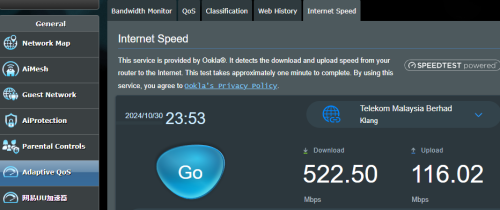 |
|
|
Nov 9 2024, 11:37 PM
Return to original view | IPv6 | Post
#49
|
|
Senior Member
1,601 posts Joined: Jan 2016
|
Unifi international routing kaboom again?
|
|
|
Nov 29 2024, 06:53 PM
Return to original view | IPv6 | Post
#50
|
|
Senior Member
1,601 posts Joined: Jan 2016
|
QUOTE(kicko0o @ Nov 29 2024, 06:15 PM) Hi, This is legit, I switched from Maxis to Unifi last monthIs this legit? For port over sub,  But I got 8 months free bill instead  kicko0o liked this post
|
|
|
Nov 30 2024, 10:46 AM
Return to original view | IPv6 | Post
#51
|
|
Senior Member
1,601 posts Joined: Jan 2016
|
QUOTE(kicko0o @ Nov 30 2024, 10:19 AM) Wow, how you got that? Have to walk into TMpoint then ask them any offer for port-over sub? Just tell them you want to port-over to Unifi and ask for promotion plansOr is there any secret code that I need to say while there?  I got additional 2 months free because I got it through an agent (a friend) kicko0o liked this post
|
|
|
Dec 7 2024, 09:46 PM
Return to original view | IPv6 | Post
#52
|
|
Senior Member
1,601 posts Joined: Jan 2016
|
Unifi has a new campaign
Ngam something... Nothing special |
|
|
Dec 14 2024, 10:19 AM
Return to original view | IPv6 | Post
#53
|
|
Senior Member
1,601 posts Joined: Jan 2016
|
QUOTE(PRSXFENG @ Dec 14 2024, 10:04 AM) To the best of my knowledge, I've only seen 1 device hijack DNS HG8145X6 as wellTIME's Huawei HG8245V5 This one hijacks port 53 and redirects to the configured DNS, which normally is TIME, and can't be changed without contacting CS, but they are willing to if you ask No, my friend tried to ask CS to change the DNS for him and this is the reply "Thank you for waiting xxxx on my checking with the relevant team, you can change to google DNS. However, you need to change this from your router setting. We unable to remote change DNS from our side. May I know if you can access the router setting?" PRSXFENG liked this post
|
|
|
|
|
|
Jan 1 2025, 11:06 PM
Return to original view | IPv6 | Post
#54
|
|
Senior Member
1,601 posts Joined: Jan 2016
|
QUOTE(Edlois @ Jul 1 2024, 01:47 AM) 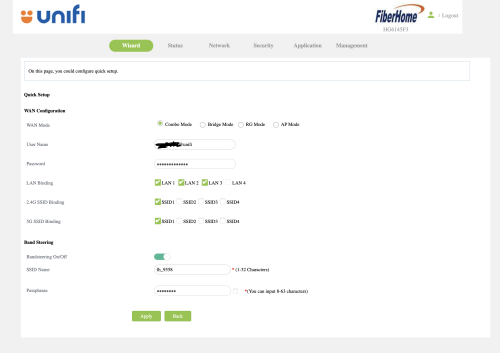 Tm unifi just upgraded my plan to 800mbps. and gave me this Fiberhome HG6145F3. I had an existing DECO M5 mesh wifi. But the problem comes when. I change the combo mode -> Bridge mode. I reset my DECO mesh and authenticate the PPPOE service credentials with proper VLAN profile. it's not working. Okay nvm then I change back the ONU/combo box to combo mode again. suddenly. the internet led start blinking. meaning I can't access to the internet. I had the correct PPPOE service credentials then I didn't touch anything, other than toggling between "Combo Mode" and "Bridge Mode" I can't find any other people who got this "HG6145F3" on the forum. so.... help......   |
|
|
Jan 2 2025, 09:48 PM
Return to original view | IPv6 | Post
#55
|
|
Senior Member
1,601 posts Joined: Jan 2016
|
QUOTE(Yluxion @ Jan 2 2025, 09:23 PM) Reporting for my unifi free upgrade from 800Mbps to 1Gbps: I dont think GN630V is 2.5G capable18 Dec - whatsapp (unifi) msg notifying for free upgrade. Submitted my application on that day. 20 Dec - call from unifi via +60379647000, for confirmation of application, T&C explanation & preferred appointment time. 24 Dec - SMS from 61000 informing of modification order successfully processed. 26 Dec - technicians come over, being given Skyworth GN630V 2.5G combo box by the technicians on that day. Unfortunately, they tell me that they are not familiar with combo box thus unable help me set it as bridge mode. After trials and errors, takes me 90+ minutes to successfully set it as bridge mode while using my own router. (Asus RT-AX86U Pro) So far so good for the past 7 days, smooth sailing.  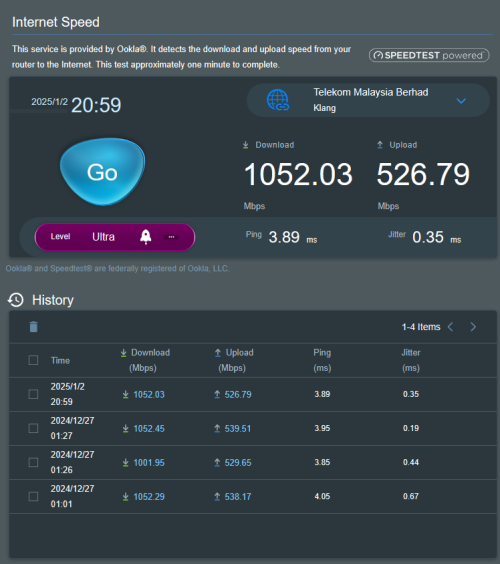 |
|
|
Jan 3 2025, 06:05 PM
Return to original view | IPv6 | Post
#56
|
|
Senior Member
1,601 posts Joined: Jan 2016
|
Hey guys, I'm deciding which ONU to giveaway to my landlord At the moment I have Huawei hg8240h5 and ZTE F620 to choose from Which is the better one ya? Gonna give her a little suprise by changing her lousy fiberhome combo box to full blown tplink mesh system Moogle Stiltzkin liked this post
|
|
|
Jan 5 2025, 06:35 PM
Return to original view | Post
#57
|
|
Senior Member
1,601 posts Joined: Jan 2016
|
QUOTE(Epic_winner091 @ Jan 5 2025, 04:54 PM) Thanks! Do I also still need to setup the VLANs? Depends, which combo unit are you using right now?Plus I can still leave the homephone plugged into the ONR right? |
|
|
Apr 8 2025, 06:45 PM
Return to original view | IPv6 | Post
#58
|
|
Senior Member
1,601 posts Joined: Jan 2016
|
I've encountered something weird recently, I'm not able to sign into PBB app using Unifi on my iPhone. However, when I'm using data or other ISP, all is well.
Tried to restart router and change IP, still the same |
|
|
Apr 9 2025, 12:30 PM
Return to original view | IPv6 | Post
#59
|
|
Senior Member
1,601 posts Joined: Jan 2016
|
QUOTE(kwss @ Apr 9 2025, 12:20 PM) Do you happen to be using D-Link? It's a known issue with PBB Nope, Asus AX88u with merlin wrt |
|
|
Apr 9 2025, 03:26 PM
Return to original view | IPv6 | Post
#60
|
|
Senior Member
1,601 posts Joined: Jan 2016
|
QUOTE(kwss @ Apr 9 2025, 02:00 PM) What DNS server you configured? I'm using Controld DNS, yet to try the stock DNSDoes it happen if you use TM DNS server? |
|
Topic ClosedOptions
|
| Change to: |  0.8056sec 0.8056sec
 1.88 1.88
 7 queries 7 queries
 GZIP Disabled GZIP Disabled
Time is now: 18th December 2025 - 08:17 AM |
 Quote
Quote