Outline ·
[ Standard ] ·
Linear+
Unifi Official TM UniFi High Speed Broadband Thread V42, READ 1ST PAGE FOR RELEVANT WIFI INFO!
|
Jeffreynsx
|
 Sep 3 2024, 12:43 PM Sep 3 2024, 12:43 PM
|

|
QUOTE(go626201 @ Sep 3 2024, 11:22 AM) From what i observed and check and test. It is still working without any hijacking. Just tried to use google dns only,and dns leak test show the correct Google server in Singapore. I noticed if you did not connect to VPN, the DNS will redirect to TM DNS. If you connect to VPN, regardless of which DNS you configured, it will redirect to Google DNS. Not sure will our ISP collect our personal data information from Google? Or else why only Google DNS is being shown while not Cloudflare, OpenDNS and etc? This post has been edited by Jeffreynsx: Sep 3 2024, 12:44 PM |
|
|
|
|
|
Jeffreynsx
|
Sep 3 2024, 12:52 PM
|
|
|
QUOTE(Omochao @ Sep 3 2024, 12:32 PM) Setting DoH on my Windows 11, also still fail, dnsleaktest showing DNS server at Bentong.. It is a waste of time to enable secured DNS for both DOH and DOT as both of it is not working. For those who yet to take any SWU package, please hold on first as this Transparent Proxy thingy will apply to those who signed the new contract with TM. This is what I noticed so far among the users out there. I am kind of regret to take the SWU package that being treated just like that. Imagine you pay every month to your ISP and they put poison to your DNS without seeking your advise. It is against our personal rights already. This post has been edited by Jeffreynsx: Sep 3 2024, 12:54 PM |
|
|
|
|
|
Jeffreynsx
|
Sep 3 2024, 01:19 PM
|
|
|
QUOTE(blackbox14 @ Sep 3 2024, 01:05 PM) The posters above answered that the only way to block DoH is by blocking the Domain and IP of the public DNS provider so no one can make queries. I understand if they blocked DoT by blocking the associated port, but how is it possible that they are blocking DoH AND DoT but only for specific users? Transparent Proxy should only apply if you are using neither DoT nor DoH, to my understanding. If you read the recent comments given by different users, some user can access without issue while some totally cannot access despite using own router. If you mentioned it apply for all, then why some people still can access using DOT and DOH? I'm wonder how they evaluate our Internet usage and imposed this type of policy to end users? I'm planning to terminate my SWU package after received this type of treatment. This post has been edited by Jeffreynsx: Sep 3 2024, 01:26 PM |
|
|
|
|
|
Jeffreynsx
|
Sep 3 2024, 01:34 PM
|
|
|
QUOTE(blackbox14 @ Sep 3 2024, 01:28 PM) That's what I'm trying to make sense of. Maybe this is done through a setting in the ONU/modem that they remote accessed into and changed, assuming your idea of SWU users being affected. Or maybe it only affects certain TM IP ranges. One of the people you quoted also has some DNS providers blocked according to nmap, but can still access blocked sites. It is very unusual. I got different ONU and I noticed as long as my PPPOE being signed in to the Internet, the POS light will keep on blinking in red. I need to reboot my ONU and ONR 3 times before POS light went off. Subsequently the similar outcome received. Blocked by ISP for the DNS. |
|
|
|
|
|
Jeffreynsx
|
Sep 3 2024, 01:45 PM
|
|
|
QUOTE(Quantum Geist @ Sep 3 2024, 01:43 PM) Did you meant LOS (loss of service)? I'm not sure if related or not, but from my experience I used to get random LOS blinking because the splice between TM fiber optic cable and my home was misaligned after a while because exposed to outside heat. Ended up buying a fiber optic splice protector, it's a small box to make sure it was properly held together and the issue is gone. example: shopee linkLast time before I signed the SWU package, the LOS light will not blink when I turn on the ONU. Nowadays before the PON light lighted up, the LOS light will blink 3 times first before the PON light turn on. |
|
|
|
|
|
Jeffreynsx
|
Sep 3 2024, 02:07 PM
|
|
|
QUOTE(Quantum Geist @ Sep 3 2024, 02:00 PM) From my basic knowledge on the ONU, LOS implies that the device is not even able to get a signal from the fiber optic cable for it to establish any sort of connection to TM. You might want to get it checked no? any sifus here want to chime in? I'm able to access Internet after LOS light blink 3 times. This post has been edited by Jeffreynsx: Sep 3 2024, 02:07 PM |
|
|
|
|
|
Jeffreynsx
|
Sep 3 2024, 04:20 PM
|
|
|
QUOTE(countingcrows @ Sep 3 2024, 04:00 PM) Does Win11 Network & Internet >> Ethernet and/or Wifi show "encrypted"? 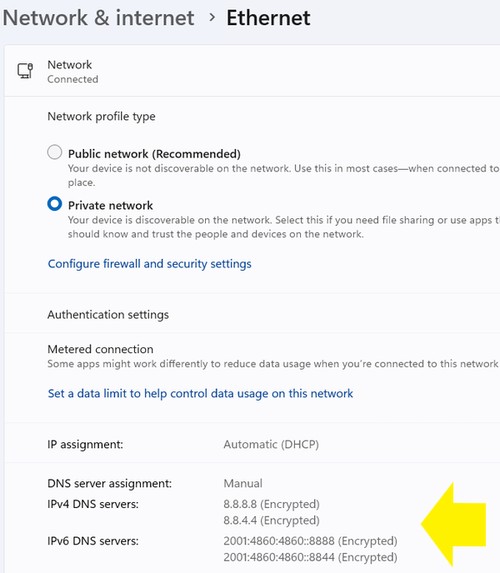 I already tried. As long as you encrypted your network with SSL over TLS or DOH. The webpage immediately not able to load. |
|
|
|
|
|
Jeffreynsx
|
Sep 3 2024, 04:39 PM
|
|
|
QUOTE(countingcrows @ Sep 3 2024, 04:33 PM) Are you on private IP or public IP? Perhaps, he can help? https://nmap.org/download#windows>>nmap-7.95-setup.exe Any different between Private IP and Public IP? |
|
|
|
|
|
Jeffreynsx
|
Sep 5 2024, 09:20 AM
|
|
|
I just realized my company VPN also intercepted by TM after done my checking on DNS leak test. Beware of what you posted as TM may use AI Intelligent to filter and deploy it in stages.
|
|
|
|
|
|
Jeffreynsx
|
Sep 10 2024, 06:40 AM
|
|
|
QUOTE(LonelyHart16 @ Sep 10 2024, 06:23 AM) Tmnet banned manual DNS setting ka? I got the GN630V Skyworth router from Unifi. But I cannot find the DNS settings? How to change? Can you take a screenshot of the Network tab and under the section of LAN for the Skyworth web console? The IPv4 manual DNS section is there and under IPv6, you can change it to STATIC and input your own preferred IPv6 DNS Server as well. If still cannot find this option, change the Network Type to Bridge and use your own router. It is more stable and able to customize more features and feel peace of mind. This post has been edited by Jeffreynsx: Sep 10 2024, 06:43 AM |
|
|
|
|
|
Jeffreynsx
|
Sep 10 2024, 07:14 AM
|
|
|
QUOTE(LonelyHart16 @ Sep 10 2024, 06:59 AM) I found this.  But it's under LAN? Is this correct? I connect to wifi with my laptop. Yes, correct. Regardless of Wifi or LAN, it will redirect you to Google DNS. But make sure your PC got enabled Secured DNS in the browser in order to redirect your network to Google DNS. Or else if you check from browser leak, the Skyworth router will redirect you to their TM DNS. |
|
|
|
|
|
Jeffreynsx
|
Sep 10 2024, 07:19 AM
|
|
|
For those of you want to test which DNS is the quickest to run in your area for your ISP, can click on this link: https://dnsspeedtest.online/To test your DNS Leak, can click on this link: https://browserleaks.com/dnsI realized for this period the quickest is OpenDNS, followed by Google DNS and last is Cloudflare DNS. This post has been edited by Jeffreynsx: Sep 10 2024, 07:23 AM |
|
|
|
|
|
Jeffreynsx
|
Sep 10 2024, 07:21 AM
|
|
|
QUOTE(LonelyHart16 @ Sep 10 2024, 07:18 AM) I see, so I have to open Chrome and find the secure DNS setting, enable it? Please refer to the below link and look for Manage Advanced security settings > Use a secure connection to look up a site’s IP address. https://support.google.com/chrome/answer/10...ites-ip-address |
|
|
|
|
|
Jeffreynsx
|
Sep 10 2024, 08:21 AM
|
|
|
QUOTE(LonelyHart16 @ Sep 10 2024, 07:37 AM) Thank you, found it.  Now I have to do it for the other browsers, haha. I didn't know browsers will not auto use the new DNS, so weird, all the guides no mention. Btw, what about IPV6, no need change the DNS in router?  You can scroll down the page and you may saw IPv6 configuration. Try to change the Prefix to Static and input your desire IPv6 IP Address and click the Apply to make the changes. Try to do the browser leak test to ensure no TM DNS is shown from the result page. This post has been edited by Jeffreynsx: Sep 10 2024, 08:22 AM |
|
|
|
|



 Quote
Quote
 0.0673sec
 0.74
0.74
 7 queries
 GZIP Disabled