

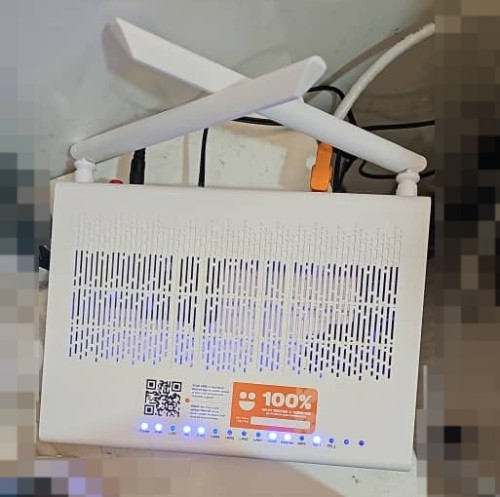
"DPN-FX3060V COMBO BOX 2.5G UONU RG"
The QR code is just a link to the MyUnifi app
2.5Gbps GPON WAN interface with 4x1Gbps LAN ports.

This post has been edited by eclectice: Mar 13 2024, 11:55 AM
Unifi Official TM UniFi High Speed Broadband Thread V42, READ 1ST PAGE FOR RELEVANT WIFI INFO!
|
|
 Mar 13 2024, 11:45 AM Mar 13 2024, 11:45 AM
Return to original view | Post
#21
|
 
Senior Member
2,734 posts Joined: Mar 2008 
|
"DPN-FX3060V COMBO BOX 2.5G UONU RG" The QR code is just a link to the MyUnifi app 2.5Gbps GPON WAN interface with 4x1Gbps LAN ports. This post has been edited by eclectice: Mar 13 2024, 11:55 AM |
|
|
|
|
|
Mar 13 2024, 12:17 PM
Return to original view | Post
#22
|
|
Senior Member
2,734 posts Joined: Mar 2008
|
QUOTE(Jjuggler @ Mar 13 2024, 12:09 PM) I would rather subscribe to low speed and having control over my equipment (wired/wireless router) rather than stuck with some crap equipment provided by TM at least for now, double-NAT is possible, but not worth it. The UONU RG provides three modes:  This post has been edited by eclectice: Mar 13 2024, 12:42 PM arslow liked this post
|
|
|
Mar 13 2024, 12:25 PM
Return to original view | IPv6 | Post
#23
|
|
Senior Member
2,734 posts Joined: Mar 2008
|
QUOTE(yenchenje @ Mar 13 2024, 12:23 PM) Router Mode, GPON Bridge, RG Mode, RG is only for ATA from what it seems for now. My FX3060V is currently only in ATA mode serving pure VoIP mode Have you ever changed it to GPON Bridge and let a third-party router take over PPPoE configurations and VOIP setup?This post has been edited by eclectice: Mar 13 2024, 12:26 PM |
|
|
Mar 13 2024, 12:33 PM
Return to original view | IPv6 | Post
#24
|
|
Senior Member
2,734 posts Joined: Mar 2008
|
QUOTE(yenchenje @ Mar 13 2024, 12:28 PM) PPPoE yes, not VoIP, as I’m not certain on how the settings for VoIP would be in a consumer grade router, and as expected 940Mbps max of DL and nothing more I would keep the original VLAN tagging from the RG and replicate it in the third-party router. It would be easy if the RG and the third-party router had the equivalent numbers of LAN ports.It’s probably possible but I have never tried to set that up on router, only after I’ve started to use GPON ONU SFP in my OPNSense box and pass through VLAN 600 to it This post has been edited by eclectice: Mar 13 2024, 12:35 PM |
|
|
Mar 13 2024, 06:59 PM
Return to original view | IPv6 | Post
#25
|
|
Senior Member
2,734 posts Joined: Mar 2008
|
@Anime4000 connected his custom GPON stick to his customer's TP Archer BE800's SFP+ port. Unsure if VOIP is supported. https://www.tp-link.com/us/home-networking/...r/archer-be800/ 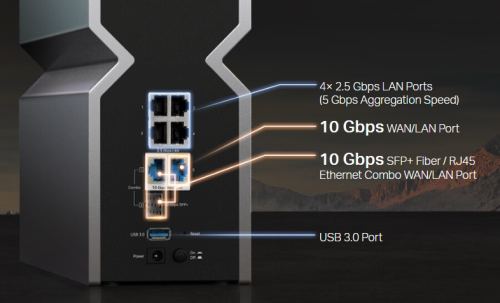 enduser liked this post
|
|
|
Mar 14 2024, 08:24 AM
Return to original view | Post
#26
|
|
Senior Member
2,734 posts Joined: Mar 2008
|
Bridging mode is easy to set up on the Unifi ONR D-Link DPN-FX3060V. Connect the LAN cable from the laptop/PC to any unused LAN port on the ONR to access the ONR Web UI at the default http: // 192.168.0.1. Select the "GPON-Bridge", connect the LAN cable from the LAN1 port on ONR to our third-party router's WAN port, and wait a few seconds for the ONR to reset after applying changes. Then, connect the LAN cable from the laptop/PC to any LAN port of the third-party router to configure everything (but no change is required if it works like before). 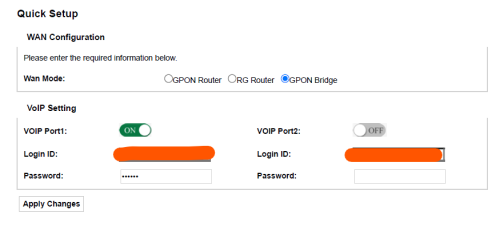 Note that VOIP port 1 is made available for a VOIP phone by connecting the cable from TEL1 of the ONR to the phone. Before performing the bridging, make sure the interfaces are correctly set up, especially the INTERNET service: 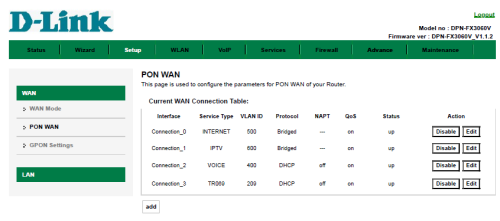  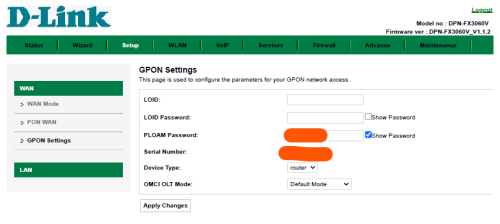 The speed test result for the Free Speed Upgrade from the 800 Mbps plan to the 1 Gbps plan; as expected after bridging. The download speed result is probably due to a non-Nokia OLT source. The WAN port of the third-party router is 2.5 Gbps capable but it detects a 1 Gbps connection from the ONR when probed (Asus ZenWiFi XT12 Pro 2-pack). 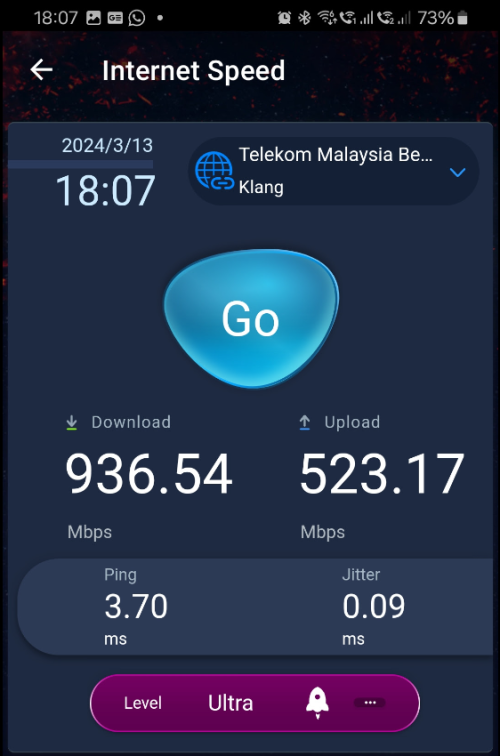 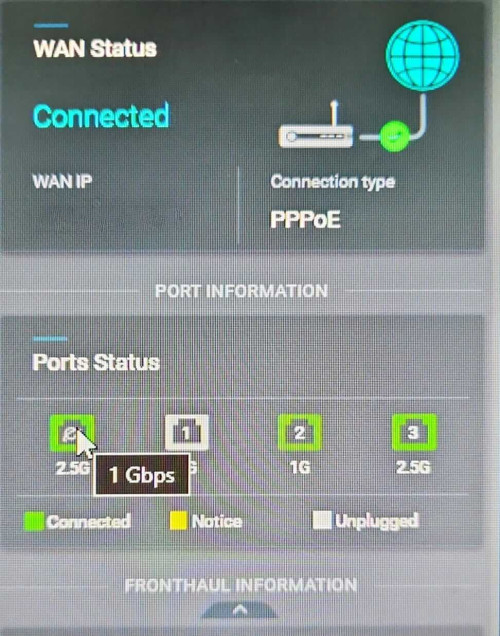 This post has been edited by eclectice: Mar 14 2024, 12:27 PM cHiLdHo0drEaMz, excaliburcombo, and 5 others liked this post
|
|
|
|
|
|
Mar 14 2024, 01:57 PM
Return to original view | IPv6 | Post
#27
|
|
Senior Member
2,734 posts Joined: Mar 2008
|
QUOTE(yenchenje @ Mar 14 2024, 01:42 PM) Enable SSH on ONR, ssh into it, omcicli get mib 131, check for the vendor ID there Do you mean the OMCI Vendor ID of the OLT source? Hmm maybe later since I am not at home. The following is the OMCI Vendor ID for the ONR/UONU. Nothing is interesting to note about it.  |
|
|
Apr 29 2024, 05:27 PM
Return to original view | Post
#28
|
|
Senior Member
2,734 posts Joined: Mar 2008
|
QUOTE(sHawTY @ Apr 26 2024, 05:20 PM) My order got cancelled out of the blue. No explanation, no calls, no texts, no emails—nothing at all. I believe that you should have received another service order for a new appointment date for the installation service. Until the installation is completed, your current service will remain at 800 Mbps. The 1Gbps mentioned in the service detail is for the upcoming service order that you will be undertaking.Updated my MCMC ticket with the screenshot for them to explain why. 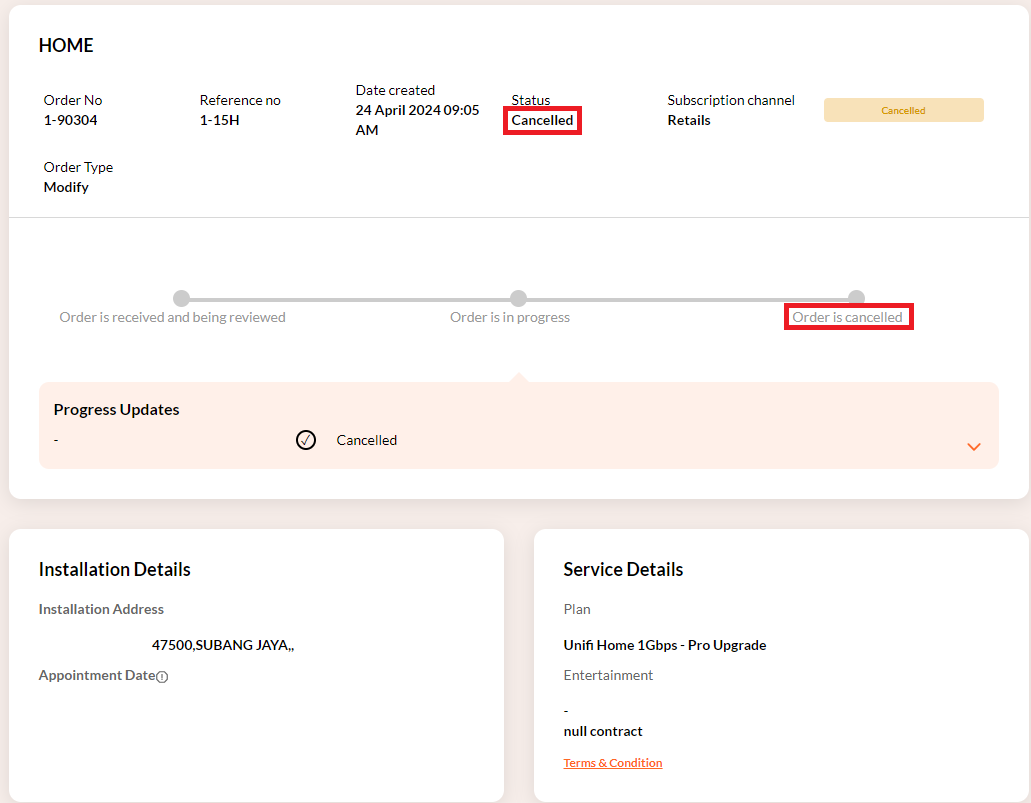 Unifi itself canceled the service order to modify the current package to the free 1 Gbps Pro upgrade twice before agreeing on the final one with a set appointment date that is currently in progress. At this stage, you will receive an SMS. However, the service may be delayed due to the unavailability of technicians. You can check your appointment and either confirm or cancel it within the dateline given. If you need to reschedule, it will take up to 3 days to process. However, if you make a call to their customer support, they can escalate the request to the next-tier team and expedite the process. 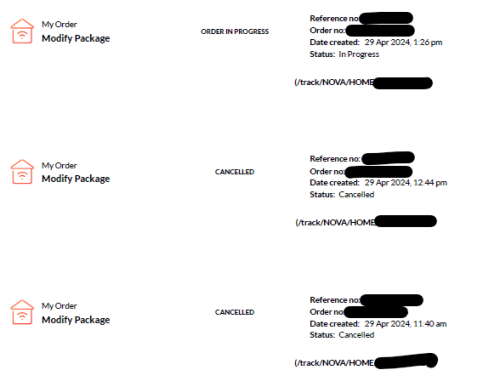 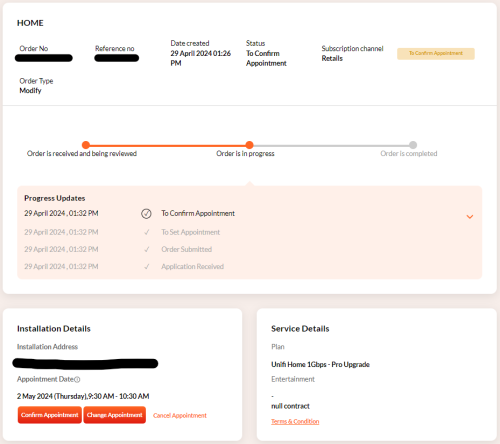 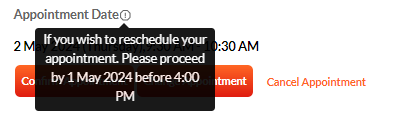 This post has been edited by eclectice: Apr 29 2024, 06:09 PM enduser liked this post
|
|
|
Apr 30 2024, 11:23 AM
Return to original view | IPv6 | Post
#29
|
|
Senior Member
2,734 posts Joined: Mar 2008
|
QUOTE(danielyeap @ Apr 30 2024, 08:05 AM) Hi Guys, I am also still waiting for my upgrade to 1Gbps. As per the Unifi procedure, the technician is responsible for replacing the old HG8240H with an optical network router (ONR) that can handle internet speeds of 1 Gbps and higher. However, you can set the ONR to bridge mode (it will just become a modem/digital media converter) and use your third-party router as the primary router to authenticate the PPPoE.I am currently using the Huawei HG8240H BTU and my own Mikrotik RB750Gr3 (LAN) + Asus XT8 (Wifi). I am a networking noob and I wonder whether there's any need for Unifi to change the BTU to support 1Gbps? Thanks. According to a Unifi technician, the ONR is currently in limited stock. This post has been edited by eclectice: Apr 30 2024, 11:30 AM danielyeap liked this post
|
|
|
Apr 30 2024, 12:10 PM
Return to original view | IPv6 | Post
#30
|
|
Senior Member
2,734 posts Joined: Mar 2008
|
QUOTE(bobby25 @ Apr 30 2024, 12:08 PM) It’s not limited stock , it’s for the new subscribers who are subscribing for the 249 package , all those who want to upgrade have to wait .. As I have said, this is the word from the Unifi technician, not me. |
|
|
May 14 2024, 12:15 AM
Return to original view | IPv6 | Post
#31
|
|
Senior Member
2,734 posts Joined: Mar 2008
|
QUOTE(RViN @ May 12 2024, 12:02 PM) I mean potentially I misconfigured this black FX3060V, but the old Alcatel was working before it should work again if I just plugged it in right. Router modeTo reset the new black DLINK ONR router into the default router mode/factory settings, you need to use the phone reset pin tool to poke the small hole located on one side of the router. After that, wait for a few seconds for the router to restart. To access the ONR Web UI, connect the LAN cable from the laptop/PC to any unused LAN port on the ONR. The default HTTP: // 192.168.0.1 can be used to access the ONR web UI. To set up your WAN connection, use the wizard and enter your PPPoE username and password. Type in your VOIP1 Unifi phone number address and password (a 6-digit number). You can set your wireless SSIDs to your content. Apply changes. Bridge mode To set the ONR router in bridge mode, Select the "GPON-Bridge" in the Quick Setup, Then, connect the LAN cable from the LAN1 (2.5GE) port on ONR to our third-party router's WAN port, and wait a few seconds for the ONR to reset after applying changes. Then, connect another LAN cable from the laptop/PC to any LAN port of the third-party router to configure the PPPoE and wireless setup. Some notes... If you want to undo the changes made to the bridge mode setup, connect a LAN cable from your laptop/PC to any unused LAN port on the ONR. For accessing the ONR web UI, manually set the IP address of your laptop/PC's LAN port to match the default IP domain of the ONR 192.168.0.x/24. The default gateway (GW) is the ONR IP 192.168.0.1. Your laptop/PC's LAN port IP address must not be the same as the GW. You cannot access the internet while the ONR is in bridge mode when connecting LAN to it. You can use ONR GW instead for the DNS server setup. Use your third-party router's WIFI/LAN (automatic DHCP mode) for Internet access. 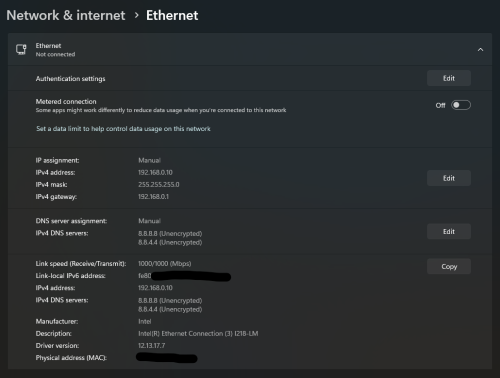 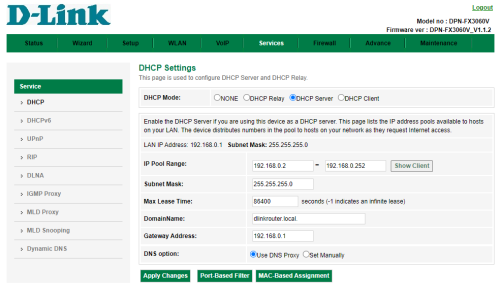 Edit the ONR web UI to set it up in router mode using the wizard or the quick setup. However, if you encounter any issues while trying to access the web GUI of the ONR, you can use the same procedure to reset the ONR to its factory settings. This post has been edited by eclectice: May 14 2024, 02:44 AM arslow, DroppedJaw, and 4 others liked this post
|
|
|
Jul 27 2024, 08:52 PM
Return to original view | IPv6 | Post
#32
|
|
Senior Member
2,734 posts Joined: Mar 2008
|
QUOTE(countingcrows @ Jul 26 2024, 06:02 PM) Getting Error 6007 on Unifi TV Web For one week, I got this issue when viewing TV2 and TV3 using Chrome from its UnifiTV Android/Android TV app and its web version (playtv.unifi.com.my)—no issue viewing those channels using its web version via Edge browser.Anyone know how to remedy? It was working last week, but today in prep for Paris 24, checked and not working. 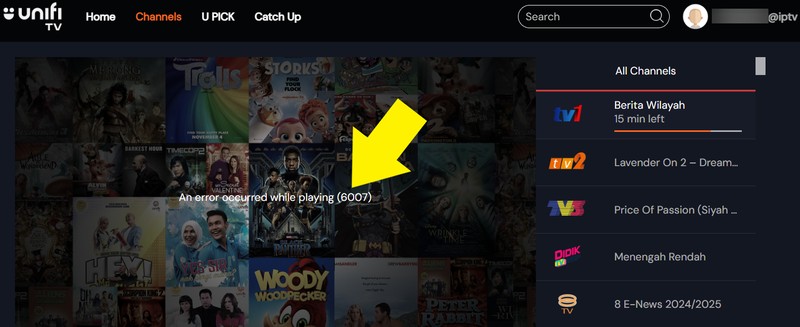 This post has been edited by eclectice: Jul 27 2024, 08:52 PM |
|
|
Aug 19 2024, 10:58 PM
Return to original view | IPv6 | Post
#33
|
|
Senior Member
2,734 posts Joined: Mar 2008
|
Consider the new Cybersecurity Act to compel TM to improve its security solutions since it is categorized under NCII sector. This post has been edited by eclectice: Aug 19 2024, 11:01 PM enduser liked this post
|
|
|
|
|
|
Sep 4 2024, 12:29 PM
Return to original view | IPv6 | Post
#34
|
|
Senior Member
2,734 posts Joined: Mar 2008
|
Since attempts to hijack DNS are occurring (I have just suffered from it this early morning), causing problems in resolving DNS queries properly, I suggest setting the DNS-to-TLS profile to opportunistic mode for the time being to avoid Internet connection issues. 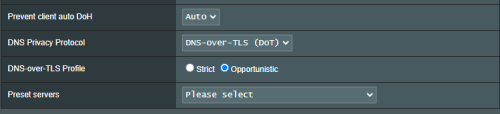 This post has been edited by eclectice: Sep 4 2024, 12:31 PM solarmystic and BladeRider88 liked this post
|
|
|
Sep 4 2024, 12:33 PM
Return to original view | IPv6 | Post
#35
|
|
Senior Member
2,734 posts Joined: Mar 2008
|
QUOTE(seatux @ Sep 4 2024, 12:30 PM) This old trick is what they are blocking now. Even naked Google and 1.1.1.1 also cannot already. That mode only allows the router to resolve DNS queries so that the DNS can be resolved if its authentication fails. Usually, I set it to Strict mode to always authenticate.This post has been edited by eclectice: Sep 4 2024, 12:34 PM |
|
|
Sep 8 2024, 02:03 PM
Return to original view | IPv6 | Post
#36
|
|
Senior Member
2,734 posts Joined: Mar 2008
|
Even the White House is concerned about BGP security.
I am unsure about BGP hijacking, but this test resolves BGP correctly for Unifi for IP range 175.*. 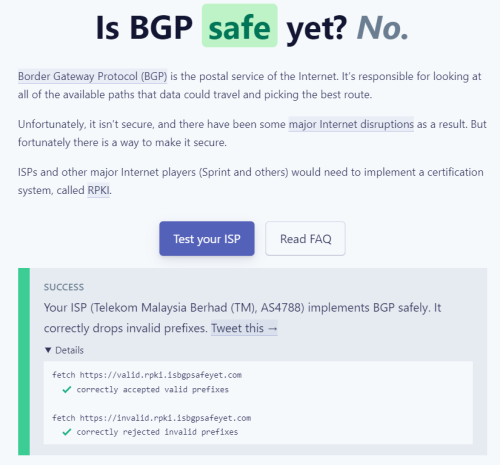 https://bgp.tools/as/4788 https://isbgpsafeyet.com/ 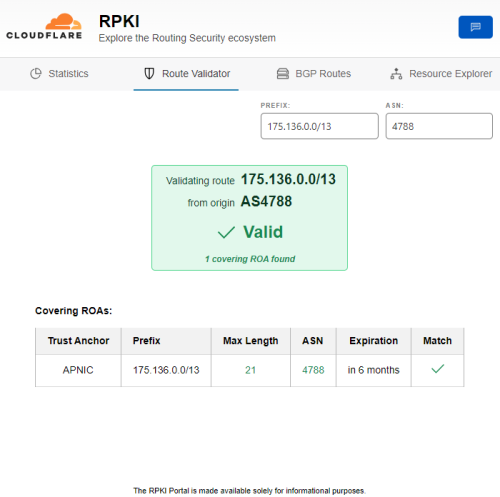 This post has been edited by eclectice: Sep 8 2024, 02:31 PM |
|
Topic ClosedOptions
|
| Change to: |  0.0840sec 0.0840sec
 0.53 0.53
 7 queries 7 queries
 GZIP Disabled GZIP Disabled
Time is now: 14th December 2025 - 08:42 PM |
 Quote
Quote