

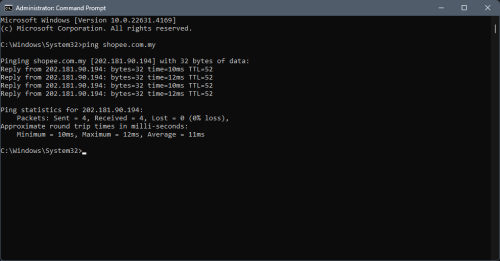
What a beautiful sight. Also it's way more responsive now.
Also isn't the 175.xxx prefix has always has been TM's "premium" IP range? Even from the Streamyx days?
This post has been edited by Epic_winner091: Sep 18 2024, 07:39 PM
Unifi Official TM UniFi High Speed Broadband Thread V42, READ 1ST PAGE FOR RELEVANT WIFI INFO!
|
|
 Sep 18 2024, 07:36 PM Sep 18 2024, 07:36 PM
Return to original view | Post
#101
|
 
Junior Member
338 posts Joined: Mar 2010 From: Shah Alam  
|
What a beautiful sight. Also it's way more responsive now. Also isn't the 175.xxx prefix has always has been TM's "premium" IP range? Even from the Streamyx days? This post has been edited by Epic_winner091: Sep 18 2024, 07:39 PM |
|
|
|
|
|
Sep 18 2024, 07:49 PM
Return to original view | IPv6 | Post
#102
|
|
Junior Member
338 posts Joined: Mar 2010 From: Shah Alam
|
Methinks TM got a bit trigger happy with their free speed upgrades. And now they're starved of bandwidth hence the throttling during peak hours. skywardsword, PRSXFENG, and 1 other liked this post
|
|
|
Sep 19 2024, 06:31 PM
Return to original view | IPv6 | Post
#103
|
|
Junior Member
338 posts Joined: Mar 2010 From: Shah Alam
|
DPN-FX3060V, specifically the 2.5 GbE model.
This post has been edited by Epic_winner091: Sep 19 2024, 06:35 PM |
|
|
Sep 20 2024, 07:22 AM
Return to original view | IPv6 | Post
#104
|
|
Junior Member
338 posts Joined: Mar 2010 From: Shah Alam
|
Any idea what cable it might be?
|
|
|
Sep 20 2024, 03:06 PM
Return to original view | IPv6 | Post
#105
|
|
Junior Member
338 posts Joined: Mar 2010 From: Shah Alam
|
QUOTE(Brotherjoe @ Sep 20 2024, 02:22 PM) TM: Submarine cable fault impacting Unifi Internet service, repairs underway No confirmation on which cable is affected?https://www.thestar.com.my/tech/tech-news/2...epairs-underway  |
|
|
Oct 8 2024, 11:13 PM
Return to original view | IPv6 | Post
#106
|
|
Junior Member
338 posts Joined: Mar 2010 From: Shah Alam
|
175 seems solid.
|
|
|
|
|
|
Nov 5 2024, 09:24 AM
Return to original view | Post
#107
|
|
Junior Member
338 posts Joined: Mar 2010 From: Shah Alam
|
I would suggest leaving IPv6 on especially if you have a private IP. IPv6 is less congested than IPv4 and from experience, routing is much better.
|
|
|
Nov 20 2024, 02:01 PM
Return to original view | IPv6 | Post
#108
|
|
Junior Member
338 posts Joined: Mar 2010 From: Shah Alam
|
Apparently there was a cable cut in Seksyen 7, Shah Alam.
Explains the outage I had last night. It's resolved by now. Was still down when I left for work. 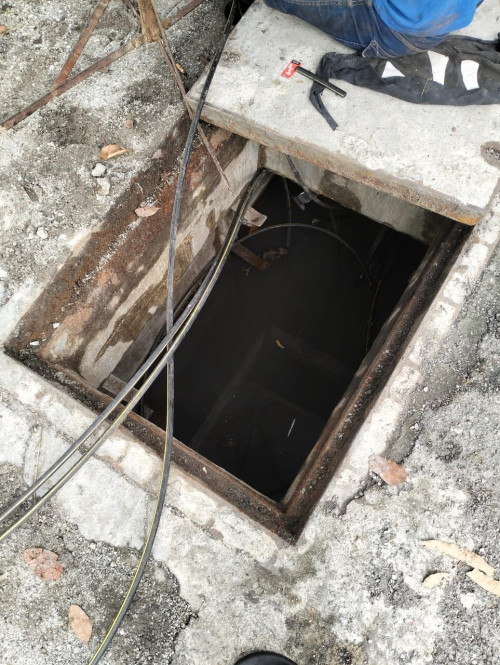 |
|
|
Jan 3 2025, 09:22 PM
Return to original view | IPv6 | Post
#109
|
|
Junior Member
338 posts Joined: Mar 2010 From: Shah Alam
|
If I ever get a raise this year I want to splurge on networking gear. Should I keep using the ONR (set to bridge mode) or reuse the old ONU? The thing is, the day before the TM tech came to replace the old setup with the ONR, the internet stopped working and only came back with the ONR. Even the tech was bewildered as the internet should keep on working. Moogle Stiltzkin liked this post
|
|
|
Jan 5 2025, 02:12 PM
Return to original view | IPv6 | Post
#110
|
|
Junior Member
338 posts Joined: Mar 2010 From: Shah Alam
|
QUOTE(blacktubi @ Jan 4 2025, 11:14 AM) I would prefer to use the ONR on bridge mode and use your own router to handle the networking I might expedite the timeline.I've tried running the ONR on router mode and connect another router to it on AP mode and the speed is throttled and it's kinda laggy due to the slow CPU on the free ONR The ONR seems to be glitching out for me. Some of my devices seem to refuse to connect to it via WiFi. Rebooting it seems to have briefly fixed it. Seems to have something to do with WPA3 but I was running under WPA2/WPA3 mixed for a while with no issues. If the ONR is set on bridge mode do i need to the PPPoE setting on the router? |
|
|
Jan 5 2025, 04:54 PM
Return to original view | IPv6 | Post
#111
|
|
Junior Member
338 posts Joined: Mar 2010 From: Shah Alam
|
Thanks! Do I also still need to setup the VLANs?
Plus I can still leave the homephone plugged into the ONR right? |
|
|
Jan 5 2025, 06:38 PM
Return to original view | IPv6 | Post
#112
|
|
Junior Member
338 posts Joined: Mar 2010 From: Shah Alam
|
QUOTE(QuantumEdge @ Jan 5 2025, 06:35 PM) Depends, which combo unit are you using right now? Black D-Link.Addendum: Should I worry about the speed drop outs people are getting with the the D-Link on bridge mode? I think my area has a Fiberhome OLT as our previous ONUs have always been Fiberhome. I can just reuse the old Fiberhome ONU if it's still an issue. This post has been edited by Epic_winner091: Jan 6 2025, 09:49 AM |
|
Topic ClosedOptions
|
| Change to: |  0.0277sec 0.0277sec
 0.51 0.51
 7 queries 7 queries
 GZIP Disabled GZIP Disabled
Time is now: 10th December 2025 - 08:35 AM |
 Quote
Quote