QUOTE(contestchris @ Nov 13 2023, 10:32 PM)
Is Time Fiber not cutting prices, at all?

They aldy cheap rm99 for 500mbpsUnifi Official TM UniFi High Speed Broadband Thread V41, READ 1ST PAGE FOR RELEVANT WIFI INFO
|
|
 Nov 14 2023, 08:10 AM Nov 14 2023, 08:10 AM
Return to original view | IPv6 | Post
#41
|
 
Senior Member
4,494 posts Joined: Oct 2013 
|
QUOTE(contestchris @ Nov 13 2023, 10:32 PM) Is Time Fiber not cutting prices, at all? They aldy cheap rm99 for 500mbps |
|
|
|
|
|
Nov 14 2023, 06:39 PM
Return to original view | IPv6 | Post
#42
|
|
Senior Member
4,494 posts Joined: Oct 2013
|
QUOTE(duabijitelur @ Nov 14 2023, 01:49 PM) DIR-850L vs TP-Link AC1200 Tplink but u need to reset it every day to maint perfwhich is better |
|
|
Nov 14 2023, 09:00 PM
Return to original view | IPv6 | Post
#43
|
|
Senior Member
4,494 posts Joined: Oct 2013
|
QUOTE(duabijitelur @ Nov 14 2023, 06:41 PM) its been a while since i used that, btm damn hot I'm using tplink provided by unifi as an APnot sure why that dir-850L cant reach 300 Can reach 300mbps but mine is using bridge mode with cat6 cable |
|
|
Nov 18 2023, 10:26 AM
Return to original view | IPv6 | Post
#44
|
|
Senior Member
4,494 posts Joined: Oct 2013
|
How to know public or priv ip ?
My wan ip is 100.72.x.x |
|
|
Nov 18 2023, 07:21 PM
Return to original view | IPv6 | Post
#45
|
|
Senior Member
4,494 posts Joined: Oct 2013
|
QUOTE(MyProLife @ Nov 18 2023, 04:57 PM) Story of swu3.0 So nowadays no ctrct also need inforn wanna trf to maxis then baru tm wanna proceed ?Live chat, failed (eventually TM CS center will call back and say cannot) Direct call 100 center and press 4, also failed (rep will say need walk in for latest offer/promotions) And now live chat with agent is unavailable for a month cause of some obvious reasons (too high volume thanks to FSU) TM purposely make SWU difficult to apply, for obvious reasons So I make a Surat wakil, get owner IC photocopy, and bring in some supporting documents like medical bills (in my case my dad is account owner) And go to unifi store Shah Alam today with those docs Unifi store staff greets me, no ever need scan qr code, she just ask and I say want recontract or change owner something The same story that I shared before above, also applies on me. Initially the staff offered the latest plans like 159 500m, 139 300m, 99 100m. Then I straight ask SWU, she said this is meant for whose want terminate only So I straight say want transfer to maxis , she say suppose to get the transfer request first (I didn't get the tr beforehand) But anyway she offered me the 119 500m plan. No other questions asked, no even need take postpaid or nonsense. After a very short while, I show my IC, scan thumbprint 2 times, and done the plan change. Owner still the same under my dad Next Monday installer will come to bring in mesh routers. But I will just keep them in store for backup or sell later. Lol 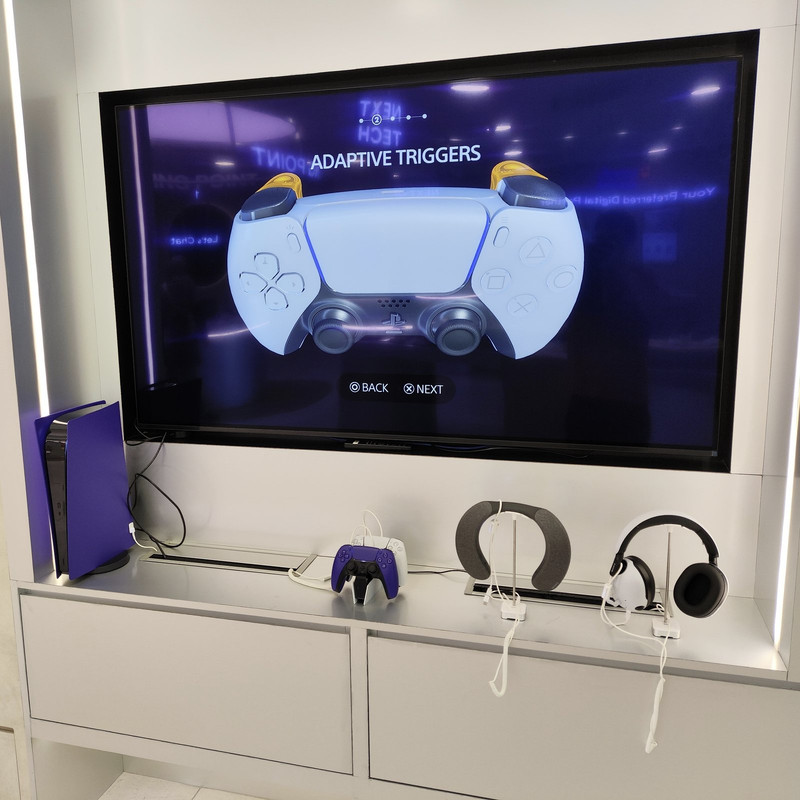 Unifi store Shah Alam got purple PS5 on display, lol |
|
|
Nov 18 2023, 11:12 PM
Return to original view | IPv6 | Post
#46
|
|
Senior Member
4,494 posts Joined: Oct 2013
|
Anyone with 300mbps
What's ur torrent max dload spd ? |
|
|
|
|
|
Nov 19 2023, 12:42 AM
Return to original view | IPv6 | Post
#47
|
|
Senior Member
4,494 posts Joined: Oct 2013
|
QUOTE(tng55 @ Nov 19 2023, 12:29 AM) mine SWU 3.0 300MBPS FREE UPGRADE 500Mbps i always full speed torrent max 500Mbps no problem i use asus router stable night i always full speed never throttling just depend seed no problem for me QUOTE(BenYeeHua @ Nov 19 2023, 12:36 AM) Same for me, most hot seed full speed, even just 100M la lol. Can give 1 sample hot seed torrent ? Mine always stuck at 12MB/s max Suppose can go up to avg 35MB/s Device is using cat5e lan n 5ghz wifi 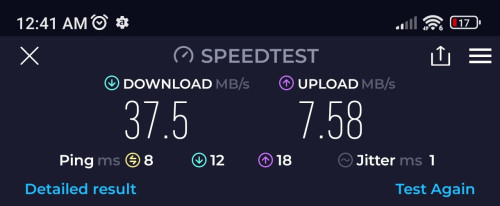 This post has been edited by sitescope: Nov 19 2023, 12:48 AM |
|
|
Nov 19 2023, 08:55 AM
Return to original view | IPv6 | Post
#48
|
|
Senior Member
4,494 posts Joined: Oct 2013
|
QUOTE(failed.hashcheck @ Nov 19 2023, 01:17 AM) Debian x64 lts look like no improvement. upload has been set max to 50kB/ss only.always have at least 150 seeds and lots of them are on gigabit seedbox. but its a 4.gb dvd image too small for meaningful test beyond 500mbps. By the time you contacted enough peer to reach 30MB/s its already 75%  this is avg spd when my old pkg was 100mbps before free upg to 300mbps 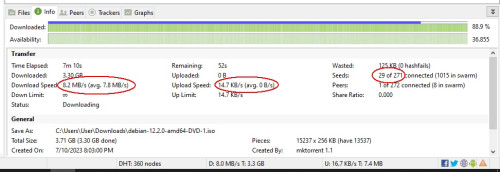 |
|
|
Nov 19 2023, 02:17 PM
Return to original view | IPv6 | Post
#49
|
|
Senior Member
4,494 posts Joined: Oct 2013
|
QUOTE(failed.hashcheck @ Nov 19 2023, 11:57 AM) That yellow triangle, possibly you just have p2p connectivity issue? yes 300mbps is on priv iplots of reason. maybe you are somehow in private address. or upnp not working. have you tried manually portforward? plus you are only connected to 30 seeds while I typically get around 100. QUOTE(BenYeeHua @ Nov 19 2023, 12:01 PM) Look like your IPv6 not even working/promoting... any extra steps to configure ipv6 ?Did you try add tracker manually? https://github.com/ngosang/trackerslist Connect via IPv6 should helps, and global connection limit should at least 500, same to per seed. For mine case, it is qbittorrent need higher connection limit, while utorrent no need(but the ads, lol). And yes, DHT a bit less, hmmm. Try tracker la, DHT is kind of no need nowadays. i just enabled it in router and add cloudflare ipv6 dns n save. thats all add trackers as per ur link but no improvement too QUOTE(tng55 @ Nov 19 2023, 12:29 PM) confirm you are private ip address that why yellow triangle yes 300mbps is on priv ipmine public ip address i get green mine still use utorrent without ads because i use old version i wont update new version hahaha already stable old version utorrent thats why i ask if others with 300mbps pkg also got slowness in their torrent if no, then need to know how they configure it This post has been edited by sitescope: Nov 19 2023, 02:18 PM |
|
|
Nov 19 2023, 05:41 PM
Return to original view | IPv6 | Post
#50
|
|
Senior Member
4,494 posts Joined: Oct 2013
|
QUOTE(PJng @ Nov 19 2023, 03:21 PM) My 100 to 300, speed still good Whats ur wan ip ?Can near 40MB/s Btw got anyone got swu 3.0 +unifi tv price? Or still same like old plan? |
|
|
Nov 19 2023, 09:27 PM
Return to original view | IPv6 | Post
#51
|
|
Senior Member
4,494 posts Joined: Oct 2013
|
QUOTE(PJng @ Nov 19 2023, 07:24 PM) 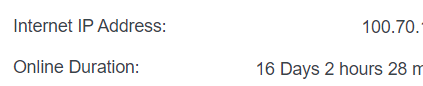 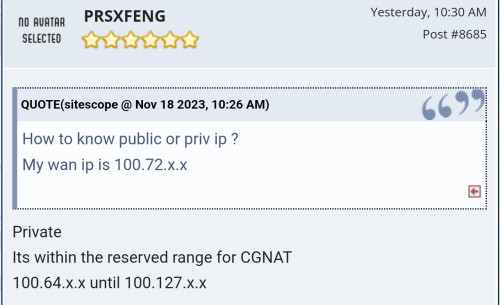 Now this become more confusing Same said priv ip cant boost torrent dload |
|
|
Nov 19 2023, 09:29 PM
Return to original view | IPv6 | Post
#52
|
|
Senior Member
4,494 posts Joined: Oct 2013
|
QUOTE(BenYeeHua @ Nov 19 2023, 08:43 PM) Then it is global connection limit too low, change it higher. Will check that NAS boost even my spd is below 500MAnd you test via cable, right? It can be your router handle half-open too slow as well, depend. The best is enable NAT Boost of router for testing, many old router have weak CPU for QoS processing performance >500M. |
|
|
Nov 19 2023, 10:36 PM
Return to original view | IPv6 | Post
#53
|
|
Senior Member
4,494 posts Joined: Oct 2013
|
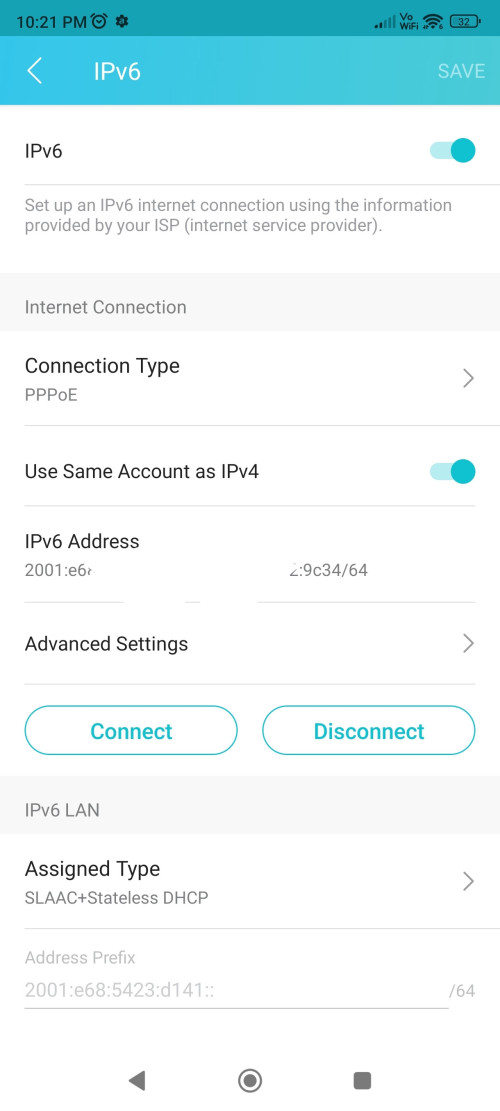
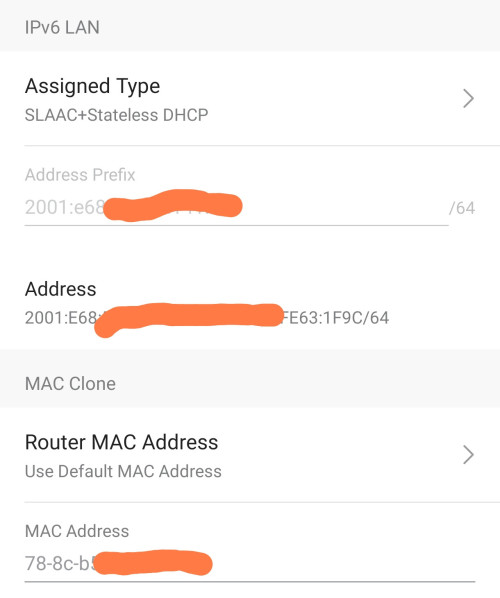
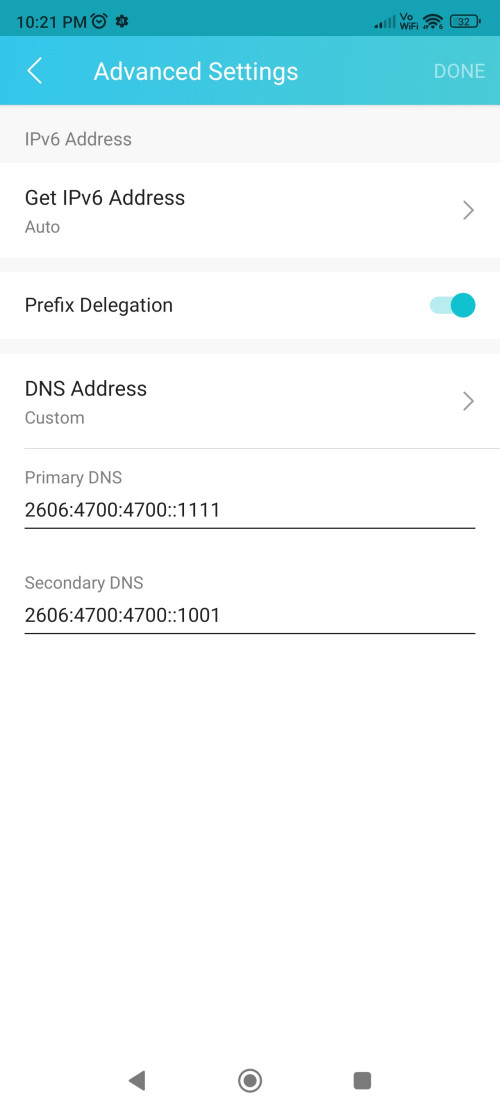
QUOTE(BenYeeHua @ Nov 19 2023, 09:32 PM) Can, use IPv6, now global internet 50% IPv6 already, if including China, 70%. Does below ipv6 setting is correct on tplink ax55 ?Unless your router blocked IPv6 incoming data, you can get incoming traffic from IPv6, and no issues. As IPv6 bypass NAT as well, no need worry too much overhead for NAT processing issues. Example, above post using EvXnK5.md.jpg, middle size jpg by default. I think slow loading caused by slowdown of cloudflare, now cloudflare SG IPv4/IPv6 going via telstra HK then telstra SG.... You need to blame UniFi for doing that HK reroute... » Click to show Spoiler - click again to hide... « QUOTE(BenYeeHua @ Nov 19 2023, 09:33 PM) Easy test is switch another router, see got similar issues or not. Will try with my old tenda router. So lazy to dismantleIf got, it means problem lies on your computer, like your SSD written speed too low, or you forget set firewall open to your torrent software, lol. Laptop is using nvme disk. Torrent s/ware is allowed in windows fwall laptop QUOTE(PJng @ Nov 19 2023, 09:41 PM) what i do is when upgrade 100mbps speed Will try folo ur settingsfirewall already open long time ago torrent client set fix port, router open port only for torrent client for TCP UDP upload speed i limit either 3 or 4 MB/s, if no limit download cannot full speed disk cache i manual increase default i think only 2MB, i notice speed hardly increase with default cache, as disk usage keep 80% above increase disk cache also increase RAM usage Thought in priv ip, open fwding port in router doesnt affect anything This post has been edited by sitescope: Nov 19 2023, 10:36 PM |
|
|
|
|
|
Nov 19 2023, 10:40 PM
Return to original view | IPv6 | Post
#54
|
|
Senior Member
4,494 posts Joined: Oct 2013
|
QUOTE(tng55 @ Nov 19 2023, 10:27 PM) sorry wont work for private ip address But he is on priv ip but worksmine SWU 3.0 RM119 300Mbps to Free Speed Upgrade 500Mbps i got 500Mbps so i will be Public IP Address stay so private ip address wont work my friend 30mbps always private ip address i did setting also wont work 100% my friend request help so i also help download full speed then save pendrive i send him lol https://forum.lowyat.net/index.php?showtopi...ost&p=108582796 |
|
|
Nov 27 2023, 01:00 PM
Return to original view | IPv6 | Post
#55
|
|
Senior Member
4,494 posts Joined: Oct 2013
|
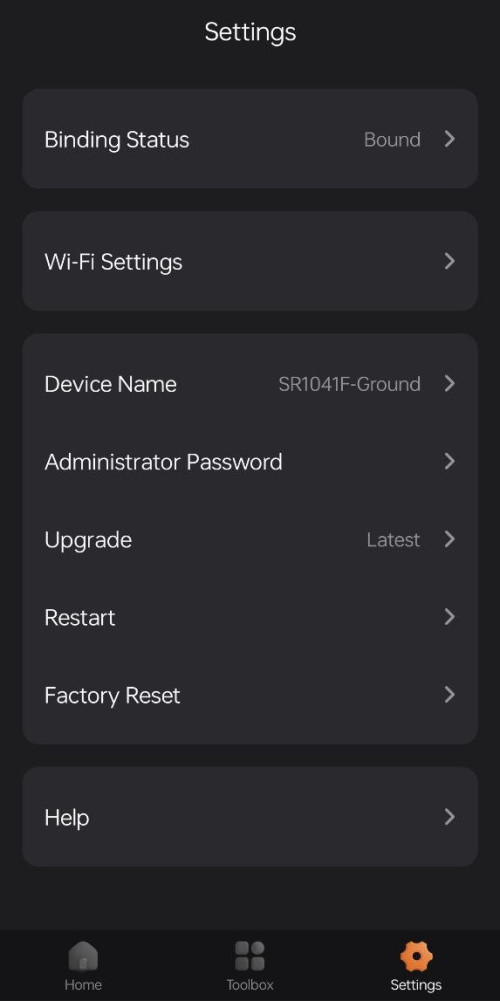
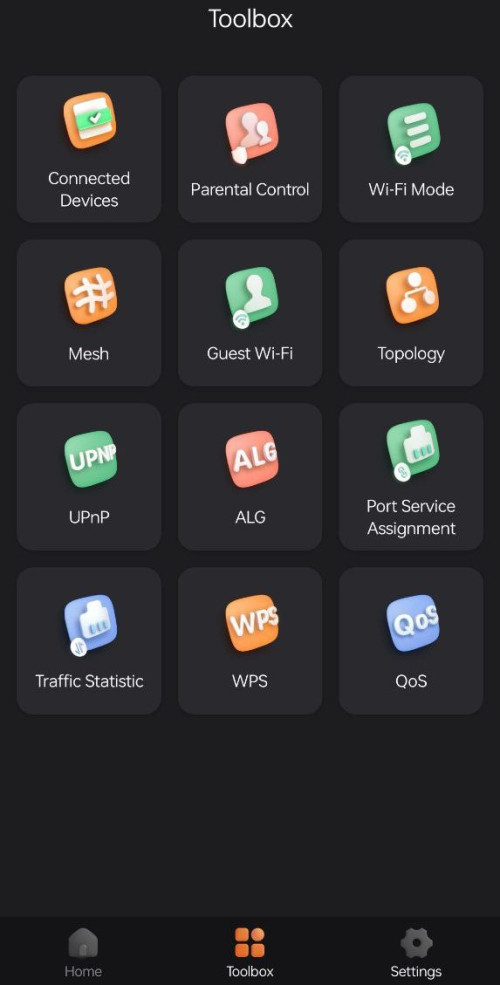
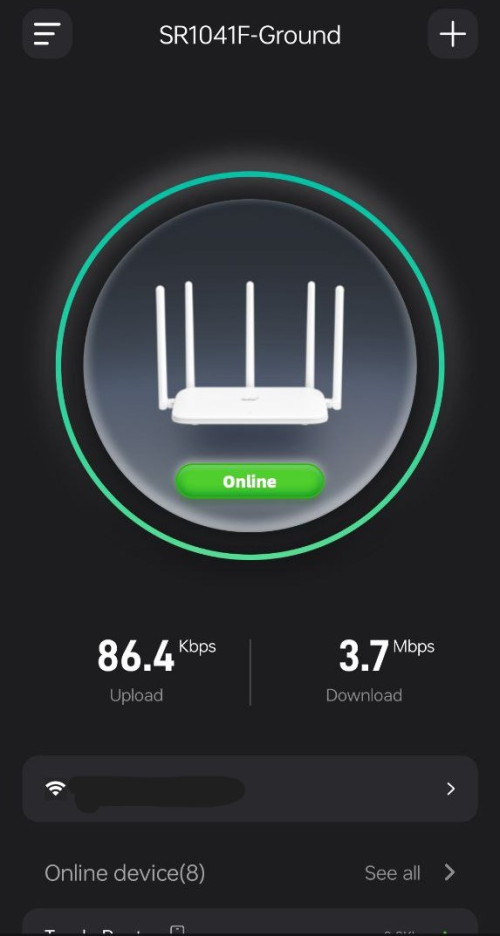
QUOTE(Omochao @ Nov 27 2023, 09:44 AM) Just found out that there is an app on google playstore for Fiberhome SR1041F model..should be compatible with other fiberhome models as well, I guess. Can u open parental ctrlAnd I believe the future firmware upgrades will be through this app as well, as the option page has an upgrade function. A lot of basic functions can be found at toolbox page, parental control, wifi mode, and guest mode etc. https://play.google.com/store/apps/details?...erhome.terminal Also, can be bind to your email, to remotely manage your router + mesh from anywhere anytime. The setup to all of this is very straightforward, just need to connect your wifi on fiberhome and follow on screen instructions. » Click to show Spoiler - click again to hide... « What option it has there ? |
|
|
Nov 27 2023, 05:44 PM
Return to original view | IPv6 | Post
#56
|
|
Senior Member
4,494 posts Joined: Oct 2013
|
QUOTE(Omochao @ Nov 27 2023, 05:07 PM) 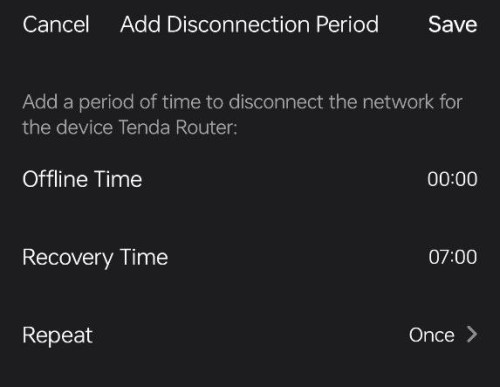 Cant separated by individual hp |
|
|
Nov 30 2023, 12:09 PM
Return to original view | IPv6 | Post
#57
|
|
Senior Member
4,494 posts Joined: Oct 2013
|
What is the fiberhome admin id n pwd ?
Not a normal user id |
|
|
Dec 1 2023, 08:18 AM
Return to original view | IPv6 | Post
#58
|
|
Senior Member
4,494 posts Joined: Oct 2013
|
QUOTE(HumanExtinction @ Dec 1 2023, 02:40 AM) who and why reported my post dafuq, i didnt break any rules I sold mine for rm100 both in 1 hr. Try lower itya, im selling at garage sell and carousell as well, but so far no respond at all. Even super cheap also no one wants  |
|
|
Dec 1 2023, 09:41 AM
Return to original view | IPv6 | Post
#59
|
|
Senior Member
4,494 posts Joined: Oct 2013
|
QUOTE(laytiong @ Nov 30 2023, 02:08 PM) 1. Locate your Wifi name and see the graph chart, see how many networks are overlapping your network channel, is there any channels which are lesser overlaps, maybe can manually switch to that channel via your router config page. Why if i set channel between 100 - 144, it'll not appear in the graph ?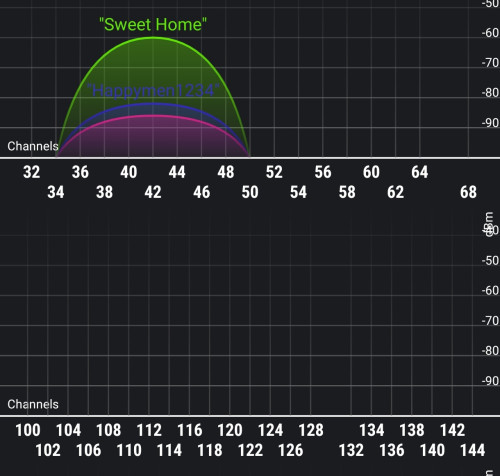 |
|
|
Dec 1 2023, 10:14 AM
Return to original view | IPv6 | Post
#60
|
|
Senior Member
4,494 posts Joined: Oct 2013
|
QUOTE(PRSXFENG @ Dec 1 2023, 09:52 AM) DFS Channels, reserved for radar but shared with wifi as well Then no choice. Need to choose between (149-153-157-161) although will overlap with others 5ghzIf its on first boot/change, it might be waiting a few minutes to check the conditions before begining broadcasting if it's been a while, maybe it detected interfereance and auto changed to other channels Personally I prefer to avoid those channels whenever possible |
|
Topic ClosedOptions
|
| Change to: |  0.2354sec 0.2354sec
 0.69 0.69
 7 queries 7 queries
 GZIP Disabled GZIP Disabled
Time is now: 11th December 2025 - 11:47 AM |
 Quote
Quote