Welcome Guest ( Log In | Register )

Bump Topic Topic Closed RSS Feed

Outline · [ Standard ] · Linear+

Unifi Official TM UniFi High Speed Broadband Thread V41, READ 1ST PAGE FOR RELEVANT WIFI INFO

views
     
NimalKumar
post Oct 12 2023, 11:17 AM

Getting Started
**
Junior Member
272 posts

Joined: Sep 2020


QUOTE(xperiaVuser @ Oct 12 2023, 11:16 AM)
I got an order and appointment set, but I can't seem to Confirm it on the app. When I press confirm, it doesn't do anything. Anyone had the same problem?
*
Yes, mine won't even open in app. Log in to the web instead.
NimalKumar
post Oct 12 2023, 02:34 PM

Getting Started
**
Junior Member
272 posts

Joined: Sep 2020


Just an update on my SWU3 switch.

1. Technician came today and gave us FibreHome routers, Unfortunately (Damn Seremban).

2. I'm not sure if its congestion or server issue, but I'm getting very wobbly speed test results ... 320 .. 430 .. 190 .. 220 .. 390

3. Technician stated I need to wait at least until evening to ensure I get the smooth transition.

4. Technician himself admitted that TPLink router is way superior ... Second Dlink .. So he said I can continue using my AX20 if the Fibrehome routers are unsatisfactory.

5. Need to monitor why wobbly speed.
NimalKumar
post Oct 12 2023, 02:51 PM

Getting Started
**
Junior Member
272 posts

Joined: Sep 2020


QUOTE(westlife @ Oct 12 2023, 02:48 PM)
Exactly the same prob. Especially if u use fast to test and not speedtest.
*
The technician insisted to use TM's speedtest. Yet similar result. He then said wait till evening or night for the full speed upgrade. Tonight I'll definitely swap back to my TP Link. Waiting for the order completion status.
NimalKumar
post Oct 12 2023, 03:39 PM

Getting Started
**
Junior Member
272 posts

Joined: Sep 2020


QUOTE(CAL V @ Oct 12 2023, 03:36 PM)
The technician is also installing at my place now. Also FiberHome router. (Seremban too)

Sadly I’m not at home, will test tomorrow and see how it is. Most likely I will swap back to my Asus router.
*
Kesian kita 🄹🄹🄹 ...
NimalKumar
post Oct 12 2023, 05:08 PM

Getting Started
**
Junior Member
272 posts

Joined: Sep 2020


QUOTE(Max2006 @ Oct 12 2023, 05:03 PM)
Seeing you guys are having various issues with the given routers, why not just using back the old routers and see if the problems still exist? Frankly speaking, if the old router still working fine, then better don't replace it first. The unifi routers they gave are yours. You can keep them for future replacement. No need so rush to change it now.

Of course, if your old router cannot support the new upgraded speed, then you would have no choice but to change.
*
I am planning to do that as the technician said my AX20 can still support the speed upgrade. However he advised me to wait till evening to ensure all the necessary works are finalised and the order completes.
NimalKumar
post Oct 12 2023, 05:09 PM

Getting Started
**
Junior Member
272 posts

Joined: Sep 2020


*deleted

This post has been edited by NimalKumar: Oct 12 2023, 05:09 PM
NimalKumar
post Oct 12 2023, 08:55 PM

Getting Started
**
Junior Member
272 posts

Joined: Sep 2020


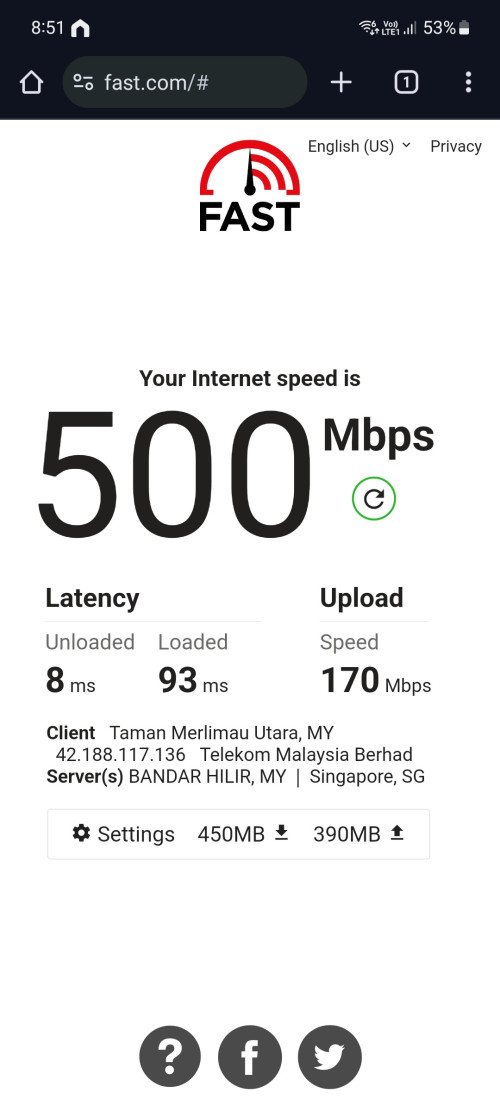
Just changed from the FiberHome to my existing router (TPLink AX20) and this is my speed now. Stable all the test.

Makes me wonder why didn't Unifi stick to TPLink ...


user posted image
NimalKumar
post Oct 12 2023, 11:21 PM

Getting Started
**
Junior Member
272 posts

Joined: Sep 2020


Is there even any way for us to return the Fibrehome and ask for at least one decent DLink router? I feel scammed 🄹🄹🄹
NimalKumar
post Oct 13 2023, 12:21 AM

Getting Started
**
Junior Member
272 posts

Joined: Sep 2020


I'm eyeing on TP Link AX55 as I got too familiar with TP Link routers. Their UI experience is polished.
NimalKumar
post Oct 13 2023, 01:05 PM

Getting Started
**
Junior Member
272 posts

Joined: Sep 2020


QUOTE(hjh87 @ Oct 13 2023, 01:01 PM)
I'm upgrading from my TP-Link AX5400 Archer AX73 to a different brand of router. If anyone is interested, please PM me.

Thanks!
*
Can know the condition?
NimalKumar
post Oct 13 2023, 10:56 PM

Getting Started
**
Junior Member
272 posts

Joined: Sep 2020


QUOTE(aniq8676 @ Oct 13 2023, 10:52 PM)
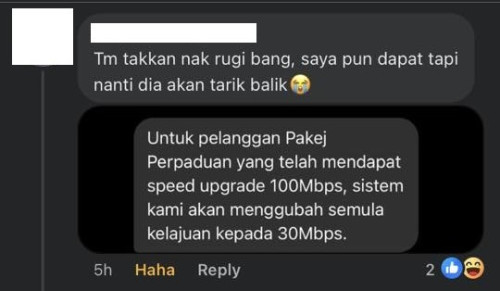
Pelan Perpaduan users who have been upgraded to 100Mbps.
Unifi will downgrade back to 30Mbps

user posted image
*
Damn. Why they do that?
NimalKumar
post Oct 14 2023, 12:05 AM

Getting Started
**
Junior Member
272 posts

Joined: Sep 2020


QUOTE(Oltromen Ripot @ Oct 13 2023, 11:14 PM)
T&C already explicitly mentioned Perpaduan does not get speed upgrade.
So rolling back is also within TM's prerogative, the same like those SWU sign ups after 4th also up to TM's prerogative to get FSU2023.

Same like 2Gbps also excluded. If there is a 2Gbps out there suddenly get a speed upgrade, I will flip table mengamuk wehh....
*
For Pakej Perpaduan .. yes they can do that because they clearly mentioned.

As for SWU I dont think so regardless the date they applied as this would greatly throw TM to a bad remark. Additionally it was their own agents whom said the upgrade was permanent.
NimalKumar
post Oct 14 2023, 12:17 AM

Getting Started
**
Junior Member
272 posts

Joined: Sep 2020


QUOTE(cyberic @ Oct 13 2023, 11:38 PM)
Double check if your fiber cable bend too much. This can have bad effect on speed too.
*
Also my is my ping so high 😩😩😩
NimalKumar
post Oct 14 2023, 04:12 PM

Getting Started
**
Junior Member
272 posts

Joined: Sep 2020


QUOTE(soonwai @ Oct 14 2023, 12:49 PM)
I haven't really tested wifi6 at 2.4Ghz but 100Mbps is considered very good already.
*
If you're talking about FiberHome AX3000 then yes. I faced an issue where the 5GHz can achieve the speed (inconsistently) and the 2.4 GHz gave me the worst speed. My old Redmi Note 8 can't even connect to 5GHz and the 2.4GHz it connects to gets speed of mere 20Mbps. Tested the thing over PC and similar result occured.

It is safe to say that I don't think FiberHome can handle 500Mbps, should have been given to those with 300Mbps at least.

Personally speaking, seeing FiberHome configuration UI made me love my old AX20 TpLink even more. Its unacceptable for me to see typos and grammatical errors in an official device like this. Setup was not clean and a lot of unnecessary settings that you wouldn't even understand. Mine had 5 SSID option till now idk what to do with it. For some odd reason it has an IPv6 settings that I quite not get (please someone explain bcs I thought all this while TM only had IPv4).

TLDR : Get a better Wifi like TPLink or DLink if you experience wobbly speed. FiberHome keep as backup.

EDIT : Haiya wrong post quote hahahhaha sorry still dara to lowyat forums.

This post has been edited by NimalKumar: Oct 14 2023, 04:16 PM

NimalKumar
post Oct 16 2023, 01:56 AM

Getting Started
**
Junior Member
272 posts

Joined: Sep 2020


QUOTE(keong8867 @ Oct 16 2023, 01:22 AM)
I wanna ask who using 500mbps currently and what brand and model router you are using? Free from unifi or buy yourself? I,m using AX3000 free from unifi, should I change 1 ?
*
Solely depends on your budget. If you're looking to benefit from the full speed, I would suggest changing to a TP Link router. AX53 would be the one that I recommend, however AX20 is also an excellent choice if you're on a budget.

If the router TM provided is DLink then you should have no issues. Even FiberHome some says okay but for me it was inconsistent, hence I made my change back to my good old AX20 from TP Link.
NimalKumar
post Oct 16 2023, 06:37 PM

Getting Started
**
Junior Member
272 posts

Joined: Sep 2020


Can anyone please share me the IPv6 details for TP Link routers. I can't seem to set them properly. Help me.
NimalKumar
post Oct 17 2023, 01:23 PM

Getting Started
**
Junior Member
272 posts

Joined: Sep 2020


QUOTE(AVFAN @ Oct 17 2023, 09:56 AM)
that means...

ethernet : wifi
800 : 400-500
500 : 250-300
300 : 150-200

i m puzzled why still 1 of every 2 posts in this or related threads are about "not getting full speed with wifi"!
*
Agree .. my phone can pull around 350 ish for 500Mbps ... But wifi on a Laptop it always pulls full speed. All the time. And its on Wifi 5 😘😘😘
NimalKumar
post Oct 17 2023, 04:20 PM

Getting Started
**
Junior Member
272 posts

Joined: Sep 2020


Why wanna change ONT ? I received my Huawei ONT during my first install and would never let them change to the FiberHome one. No hate to FiberHome but I feel Huawei is superior.
NimalKumar
post Oct 17 2023, 09:00 PM

Getting Started
**
Junior Member
272 posts

Joined: Sep 2020


QUOTE(coolguy_0925 @ Oct 17 2023, 08:53 PM)
Just within this forum there are also members reported receiving 50 > 300 and 300 > 800 biggrin.gif
*
Could it be a glitch? Because I think very few reported the upgrade to 800Mbps ...
NimalKumar
post Oct 17 2023, 09:05 PM

Getting Started
**
Junior Member
272 posts

Joined: Sep 2020


Anyways I'm still happy with Unifi for this plan. 800Mbps gonna be an extreme overkill for me anyways. Lauyu Yunifai ā™„ļø

3 Pages < 1 2 3 >Top
Topic ClosedOptions
 

Change to:
| Lo-Fi Version
0.2550sec    0.85    7 queries    GZIP Disabled
Time is now: 19th December 2025 - 10:07 PM