Welcome Guest ( Log In | Register )

Outline · [ Standard ] · Linear+

 U Home 5G

views
     
4WD_er
post May 14 2024, 12:12 PM

On my way
****
Junior Member
572 posts

Joined: Aug 2018


QUOTE(ultrageek @ May 14 2024, 09:10 AM)
Define problematic? tongue.gif

A few of us had DC's that requires a reboot to resolve on a frequent basis...
*
Can counter it by let's say a timer switch, whereby you set the timer to turn off at 4:00am and turn it back on the next minute ? 4am is a time that nobody will stay awake and use internet let's say.
4WD_er
post Jun 5 2024, 09:06 AM

On my way
****
Junior Member
572 posts

Joined: Aug 2018


QUOTE(xswatch @ Jun 5 2024, 07:39 AM)
my maxis fibre contract ending in a month time. after reading about so many issues with the free modem from umobile, I'm thinking on getting tplink x50 since latest update can lock band already & comes with 3yrs warranty.

however I'm thinking to get a55 as spare phone (current phone start having issues) with the postpaid 98 instead. just need to +30 from uhome rm68.

question: postpaid 98 comes with 1tb data & can use as hotspot all of the 1tb data. will the hotspot only function inside phone & mod router only? i mean, if I put inside stock non-mod router will it work? example tplink x50 or nokia fastmile. I mean I want to use the 1tb as hotspot purpose but using non-mod router. anyone use any postpaid from u mobile ever try this? thanks in advance smile.gif
*
Technically speaking, you shall be allowed to pop in the simcard inside a modem.

I was doing it with u mobile in the past.
4WD_er
post Jun 27 2024, 10:03 AM

On my way
****
Junior Member
572 posts

Joined: Aug 2018


QUOTE(xswatch @ Jun 26 2024, 07:28 PM)
instead of having one fibre & one 5g. I'm planning to use two 5g instead.

yes ft5g prepaid rm25 with auto reload (ehem router)
uhome rm68 24m contract with the supplied router

monthly cost: rm72 (with +6%) + rm25 = rm97 only.

i just need about 100mbps connection only. mostly just to watch Netflix & prime video.
*
There has been quite some reported cases of FT5G users' internet being blocked by Yes as their usage was too high, breaking the fair usage policy and a result of using ahem router.

In so to speak, YES can detect high usage from modded modem and block you.
4WD_er
post Jun 27 2024, 03:53 PM

On my way
****
Junior Member
572 posts

Joined: Aug 2018


QUOTE(eauyong @ Jun 27 2024, 10:13 AM)
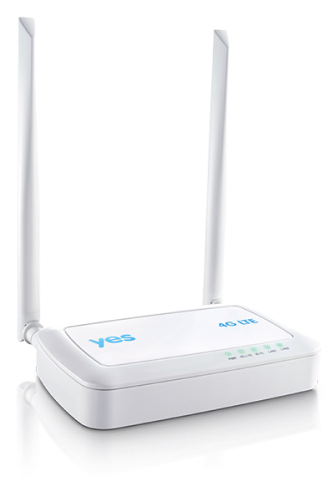
Just use the YES branded modem? YES 4G modem
user posted image
*
I think with FT5G you are still lack of hotspot sharing quota.

This post has been edited by 4WD_er: Jun 27 2024, 08:43 PM
4WD_er
post Sep 2 2024, 10:35 AM

On my way
****
Junior Member
572 posts

Joined: Aug 2018


QUOTE(Zaryl @ Sep 1 2024, 08:53 PM)
user posted image


i suggest you buy either Nokia Fast Mile 3 5G router (RM600) or like mine, GTeniq IQ20X55 ver2 (RM800). Both available at shopee. Ensure you get the router that has Qualcomm Snapdragon X50 series. Don't try your luck with MediaTek. NEVER TOUCH UniSOC IVY 510 Makalu (MC888s) anymore!  bangwall.gif

Qualcomm SD X50 series chipset = very fast speed, no more frequent auto reboot.  thumbup.gif
*
I beg to defer your "conclusion" on MediaTek 5G modem. Was using Yeacomm NR330 for a year now, nothing other than fantastic stability and speed.

Has never shutdown or reboot for... months now, stand next to the modem (on 1st floor windows) I get 800 mbps DL, and 125-150 mbps UL. At my home ground floor still get 200-300mbps, so don't talk rubbish about MediaTek chipset wink.gif

But the catch is, being the early adopter on 5G modem back in mid 2023, there is a premium price to pay for Yeacomm, at RM800-900.
4WD_er
post Sep 2 2024, 11:03 AM

On my way
****
Junior Member
572 posts

Joined: Aug 2018


QUOTE(Zaryl @ Sep 2 2024, 10:48 AM)
sorry didn't really knew MediaTek could perform well other than SD X55.

All my research before this had led to my conclusion that X55 is the most stable & most performing router chipset.  icon_rolleyes.gif
*
SD X55 is newer I think, so it has the benefit of improving from the predecessor.

Nonetheless, for me, the MediaTek is fantastic so far.

Well, I am on Yes 5G though, I found it more stable than U/M on 5G connection although the 2 telcos share the same tower nearby my house. I used U/M before switching to Yes 5G, U/M would drop to 4G from time to time, but when I lock band to only 5G then it had intermittent disconnect issue, as if the 5G service is up and down. But this do not happen on Yes5G, or rarely happened.
4WD_er
post Sep 2 2024, 11:43 AM

On my way
****
Junior Member
572 posts

Joined: Aug 2018


Best above 800mbps, 90% of the time above 600mbps. I don't do speedtest from the 5G modem these days, as I am at ground floor like 95% of the time, I bought a Xiaomi AX3000 router connect via wifi (as wifi extender, cabling is not possible for me) to my Yeacomm which I get 250-300mbps. And my speedtest have been on the Xiaomi AX3000 most of the time.

My house is a 3 storey terrace corner lot, so need two Xiaomi router, one AX3000 on ground floor, another AX1800 on 2nd floor, in order to get wifi signal for the full house including toilets tongue.gif

user posted image

This post has been edited by 4WD_er: Sep 2 2024, 11:50 AM
4WD_er
post Sep 2 2024, 12:02 PM

On my way
****
Junior Member
572 posts

Joined: Aug 2018


QUOTE(andrekua2 @ Sep 2 2024, 11:55 AM)
I see... thanks for sharing. Are you using their free modem as well? My celcom contract still had like 5 or 6 months... thinking wanna change to UM or Yes. I did trial my own UM in office (since the tower is literally in front of my office, less than 50m) and it does 300+ consistently. If YES is better then might consider it as well. Currently paying RM149 for Celcom.
*
Nope, as I bought my Yeacomm in June 2023, way before the free modem - telco bundle.

So I have :

1st floor : Yeacomm 5G modem, share out internet thru WiFi both 2.4ghz and 5ghz.

Grnd floor : Xiaomi AX3000 router, wifi extender to my Yeacomm 5ghz, diff SSID from Yeacomm. Only one 5ghz SSID.

2nd flr : Xiaomi AX1800 router, wifi extender to my Yeacomm 5ghz, same SSID as my Grnd floor Xiaomi. Only one 5ghz SSID.

Hence all my family's mobile phones, PC, TV box take internet from the Xioomi SSID actually. Do Ms Teams call, Whatsapp video call all are good. Watching F1, TVB or Korea dramas, from my TV box all good.

As for all my smart devices which take on 2.4ghz, are actually connected to Yeacomm 2.4 ghz, which is strong enough to cover the whole house but at low speed. Good enough for smart devices like lighting switches, robot, air purifier, fridge. No CCTV yet tongue.gif

This post has been edited by 4WD_er: Sep 2 2024, 12:05 PM

4WD_er
post Sep 2 2024, 12:26 PM

On my way
****
Junior Member
572 posts

Joined: Aug 2018


QUOTE(andrekua2 @ Sep 2 2024, 12:16 PM)
I see... guess I will be stuck with UM for 2 years then... Im not really a sucker for fast speed since my usage even with kids is not that high really. Tonight will do a few speedtest to see how much my connection is throttled if any. I do feel loading youtube, iqiyi, bein sport and other is slightly more consistent with UM than Unifi. The only app that would not work right now is HBO Go on my Sony TV for whatever reason. Could be blocking by UM. When I hotspot my XoX lines to my TV, HBO Go load instantly.
*
As you are more or less stuck with a 2 years contract (due to the free device), you may consider 2 alternative strategy to improve the line :

1. Invest in a separate 5G modem that is known to have strong signal and high speed. Just close one eye, bite the bullet to pay something around RM800.
2. Find the best spot at home which has the best signal and speed from the ZTE modem, even if that is not ideal to share out the line. Pull a LAN cable to a stable router that share out good internet speed. Do note that the 5G modem is not to be placed right next to metal / steel. Keep some distance.

I think what you have been testing and trying on the ZTE are already the good base, if the active cooling works, the next step is to do the point 2 above. Even if that is let's say in your storeroom or toilet, just do it loh wink.gif

This post has been edited by 4WD_er: Sep 2 2024, 12:28 PM


Change to:
| Lo-Fi Version
0.0219sec    0.74    7 queries    GZIP Disabled
Time is now: 20th December 2025 - 12:50 AM