

My first CN phone and have no idea what to do first like Google Play side load installation ...currently using S23 U.
Any advice is really appreciated...1 week waiting from Fastech
2023 Motorola Razr 40 Series Discussion, Flip The Script
2023 Motorola Razr 40 Series Discussion, Flip The Script
|
|
 Jun 27 2023, 01:48 AM Jun 27 2023, 01:48 AM
|
 
Senior Member
1,846 posts Joined: Jan 2003 From: City^of^Anggerik   
|
My first CN phone and have no idea what to do first like Google Play side load installation ...currently using S23 U.
Any advice is really appreciated...1 week waiting from Fastech |
|
|
|
|
|
Jun 27 2023, 07:01 AM
Show posts by this member only | IPv6 | Post
#182
|

Senior Member
6,904 posts Joined: Jan 2003
|
QUOTE(TOMEI-R @ Jun 26 2023, 11:01 PM) I wouldn't touch that with a pole as well. No local support, no warranty, No 5G, no VolTE and Vowifi which is a pain in the arse. Pay top dollar for a half functioning phone. No thanks. Nope the volte works out of the box  |
|
|
Jun 27 2023, 07:02 AM
Show posts by this member only | IPv6 | Post
#183
|
|
Senior Member
6,904 posts Joined: Jan 2003
|
QUOTE(silencer @ Jun 27 2023, 01:48 AM) My first CN phone and have no idea what to do first like Google Play side load installation ...currently using S23 U. There will be a toggle to enable play service.. u need to just install Google play ... Also maybe contact sync if u are syncing your contacts that is on Google cloudAny advice is really appreciated...1 week waiting from Fastech |
|
|
Jun 27 2023, 08:40 AM
|

Senior Member
1,064 posts Joined: Oct 2016
|
QUOTE(silencer @ Jun 27 2023, 01:48 AM) My first CN phone and have no idea what to do first like Google Play side load installation ...currently using S23 U. TO ALL NEW MOTO CN ROM USERSAny advice is really appreciated...1 week waiting from Fastech Instruction on how to enable GMS and enable push notifications (no delayed WhatsApp, Messenger notifications, etc) Turn on Google Play Services: 1. Go to Settings > System > Google Play Services 2. Turn ON (it will ask you to login your Google Account) 3. Ensure account sync is ON 3. Done Turn on Location (this is a MUST as apps require location enabled) 1. Go to Settings > Location 2. Turn ON 3. Done Download Google Play from App Center 1. Open App Center 2. Search for "Google Play" and download. 3. Do NOT download any Google app from App center. Do it from Play Store. 4. Open Play Store (and login to your account) 5. Download all relevant Google apps first. - GOOGLE (search for "GOOGLE" app - GMAIL - DRIVE - KEEP NOTES - YOUTUBE - PHOTOS - MAPS - GOOGLE CALENDAR (why? see below) How to sync your Google calendar to the stock Moto "CALENDAR" app (ex. Malaysia public holiday, your tasks, etc) 1. Download Google Calendar 2. Open the app and let is sync 3. Open Moto "Calendar" app (orange color) 4. The app will ask you which accounts you want to be visible (I select Holidays in Malaysia and my GMail account). 5. Deselect PC Sync (kinda useless and won't sync to any) 6. Done 7. UNINSTALL Google Calendar (you don't need this anymore as your account is already synced) Check whether Google Contacts is sync to Moto Contacts (for older Moto CN phones and if you cannot see your contacts) 1. Open "Contacts" app 2. Check if your contacts are there 3. If not, download "Google Contacts Sync apk" -- Where? Google is your friend. For delayed notification, this is due to the Google framework missing in CN ROMs (not just Motorola). Motorola is smart so they came up with a solution - MOTO DEVICE SHIELD. You have to do ALL STEPS BELOW. ALL. STEP # 1 Go to Settings > Device Shield > Utility Tools (LOWER RIGHT TAB) App auto start menu Enable the apps you want to auto start after restarting your phone. 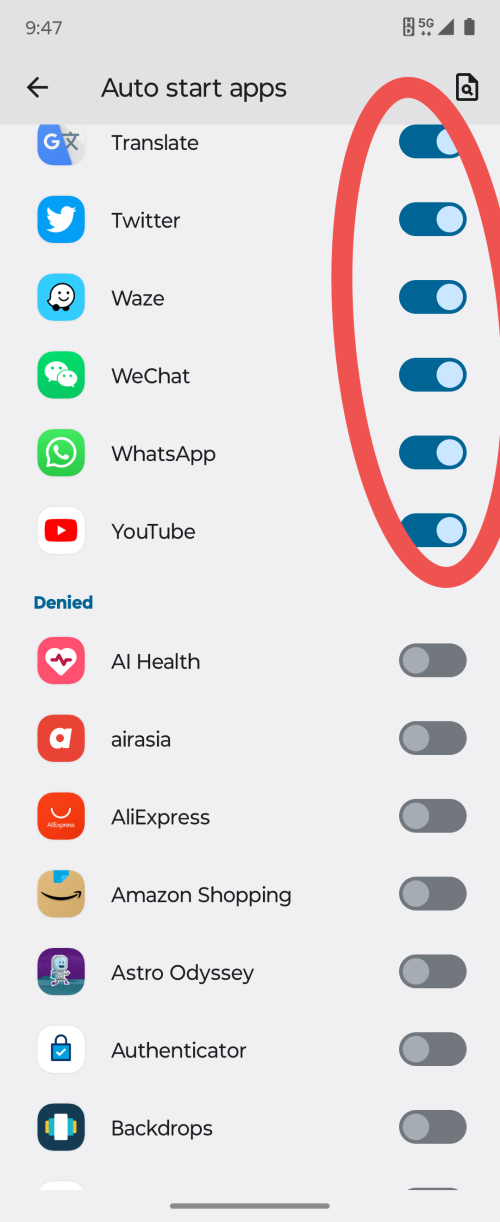 STEP # 2 Background running menu Put the apps to Allow running in background. 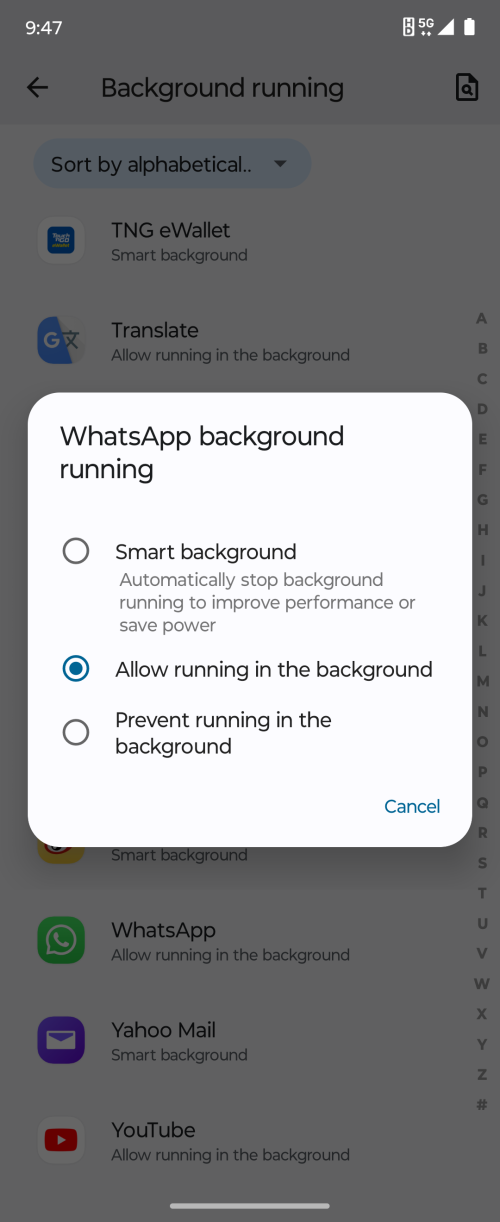 AND LASTLY STEP # 3 Go to App info (example WhatsApp) and put the app to UNRESTRICTED. 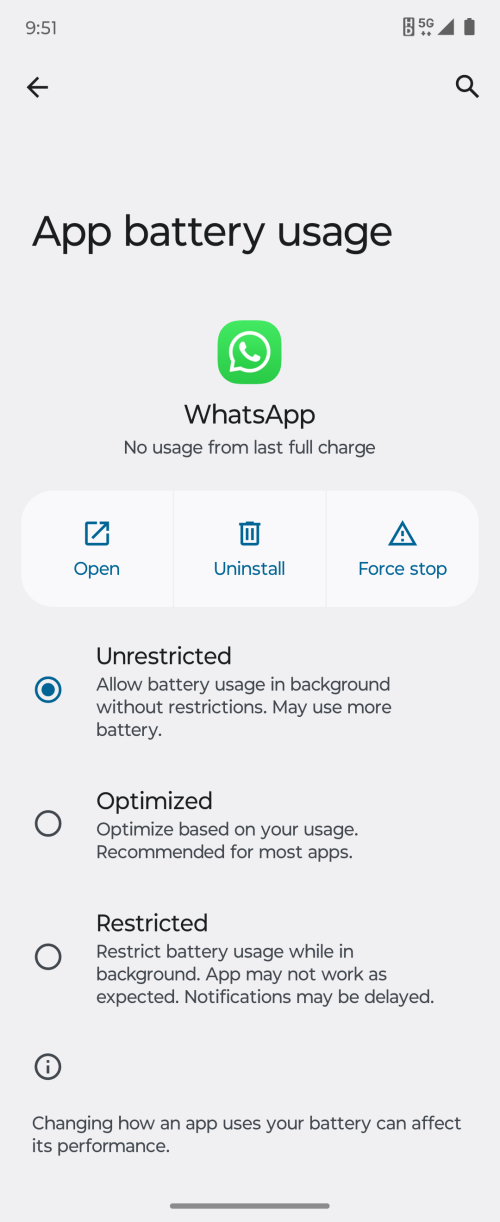 DONE. NO DELAYED NOTIFICATION ISSUE. 10000% WORKING. This post has been edited by ijuanp03: Jun 27 2023, 08:43 AM |
|
|
Jun 27 2023, 01:30 PM
|
|
Senior Member
1,846 posts Joined: Jan 2003 From: City^of^Anggerik
|
Really appreciate for the guide....the phone is too sexy to ignore ..
|
|
|
Jun 27 2023, 02:50 PM
|
|
Senior Member
6,904 posts Joined: Jan 2003
|
QUOTE(ijuanp03 @ Jun 27 2023, 08:40 AM) TO ALL NEW MOTO CN ROM USERS Good instructionsInstruction on how to enable GMS and enable push notifications (no delayed WhatsApp, Messenger notifications, etc) Turn on Google Play Services: 1. Go to Settings > System > Google Play Services 2. Turn ON (it will ask you to login your Google Account) 3. Ensure account sync is ON 3. Done Turn on Location (this is a MUST as apps require location enabled) 1. Go to Settings > Location 2. Turn ON 3. Done Download Google Play from App Center 1. Open App Center 2. Search for "Google Play" and download. 3. Do NOT download any Google app from App center. Do it from Play Store. 4. Open Play Store (and login to your account) 5. Download all relevant Google apps first. - GOOGLE (search for "GOOGLE" app - GMAIL - DRIVE - KEEP NOTES - YOUTUBE - PHOTOS - MAPS - GOOGLE CALENDAR (why? see below) How to sync your Google calendar to the stock Moto "CALENDAR" app (ex. Malaysia public holiday, your tasks, etc) 1. Download Google Calendar 2. Open the app and let is sync 3. Open Moto "Calendar" app (orange color) 4. The app will ask you which accounts you want to be visible (I select Holidays in Malaysia and my GMail account). 5. Deselect PC Sync (kinda useless and won't sync to any) 6. Done 7. UNINSTALL Google Calendar (you don't need this anymore as your account is already synced) Check whether Google Contacts is sync to Moto Contacts (for older Moto CN phones and if you cannot see your contacts) 1. Open "Contacts" app 2. Check if your contacts are there 3. If not, download "Google Contacts Sync apk" -- Where? Google is your friend. For delayed notification, this is due to the Google framework missing in CN ROMs (not just Motorola). Motorola is smart so they came up with a solution - MOTO DEVICE SHIELD. You have to do ALL STEPS BELOW. ALL. STEP # 1 Go to Settings > Device Shield > Utility Tools (LOWER RIGHT TAB) App auto start menu Enable the apps you want to auto start after restarting your phone. STEP # 2 Background running menu Put the apps to Allow running in background. AND LASTLY STEP # 3 Go to App info (example WhatsApp) and put the app to UNRESTRICTED. DONE. NO DELAYED NOTIFICATION ISSUE. 10000% WORKING. I think work on any CN phone except Huawei since US block all Google services Yes I need to install contact sync APK 🤣 other than that work just fine Also the device shield thingy need to be done to Whatsapp in my case others just works fine Can the thread starter put this guide on the first post??? ijuanp03 liked this post
|
|
|
|
|
|
Jun 27 2023, 03:25 PM
Show posts by this member only | IPv6 | Post
#187
|
|
All Stars
24,227 posts Joined: Mar 2007 From: Kuala Lumpur
|
QUOTE(cruzzmz @ Jun 27 2023, 07:01 AM) Nope the volte works out of the box Some have reported it works some work. Its like a hit and miss too. Some have reported after updating VoLTE doesn't work. But there is a workaround for VolTE for now.QUOTE(ijuanp03 @ Jun 27 2023, 08:40 AM) TO ALL NEW MOTO CN ROM USERS Nice write up. Instruction on how to enable GMS and enable push notifications (no delayed WhatsApp, Messenger notifications, etc) Turn on Google Play Services: 1. Go to Settings > System > Google Play Services 2. Turn ON (it will ask you to login your Google Account) 3. Ensure account sync is ON 3. Done Turn on Location (this is a MUST as apps require location enabled) 1. Go to Settings > Location 2. Turn ON 3. Done Download Google Play from App Center 1. Open App Center 2. Search for "Google Play" and download. 3. Do NOT download any Google app from App center. Do it from Play Store. 4. Open Play Store (and login to your account) 5. Download all relevant Google apps first. - GOOGLE (search for "GOOGLE" app - GMAIL - DRIVE - KEEP NOTES - YOUTUBE - PHOTOS - MAPS - GOOGLE CALENDAR (why? see below) How to sync your Google calendar to the stock Moto "CALENDAR" app (ex. Malaysia public holiday, your tasks, etc) 1. Download Google Calendar 2. Open the app and let is sync 3. Open Moto "Calendar" app (orange color) 4. The app will ask you which accounts you want to be visible (I select Holidays in Malaysia and my GMail account). 5. Deselect PC Sync (kinda useless and won't sync to any) 6. Done 7. UNINSTALL Google Calendar (you don't need this anymore as your account is already synced) Check whether Google Contacts is sync to Moto Contacts (for older Moto CN phones and if you cannot see your contacts) 1. Open "Contacts" app 2. Check if your contacts are there 3. If not, download "Google Contacts Sync apk" -- Where? Google is your friend. For delayed notification, this is due to the Google framework missing in CN ROMs (not just Motorola). Motorola is smart so they came up with a solution - MOTO DEVICE SHIELD. You have to do ALL STEPS BELOW. ALL. STEP # 1 Go to Settings > Device Shield > Utility Tools (LOWER RIGHT TAB) App auto start menu Enable the apps you want to auto start after restarting your phone. STEP # 2 Background running menu Put the apps to Allow running in background. AND LASTLY STEP # 3 Go to App info (example WhatsApp) and put the app to UNRESTRICTED. DONE. NO DELAYED NOTIFICATION ISSUE. 10000% WORKING.  ijuanp03 liked this post
|
|
|
Jun 27 2023, 03:37 PM
|
|
Senior Member
6,904 posts Joined: Jan 2003
|
QUOTE(TOMEI-R @ Jun 27 2023, 03:25 PM) Some have reported it works some work. Its like a hit and miss too. Some have reported after updating VoLTE doesn't work. But there is a workaround for VolTE for now. For volte it worked after Mac updateVowofi got workaround 5g need to root and use software mod 😅 Btw the above instructions works on 2022 also ya .. if anyone wants to buy it since it is cheaper now 😄 This post has been edited by cruzzmz: Jun 27 2023, 03:38 PM ijuanp03 liked this post
|
|
|
Jun 27 2023, 03:42 PM
Show posts by this member only | IPv6 | Post
#189
|
|
All Stars
24,227 posts Joined: Mar 2007 From: Kuala Lumpur
|
QUOTE(cruzzmz @ Jun 27 2023, 03:37 PM) For volte it worked after Mac update You mean enabling VoWifi using the Shizuku app isit?Vowofi got workaround 5g need to root and use software mod 😅 Btw the above instructions works on 2022 also ya .. if anyone wants to buy it since it is cheaper now 😄 This post has been edited by TOMEI-R: Jun 27 2023, 06:03 PM |
|
|
Jun 27 2023, 03:49 PM
Show posts by this member only | IPv6 | Post
#190
|

Senior Member
1,927 posts Joined: Dec 2005
|
QUOTE(TOMEI-R @ Jun 26 2023, 09:39 PM) Nope... going to use it as my main daily driver. I getting local set sure no issue haha. Ya seems like it getting too old to keep changing phones also. That is why I thinking twice now.  I used to be like you last time bro... but I stopped doing that already. Signs of growing old. Im lazy to mod/flash here and there. I just want a stable phone, OS Im used to. No fuss, no funny issues. Just working good straight out of the box. One of the reasons I have stucked to Oneplus and Iphones all these while. I thinking ZenFone 10 will be my last phone for this yr. Where your best friend from Samsung thread bro ? I forgot what his nick. You two always chatting in Samsung thread I remember 😁 Ya I phone I agreed is a good phone for daily normal use. Last yr Nov I got myself a 14 pro, use 2 months then sold to my sister and got oppo find N2. 😂 This post has been edited by badboy77: Jun 27 2023, 03:51 PM |
|
|
Jun 27 2023, 04:58 PM
Show posts by this member only | IPv6 | Post
#191
|
|
Senior Member
6,904 posts Joined: Jan 2003
|
QUOTE(TOMEI-R @ Jun 27 2023, 03:42 PM) You meanenabling VoWifi using the Shizuku app isit? yesQUOTE(badboy77 @ Jun 27 2023, 03:49 PM) I getting local set sure no issue haha. Ya seems like it getting too old to keep changing phones also. you sure u can tahan meh I thinking ZenFone 10 will be my last phone for this yr. Where your best friend from Samsung thread bro ? I forgot what his nick. You two always chatting in Samsung thread I remember 😁 Ya I phone I agreed is a good phone for daily normal use. Last yr Nov I got myself a 14 pro, use 2 months then sold to my sister and got oppo find N2. 😂  This post has been edited by cruzzmz: Jun 27 2023, 04:58 PM |
|
|
Jun 27 2023, 05:28 PM
Show posts by this member only | IPv6 | Post
#192
|
|
Junior Member
53 posts Joined: Oct 2007
|
QUOTE(ijuanp03 @ Jun 27 2023, 08:40 AM) TO ALL NEW MOTO CN ROM USERS Thank you so much! really helpful!Instruction on how to enable GMS and enable push notifications (no delayed WhatsApp, Messenger notifications, etc) Turn on Google Play Services: 1. Go to Settings > System > Google Play Services 2. Turn ON (it will ask you to login your Google Account) 3. Ensure account sync is ON 3. Done Turn on Location (this is a MUST as apps require location enabled) 1. Go to Settings > Location 2. Turn ON 3. Done Download Google Play from App Center 1. Open App Center 2. Search for "Google Play" and download. 3. Do NOT download any Google app from App center. Do it from Play Store. 4. Open Play Store (and login to your account) 5. Download all relevant Google apps first. - GOOGLE (search for "GOOGLE" app - GMAIL - DRIVE - KEEP NOTES - YOUTUBE - PHOTOS - MAPS - GOOGLE CALENDAR (why? see below) How to sync your Google calendar to the stock Moto "CALENDAR" app (ex. Malaysia public holiday, your tasks, etc) 1. Download Google Calendar 2. Open the app and let is sync 3. Open Moto "Calendar" app (orange color) 4. The app will ask you which accounts you want to be visible (I select Holidays in Malaysia and my GMail account). 5. Deselect PC Sync (kinda useless and won't sync to any) 6. Done 7. UNINSTALL Google Calendar (you don't need this anymore as your account is already synced) Check whether Google Contacts is sync to Moto Contacts (for older Moto CN phones and if you cannot see your contacts) 1. Open "Contacts" app 2. Check if your contacts are there 3. If not, download "Google Contacts Sync apk" -- Where? Google is your friend. For delayed notification, this is due to the Google framework missing in CN ROMs (not just Motorola). Motorola is smart so they came up with a solution - MOTO DEVICE SHIELD. You have to do ALL STEPS BELOW. ALL. STEP # 1 Go to Settings > Device Shield > Utility Tools (LOWER RIGHT TAB) App auto start menu Enable the apps you want to auto start after restarting your phone. STEP # 2 Background running menu Put the apps to Allow running in background. AND LASTLY STEP # 3 Go to App info (example WhatsApp) and put the app to UNRESTRICTED. DONE. NO DELAYED NOTIFICATION ISSUE. 10000% WORKING. Btw, i got some questions (my first android phone): 1. After I choose english as main language, I noticed some of the apps still in chinese. is it normal? even the web browser and App centre. haha. I cannot read it. 2. Which native apps should I delete and not beneficial? Im afraid if I delete so many apps (in chinese wording), suddenly it important and cannot download it again. The App centre still need to keep after downloading the Google play? 3. does razr 40 ultra need screen protector for internal and external screen? Thank you in advance. |
|
|
Jun 27 2023, 06:12 PM
Show posts by this member only | IPv6 | Post
#193
|
|
All Stars
24,227 posts Joined: Mar 2007 From: Kuala Lumpur
|
QUOTE(badboy77 @ Jun 27 2023, 03:49 PM) I getting local set sure no issue haha. Ya seems like it getting too old to keep changing phones also. Ya bro... changed so many phones for so many years already. Tired already. Now just want something good, stable and everything works out of the box. Really lazy to do research and mod here and there. But I still have to do it for my Oneplus 9R now which would be my very last Oneplus phone after so many donkey years supporting them. Im still on OP because Im so used to OOS but I think its time to change because the company has totally shifted its direction. I thinking ZenFone 10 will be my last phone for this yr. Where your best friend from Samsung thread bro ? I forgot what his nick. You two always chatting in Samsung thread I remember 😁 Ya I phone I agreed is a good phone for daily normal use. Last yr Nov I got myself a 14 pro, use 2 months then sold to my sister and got oppo find N2. 😂 The best bet on Android now would still be the Samsung Galaxy S23 series. This is for those who don't want to bother meddling on the phone. Just buy, open box and use. Iphone and IOS is still more polished in terms of hardware and apps as well as being more secure IMO. That is why I have another 14 PM as a daily driver. |
|
|
|
|
|
Jun 27 2023, 07:01 PM
Show posts by this member only | IPv6 | Post
#194
|
|
Senior Member
6,904 posts Joined: Jan 2003
|
QUOTE(syukry @ Jun 27 2023, 05:28 PM) Thank you so much! really helpful! i try to answer based on my experienceBtw, i got some questions (my first android phone): 1. After I choose english as main language, I noticed some of the apps still in chinese. is it normal? even the web browser and App centre. haha. I cannot read it. 2. Which native apps should I delete and not beneficial? Im afraid if I delete so many apps (in chinese wording), suddenly it important and cannot download it again. The App centre still need to keep after downloading the Google play? 3. does razr 40 ultra need screen protector for internal and external screen? Thank you in advance. 1. Yes because CN version. Use other browser and install play store 2. All CN one hahaha ... no need to keep the app center 3. it is up to you, the only SP is the hydrogel type ... last time i put one in and out but eventually i take it off syukry liked this post
|
|
|
Jun 27 2023, 07:03 PM
Show posts by this member only | IPv6 | Post
#195
|
|
Senior Member
6,904 posts Joined: Jan 2003
|
QUOTE(TOMEI-R @ Jun 27 2023, 06:12 PM) Ya bro... changed so many phones for so many years already. Tired already. Now just want something good, stable and everything works out of the box. Really lazy to do research and mod here and there. But I still have to do it for my Oneplus 9R now which would be my very last Oneplus phone after so many donkey years supporting them. Im still on OP because Im so used to OOS but I think its time to change because the company has totally shifted its direction. I get you bro ... now i only change phone 2-3 yrs once The best bet on Android now would still be the Samsung Galaxy S23 series. This is for those who don't want to bother meddling on the phone. Just buy, open box and use. Iphone and IOS is still more polished in terms of hardware and apps as well as being more secure IMO. That is why I have another 14 PM as a daily driver. I like OP also ... maybe ill take another shot when OP V fold is out later ... see if the price is right lah ... getting old need a bigger screen hahahaTo be frank i dont like ios ... tried once can only tahan a week This post has been edited by cruzzmz: Jun 27 2023, 07:04 PM |
|
|
Jun 27 2023, 08:27 PM
Show posts by this member only | IPv6 | Post
#196
|
|
All Stars
24,227 posts Joined: Mar 2007 From: Kuala Lumpur
|
QUOTE(cruzzmz @ Jun 27 2023, 07:01 PM) i try to answer based on my experience Hydrogel/silicone type SP are a nono. It makes the whole touch screen experience go bad.1. Yes because CN version. Use other browser and install play store 2. All CN one hahaha ... no need to keep the app center 3. it is up to you, the only SP is the hydrogel type ... last time i put one in and out but eventually i take it off cruzzmz liked this post
|
|
|
Jun 28 2023, 11:45 AM
|
|
Junior Member
53 posts Joined: Oct 2007
|
Btw, how can I sign up for Lenovo ID?
Im trying to use wallet app. but need to log in Lenovo ID. When I try to sign up, the phone no cannot change to Malaysia code. only China code. Anyone got suggestions? thank you in advance |
|
|
Jun 28 2023, 04:08 PM
Show posts by this member only | IPv6 | Post
#198
|
|
Senior Member
6,904 posts Joined: Jan 2003
|
QUOTE(syukry @ Jun 28 2023, 11:45 AM) Btw, how can I sign up for Lenovo ID? Can you try the website to register the ID?Im trying to use wallet app. but need to log in Lenovo ID. When I try to sign up, the phone no cannot change to Malaysia code. only China code. Anyone got suggestions? thank you in advance i didnt remember how did i register for it though |
|
|
Jun 28 2023, 07:10 PM
|
|
Senior Member
1,064 posts Joined: Oct 2016
|
QUOTE(syukry @ Jun 28 2023, 11:45 AM) Btw, how can I sign up for Lenovo ID? I also can't. We need a valid China mobile number to register.Im trying to use wallet app. but need to log in Lenovo ID. When I try to sign up, the phone no cannot change to Malaysia code. only China code. Anyone got suggestions? thank you in advance Of course we can register a Lenovo account but that is for global use. Lenovo ID = Lenovo China account. Btw, you can still use wallet without signing in. Turn on NFC and tap your card behind the phone. Wallet will automatically open. cruzzmz liked this post
|
|
|
Jun 28 2023, 08:37 PM
Show posts by this member only | IPv6 | Post
#200
|
|
Senior Member
6,904 posts Joined: Jan 2003
|
QUOTE(ijuanp03 @ Jun 28 2023, 07:10 PM) I also can't. We need a valid China mobile number to register. You can register the card and use it?Of course we can register a Lenovo account but that is for global use. Lenovo ID = Lenovo China account. Btw, you can still use wallet without signing in. Turn on NFC and tap your card behind the phone. Wallet will automatically open. |
| Change to: |  0.0359sec 0.0359sec
 0.25 0.25
 6 queries 6 queries
 GZIP Disabled GZIP Disabled
Time is now: 20th December 2025 - 10:41 PM |
 Quote
Quote