

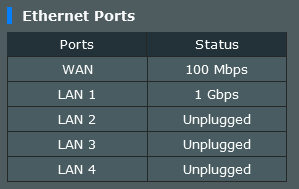
My router show the WAN port only have 100mbps.
Unifi Where to buy Unifi BTU/Modem
|
|
 May 17 2023, 10:46 PM, updated 3y ago May 17 2023, 10:46 PM, updated 3y ago
Show posts by this member only | Post
#1
|
 
Probation
4 posts Joined: Aug 2019  
|
My internet plan is 500 Mbps down/ 100 Mbps up, but when I do a speed test only can reach 92 Mbps down /91 Mbps up (using a LAN cable connected to my router and doing the speed test). I tried rebooting my router and tried to replace the other cat6 cable, but the result was still the same. I called the Unifi technical assistant for help, but they kept telling me that the modem was fine and could handle the 500mbps speed. I did google research and found that my modem LAN ports only support 10/100mbps. Now I want to change the modem to see if I can reach 500mbps download speed to know whether it is the modem problem or the router.
My router show the WAN port only have 100mbps. |
|
|
|
|
|
May 17 2023, 10:54 PM
Show posts by this member only | Post
#2
|

All Stars
21,963 posts Joined: Dec 2004 From: KL  
|
QUOTE(tommyisme218 @ May 17 2023, 10:46 PM) My internet plan is 500 Mbps down/ 100 Mbps up, but when I do a speed test only can reach 92 Mbps down /91 Mbps up (using a LAN cable connected to my router and doing the speed test). I tried rebooting my router and tried to replace the other cat6 cable, but the result was still the same. I called the Unifi technical assistant for help, but they kept telling me that the modem was fine and could handle the 500mbps speed. I did google research and found that my modem LAN ports only support 10/100mbps. Now I want to change the modem to see if I can reach 500mbps download speed to know whether it is the modem problem or the router. Lel please provide the BTU model and ur wifi router model. Photo can too. My router show the WAN port only have 100mbps.  |
|
|
May 17 2023, 10:56 PM
Show posts by this member only | Post
#3
|
|
Junior Member
303 posts Joined: Apr 2011
|
QUOTE(tommyisme218 @ May 17 2023, 10:46 PM) My internet plan is 500 Mbps down/ 100 Mbps up, but when I do a speed test only can reach 92 Mbps down /91 Mbps up (using a LAN cable connected to my router and doing the speed test). I tried rebooting my router and tried to replace the other cat6 cable, but the result was still the same. I called the Unifi technical assistant for help, but they kept telling me that the modem was fine and could handle the 500mbps speed. I did google research and found that my modem LAN ports only support 10/100mbps. Now I want to change the modem to see if I can reach 500mbps download speed to know whether it is the modem problem or the router. Cable problem? Some cable is not gb cables My router show the WAN port only have 100mbps. |
|
|
May 17 2023, 10:58 PM
Show posts by this member only | Post
#4
|
|
All Stars
21,963 posts Joined: Dec 2004 From: KL
|
QUOTE(bee88 @ May 17 2023, 10:56 PM) Cable problem? Some cable is not gb cables Not true. Even cat5e can support upto 1gbps and he is using cat6 cable. |
|
|
May 18 2023, 07:29 AM
Show posts by this member only | Post
#5
|
|
Senior Member
2,616 posts Joined: Nov 2020
|
QUOTE(tommyisme218 @ May 17 2023, 10:46 PM) My internet plan is 500 Mbps down/ 100 Mbps up, but when I do a speed test only can reach 92 Mbps down /91 Mbps up (using a LAN cable connected to my router and doing the speed test). I tried rebooting my router and tried to replace the other cat6 cable, but the result was still the same. I called the Unifi technical assistant for help, but they kept telling me that the modem was fine and could handle the 500mbps speed. I did google research and found that my modem LAN ports only support 10/100mbps. Now I want to change the modem to see if I can reach 500mbps download speed to know whether it is the modem problem or the router. The problem is even if you can get your hands on a modem, you require quite some info to set it up (such as PLOAM Password) My router show the WAN port only have 100mbps. Can provide model of the current modem? Try going this path to get someone out https://easyfix.unifi.com.my/ Easyfix for Home -> Start Self troubleshooting -> Let's Begin (I don't have an account so I choose the no login option below it) -> Unifi Broadband -> Slow Connection -> Setup 1 -> Reboot did not fix -> Select "Other BTU" for equipment (at the end of the list) -> start live chat The "other BTU" option is what's important and should tell you it's possible your modem isn't compatible with high speeds (which it is) and sends the info to the live chat agent. |
|
|
May 18 2023, 10:36 AM
Show posts by this member only | IPv6 | Post
#6
|
|
Senior Member
5,296 posts Joined: Nov 2006
|
QUOTE(tommyisme218 @ May 17 2023, 10:46 PM) My internet plan is 500 Mbps down/ 100 Mbps up, but when I do a speed test only can reach 92 Mbps down /91 Mbps up (using a LAN cable connected to my router and doing the speed test). I tried rebooting my router and tried to replace the other cat6 cable, but the result was still the same. I called the Unifi technical assistant for help, but they kept telling me that the modem was fine and could handle the 500mbps speed. I did google research and found that my modem LAN ports only support 10/100mbps. Now I want to change the modem to see if I can reach 500mbps download speed to know whether it is the modem problem or the router. BTU is the property of your ISP. If rosak request new unit from your ISP. My router show the WAN port only have 100mbps. Itu cahaya lubang tutup kasi ketas then cakap rosak. This post has been edited by OlgaC4: May 18 2023, 10:39 AM Anime4000 liked this post
|
|
|
|
|
|
May 18 2023, 03:17 PM
Show posts by this member only | IPv6 | Post
#7
|
|
Junior Member
214 posts Joined: May 2017
|
QUOTE(tommyisme218 @ May 17 2023, 10:46 PM) My internet plan is 500 Mbps down/ 100 Mbps up, but when I do a speed test only can reach 92 Mbps down /91 Mbps up (using a LAN cable connected to my router and doing the speed test). I tried rebooting my router and tried to replace the other cat6 cable, but the result was still the same. I called the Unifi technical assistant for help, but they kept telling me that the modem was fine and could handle the 500mbps speed. I did google research and found that my modem LAN ports only support 10/100mbps. Now I want to change the modem to see if I can reach 500mbps download speed to know whether it is the modem problem or the router. did you try to replace the cable between your BTU and Asus router? My router show the WAN port only have 100mbps. since your LAN1 port is getting 1Gbps, use that same cable to plug between BTU and router. |
|
|
May 18 2023, 09:40 PM
Show posts by this member only | IPv6 | Post
#8
|

Senior Member
2,400 posts Joined: Jul 2009 From: /dev/null
|
QUOTE(OlgaC4 @ May 18 2023, 10:36 AM) BTU is the property of your ISP. If rosak request new unit from your ISP. this method works to force TM swap ONU Itu cahaya lubang tutup kasi ketas then cakap rosak.  and dump many OMCI Info to the internet and dump many OMCI Info to the internet |
|
|
May 19 2023, 12:57 AM
Show posts by this member only | Post
#9
|
|
Probation
4 posts Joined: Aug 2019
|
Sorry forget to add more details.
Router : Asus RT-AC66U B1 Modem : huawei echollife hg850a cable use cat5e and cat6 I already contact TM technical assistant to bring new modem and router to my house to do speed testing. |
|
|
May 19 2023, 01:01 AM
|
|
Probation
4 posts Joined: Aug 2019
|
QUOTE(papyrous @ May 18 2023, 03:17 PM) did you try to replace the cable between your BTU and Asus router? I tried this method but result still same, so i dont think is the cable problem.since your LAN1 port is getting 1Gbps, use that same cable to plug between BTU and router. |
|
|
May 19 2023, 01:03 AM
|
|
Senior Member
1,882 posts Joined: Sep 2017
|
QUOTE(tommyisme218 @ May 19 2023, 01:01 AM) I tried this method but result still same, so i dont think is the cable problem. Seems like your btu is too old,maybe it only have 100mbps port. if your BTU not supporting 1gbps port,TM will replace the BTU for you. |
|
|
May 19 2023, 02:53 AM
Show posts by this member only | IPv6 | Post
#12
|
|
Junior Member
381 posts Joined: Oct 2017
|
Asus router try resetting your router. I am using asus ax3000 for 2 branches of my company.
For the first incident, i upgraded my unifi from 500 to 800 but when i do speedtest, the speed peaked under 200. I even called unifi for port reset and they sent technician over for troubleshooting but to no avail. I ended up resetting the router and boom. The actual Speed restored. For 2nd instance, last month, for my other branch, i was doing network devices upgrade and to my surprise, my 800mbps package speed peaked under 200mbps both download and upload speed. My network is wired with cat 6 cables. I called tm and they reset my port and keep asking me to do speedtest both via speedtest.net and their native tm speedtest website. The speed all fall under 200. I suddenly remembered what I did for my other branch. I reset my router and boom the 800 speed restored. I don't know why this happen but it works. You may give it a try. |
|
|
May 19 2023, 04:35 AM
Show posts by this member only | IPv6 | Post
#13
|

All Stars
11,460 posts Joined: Oct 2007 From: KL
|
QUOTE(tommyisme218 @ May 19 2023, 12:57 AM) Sorry forget to add more details. HG850a only 100Mbps ports. TM will change it for you foc. Make sure they don’t charge you anything.Router : Asus RT-AC66U B1 Modem : huawei echollife hg850a cable use cat5e and cat6 I already contact TM technical assistant to bring new modem and router to my house to do speed testing. This post has been edited by soonwai: May 19 2023, 04:46 AM |
|
|
May 19 2023, 05:06 AM
Show posts by this member only | IPv6 | Post
#14
|
|
Junior Member
176 posts Joined: Feb 2008
|
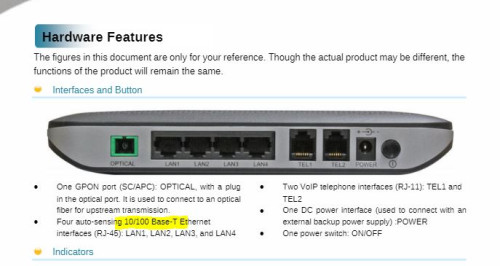
Ethernet port max 100Mbps. Ask for refund from TM due low speed since your upgrade. At least can offset your billing.
 |
|
|
May 19 2023, 11:04 PM
|
|
Probation
4 posts Joined: Aug 2019
|
Update: today the technical assistant came to find out that the old modem LAN port can't support more than 100mbps speed, and then helped me change the modem to new without any fee charge. Now my internet can reach around 493~500mbps. Thank everyone for the help. PRSXFENG liked this post
|
| Change to: |  0.0220sec 0.0220sec
 1.13 1.13
 5 queries 5 queries
 GZIP Disabled GZIP Disabled
Time is now: 23rd December 2025 - 11:42 PM |
 Quote
Quote