

 May 18 2023, 07:29 AM


QUOTE(tommyisme218 @ May 17 2023, 10:46 PM)
My internet plan is 500 Mbps down/ 100 Mbps up, but when I do a speed test only can reach 92 Mbps down /91 Mbps up (using a LAN cable connected to my router and doing the speed test). I tried rebooting my router and tried to replace the other cat6 cable, but the result was still the same. I called the Unifi technical assistant for help, but they kept telling me that the modem was fine and could handle the 500mbps speed. I did google research and found that my modem LAN ports only support 10/100mbps. Now I want to change the modem to see if I can reach 500mbps download speed to know whether it is the modem problem or the router.
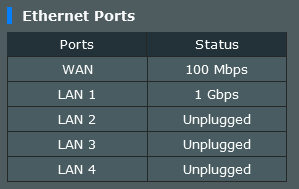
My router show the WAN port only have 100mbps.

The problem is even if you can get your hands on a modem, you require quite some info to set it up (such as PLOAM Password) My router show the WAN port only have 100mbps.
Can provide model of the current modem?
Try going this path to get someone out
https://easyfix.unifi.com.my/
Easyfix for Home -> Start Self troubleshooting -> Let's Begin (I don't have an account so I choose the no login option below it) -> Unifi Broadband -> Slow Connection -> Setup 1 -> Reboot did not fix -> Select "Other BTU" for equipment (at the end of the list) -> start live chat
The "other BTU" option is what's important and should tell you it's possible your modem isn't compatible with high speeds (which it is) and sends the info to the live chat agent.
 Quote
Quote
 0.0155sec
 1.30
1.30
 6 queries
 GZIP Disabled