Welcome Guest ( Log In | Register )

5 Pages < 1 2 3 4 5 >Bottom

Outline · [ Standard ] · Linear+

 GeForce NOW in Malaysia

views
     
TSHumanExtinction
post May 28 2023, 02:18 PM

Casual
***
Junior Member
364 posts

Joined: Jan 2018
From: Tim Apple
QUOTE(ear_hear @ May 28 2023, 02:10 PM)
Any more reviews to share? For non-Yes subscription it's RM50 per month. Beats spending thousands for a good gaming PC?
*
I tried starhub geforce b4, really not bad and very convenient. I have played cyberpunk dota and overall quite impressed with the latency and ping. Just need a very strong internet connection.

wanted to try yes geforce but after looking at the pricing, shakehead.gif

This post has been edited by HumanExtinction: May 28 2023, 02:18 PM
spyworld
post Jun 6 2023, 12:05 AM

Getting Started
**
Junior Member
175 posts

Joined: Jun 2006


When playing Battlefield 2042 on Yes5G network, I can't play smoothly and damn laggy. On Starhub network, very smooth. You guy should try starhub.

This post has been edited by spyworld: Jun 6 2023, 12:05 AM
Drian
post Jun 6 2023, 11:59 AM

Look at all my stars!!
*******
Senior Member
4,999 posts

Joined: Jan 2003


are they putting the servers in Malaysia or singapore?
If Singapore the latency will be worst.
eclectice
post Jun 12 2023, 11:45 AM

Look at all my stars!!
*******
Senior Member
2,734 posts

Joined: Mar 2008
QUOTE(Drian @ Jun 6 2023, 11:59 AM)
are they putting the servers in Malaysia or singapore?
If Singapore the latency will be worst.
*
Any cloud gaming experience will always include latency. Malaysian and Singaporean latency may be subjective. However, the general rule is that the closer the server, the lower the latency.

But, I don't find it a big issue while playing GFN via the Singapore Gamehub+ server so far maybe because I have enough bandwidth (800 Mbps connection) to play cloud gaming within my home mesh network to support more than 40 devices at one time. But, I currently don't play any games that are latency-sensitive yet; mostly single-player games and puzzle adventure games.

This post has been edited by eclectice: Jun 12 2023, 11:49 AM
eclectice
post Jun 12 2023, 02:30 PM

Look at all my stars!!
*******
Senior Member
2,734 posts

Joined: Mar 2008
GeForce Now now supports Xbox Game Pass, Ubisoft+, and EA Play:

In June 2023, Nvidia announced that Xbox Game Pass for PC will be available on GeForce Now in the "months ahead."

QUOTE

GeForce Now members will be able to “stream select PC games from the library,” so it doesn’t look like it will be the full catalog. Either way, this is a big deal for cloud gaming, allowing PC Game Pass subscribers to use Nvidia’s superior game streaming service with RTX 4080 levels of performance. In our own testing we found the RTX 4080 tier of GeForce Now was far superior to Microsoft’s own Xbox Cloud Gaming offering for performance and latency.

https://www.theverge.com/2023/6/11/23757313...dia-geforce-now
In March 2023, Nvidia announced that Ubisoft+ will be available on GeForce Now in the "coming weeks."

In January 2023, it was announced that EA Play will be available on GeForce Now in the "coming months."

These partnerships will allow GeForce Now users to stream a selection of games from these platforms to their devices.

As the cloud gaming market continues to expand, we can expect to see more exciting partnerships and game announcements in the future.

As a result, we no longer require powerful machines to enjoy cloud gaming on GFN, just a good Internet connection and a nearer GFN server whenever available like Yes5G GFN (Malaysia) and Starhub Gamehub+ GFN (Singapore)

https://www.nvidia.com/en-us/geforce-now/blog/

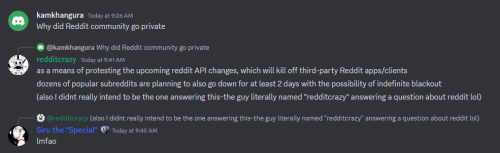
N.B.: For Reddit users that visit r/GeforceNow, it has now been made private in response to Reddit API changes. You may join r/GeforceNow Discord channel for GFN news and updates
user posted image

This post has been edited by eclectice: Jun 12 2023, 02:31 PM

Eternalgl0ry
post Oct 27 2023, 11:07 AM

Casual
***
Junior Member
463 posts

Joined: Aug 2016
Geforce now works on any laptop?

I wonder my Old lenovo x1 carbon (7th gen) can support it ?

The internet connection i have is 800mbps unifi
TSHumanExtinction
post Oct 27 2023, 12:12 PM

Casual
***
Junior Member
364 posts

Joined: Jan 2018
From: Tim Apple
QUOTE(Eternalgl0ry @ Oct 27 2023, 11:07 AM)
Geforce now works on any laptop?

I wonder my Old lenovo x1 carbon (7th gen) can support it ?

The internet connection i have is 800mbps unifi
*
Yes, as long you have first gen i processor can support.
Eternalgl0ry
post Oct 28 2023, 09:09 PM

Casual
***
Junior Member
463 posts

Joined: Aug 2016
Just try out for a month

I was surprised my laptop can play the games at 60fps lol. But the settings are really a letdown

Resolution stuck at 1080p and the graphics look a bit awkward
eclectice
post Oct 31 2023, 01:36 PM

Look at all my stars!!
*******
Senior Member
2,734 posts

Joined: Mar 2008
QUOTE(Eternalgl0ry @ Oct 28 2023, 09:09 PM)
Just try out for a month

I was surprised my laptop can play the games at 60fps lol. But the settings are really a letdown

Resolution stuck at 1080p and the graphics look a bit awkward
*
Were you subscribed directly to GFN or through an alliance partner? Direct subscribers get the highest tier with custom game settings up to 4K @ 120 fps. Alliance partners in the SEA region offer up to GTX 1060 and RTX 2080 with no custom game settings. In either way, resolution and refresh rate depend on the GFN client used.

This post has been edited by eclectice: Oct 31 2023, 01:36 PM
Bananahead
post Oct 31 2023, 01:50 PM

Getting Started
**
Junior Member
57 posts

Joined: Feb 2023

I still don't like the idea of cloud / digital.
Hated it when games started to go digital only, still hate them now. And now this cloud gaming thingy, I prefer to have my own GPU. This is just like renting, and I hate the idea of renting.
viktorherald
post Oct 31 2023, 01:52 PM

Getting Started
**
Junior Member
172 posts

Joined: Jan 2017


But can it run Crysis?
TSHumanExtinction
post Oct 31 2023, 03:07 PM

Casual
***
Junior Member
364 posts

Joined: Jan 2018
From: Tim Apple
QUOTE(Bananahead @ Oct 31 2023, 01:50 PM)
I still don't like the idea of cloud / digital.
Hated it when games started to go digital only, still hate them now. And now this cloud gaming thingy, I prefer to have my own GPU. This is just like renting, and I hate the idea of renting.
*
For me depends on your pov. Of course it’s a no brainer to own a gpu but for example if ur pc got any problem or during travel where you need to kill some time, cloud gaming is kinda great. It’s good to have options biggrin.gif

This post has been edited by HumanExtinction: Oct 31 2023, 03:49 PM
sajhino
post Oct 31 2023, 03:20 PM

New Member
*
Newbie
2 posts

Joined: Apr 2012


kenot play at my kampung no 5g, i pass
Eternalgl0ry
post Oct 31 2023, 09:44 PM

Casual
***
Junior Member
463 posts

Joined: Aug 2016
QUOTE(eclectice @ Oct 31 2023, 01:36 PM)
Were you subscribed directly to GFN or through an alliance partner? Direct subscribers get the highest tier with custom game settings up to 4K @ 120 fps. Alliance partners in the SEA region offer up to GTX 1060 and RTX 2080 with no custom game settings. In either way, resolution and refresh rate depend on the GFN client used.
*
I sign up through yes alliance. It kept directing me to it


eclectice
post Nov 1 2023, 09:02 AM

Look at all my stars!!
*******
Senior Member
2,734 posts

Joined: Mar 2008
QUOTE(Eternalgl0ry @ Oct 31 2023, 09:44 PM)
I signed up through Yes Alliance. It kept directing me to it
*
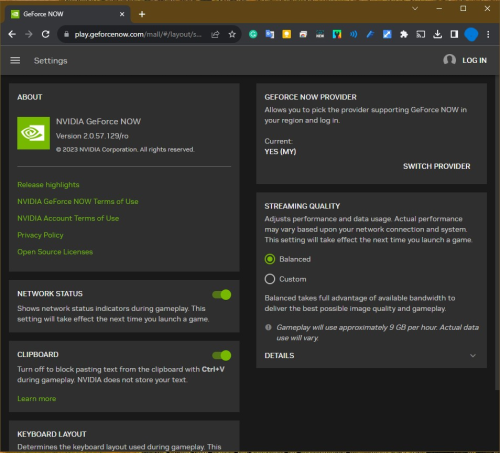
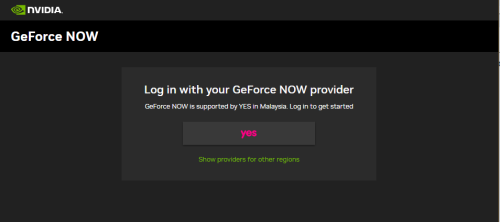
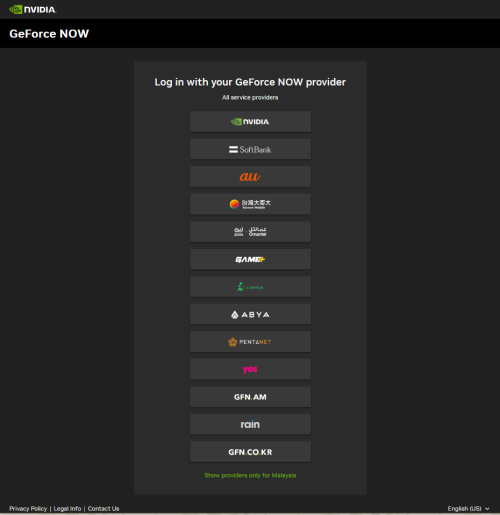
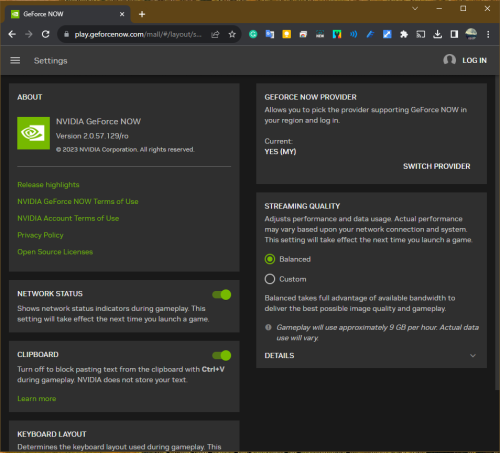
The official NVIDIA website, geforcenow.com, automatically selects the available providers based on your country of residence. However, you have the option to switch to a different provider by accessing the GFN app > hamburger icon (top-left corner) > Settings > Geforce Now Provider > Switch Provider option, but only if you haven't logged in or registered. This is the only way to change your provider.

This is using a supported web browser to access the GFN settings from the play.geforcenow.com website:

Click the "Switch Provider" button
user posted image

Click the "Show providers for other regions" link
user posted image

Choose the provider you want to register with or have registered to (certain provider's web access may require you to use a VPN)
user posted image

This post has been edited by eclectice: Nov 1 2023, 09:16 AM
TSHumanExtinction
post Nov 1 2023, 09:15 AM

Casual
***
Junior Member
364 posts

Joined: Jan 2018
From: Tim Apple
QUOTE(eclectice @ Nov 1 2023, 09:02 AM)
The official NVIDIA website, geforcenow.com, automatically selects the available providers based on your country of residence. However, you have the option to switch to a different provider by accessing the GFN app > hamburger icon (top-left corner) > Settings > Geforce Now Provider > Switch Provider option, but only if you haven't logged in or registered. This is the only way to change your provider.

This is using a supported web browser to access GFN settings from the play.geforcenow.com website:

Click the "Switch Provider" button
user posted image

Click the "Show providers for other regions" link
user posted image

Choose the provider you want to register with or have registered to (certain provider's web access may require you to use a VPN)
user posted image
*
But if u choose for example us, won’t u be playing on us server? And the ping and delays will be high?

eclectice
post Nov 1 2023, 09:18 AM

Look at all my stars!!
*******
Senior Member
2,734 posts

Joined: Mar 2008
QUOTE(HumanExtinction @ Nov 1 2023, 09:15 AM)
But if u choose for example us, won’t u be playing on us server? And the ping and delays will be high?
*
You have to use a VPN to access official GFN servers in the US, Canada, and EU countries. But, VPN will introduce latency.
HAMST3R
post Nov 1 2023, 09:21 AM

New Member
*
Junior Member
44 posts

Joined: Dec 2022
QUOTE(HumanExtinction @ Nov 1 2023, 09:15 AM)
But if u choose for example us, won’t u be playing on us server? And the ping and delays will be high?
*
You could use VPN to connect to Japan / Taiwan server if want to try GFN for free. Taiwan server have <100 ping so its fine if not playing competitive games.
h@ksam
post Nov 1 2023, 09:35 AM

@ is a
*******
Senior Member
3,460 posts

Joined: Nov 2009
From: KL
QUOTE(HumanExtinction @ Oct 31 2023, 03:07 PM)
For me depends on your pov. Of course it’s a no brainer to own a gpu but for example if ur pc got any problem or during travel where you need to kill some time, cloud gaming is kinda great. It’s good to have options biggrin.gif
*
build your own cloud computer using software like Parsec
TongCN
post Mar 10 2025, 10:32 AM

Look ma, I have lots stars :D
*******
Senior Member
6,686 posts

Joined: Aug 2008
From: Malaysia


Recently just subscribe GFN 1 month to play monster hunter wilds on steam deck / Ally X

though the rig in Malaysia still kinda outdated, but it still smoother than Ally X a lot a lot.
CPU : Intel CC150
GPU : Nvidia 2080


5 Pages < 1 2 3 4 5 >Top
 

Change to:
| Lo-Fi Version
0.0241sec    0.49    5 queries    GZIP Disabled
Time is now: 15th December 2025 - 02:50 PM