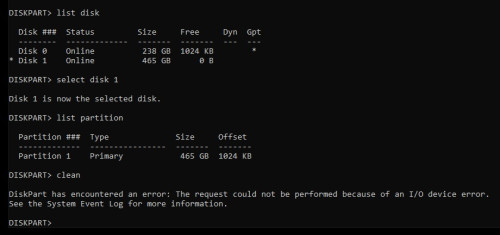
Yeah I would say just warranty it (if it also doesnt format on other devices (eg, android phone), I had a basic 16gb sandisk go read only on me when it died, so could be similar problem.
Remove DEX virus
Remove DEX virus
|
|
 Feb 12 2023, 12:19 PM Feb 12 2023, 12:19 PM
|
 
Senior Member
2,608 posts Joined: Nov 2020  
|
Yeah I would say just warranty it (if it also doesnt format on other devices (eg, android phone), I had a basic 16gb sandisk go read only on me when it died, so could be similar problem.
|
|
|
|
|
|
Feb 12 2023, 05:22 PM
Show posts by this member only | IPv6 | Post
#22
|

All Stars
10,476 posts Joined: Jan 2003 From: Sarawak
|
QUOTE(PJng @ Feb 11 2023, 09:01 PM) Is it normally usb / card that starting fail, will become read only mode? Cannot cppy file and format, but still can read? Yes. Read only. |
|
|
Feb 12 2023, 06:51 PM
|

Junior Member
417 posts Joined: Mar 2010 From: Chukai
|
Just curious, have you check the physical switch on write protection on your SD card?
|
|
|
Feb 12 2023, 06:56 PM
|

Senior Member
6,733 posts Joined: Jan 2003 From: Zion
|
QUOTE(yeo1992cc @ Feb 12 2023, 06:51 PM) Just curious, have you check the physical switch on write protection on your SD card? I wanted to say this. But i have no idea if TS has the newer micro SD cards that does not have physical switch like the older SD version. |
|
|
Feb 12 2023, 08:12 PM
|
|
Senior Member
2,608 posts Joined: Nov 2020
|
Checking the listing in TS's screenshot, it does seem to be a MicroSD Card with an adapter
Do make sure the adapter's write protect notch isn't set to lock And do double check, my old laptop liked to push it over to lock while inserting the card in |
|
|
Feb 13 2023, 11:23 AM
|
|
Senior Member
4,494 posts Joined: Oct 2013
|
QUOTE(yeo1992cc @ Feb 12 2023, 06:51 PM) Just curious, have you check the physical switch on write protection on your SD card? QUOTE(netmatrix @ Feb 12 2023, 06:56 PM) I wanted to say this. But i have no idea if TS has the newer micro SD cards that does not have physical switch like the older SD version. QUOTE(PRSXFENG @ Feb 12 2023, 08:12 PM) Checking the listing in TS's screenshot, it does seem to be a MicroSD Card with an adapter There's no lock swtchDo make sure the adapter's write protect notch isn't set to lock And do double check, my old laptop liked to push it over to lock while inserting the card in » Click to show Spoiler - click again to hide... « |
|
|
|
|
|
Feb 13 2023, 12:14 PM
|
|
Senior Member
6,733 posts Joined: Jan 2003 From: Zion
|
|
|
|
Feb 13 2023, 02:26 PM
|
|
Senior Member
2,608 posts Joined: Nov 2020
|
QUOTE(netmatrix @ Feb 13 2023, 12:14 PM) eh, I dont like sites like these, they are SEO junk generated sites made from templates like "10 ways to fix PROBLEM" diskpart already tried by TS messing with regedit or group policy is risky which brings you to step 4 where they try to sell you their software, which is their goal |
|
|
Feb 13 2023, 02:40 PM
|
|
Senior Member
4,494 posts Joined: Oct 2013
|
QUOTE(netmatrix @ Feb 13 2023, 12:14 PM) method 1 n 4 are failedmethod 2 n 3 believe are for computer managed by GPO. my home laptop doesnt has those settings 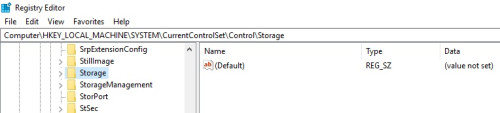  btw if using other sd card no isu. no need to touch above setting This post has been edited by sitescope: Feb 13 2023, 02:41 PM |
|
|
Feb 13 2023, 04:04 PM
Show posts by this member only | IPv6 | Post
#30
|
|
Senior Member
6,733 posts Joined: Jan 2003 From: Zion
|
QUOTE(sitescope @ Feb 13 2023, 02:40 PM) method 1 n 4 are failed If all diy methods used don't work, very likely the card gone case.method 2 n 3 believe are for computer managed by GPO. my home laptop doesnt has those settings btw if using other sd card no isu. no need to touch above setting watabakiu liked this post
|
|
|
Feb 13 2023, 04:53 PM
|
|
Senior Member
2,608 posts Joined: Nov 2020
|
Easier to just go claim warranty, seems like this product has lifetime warranty, so go make use of it.
|
|
|
Feb 18 2023, 09:46 PM
|
|
Senior Member
1,573 posts Joined: Oct 2015
|
QUOTE(sitescope @ Feb 12 2023, 07:15 AM) » Click to show Spoiler - click again to hide... « You may try to download the files onto another drive (if you were able to access the disk, that it). But have to do it many times, and small number of files at a time. Good luck. |
|
|
Feb 18 2023, 09:48 PM
|
|
Senior Member
1,573 posts Joined: Oct 2015
|
QUOTE(PRSXFENG @ Feb 13 2023, 04:53 PM) Easier to just go claim warranty, seems like this product has lifetime warranty, so go make use of it. But it does not allow retrieving the files inside, yes? Like will only give replacement card? |
|
|
|
|
|
Feb 18 2023, 11:11 PM
|
|
Senior Member
2,608 posts Joined: Nov 2020
|
QUOTE(watabakiu @ Feb 18 2023, 09:48 PM) But it does not allow retrieving the files inside, yes? Like will only give replacement card? Usually no, you will have to manually copy anything you need off the card and store it somewhere else temporarily before sending it inThis post has been edited by PRSXFENG: Feb 18 2023, 11:11 PM watabakiu liked this post
|
|
|
Feb 18 2023, 11:16 PM
|
|
Senior Member
1,573 posts Joined: Oct 2015
|
QUOTE(PRSXFENG @ Feb 18 2023, 11:11 PM) Usually no, you will have to manually copy anything you need off the card and store it somewhere else temporarily before sending it in This is a bummer. A bit ironic that they are giving a replacement to a product they sold that went konk in the first place. |
|
|
Feb 19 2023, 12:40 AM
|
|
Senior Member
4,494 posts Joined: Oct 2013
|
QUOTE(watabakiu @ Feb 18 2023, 09:46 PM) Looks to me it is a damaged card. Nothing much you can do with this I/O device error. Weird dmg card but still can read the files inside You may try to download the files onto another drive (if you were able to access the disk, that it). But have to do it many times, and small number of files at a time. Good luck. Except can't format only |
|
|
Feb 19 2023, 01:15 PM
|
|
Senior Member
2,608 posts Joined: Nov 2020
|
QUOTE(sitescope @ Feb 19 2023, 12:40 AM) Weird dmg card but still can read the files inside It's the most ideal failure mode, since you can still read and get anything you need off itExcept can't format only If it had died completely and could not be read, then rip all your data on it |
| Change to: |  0.0195sec 0.0195sec
 0.65 0.65
 6 queries 6 queries
 GZIP Disabled GZIP Disabled
Time is now: 14th December 2025 - 08:41 AM |
 Quote
Quote