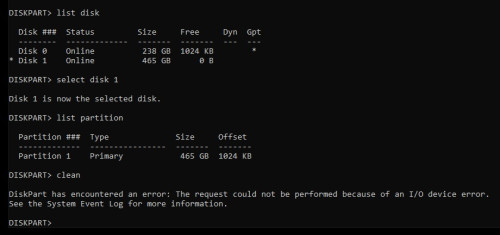
Anyone experience remove this virus ?
Google everywhere but still failed
Try few malware tools
Try del in safe mode
Try del in HIREN win10 usb boot
But all failed
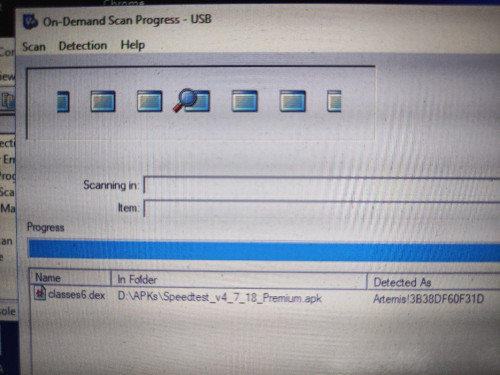
Remove DEX virus
|
|
 Feb 11 2023, 10:57 AM, updated 3y ago Feb 11 2023, 10:57 AM, updated 3y ago
Return to original view | Post
#1
|
 
Senior Member
4,494 posts Joined: Oct 2013 
|
Hi
Anyone experience remove this virus ? Google everywhere but still failed Try few malware tools Try del in safe mode Try del in HIREN win10 usb boot But all failed |
|
|
|
|
|
Feb 11 2023, 02:30 PM
Return to original view | IPv6 | Post
#2
|
|
Senior Member
4,494 posts Joined: Oct 2013
|
QUOTE(RT8081 @ Feb 11 2023, 11:45 AM) Best is to just clean wipe and reinstall. Do u refer to hp ? This isnt hp. This is micro sd card |
|
|
Feb 11 2023, 02:32 PM
Return to original view | IPv6 | Post
#3
|
|
Senior Member
4,494 posts Joined: Oct 2013
|
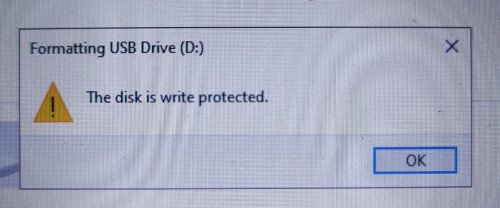
QUOTE(PRSXFENG @ Feb 11 2023, 02:11 PM) so the .dex is a file inside the apk Micro sd card cucuk to my w10 laptopbecause if you try to open an apk file in like 7zip, its basically just a zip file, can explore the contents inside so it seems like whatever weird antivirus you have unpacked it and detected something suspicious in said file (well, you know what you downloaded) it says D is a usb drive, what usb drive is this? Actually not me dload but my friend n he copy it into that sd card Anyway i dont need the file, just need to format it No matter what cmd i use it always show disk is protected This card doesnt has physical read/write switch I know got card with that switch where u need to push up/down to allow read/write This post has been edited by sitescope: Feb 13 2023, 11:21 AM |
|
|
Feb 11 2023, 02:37 PM
Return to original view | IPv6 | Post
#4
|
|
Senior Member
4,494 posts Joined: Oct 2013
|
QUOTE(acbc @ Feb 11 2023, 02:34 PM) For problematic SD cards, format using a digital camera or other non-PC devices. These devices will ignore the damages done by the malware. Oh ok how come i didnt think about thatNeed to find digital camera to test it watabakiu liked this post
|
|
|
Feb 11 2023, 06:42 PM
Return to original view | Post
#5
|
|
Senior Member
4,494 posts Joined: Oct 2013
|
QUOTE(netmatrix @ Feb 11 2023, 04:23 PM) If you cannot reformat that SD card, it is very likely damaged/ corrupted. Still failedYou can try to reformat/ repair it. https://filehippo.com/download_hp-usb-disk-...ge-format-tool/ Or if you want to try to unlock the file, https://www.filecroco.com/download-unlocker/download/ 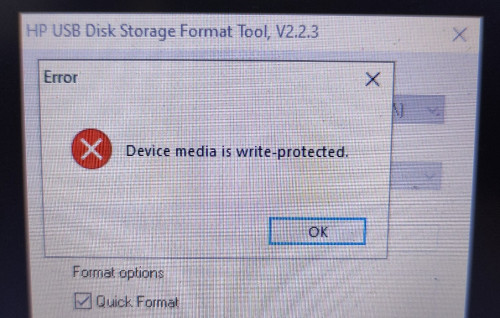 |
|
|
Feb 11 2023, 07:30 PM
Return to original view | Post
#6
|
|
Senior Member
4,494 posts Joined: Oct 2013
|
QUOTE(PRSXFENG @ Feb 11 2023, 06:56 PM) Have tried other card readers? yes chg other reader tooOr it could just be a unlucky coincidence that your SD Card decided to die at this time Also try https://www.sdcard.org/downloads/formatter/ The official SD Card formatter tool still failed 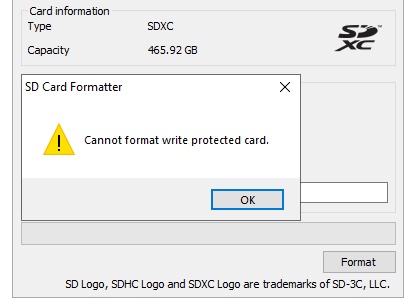 it's not dead still can see the files inside 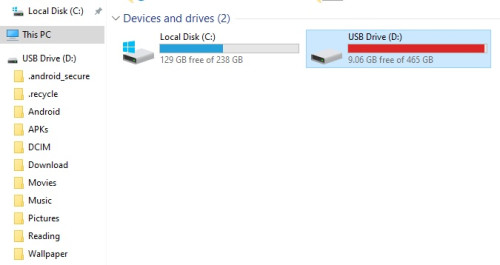 This post has been edited by sitescope: Feb 11 2023, 07:33 PM |
|
|
|
|
|
Feb 11 2023, 07:30 PM
Return to original view | Post
#7
|
|
Senior Member
4,494 posts Joined: Oct 2013
|
QUOTE(metalfire @ Feb 11 2023, 06:59 PM) oh get new sd card oh nooo 512gb sd card |
|
|
Feb 11 2023, 09:22 PM
Return to original view | Post
#8
|
|
Senior Member
4,494 posts Joined: Oct 2013
|
QUOTE(PRSXFENG @ Feb 11 2023, 08:02 PM) where did you get it from/what brand? Maybe good idea to claim. Will try tooUsually SD Cards have a decently long warranty period, try to claim it 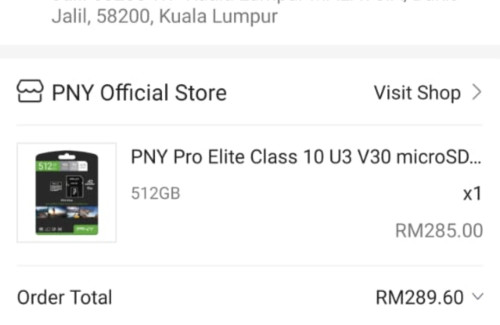 |
|
|
Feb 12 2023, 07:15 AM
Return to original view | Post
#9
|
|
Senior Member
4,494 posts Joined: Oct 2013
|
QUOTE(PJng @ Feb 11 2023, 10:28 PM) Try use diskpart, clean commend » Click to show Spoiler - click again to hide... « watabakiu liked this post
|
|
|
Feb 13 2023, 11:23 AM
Return to original view | Post
#10
|
|
Senior Member
4,494 posts Joined: Oct 2013
|
QUOTE(yeo1992cc @ Feb 12 2023, 06:51 PM) Just curious, have you check the physical switch on write protection on your SD card? QUOTE(netmatrix @ Feb 12 2023, 06:56 PM) I wanted to say this. But i have no idea if TS has the newer micro SD cards that does not have physical switch like the older SD version. QUOTE(PRSXFENG @ Feb 12 2023, 08:12 PM) Checking the listing in TS's screenshot, it does seem to be a MicroSD Card with an adapter There's no lock swtchDo make sure the adapter's write protect notch isn't set to lock And do double check, my old laptop liked to push it over to lock while inserting the card in » Click to show Spoiler - click again to hide... « |
|
|
Feb 13 2023, 02:40 PM
Return to original view | Post
#11
|
|
Senior Member
4,494 posts Joined: Oct 2013
|
QUOTE(netmatrix @ Feb 13 2023, 12:14 PM) method 1 n 4 are failedmethod 2 n 3 believe are for computer managed by GPO. my home laptop doesnt has those settings 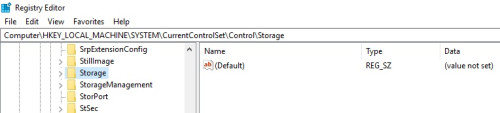 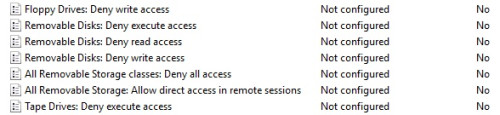 btw if using other sd card no isu. no need to touch above setting This post has been edited by sitescope: Feb 13 2023, 02:41 PM |
|
|
Feb 19 2023, 12:40 AM
Return to original view | Post
#12
|
|
Senior Member
4,494 posts Joined: Oct 2013
|
QUOTE(watabakiu @ Feb 18 2023, 09:46 PM) Looks to me it is a damaged card. Nothing much you can do with this I/O device error. Weird dmg card but still can read the files inside You may try to download the files onto another drive (if you were able to access the disk, that it). But have to do it many times, and small number of files at a time. Good luck. Except can't format only |
| Change to: |  0.0179sec 0.0179sec
 1.04 1.04
 7 queries 7 queries
 GZIP Disabled GZIP Disabled
Time is now: 15th December 2025 - 11:11 AM |
 Quote
Quote