Welcome Guest ( Log In | Register )

Outline · [ Standard ] · Linear+

 My PC Time wont update

views
     
TSLeoLilieno
post Jan 7 2023, 12:07 AM, updated 3y ago

On my way
****
Senior Member
542 posts

Joined: Oct 2008


For whatever reason, my PC Time now stop when I turn off the whole PC. When I open it again, the date and time all become outdated. At first I can still click "Sync your clock" but now this also may fail. What can I do to resolve this? What could be the cause?
PJng
post Jan 7 2023, 12:11 AM

10k Club
********
All Stars
12,056 posts

Joined: Oct 2017


check and replace motherboard cmos batter,
c2302
https://shopee.com.my/PANASONIC-CR2032-3V-C...3955.2117463252

This post has been edited by PJng: Jan 7 2023, 12:12 AM
mrdokok
post Jan 7 2023, 12:44 AM

Getting Started
**
Junior Member
223 posts

Joined: Oct 2015


go diy buy cr2032 battery and replace on your motherboard..watch youtube how..easy as play lego
TSLeoLilieno
post Jan 7 2023, 12:54 AM

On my way
****
Senior Member
542 posts

Joined: Oct 2008


I suspect this as well but I cant find where is this slot. Ha ha. My PC is just close to 4 years. So fast need to change?
PJng
post Jan 7 2023, 01:00 AM

10k Club
********
All Stars
12,056 posts

Joined: Oct 2017


Is desktop pc? Open case and see
Here my old acer desktop pc


Attached thumbnail(s)
Attached Image
TSLeoLilieno
post Jan 8 2023, 05:31 AM

On my way
****
Senior Member
542 posts

Joined: Oct 2008


Yeah. Its desktop PC. Will it cause any damage to my PC if I dont change it? Really dont know where is it. Cant find the battery location.
tik
post Jan 8 2023, 06:07 AM

Getting Started
**
Junior Member
59 posts

Joined: Feb 2006
QUOTE(LeoLilieno @ Jan 8 2023, 05:31 AM)
Yeah. Its desktop PC. Will it cause any damage to my PC if I dont change it? Really dont know where is it. Cant find the battery location.
*
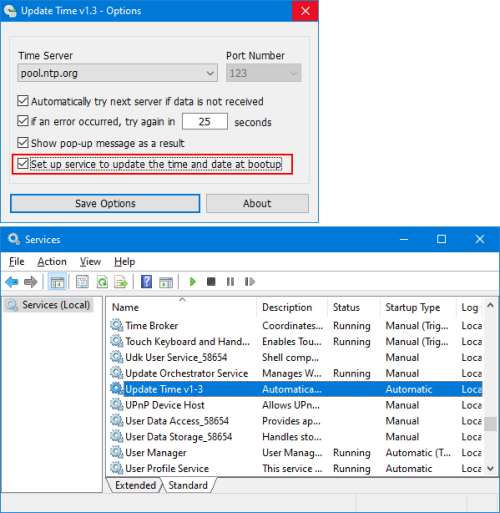
can use freeware apps to update automatically...when online


user posted image


sos
PRSXFENG
post Jan 8 2023, 08:00 PM

Look at all my stars!!
*******
Senior Member
2,614 posts

Joined: Nov 2020


QUOTE(LeoLilieno @ Jan 8 2023, 05:31 AM)
Yeah. Its desktop PC. Will it cause any damage to my PC if I dont change it? Really dont know where is it. Cant find the battery location.
*
what pc is this? a prebuilt like dell/hp/lenovo, or a custom build?
no damage but bios settings may be lost, and some pcs dont like that and will throw an error on boot

please provide desktop model or motherboard model
TSLeoLilieno
post Jan 9 2023, 07:18 AM

On my way
****
Senior Member
542 posts

Joined: Oct 2008


QUOTE(tik @ Jan 8 2023, 06:07 AM)
can use freeware apps to update automatically...when online
user posted image
sos
*
Thanks. Will check this out.

QUOTE(PRSXFENG @ Jan 8 2023, 08:00 PM)
what pc is this? a prebuilt like dell/hp/lenovo, or a custom build?
no damage but bios settings may be lost, and some pcs dont like that and will throw an error on boot

please provide desktop model or motherboard model
*
Its custom built. I think my motherboard is Gigabyte X570 Aorus Master.
sHawTY
post Jan 9 2023, 11:13 AM

Frequent Reporter
********
All Stars
14,909 posts

Joined: Jul 2005

QUOTE(LeoLilieno @ Jan 9 2023, 07:18 AM)
Its custom built. I think my motherboard is Gigabyte X570 Aorus Master.
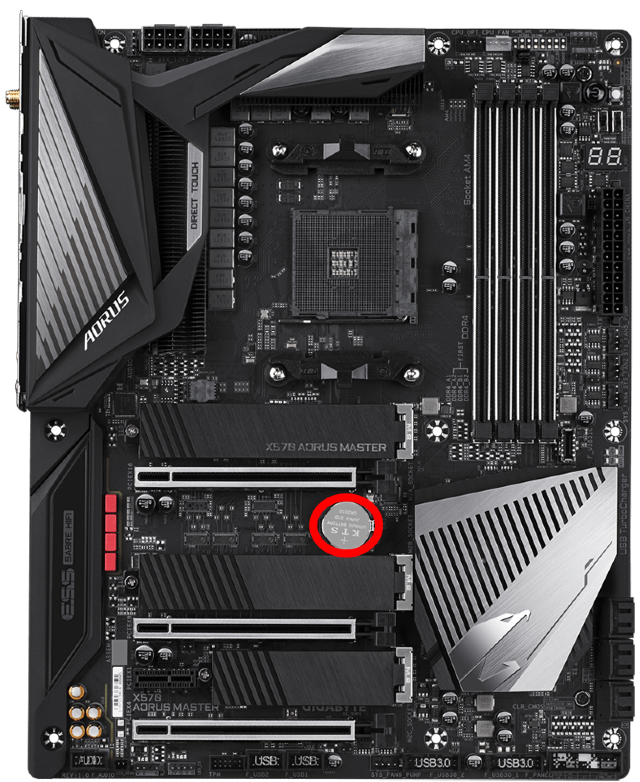
The red circle in the image below highlights the location of your CMOS battery

user posted image
TSLeoLilieno
post Jan 9 2023, 06:31 PM

On my way
****
Senior Member
542 posts

Joined: Oct 2008


Looks like I have to remove my graphic card to replace the battery. My goodness.
acbc
post Jan 9 2023, 06:43 PM

Look at all my stars!!
*******
Senior Member
9,050 posts

Joined: Jan 2003
Every PC will has a battery to store the CMOS settings. The same goes for laptops but with a smaller battery. An exception of Macs which used a capacitor to keep the PRAM settings.

For desktop, changing is easy with just a standard CR2032 battery. For laptops, usually a sealed CR2032 or smaller with a 2-3 pin connector.

Everything can DIY. Good to learn too.

This post has been edited by acbc: Jan 9 2023, 06:44 PM
TSLeoLilieno
post Jan 10 2023, 09:46 AM

On my way
****
Senior Member
542 posts

Joined: Oct 2008


What if I dont change the battery? Will it cause problem?
sHawTY
post Jan 10 2023, 10:47 AM

Frequent Reporter
********
All Stars
14,909 posts

Joined: Jul 2005

QUOTE(LeoLilieno @ Jan 10 2023, 09:46 AM)
What if I dont change the battery? Will it cause problem?
Just unplug the GPU temporarily la, it's not that hard
The whole thing will take less than 5 minutes

1. Disconnect the HDMI/Displayport cable from the back of the GPU
2. Disconnect the power cable to your GPU
3. Unplug the graphic card
4. Remove the old CMOS battery
5. Install new CMOS battery
6. Reinstall the graphic card
7. Reconnect the power cable to your GPU
8. Reconnect the HDMI/DisplayPort cable to the back of the GPU

Boom. You're done
WebDpot
post Jan 10 2023, 09:48 PM

Regular
******
Senior Member
1,026 posts

Joined: Jul 2011


Looks like you need to replace CMOS battery, buy & DIY yourself by following youtube video.
angelofpain
post Jan 10 2023, 09:52 PM

New Member
*
Newbie
16 posts

Joined: Mar 2017
I just had mine replaced and yes, most likely blocked by the chunky display card. Done and dusted. Just randomly will boot with blue screen and failing to find a solution by windows. After 2 restarts then it booted normally.

Cmos battery aside, what am i missing?

Windows 10. AMD chipset. B450 Pro Asrock.
dzire8089
post Mar 1 2023, 11:42 AM

Getting Started
**
Junior Member
84 posts

Joined: May 2016


I had the same problem on my old desktop.
Followed all the possible solution from google such as services, setting, sync time setting etc... didn't solve until I change the CMOS battery.
Just remove the GPU if can't access. small issue.
Imbi Plaza Lot 1.28
post Jun 13 2023, 04:59 PM

Getting Started
**
Junior Member
191 posts

Joined: Dec 2017
QUOTE(LeoLilieno @ Jan 10 2023, 09:46 AM)
What if I dont change the battery? Will it cause problem?
*
It is advisable to change the CMOS battery. Had experience from some of my customers that are leaving that not replacing it for years, even changing the battery after that won't be able to save anymore.


Change to:
| Lo-Fi Version
0.0315sec    0.35    6 queries    GZIP Disabled
Time is now: 20th December 2025 - 05:51 AM