

QUOTE(LeoLilieno @ Jan 9 2023, 07:18 AM)
Its custom built. I think my motherboard is Gigabyte X570 Aorus Master.
The red circle in the image below highlights the location of your CMOS battery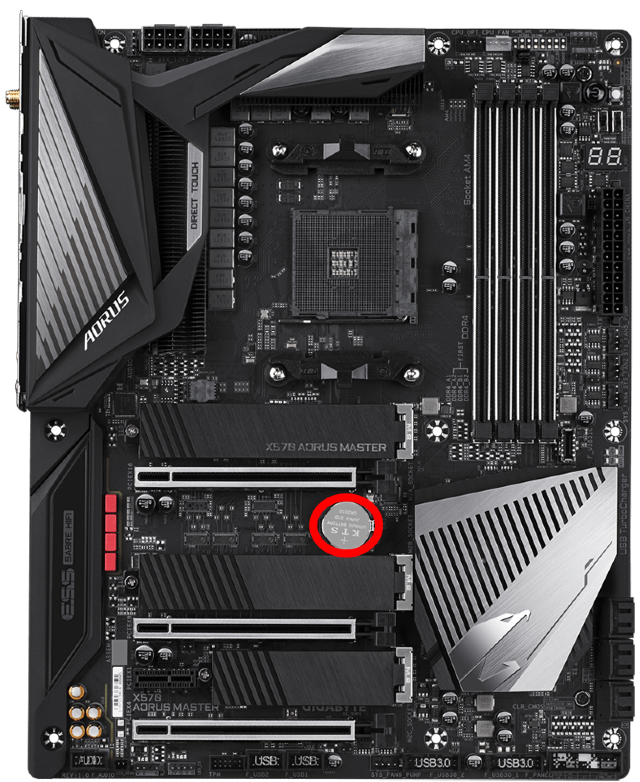
My PC Time wont update
|
|
 Jan 9 2023, 11:13 AM Jan 9 2023, 11:13 AM
Return to original view | Post
#1
|
 
All Stars
14,909 posts Joined: Jul 2005  
|
QUOTE(LeoLilieno @ Jan 9 2023, 07:18 AM) Its custom built. I think my motherboard is Gigabyte X570 Aorus Master. The red circle in the image below highlights the location of your CMOS battery |
|
|
Jan 10 2023, 10:47 AM
Return to original view | Post
#2
|
|
All Stars
14,909 posts Joined: Jul 2005
|
QUOTE(LeoLilieno @ Jan 10 2023, 09:46 AM) What if I dont change the battery? Will it cause problem? Just unplug the GPU temporarily la, it's not that hardThe whole thing will take less than 5 minutes 1. Disconnect the HDMI/Displayport cable from the back of the GPU 2. Disconnect the power cable to your GPU 3. Unplug the graphic card 4. Remove the old CMOS battery 5. Install new CMOS battery 6. Reinstall the graphic card 7. Reconnect the power cable to your GPU 8. Reconnect the HDMI/DisplayPort cable to the back of the GPU Boom. You're done |
| Change to: |  0.0192sec 0.0192sec
 0.54 0.54
 7 queries 7 queries
 GZIP Disabled GZIP Disabled
Time is now: 20th December 2025 - 10:28 AM |
 Quote
Quote